
[FF7][FAQ] 7th Heaven Frequently Asked Questions

  • Thread starter Thread starter EQ2Alyza
  • Start date Start date
Status
Not open for further replies.
E

EQ2Alyza

Guest
Frequently Asked Questions


If you do not find your answer here, then please search the 7th Heaven forum section to see if someone else has asked/solved your problem already. If you do not find what you are looking for with a search, please post a New Topic in the 7th Heaven forum section for others to read and respond.
7th Heaven won't open at all.

Open your task manager and make sure to kill any instance of 7th Heaven, even if there's no 7th Heaven window actually visible.

The game runs but crashes shortly after I click Play.

Ensure your mods are in the correct load oder. Do this automatically by clicking the
Y2IJ4bN.png
button.

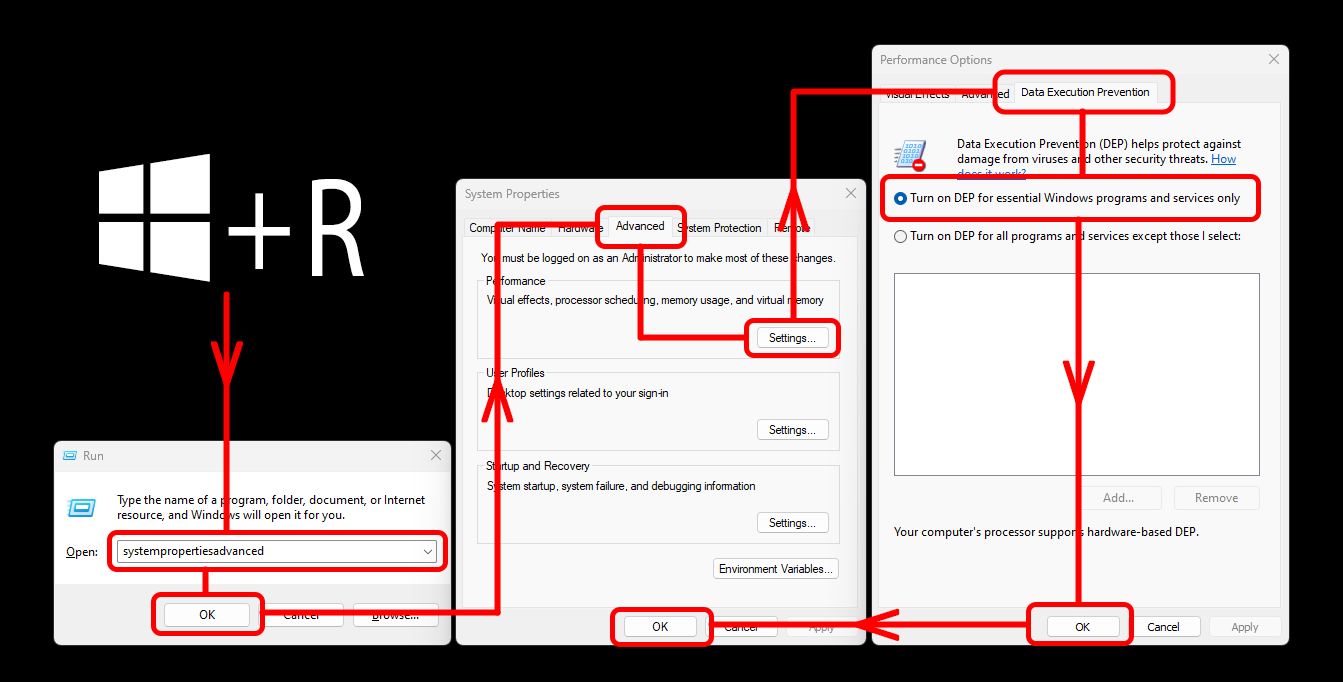
The game immediately crashes when I hit Play.
o4BTElk.png


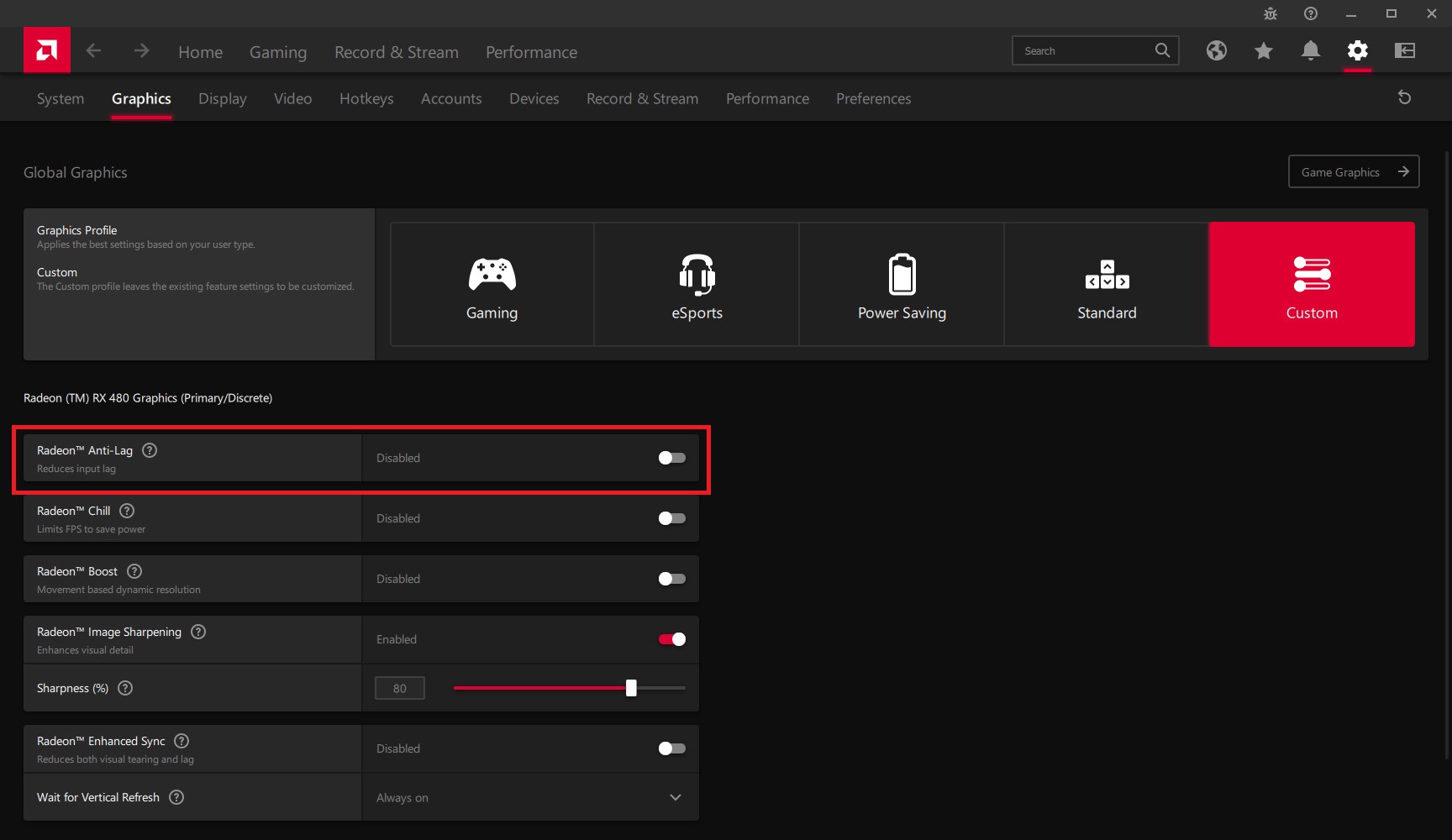
I have an AMD GPU and the game is unstable or has black screens.

Please disable the anti lag feature as shown in the following screenshot, this has resulted in fixing the problem for many players.
ZbJw7JO.jpg


I have an AMD GPU and see visual artefacts when playing.

Please use DirectX12 as your Graphics API under Game Driver settings in 7th Heaven.

For whatever reasons, I need to start over with a fresh install.

If you have modded your game folder before, particularly with installers like Bootleg Configurator, The Reunion, etc., then the registry keys aren't cleaned properly to work with 7th Heaven.

1. Uninstall Final Fantasy VII.
2. Delete all the junk files in the game directory.
2. Run this to clean FF7 registry keys: DOWNLOAD
3. Run CCleaner (optional but free): DOWNLOAD
4. Install Final Fantasy VII and begin at STEP 1 again.

Battle encounters are showing the wrong enemies.

Ensure your mods are in the correct load order. Do this automatically using the
Y2IJ4bN.png
button.
Beyond, that ensure there are not conflicting mods. Particularly any difficulty mods and ESUI Controller Addon.
If all that fails, it's a good indication that you need to start modding with a fresh install (no previous FF7 modded installs). Follow the procedure above for setting up a fresh install.

How do I uninstall a mod?

Under the My Mods tab, click the mod you mean to delete and click the
c32hoE0.png
button.

How do I update a mod?

If a mod update is available, you will see the

1iFP22G.png
button next to that mod in the My Mods tab.

I get an "Error Downloading..." message when I download from the Catalog. Is something wrong?

Possibly, please report this as a download link may have died.

The spacing of the menu text is squished together or spaced too far apart.

Make sure you are using the correct ff7.exe
If you are using Reshade, try turning it off.

Every time I get in a battle, the screen goes black, but I can still hear the game.

This is a result of soft-resetting during battle. If you do this, the next battle you get in will be black. Never soft-reset during battle.

When I use the 60fps mod, I can't use speed hack.

Disable VSync.

I get significant slow downs on some screens.

Turn off animated textures within the SYW5 Fields mod.

Does this work with Steam achievements?

Yes. You only need to enable Steam Compatibility in the advanced tab of Game Driver settings. Steam will also need to be open while playing.
 
Last edited:
Wow this looks great, amazing work...

But of course I got several errors when trying to Launch Game.
System.ArgumentException: STATUS_INVALID_PARAMETER: Unable to start process; please check the given parameters. (Code: 740)
   at EasyHook.NativeAPI.Force(Int32 InErrorCode) in C:\Code\EasyHook-2.7.4761.0-Source\EasyHook\DllImport.cs:line 460
   at EasyHook.NativeAPI.RtlCreateSuspendedProcess(String InEXEPath, String InCommandLine, Int32 InProcessCreationFlags, Int32& OutProcessId, Int32& OutThreadId) in C:\Code\EasyHook-2.7.4761.0-Source\EasyHook\DllImport.cs:line 671
   at EasyHook.RemoteHooking.CreateAndInject(String InEXEPath, String InCommandLine, Int32 InProcessCreationFlags, String InLibraryPath_x86, String InLibraryPath_x64, Int32& OutProcessId, Object[] InPassThruArgs) in C:\Code\EasyHook-2.7.4761.0-Source\EasyHook\RemoteHook.cs:line 913
   at Iros._7th.Workshop.fLibrary.Launch(Boolean varDump, Boolean debug) in c:\Iros\7thWorkshop\fLibrary.cs:line 816
   at Iros._7th.Workshop.fLibrary.bLaunch_Click(Object sender, EventArgs e) in c:\Iros\7thWorkshop\fLibrary.cs:line 715
   at System.Windows.Forms.Control.OnClick(EventArgs e)
   at System.Windows.Forms.Button.OnClick(EventArgs e)
   at System.Windows.Forms.Button.OnMouseUp(MouseEventArgs mevent)
   at System.Windows.Forms.Control.WmMouseUp(Message& m, MouseButtons button, Int32 clicks)
   at System.Windows.Forms.Control.WndProc(Message& m)
   at System.Windows.Forms.ButtonBase.WndProc(Message& m)
   at System.Windows.Forms.Button.WndProc(Message& m)
   at System.Windows.Forms.Control.ControlNativeWindow.OnMessage(Message& m)
   at System.Windows.Forms.Control.ControlNativeWindow.WndProc(Message& m)
   at System.Windows.Forms.NativeWindow.Callback(IntPtr hWnd, Int32 msg, IntPtr wparam, IntPtr lparam)
I tried following the whole process as listed above, but didn't work for me I'm afraid.
 
Dat Tifa!

And i definitely need to go through this tutorial someday! So many things on my list for now!
 
Last edited:
I haven't tested one of these but maybe it is better to use one of these programs to move the game to a non system folder:
http://www.stefanjones.ca/steam/
http://www.traynier.com/software/steammover
Where is the step to install DLPB's tools? Are these implemented in the special games converter for 7H?

Considering that many graphic cards have a screen tearing problem when they have to play games with a OpenGL renderer:
https://www.ff7catalog.com/posts/202424/

@Erik
The crash log should be posted on the 7th Heaven tool page.
https://www.ff7catalog.com/threads/9844/

First thing can you launch the game with 7th Heaven when no mod is active? We need to make first sure that the files it should replace aren't buggy. You can then start to activate mods (step by step a few). And if the error occur deactivate one of the last activated mods after another until 7H doesn't crashes anymore. This should be help to find the mod or file in the data folder which causing trouble.
 
first, your pictures are like always awesome ^^
second, again a great manual. keep it up :D
 
@Erik
The crash log should be posted on the 7th Heaven tool page.
https://www.ff7catalog.com/threads/9844/

First thing can you launch the game with 7th Heaven when no mod is active? We need to make first sure that the files it should replace aren't buggy. You can then start to activate mods (step by step a few). And if the error occur deactivate one of the last activated mods after another until 7H doesn't crashes anymore. This should be help to find the mod or file in the data folder which causing trouble.
Ah I see, my fault.

Actually everything works great and all with the FF7 Bootloader. I just saw this and tried it out (without knowing really what it was). And yeah got the errors then. I'll post the errors in the other thread and continue from there.
 
I haven't tested one of these but maybe it is better to use one of these programs to move the game to a non system folder:
http://www.stefanjones.ca/steam/
http://www.traynier.com/software/steammover
Where is the step to install DLPB's tools? Are these implemented in the special games converter for 7H?

Considering that many graphic cards have a screen tearing problem when they have to play games with a OpenGL renderer:
https://www.ff7catalog.com/posts/202424/
Okay, I'll look into getting all those put into the guide. The 7H game converter installs DLPB's tools. You can use GC v0.11 and still do all the manual stuff afterwards to get 7H working, but I felt that could potentially be a problem for some new users. It also has a built-in message warning about the game being installed into Program Files, Program Files (x86), or Users folders and mod compatibility. It will ask a yes/no choice to copy game files to _:\Games\Final Fantasy VII, where _:\ is the identified driver letter that the game is currently installed. I don't trust this method 100% though because it's not tested enough to know if it works.

@Erik
The crash log should be posted on the 7th Heaven tool page.
https://www.ff7catalog.com/threads/9844/

First thing can you launch the game with 7th Heaven when no mod is active? We need to make first sure that the files it should replace aren't buggy. You can then start to activate mods (step by step a few). And if the error occur deactivate one of the last activated mods after another until 7H doesn't crashes anymore. This should be help to find the mod or file in the data folder which causing trouble.
Just a side note to add...7H won't let you launch the game without at least one mod being active.

I think Erik's error is probably due to using FF7Bootloader (Bootleg install) alongside 7H. That was the way suggested by others before Aali's Driver v0.8.1b was released, but since it changed so much in the configuration from the old v0.7.11b, I can't possibly pinpoint what's going on with Erik's Aali configuration and 7H settings/opengl configuration. My suggestion would be to start with a fresh install again, skipping Bootleg and only using 7H. That's all this guide supports anyways.
 
Last edited:
Okay, I'll look into getting all those put into the guide. The 7H game converter installs DLPB's tools. You can use GC v0.11 and still do all the manual stuff afterwards to get 7H working, but I felt that could potentially be a problem for some new users. It also has a built-in message warning about the game being installed into Program Files, Program Files (x86), or Users folders and mod compatibility.
if you ever are in a need to use program files like i do, since i have a separate partition where i have installed it (D:\Program Files (x86)\....), just use Progra~2 for Program Files (x86) or Progra~1 for Program Files.

Example: D:\Progra~1\...

When i have changed that at the Converter and in the 7th Tool, it worked ;)
 
************EDIT**********

Ignore that, I am a div sometimes
 
Last edited:
Ok does it matter what order these mods are loaded as right now I get no music and also no cutscenes as it says it can't find them but I have it setup as requested and the mods are activated?
 
Load order is:

Gameplay - Difficulty and Story
Battle Models - Weapons
Any order thereafter...

I forgot to add that to the guide. Sorry.

Are you getting the message at the bottom of the screen ingame? It should also be recorded in your APP.LOG. Music is loaded through the VGMStream plugin from Workship --> OpenGL driver configuration, and is pointed at your [gamedir]\music\vgmstream folder. Movies are loaded from the [gamedir]\data\movies folder, unless the FF7_GameConverter_7H.exe asked you to type in the path and you did so somewhere else. Check to see if both of those folders exist (FF7_GameConverter_7H.exe should have already created them).

Is your game installation completely fresh and unmodded? Other mods alongside the use of Bootleg's Converter or GC v.011 will undoubtedly cause issues.

Have you modded a different install in the past but didn't clean your registry after uninstalling? Registry keys have definitely messed up my movies during my testing.
 
Last edited:
Ok I changed the load order as you stated (btw is Gameplay Tweaks before Battle Models - Weapons) as well, or literally must those two be first and then any order after that?

Either way I tried both and I am still getting the same errors at the bottom of the screen and I have it setup exactly as you say in your tutorial?

It is a completely fresh install and everything was setup up correctly with the converter?

Here is my app log for you to look at

Code: [Select]
Code:
[00000000] INFO: FF7/FF8 OpenGL driver version 0.8.1b[00000000] INFO: Auto-detected version: FF7 1.02 US English[00000000] INFO: ATI Technologies Inc. AMD Radeon HD 7800 Series 4.3.12618 Compatibility Profile Context 13.251.9001.1001[00000000] INFO: OpenGL 2.0 support detected[00000000] INFO: Using PBO[00000000] INFO: Found swap_control extension[00000000] INFO: Max texture size: 16384x16384[00000000] INFO: Original resolution 640x480, window size 1920x1080, output resolution 1440x1080, internal resolution 3840x2160[00000000] INFO: Shader limits: varying 128, vert uniform 1024, frag uniform 1024[00000000] INFO: FFMpeg movie player plugin loaded[00000000] INFO: FFMpeg version SVN-r25886, Copyright (c) 2000-2010 Fabrice Bellard, et al.[00000000] INFO: VGMStream music plugin loaded[00000000] INFO: Loading external library Multi.dll[00000000] LOCK UNLOCK TEST [00000001] MATRIX INITIALIZE [00000001] INITIALIZE DD/D3D END [00000001] initializing sound...[00000001] creating dsound primary buffer[00000001] reading audio file[00000001] loading static sounds[00000001] sound initialized[00000001] set music volume: 127[00000001] set music volume: 127[00000001] Entering MAIN[00000001] Exiting MAIN[00000001] START OF CREDITS!!![00000001] ERROR: couldn't open movie file: G:\Games\Square Soft, Inc.\Final Fantasy VII\movies\eidoslogo.avi[00000001] ERROR: couldn't open movie file: G:\Games\Square Soft, Inc.\Final Fantasy VII\movies\sqlogo.avi[00000002] set music volume: 127[00000003] ERROR: couldn't open music file: G:\Games\Square Soft, Inc.\Final Fantasy VII\/music/vgmstream/PRE.ogg[00000211] set music volume trans: 127->0, step=60[00000276] END OF CREDITS!!![00000276] Entering MAIN[00000276] set music volume: 127[00000276] Exiting MAIN[00000276] START OF MENU SYSTEM!!![00000621] END OF MENU SYSTEM!!![00000621] Entering MAIN[00000625] Exiting MAIN[00000625] Field Start[00000626] ERROR: couldn't open movie file: G:\Games\Square Soft, Inc.\Final Fantasy VII\movies\opening.avi[00000690] WM_CLOSE [00000690] Field Quit[00000690] UNINITIALIZE DD
 
Gameplay - Tweaks is not included. Just those two, in that order, need to be first. Loading them in the incorrect order just means the mods inside those categories won't function. It doesn't interfere with the functionality of any mods outside those categories, so it's not related to your music/movies issue.

Show me your Workshop --> Settings. Please check to make sure you have both these folders:

G:\Games\Square Soft, Inc.\Final Fantasy VII\data\movies
G:\Games\Square Soft, Inc.\Final Fantasy VII\music\vgmstream

FF7_GameConverter_7H.exe should have identified your installation path, and you confirmed it by pressing ENTER. After that, it should have confirmed your movies path being found, or else you should have been asked to type it in. However, APP.LOG is identifying your movies folder being outside the data folder, so something went wrong there.

Post me also your FF7_GC.txt in code tags.
 
OK I redid everything and now the movies work fine that it is linked properly however I still have no music with the same error but the vgmstream folder is where it is meant to be?

Here is my config as requested.

Code: [Select]
Code:
Please check over the settings for FF7Config...1) Sound tab should have a Sound device set. Do NOT leave it blank.2) Perform the Sound and MIDI tests.3) Graphics tab can be ignored.4) Click OK when finished.Inserting Multi.dll, Hext.dll, and Languagefile...Patching FF7anyCDv2...Install the Laptop Keyboard Patch?(Choose YES if keyboard does NOT have a NUMPAD)NO Patching complete.Check FF7_GC.log for details.called with ""C:\Users\Mark\AppData\Local\Temp\7ZipSfx.001\FF7_GameConverter_7H.bat""Arguments: "C:\Users\Mark\AppData\Local\Temp\7ZipSfx.001\FF7_GameConverter_7H.bat"PROCESSOR_ARCHITECTURE:          x86 PROCESSOR_ARCHITEW6432:          AMD64 Actual Path:                     C:\Users\Mark\AppData\Local\Temp\7ZipSfx.001 Product Name:                    Windows 8.1 Pro Architecture:                    AMD64 Running in Modus                 32Bit WOW64 OS Bit Version                   64 Reg-Keyname Steam                HKLM\SOFTWARE\Microsoft\Windows\CurrentVersion\Uninstall\Steam App 39140 Reg-Keyname Re-Release           HKLM\SOFTWARE\Microsoft\Windows\CurrentVersion\Uninstall\{141B8BA9-BFFD-4635-AF64-078E31010EC3}_is1 Reg-Keyname 1                    HKLM\SOFTWARE\Square Soft, Inc. Reg-Keyname 2                    HKLM\SOFTWARE\Microsoft\Windows\CurrentVersion\App Paths\FF7app.exe Reg-Keyname 3                    HKCU\SOFTWARE\Classes\VirtualStore\MACHINE\SOFTWARE\Wow6432Node\Square Soft, Inc. Steam Release is present:         Steam Release Path:               Re-Release is present:            Re-Release Path:                  Original Release is present:     Yes Original Release Path:           G:\Games\Square Soft, Inc.\Final Fantasy VII Destination Path:                G:\Games\Square Soft, Inc.\Final Fantasy VII Source Path:                     G:\Games\Square Soft, Inc.\Final Fantasy VII Videos Path:                     G:\Games\Square Soft, Inc\Final Fantasy VII\data\movies Original Videos Path:            K:\FF7\Movies Original Language                en Converted Language               en Original Drive Letter:           K:\ Converted Drive Letter:          K:\ and now clear up Variables...Ending at           Date: 06/09/2014    Time:  6:11:04.47
However after looking at the app log more closely i think i have found the issue, mainly this line...

[00000116] ERROR: couldn't open music file: G:\Games\Square Soft, Inc.\Final Fantasy VII\/music/vgmstream/PRE.ogg

it seems to have some weird \/ just before "music"
 
@alyza

just wanted to know: when i am using new threat, the first battle i encounter after jumping off the train is a safer sephiroth cait sith double pack oO is that normal?
 
OK I redid everything and now the movies work fine that it is linked properly however I still have no music with the same error but the vgmstream folder is where it is meant to be?

Here is my config as requested.

Code: [Select]
Code:
Please check over the settings for FF7Config...1) Sound tab should have a Sound device set. Do NOT leave it blank.2) Perform the Sound and MIDI tests.3) Graphics tab can be ignored.4) Click OK when finished.Inserting Multi.dll, Hext.dll, and Languagefile...Patching FF7anyCDv2...Install the Laptop Keyboard Patch?(Choose YES if keyboard does NOT have a NUMPAD)NO Patching complete.Check FF7_GC.log for details.called with ""C:\Users\Mark\AppData\Local\Temp\7ZipSfx.001\FF7_GameConverter_7H.bat""Arguments: "C:\Users\Mark\AppData\Local\Temp\7ZipSfx.001\FF7_GameConverter_7H.bat"PROCESSOR_ARCHITECTURE:          x86 PROCESSOR_ARCHITEW6432:          AMD64 Actual Path:                     C:\Users\Mark\AppData\Local\Temp\7ZipSfx.001 Product Name:                    Windows 8.1 Pro Architecture:                    AMD64 Running in Modus                 32Bit WOW64 OS Bit Version                   64 Reg-Keyname Steam                HKLM\SOFTWARE\Microsoft\Windows\CurrentVersion\Uninstall\Steam App 39140 Reg-Keyname Re-Release           HKLM\SOFTWARE\Microsoft\Windows\CurrentVersion\Uninstall\{141B8BA9-BFFD-4635-AF64-078E31010EC3}_is1 Reg-Keyname 1                    HKLM\SOFTWARE\Square Soft, Inc. Reg-Keyname 2                    HKLM\SOFTWARE\Microsoft\Windows\CurrentVersion\App Paths\FF7app.exe Reg-Keyname 3                    HKCU\SOFTWARE\Classes\VirtualStore\MACHINE\SOFTWARE\Wow6432Node\Square Soft, Inc. Steam Release is present:         Steam Release Path:               Re-Release is present:            Re-Release Path:                  Original Release is present:     Yes Original Release Path:           G:\Games\Square Soft, Inc.\Final Fantasy VII Destination Path:                G:\Games\Square Soft, Inc.\Final Fantasy VII Source Path:                     G:\Games\Square Soft, Inc.\Final Fantasy VII Videos Path:                     G:\Games\Square Soft, Inc\Final Fantasy VII\data\movies Original Videos Path:            K:\FF7\Movies Original Language                en Converted Language               en Original Drive Letter:           K:\ Converted Drive Letter:          K:\ and now clear up Variables...Ending at           Date: 06/09/2014    Time:  6:11:04.47
However after looking at the app log more closely i think i have found the issue, mainly this line...

[00000116] ERROR: couldn't open music file: G:\Games\Square Soft, Inc.\Final Fantasy VII\/music/vgmstream/PRE.ogg

it seems to have some weird \/ just before "music"
The \/ aren't an issue. They can go either way. However, the APP.LOG is an issue. It's not recorded the first half of the process. Is this a copy/paste error on your part? Otherwise, I'm baffled as to how it could skip all of it and start recording at the FF7Config setup.

@alyza

just wanted to know: when i am using new threat, the first battle i encounter after jumping off the train is a safer sephiroth cait sith double pack oO is that normal?
I haven't played through all the difficulty and story mods, but I don't think that is what Sega Chief intended. Is Gamplay - Difficulty and Story at the top of the Active Mods list?

New Threat shouldn't actually be there, but I forgot to take it out. Sega Chief has said it's only complete through Disc1, and after that the difficulty starts to skew and become unbalanced. He's working on version 1.2 to balance it all out.
 
It's still in, but I have found a workaround :

-Install ff7
-convert  it
-install the mod and apply the patches
-start 7th with all mods you like, just don't use game play mods

Works so far
 
Nah, I don't accept workarounds. I want to fix it, so I'll take a look at it :)
 
The \/ aren't an issue. They can go either way. However, the APP.LOG is an issue. It's not recorded the first half of the process. Is this a copy/paste error on your part? Otherwise, I'm baffled as to how it could skip all of it and start recording at the FF7Config setup.

I haven't played through all the difficulty and story mods, but I don't think that is what Sega Chief intended. Is Gamplay - Difficulty and Story at the top of the Active Mods list?

New Threat shouldn't actually be there, but I forgot to take it out. Sega Chief has said it's only complete through Disc1, and after that the difficulty starts to skew and become unbalanced. He's working on version 1.2 to balance it all out.
Sorry it was early hours when I was trying this, copy and pasted it wrong. Here you go;

Code: [Select]
Code:
--------------------------------------------------------------------------------FF7 GameConverter, Version 7th HeavenCreator: Kompass63Editor: EQ2AlyzaStart running at    Date: 06/09/2014    Time:  6:38:10.67 Active code page: 437ActualPath C:\Users\Mark\AppData\Local\Temp\7ZipSfx.001You are running "Windows 8.1 Pro" on a 64 Bit Operating System (AMD64)Real Management 32Bit WOW64This patch is already applied.Variables are taken from GameConverterKeys.Unpatch? Overwrite? End? Selection is:   Overwrite Patching...Copying Registry Keys...Removed CompatFlags from "ff7.exe"Removed CompatFlags from "ff7config.exe"Setting GC Registry Keys...HKLM\SOFTWARE\Square Soft, Inc.\Final Fantasy VII\GameConverterkeysSetting language to en...Detecting drive letter for FF7 Discs...Drive letter for FF7DISC1 --- K:\ Original release detected...A "movies" folder has been placed into the data folder of your game directory...TYPE the path to this "movies" folder, then press ENTER.EXAMPLE: "C:\Games\Final Fantasy VII\data\movies" (parenthesis included)Movies not found...If custom Movies are located somewhere, change the "MoviePath" Registry Key entry at:HKLM\SOFTWARE\Square Soft, Inc.\Final Fantasy VIIMovies path found at..."G:\Games\Square Soft, Inc\Final Fantasy VII\data\movies\"Copying English Files...Copying 1.02 patch for ff7.exe...Copying Aali's Custom Driver, version 0.8.1b...Adding more Registry Keys...Adding Registry Keys to HKLM\SOFTWARE\Square Soft, Inc.\Final Fantasy VIIAdding Registry Keys to HKLM\SOFTWARE\Square Soft, Inc.\Final Fantasy VII\1.00\GraphicsAdding Registry Keys to HKLM\SOFTWARE\Square Soft, Inc.\Final Fantasy VII\1.00\MIDIAdding Registry Keys to HKLM\SOFTWARE\Square Soft, Inc.\Final Fantasy VII\1.00\SoundAdding Registry Key to HKLM\SOFTWARE\Microsoft\Windows\CurrentVersion\App Paths\FF7app.exePlease check over the settings for FF7Config...1) Sound tab should have a Sound device set. Do NOT leave it blank.2) Perform the Sound and MIDI tests.3) Graphics tab can be ignored.4) Click OK when finished.Inserting Multi.dll, Hext.dll, and Languagefile...Patching FF7anyCDv2...Install the Laptop Keyboard Patch?(Choose YES if keyboard does NOT have a NUMPAD)NO Patching complete.Check FF7_GC.log for details.called with ""C:\Users\Mark\AppData\Local\Temp\7ZipSfx.001\FF7_GameConverter_7H.bat""Arguments: "C:\Users\Mark\AppData\Local\Temp\7ZipSfx.001\FF7_GameConverter_7H.bat"PROCESSOR_ARCHITECTURE:          x86 PROCESSOR_ARCHITEW6432:          AMD64 Actual Path:                     C:\Users\Mark\AppData\Local\Temp\7ZipSfx.001 Product Name:                    Windows 8.1 Pro Architecture:                    AMD64 Running in Modus                 32Bit WOW64 OS Bit Version                   64 Reg-Keyname Steam                HKLM\SOFTWARE\Microsoft\Windows\CurrentVersion\Uninstall\Steam App 39140 Reg-Keyname Re-Release           HKLM\SOFTWARE\Microsoft\Windows\CurrentVersion\Uninstall\{141B8BA9-BFFD-4635-AF64-078E31010EC3}_is1 Reg-Keyname 1                    HKLM\SOFTWARE\Square Soft, Inc. Reg-Keyname 2                    HKLM\SOFTWARE\Microsoft\Windows\CurrentVersion\App Paths\FF7app.exe Reg-Keyname 3                    HKCU\SOFTWARE\Classes\VirtualStore\MACHINE\SOFTWARE\Wow6432Node\Square Soft, Inc. Steam Release is present:         Steam Release Path:               Re-Release is present:            Re-Release Path:                  Original Release is present:     Yes Original Release Path:           G:\Games\Square Soft, Inc.\Final Fantasy VII Destination Path:                G:\Games\Square Soft, Inc.\Final Fantasy VII Source Path:                     G:\Games\Square Soft, Inc.\Final Fantasy VII Videos Path:                     G:\Games\Square Soft, Inc\Final Fantasy VII\data\movies Original Videos Path:            K:\FF7\Movies Original Language                en Converted Language               en Original Drive Letter:           K:\ Converted Drive Letter:          K:\ and now clear up Variables...Ending at           Date: 06/09/2014    Time:  6:41:30.65
I can also confirm I get the same insane fight with new threat at the beginning, some really weird looking models as well. Actually thought somehow my game had sent me into some sort of radioactive nightmare mutant version of the game because of the errors lol.
 
unfortunately the music isn't playing. when i start the game, no sound is extracted to music folder. there seems to be a bug for this iro sound/music pack.

edit:
the sound pack in general isnt working.

edit2:
for a quick workaround, extract the iro soundpack to a folder of your choice and copy your desired soundtrack to the music/vgmstream folder. for sound,go to data/sound and replace the files which you want to have (new sound fx, voice attacks). make a backup of your soundfiles beforehand.
 
Last edited:
Status
Not open for further replies.
Back
Top