GUI 2.1.0

  • Thread starter Thread starter sl1982
  • Start date Start date
Status
Not open for further replies.
Through this onto an ff7.exe from a 2.0.8 install and it fixed most artifacts. I'm still getting a slight artifact under the item icons though.
 
Is this mod complete? Am I missing something? There aren't any apostrophes in any dialogue.
 
It is complete. The character of the apostrophe is on the image sheets. If it is not showing up I am not sure why
 
Hmm, I wonder what's going on then. The apostrophes are the only thing keeping me from using this mod. I have my entire game modded and the original text just looks weird with everything else in HD.
 
I have the same issue with the apostrophes. Using Reunion R05c.
 
I have found that the apostrophe issue has a very simple fix.

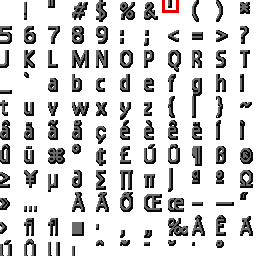
The original game reads the apostrophe from the following location.
0DXQkMT.jpg


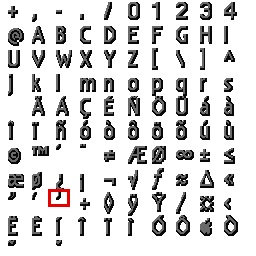
Reunion reads the apostrophe from the following location instead for some reason, maybe because DLPB finds that it looks a bit better.
eCQw6oK.jpg


Since GUI 2.1.0 does not replace every character that space is left blank in the replacement font files and nothing is displayed when the apostrophe is called in game while using Reunion.  You can copy the apostrophe from the original spot in the GUI 2.1.0 files to where Reunion expects them to be and it will now show.

You can also get the button icons to show up when using Reunion by checking where they're supposed to be in the Reunion font files and inserting them in the appropriate places in the GUI 2.1.0 files.  I found some vector graphics of the PlayStation buttons and they go well with the high resolution font.
 
Hey everyone, I'd like to give this mod a try but I'm struggling to find instructions about install. My preferred way to manage mods is using 7 Heaven but I can see that the downloaded file contains just 2 folders with a bunch of images in them (no .iro file or any reference to it).

Am I missing something obvious here?
 
Last edited:
This mod uses the modpath capability of aali's driver. I am not familiar enough with 7th heaven to advise on how to get both working. Perhaps someone else can chime in?
 
Well, turns out that simply putting the flevel and the menu folders into the mods/Textures folder just does the job with 7Heaven (which uses also aali's driver). Great mod. Thanks!
 
I have found that the apostrophe issue has a very simple fix.

The original game reads the apostrophe from the following location.
0DXQkMT.jpg


Reunion reads the apostrophe from the following location instead for some reason, maybe because DLPB finds that it looks a bit better.
eCQw6oK.jpg


Since GUI 2.1.0 does not replace every character that space is left blank in the replacement font files and nothing is displayed when the apostrophe is called in game while using Reunion.  You can copy the apostrophe from the original spot in the GUI 2.1.0 files to where Reunion expects them to be and it will now show.

You can also get the button icons to show up when using Reunion by checking where they're supposed to be in the Reunion font files and inserting them in the appropriate places in the GUI 2.1.0 files.  I found some vector graphics of the PlayStation buttons and they go well with the high resolution font.
Could you kindly explain how to do this? Or maybe with permission upload the fix? I really want to use this with the new Reunion R06. Thanks!
 
hello sl1982
I saw that you split some files, like btl_win_b_l.
It is possible to unite in one again?
I mean, will it work?
 
The images are designed to be split like that. Its the way the game uses them. If you put them back together bad things would most likely happen
 
Thanks for the answer.
I asked, why did I extract the original menu.us.lgp file.
And the btl_win_a_h and btl_win_a_l files are not split, 'h' is the normal font, and 'l' is the bold font.
Already your files are divided as follows:
btl_win_a_h_00
btl_win_a_h_01
btl_win_a_h_07
btl_win_a_h_11
and
btl_win_a_l_00
btl_win_a_l_01
btl_win_a_l_07

btl_win_b_h goes from 00 to 10
btl_win_b_l goes from 00 to 12
btl_win_c_h from 00 to 02
btl_win_c_l is 00, 01, 02, 04 and 07

btl_win_d_h and btl_win_d_l are 00, 01, 02, 04, 05, 06 and 07.

I'm asking because I'm redoing all files to include Latin letters and accents.
And I take the opportunity to improve the fonts and images.

some pictures:
https://drive.google.com/drive/folders/1Th90CzaC-icGsVG4660tUoFAUxkwqaKm?usp=sharing
 
So if your intent is to improve other languages what you want to do is find the original images and upscale and redo from there. i cannot remember the command offhand that will export the png files but that is what you want to do
 
So if your intent is to improve other languages what you want to do is find the original images and upscale and redo from there. i cannot remember the command offhand that will export the png files but that is what you want to do
You can do this with aali's driver.  Add the option
save_textures = on
to the config file and every texture it loads it will save to the mod_path.
 
It is complete. The character of the apostrophe is on the image sheets. If it is not showing up I am not sure why
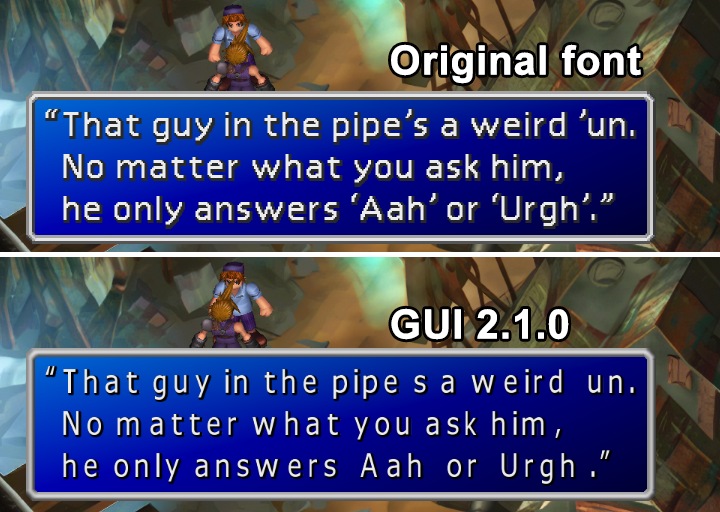
Thanks for your work! Nice and large font... But... there are no some symbols. As noticed here - there are no apostrophes.

wKHFEYP.jpg

As you can see there is a lack of apostrophes of two kinds - before ‘Aah’ and ‘Urgh’ and after them. Those symbols called "Left Single Quotation Mark" and "Right Single Quotation Mark"
User tryinmorning had nice guess, but a little bit wrong. Original game takes those symbols from usfont_b_*_** (NOT from usfont_a). See image below - you can clearly see those two symbols there. And GUI 2.1.0 has emptiness there.

uBSZ0Zq.jpg

And I'm not sure that we wouldn't miss something else - too much emptiness in GUI 2.1.0 sheets. What if the game uses some other symbols, that GUI doesn't have :(
Hope there would be GUI 2.1.1 soon  :roll:
 
Last edited:
User tryinmorning had nice guess, but a little bit wrong.
Can't edit my post, so...
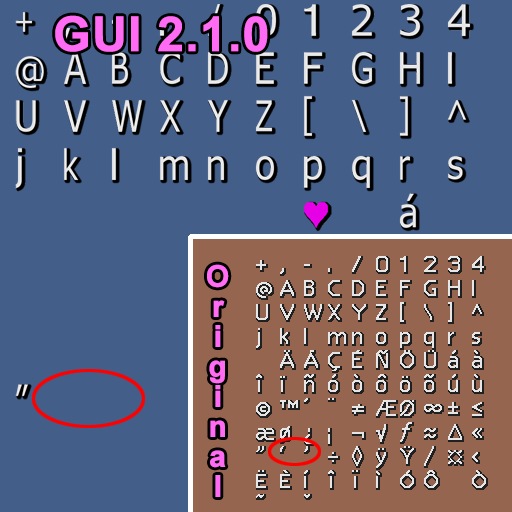
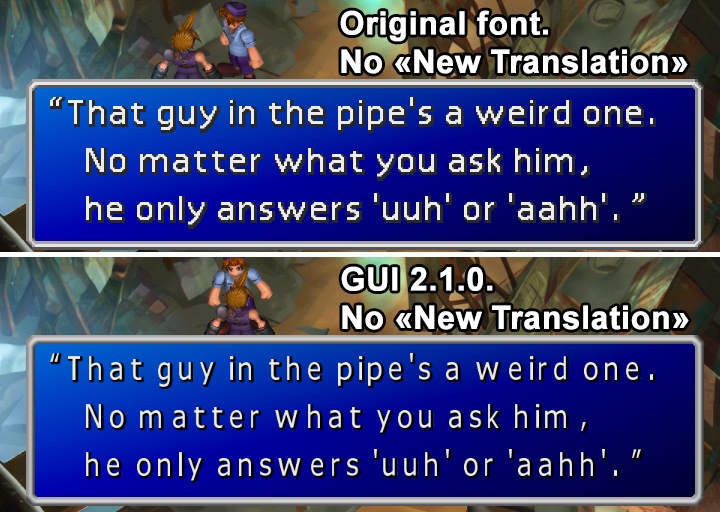
My bad, tryinmorning was right, but with one addition. If you use The Reunion with option "New_Translation = y" (on), then you will not have apostrophes using GUI 2.1.0, cause it lacks of symbols. See my post with screenshots above, that entire post is about option "New_Translation = y"
But if you use "New_Translation = n" (off), then the game uses default apostrophe from usfont_a_*_**.png as tryinmorning said. Then GUI 2.1.0 do have apostrophe:

TG2pSWF.jpg


My opinion and my wish, that GUI 2.1.0 should have more symbols :)
 
Status
Not open for further replies.
Back
Top