[PC] External Texture Support - Tonberry: Enhanced (2.04)

  • Thread starter Thread starter JeMaCheHi
  • Start date Start date
Status
Not open for further replies.
[Delete] it works now.
if you can delete these messages.
 
Last edited:

Hey guys, sorry if I am posting this in the wrong place (I have literally never used a forum before) but I am just at my wits end here.
Its probably a really simple fix that I'm missing.
I grabbed Tonberry 1.5 and got the Eden Texture repack and SeeDReborn mods working great. But then I wanted the more advanced graphics mods so I grabbed the Tonberry Enhanced with the hashmaps folders, put the Eden textures in the textures folder like normal and now they wont work. Is there a different way you are supposed to use Tonberry enhanced?
Literally any help or just being pointed to the right info would be really appreciated
 
Hey guys, new here.

After installing TonberryEnhanced 2.04 (copying textures and tonberry folder + d3d9, d3d9Callback and zlib1 .dlls to FFVIII folder), my game won't start up. If I start from steam, Steam says that the game is running but nothing happens. If I try to start the FF8_EN.exe from the FFVIII folder, I get two system errors: "The code execution cannot proceed because MSVCP120.dll was not found.", same for MSVCR120.dll.

I have Microsoft Visual C++ 2010 Redistributable Package (x86) and (x64) installed. I have the 2013 ones installed. I have DirectX End-User Runtimes (June 2010) installed. On Windows 10.

EDIT: I ran all the C++ Redistributable package installers again and that supposedly fixed it.
 
Last edited:
Hi Sir,

I'm following the instructions on how to install the Tonberry mod and the hashmaps
But I just cannot find my ''textures'' folder in the FFVIII game folder. It doesn't have it. :(

I believe I'm using 2013 Steam version.
did you solve this? I've just put the 2013 release on a newer laptop an went to start modding and have the same issue, I have no textures folder
 
v2.04 Google drive link doesn't work anymore. Shows access denied.
 
v2.04 Google drive link doesn't work anymore. Shows access denied.
I found an alternate site that, as best I can tell, is exactly what it claims to be and works fine.  Hope it helps someone until the G-drive links are fixed up.
https://www.gamepressure.com/download.asp?ID=70698

Also, on an unrelated note...  This is probably obvious to most, but when I first popped back in here to mod up for a new FF8 run, I was a little lost as to what was and was not needed.  Last time I did this, everything worked off Aali's driver, so this time around I started by setting up FFNx and trying to proceed from there.

Well needless to say, that didn't work so well since everything else I was trying to do was dependent on Tonberry, which doesn't play nice (at all) with FFNx.  Just tossing this note in case anyone else can't figure out why none of their Tonberry/texture stuff seems to want to work.

Installed clean, started with Tonberry and then dropped in all the packs, and everything looks amazing.  Kudos and thanks to everyone involved with all these lovely enhancements.  ^_^
 
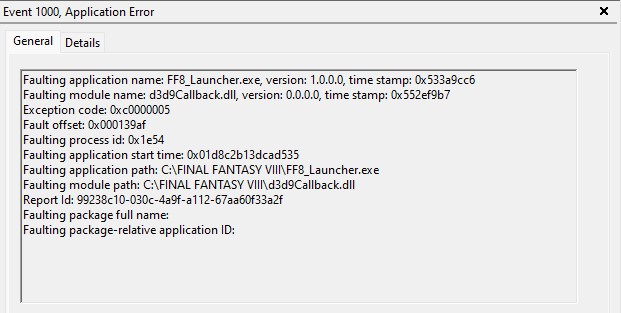
TceqQDz.jpg


Any ideas? I've already installed the required DirectX 9.0C, VC++ 2010 Redistributable (x86), VC++ 2010 Redistributable (x64), VC++ 2013 Redistributable (x86), VC++ 2013 Redistributable (x64).

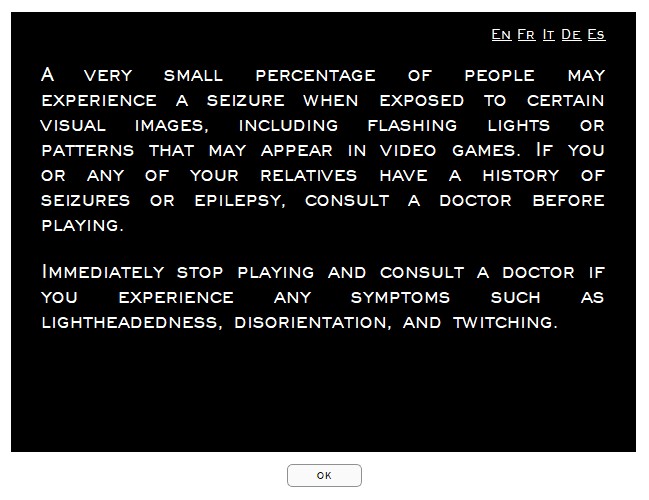
QYou1OG.jpg


This screen pops up for a second then disappears.

Game works perfectly fine if Tonberry is not installed.
Currently on Windows 11.
 
Last edited:
I'm so glad you posted this!  I know that everyone really wants a new release with a better hashing system, but until that work is completed, we really need to get people using this!
Also - I can't imagine not using the new folder hierarchy.  It makes the hashing and modding process so much cleaner and stops us from having to keep re-writing over our old hash1map.csv file - especially if we are heavily modding the game and have custom hashmaps.

In honor of this release, I am going to post the hashmap files for all of the mods currently available. 
I will be updating this list as I go!

TURN OFF THE STEAM OVERLAY TO PREVENT CRASHES!!


Hashmaps:
Put these in (/steamapps/common/FINAL FANTASY VIII/tonberry/hashmap)

HorizonPack v3.0  World, Map, and Vehicles

Pick Eden or Angelwing, NOT BOTH (or there will be glitches)
Project Eden v1.0  Background Fields
Project Angelwing v1.0  Waifu Background Fields

BattleFieldPack v2.0  Battlefields

SeeD Reborn (English)  Title Screen, Text, Icons, and Menu
SeeD Reborn (Spanish)
SeeD Reborn (French)
SeeD Reborn (German)
SeeD Reborn (Italian)

Tripod v2.0 (ALL LANGUAGES)  Triple Triad Card Game

Rebirth Flame v1.2  Characters

Project Hellfire v1.2  G.F. Summons

Apocalypse v1.1  Bosses

Lunar Cry v1.2  Enemies


***SELECT ONLY YOUR MAIN LANGUAGE!***


=============================
==**UPDATED WITH LATEST MODS!**==
==**********7/6/2020********==
=============================
I'm sorry to necro a dead thread, but I had a problem with one of the hashmaps. I tried to download the "BattleFieldPack v2.0" Battlefields, but I couldn't because the link gave me the following message instead:

Google Drive
You need access
Request access, or switch to an account with access. Learn more

Fortunately, I found a copy of the files I had previously downloaded on my hard drive. Should I repost the hashmap archive somewhere for others who need it?
 
Status
Not open for further replies.
Back
Top