Re: Final Fantasy 7 - Wh...

  • Thread starter Thread starter Final_Figue
  • Start date Start date
Status
Not open for further replies.
I tried disabling all my mods and it still happened I have DX12 running for it usually auto by default and using AMD system which is an issue, everything else before the train was fine even choices I was able to pick except on the train it would be easier to show ya then to tell you since I cant post S on here of the error or the log. I do have new threat as well but that is off when playing yours and it still happened. But I can try to see my list of mods is almost the same as yours and what ifs at the top of the list.
 
Hello again.

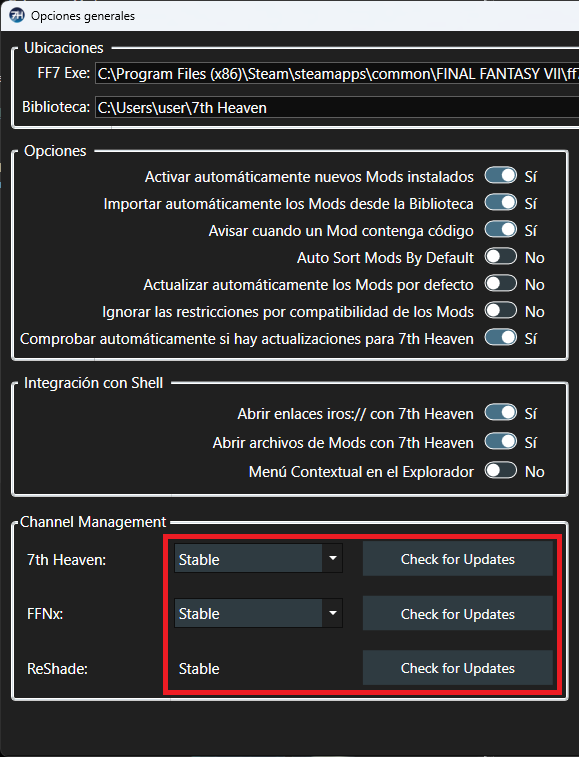
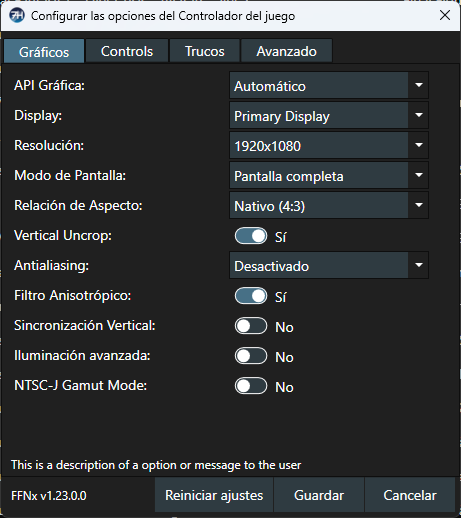
I have this configuration:

f8Zihni.png


pULTLh5.png


Let me know if this helps you.
 
Your mod crashes the game when trying to fight Lost Number at Shinra Mansion.
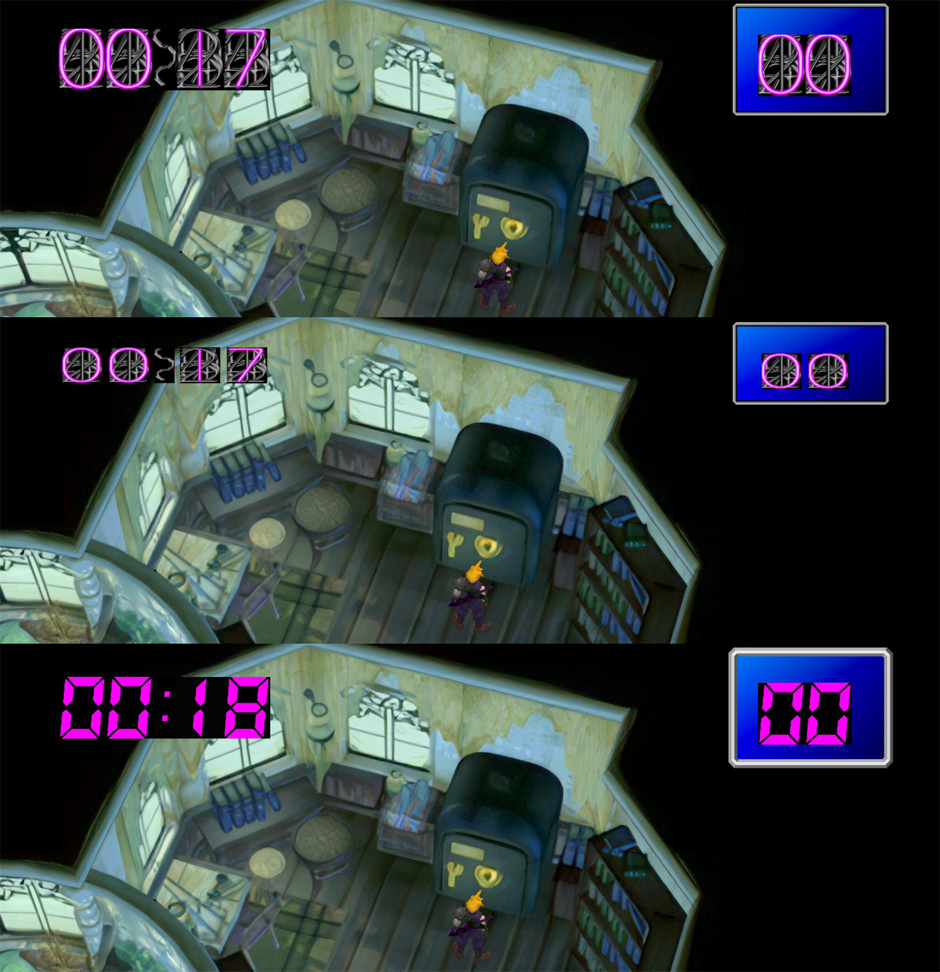
Edit: Okay so using ESUI somehow fixed it for me. Minor gripe is that the UI element for the numbers on the safe is now cut off for me.

26302-F4Bsf-GO4bw.png

Edit 2: Going into ESUI, Field Options and setting "Field Dialog Box Style" to "Stock" seems to fix the issue. Wish there was a way the game wouldn't crash without using ESUI because I prefer the default UI.

I think being able to configure the mod to disable certain features, namely UI ones, would go a long way for troubleshooting issues in the future for other users.

Furthermore, I had an issue a few days ago where only Cloud's animation speeds were insanely fast, I solved this by putting 60fps Gameplay and 60fps for ChaOS above your mod and ignoring the warning 7th Heaven gives and starting the game anyways. This issue also happened without ChaOS so just putting 60fps Gameplay above What If should work.

Good mod so far though, enjoying it. Thanks for the hard work.
 
Hello Not Interested.

First of all, thank you for reporting the issues you found and for your kind words about the mod. I hope you enjoy it until the very end. When I saw your screenshot and read what you mentioned, I ran some tests and I want to show you the result:

8dXzeEF.png


I remember that in the past, while playing other mods, I also had visual issues or cases where the game would automatically crash. I suppose that with so many different PCs, configurations, and operating systems, there will unfortunately always be a tendency for errors to appear in certain situations.

What I can tell you is that every time I release a new version of the mod, I always play through it completely beforehand. I think that for version 1.4 I will remove the "Timer" and "Indicators" mods and let each user decide whether to add them or not, since they may also be causing some issues.

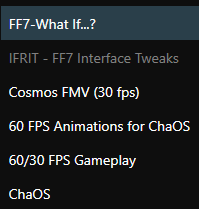
Regarding the "Chaos" mod, yes, the solution is proper load order placement. In other mods I played, when the Chaos mod was placed incorrectly, I also experienced what you described — a Turbo Mode Cloud. I’m sharing a screenshot of the load order I use for the Chaos mod:

A8c6FGd.png


Thank you very much again for taking the time to make the report and for your kind words. I hope these inconveniences do not prevent you from reaching the end of the game, or from continuing to play future updates of the mod.

 
Final_Figue said:
I remember that in the past, while playing other mods, I also had visual issues or cases where the game would automatically crash. I suppose that with so many different PCs, configurations, and operating systems, there will unfortunately always be a tendency for errors to appear in certain situations.

What I can tell you is that every time I release a new version of the mod, I always play through it completely beforehand. I think that for version 1.4 I will remove the "Timer" and "Indicators" mods and let each user decide whether to add them or not, since they may also be causing some issues.

Thank you very much again for taking the time to make the report and for your kind words. I hope these inconveniences do not prevent you from reaching the end of the game, or from continuing to play future updates of the mod.
Yeah fair enough, I'm using a lot of other mods so I didn't think everything would be smooth sailing all the time. The UI changes sound like nice options. I'm gonna continue playing tonight, I'm at the Temple of the Ancients!
I'll make another post if I encounter more issues. I'll look forward to further updates, thanks for the prompt reply!
 
Hi, I really liked this mod, but I have a big question. During the dialogue between Aerith and Cloud after the fight against Genova, she tells him that she will be hiding somewhere but that she will only tell him. At the end of the whole event, a phrase appears saying, "Aerith followed the party," but she didn't show up... My question is, is she really hiding somewhere or did the mod simply not work?
 
Hello Kaiser6,

At the moment, it's intentionally a bit ambiguous, as there isn't a real location yet. I wanted to convey the idea that her hideout is extremely difficult to find, which is part of the group's overall concept. Perhaps in the future I may add a specific location where players can find her and interact with her, but for now that's not the case.

I'm glad you're enjoying the mod. Remember that Aeris returns in Disc 3 and has her own side quest in the Forgotten Capital.

Thank you very much for your comment, and I hope you enjoy the experience all the way to the end.
 
Hello!

I just want to say that this mod sounds amazing. I haven't seen much of it yet and I'm genuinely excited! But an issue...

I'm working my way through the beginning of a new playthrough on my steam deck and have it modded to my liking. Really nothing crazy. Vanilla, with visually enhanced elements and the such. Afaik, the basics? Nothing listed as incompatible with your mod using your details listed inside of 7th heaven. ESUI seems to be giving an issue, though. Your mod is at the top, and postscriptthree's gameplay tweaks below it. Down the list, ESUI. What's happening is inside of a battle, The left-hand column of text, Name with the party's names under it, is being drawn on screen twice. The first draw normally, but the second draw is maybe 50-75 pixels to the right? If I use Optimized UI (my preference), it's drawn maybe 100-125 pixels over. V2, it sits right over the spells list.

Disabling What If...? specifically gets rid of the extra draw. Any ideas on how to approach this? I can definitely give more info if needed. Thanks!
 
Hello Dait302.

I don't have a Steam Deck, so I'm not very familiar with any issues it might have with 7th Heaven. However, I think I could get a better idea of what's causing the problem if you could share a screenshot showing all the mods you're using, please.
 
Status
Not open for further replies.
Back
Top