M
Mcindus
Guest
FF8 Controller Buttons v2.0 - by MCINDUS
For use with the STEAM version of Final Fantasy VIII
**FINALLY! An UPDATE! 9/07/2018**
This mod replaces the horrible "B1, B2, B3, etc." Button Icons with the proper Playstation and Xbox360 Buttons
***To use this mod, you MUST install Tonberry and SeeD Reborn***
***THIS MOD IS NOW COMPATIBLE WITH SHUNSQ'S FF8 BUTTONS PATCH!***
*Comes with Xbox360, PS3, PS4, DS4, SPC, and Steam controller files for use with Shunsq's controller mod*
-If using a PSX/PS2 default setup controller, Shunsq's mod, Tonberry 2.04, and Seed Reborn are all you need to get going! This mod is only needed if you want a different button setup, or you aren't using Shunsq's mod!
Get Tonberry HERE
Get SeeD Reborn HERE
Get Shunsq's FF8_Buttons mod HERE
Download:
FF8 Controller Buttons v2.0
*HID Buttons are for use ONLY with Mapping interfaces (Xpadder, JoytoKey, AutoHotKey, Pinnacle, etc):
*Using the HID interface buttons is destructive to the Green Text in the game - be warned, but the green text is BARELY used, so it shouldn't interfere with gameplay.
Directions:
1. Download and Install Tonberry and SeeD Reborn
2. Download the Controller mod above, unpack it and open the folder you need!
3. Move the 'sy' folder (OR 'ic' folder if using Shunsq's mod) into your 'textures' folder in the FINAL FANTASY VIII app folder. (steamapps/common/FINAL FANTASY VIII/textures/)
4. Merge the folders when asked
5. Enjoy!
***Disable the STEAM overlay in 'steam/settings/in-game' to prevent crashes!***
This should work with ALL versions of SeeD Reborn!
Donate to my PAYPAL to help keep these mods alive!
Special thanks to NORWIN and JeMaCheHi!
ALSO, Special thanks to the community for providing the feedback necessary to complete this mod!
Enjoy! Leave a comment and let me know what you think.
-MCINDUS-
Screenshot:
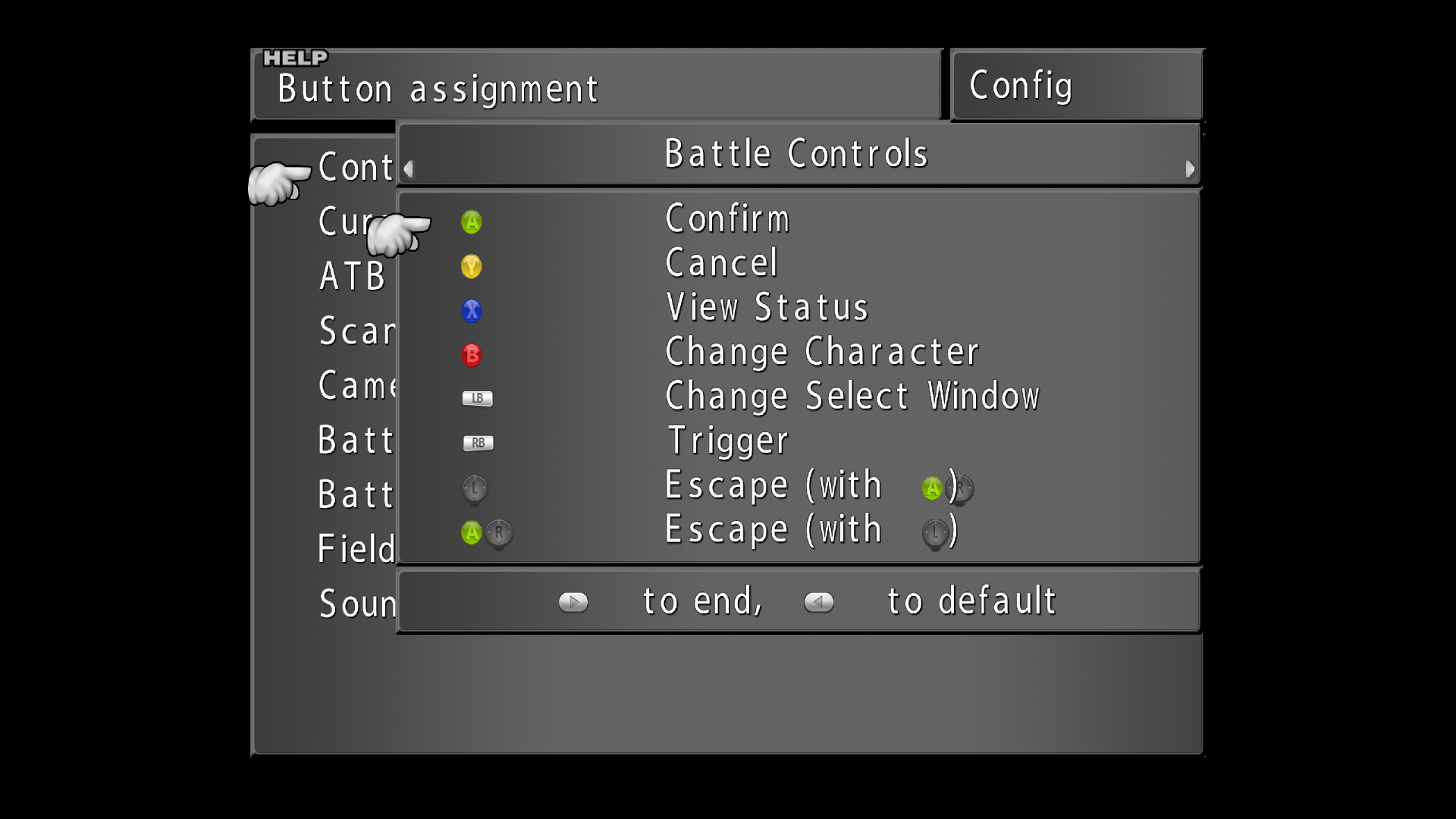
The only glitch is the "A" button showing up next to the "R Stick" button (or Triangle next to Start in PSX version) - this is due to the button being identified as "B10", where it pulls 1 and 0 for it's image. If this can be changed in the future to "button 10" being represented but it being renamed "button 0", the glitch can be fixed -- otherwise, we just have to live with it
This glitch is not present in the HID version, but it's more destructive to the green text. give/take.
For use with the STEAM version of Final Fantasy VIII
**FINALLY! An UPDATE! 9/07/2018**
This mod replaces the horrible "B1, B2, B3, etc." Button Icons with the proper Playstation and Xbox360 Buttons
***To use this mod, you MUST install Tonberry and SeeD Reborn***
***THIS MOD IS NOW COMPATIBLE WITH SHUNSQ'S FF8 BUTTONS PATCH!***
*Comes with Xbox360, PS3, PS4, DS4, SPC, and Steam controller files for use with Shunsq's controller mod*
-If using a PSX/PS2 default setup controller, Shunsq's mod, Tonberry 2.04, and Seed Reborn are all you need to get going! This mod is only needed if you want a different button setup, or you aren't using Shunsq's mod!
Get Tonberry HERE
Get SeeD Reborn HERE
Get Shunsq's FF8_Buttons mod HERE
Download:
FF8 Controller Buttons v2.0
*HID Buttons are for use ONLY with Mapping interfaces (Xpadder, JoytoKey, AutoHotKey, Pinnacle, etc):
*Using the HID interface buttons is destructive to the Green Text in the game - be warned, but the green text is BARELY used, so it shouldn't interfere with gameplay.
Directions:
1. Download and Install Tonberry and SeeD Reborn
2. Download the Controller mod above, unpack it and open the folder you need!
3. Move the 'sy' folder (OR 'ic' folder if using Shunsq's mod) into your 'textures' folder in the FINAL FANTASY VIII app folder. (steamapps/common/FINAL FANTASY VIII/textures/)
4. Merge the folders when asked
5. Enjoy!
***Disable the STEAM overlay in 'steam/settings/in-game' to prevent crashes!***
This should work with ALL versions of SeeD Reborn!
Donate to my PAYPAL to help keep these mods alive!
Special thanks to NORWIN and JeMaCheHi!
ALSO, Special thanks to the community for providing the feedback necessary to complete this mod!
Enjoy! Leave a comment and let me know what you think.
-MCINDUS-
Screenshot:
The only glitch is the "A" button showing up next to the "R Stick" button (or Triangle next to Start in PSX version) - this is due to the button being identified as "B10", where it pulls 1 and 0 for it's image. If this can be changed in the future to "button 10" being represented but it being renamed "button 0", the glitch can be fixed -- otherwise, we just have to live with it
This glitch is not present in the HID version, but it's more destructive to the green text. give/take.
Last edited:
 It's always nice to know people are enjoying my work!