M
Mcindus
Guest
SeeDRemastered-UI v1.0
Menu, UI, Icon, and misc textures for Final Fantasy 8 Remastered
For use only with the Steam release of Final Fantasy VIII Remastered (Working on creating a Switch Port)
by MCINDUS
**CURRENTLY ONLY IN ENGLISH, PORTING TO ALL OTHER LANGUAGES**
To get the ENTIRE Lunatic Pandora Remastered Mods Pack, or early access to mods:
Join my PATREON!
Before/After


This mod must be unpacked using latest zzzDeArchive program OR used with Maki's DEMASTER Tool
Get zzzDeArchive HERE
This is for the MAIN mod and the FONTS, which includes the Menu, UI, Icons, etc. but only contains one alternate Gradient.
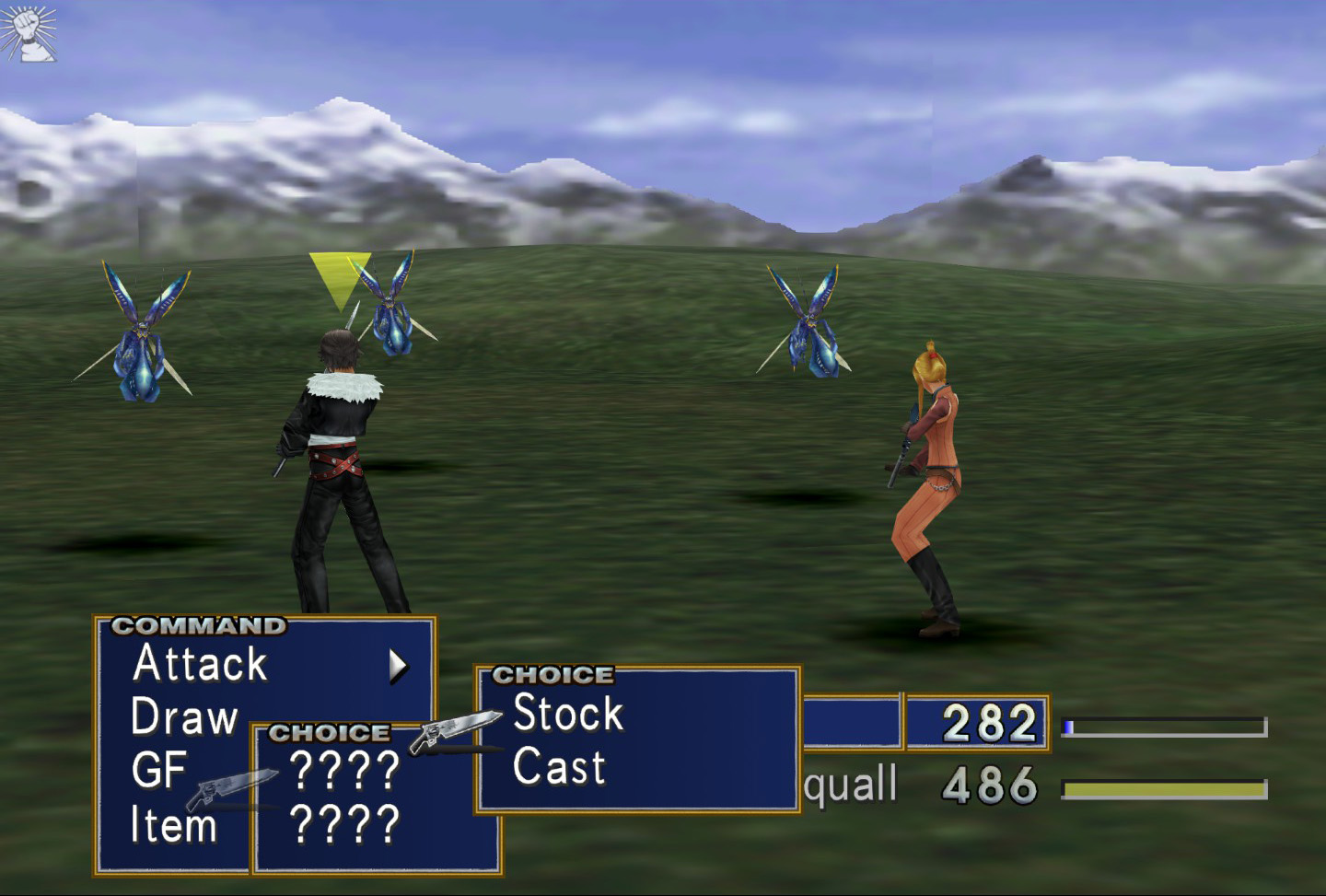
There is an extra file located in the download known as 'hitech' that will give a more updated look, with a hi-tech gradient and gunblade icon instead of the finger-pointer
"SeeDRemastered-UI v1.2"
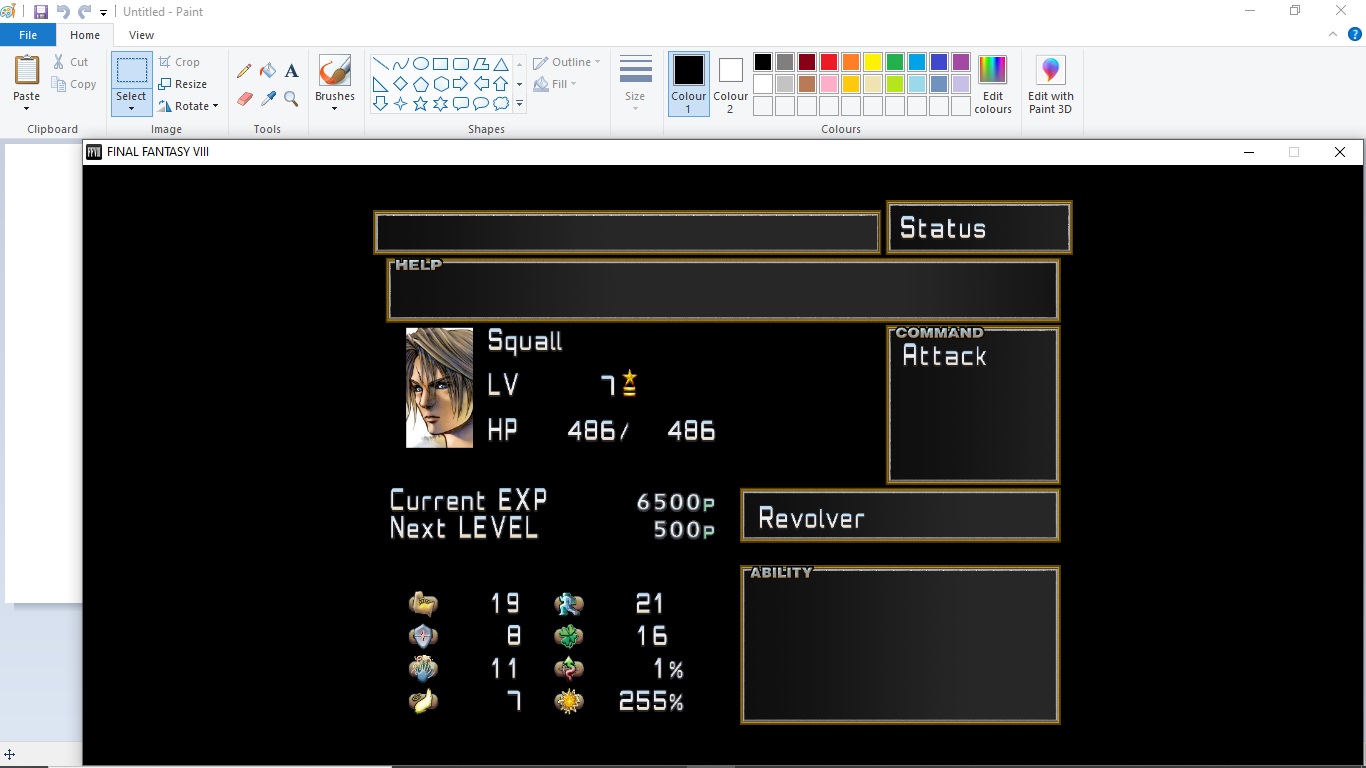
Is a graphical overhaul which includes:
- New Title Screen (Higher Resolution)
- Optional Alternate Menu Gradient (Comes with alternate 'seedreborn-ui-hitech_rem_v1.0' file that can be used)
- NEW UI Font, (NOT Game Font) as well as various menu objects modified. (SeeD, Time, Play, Disc, Fast/Slow, etc.)
- NEW Battle/Menu Icons and Text! (Target, Miss, Battle Numbers, Renzokuken indicators, etc.)
- NEW Optional Gunblade Cursor (Comes with alternate 'hitech' file)
- NEW Updated and colored Item Icons! (by MCINDUS)
- NEW colored Custom Icons for Status and Elemental Magic! (by MCINDUS)
- NEW Custom Icons for Junction Stats instead of old TEXT abbreviations! (HP, Str, Vit, Mag, Spr, Spd, Eva, Hit, Luck) (by MCINDUS)
- Alignment fixes!!
- Transparency fixes!
- Alternate FONT (SeeDReborn 4.1 modified for FF8:Remastered)
PLEASE DONATE HERE!
DEMASTER Version:
SeeDRemastered-FULL v1.2 (EN) DEMASTER Version Direct: https://mega.nz/file/XwATBSYZ#-sxXnFOOkKylpvrvCoRLetfyTM_99fOEC9fF3FDNQP4
ZZZ Versions:
SeeDRemastered-UI v1.0 (EN-English)
Additional Font Replacement:
SeeDRemasteredFont-Tech v1.a (All Languages!) Direct: https://mega.nz/file/DoRVCYQa#ho63EzySFmtlALakalNptuymErD1qFYyw4EYoaIEZ-c
Before/After


This is the official release! Let me know if you find any bugs!
READ THE INSTRUCTIONS INSIDE THE MOD!
(MORE IMAGES BEFORE/AFTER) COMING SOON
Thanks to Sebanisu and Maki for making mods possible!
Enjoy!
**CREATED 9/15/2019**
Join my PATREON for perks!
Menu, UI, Icon, and misc textures for Final Fantasy 8 Remastered
For use only with the Steam release of Final Fantasy VIII Remastered (Working on creating a Switch Port)
by MCINDUS
**CURRENTLY ONLY IN ENGLISH, PORTING TO ALL OTHER LANGUAGES**
To get the ENTIRE Lunatic Pandora Remastered Mods Pack, or early access to mods:
Join my PATREON!
Before/After
This mod must be unpacked using latest zzzDeArchive program OR used with Maki's DEMASTER Tool
Get zzzDeArchive HERE
This is for the MAIN mod and the FONTS, which includes the Menu, UI, Icons, etc. but only contains one alternate Gradient.
There is an extra file located in the download known as 'hitech' that will give a more updated look, with a hi-tech gradient and gunblade icon instead of the finger-pointer
"SeeDRemastered-UI v1.2"
Is a graphical overhaul which includes:
- New Title Screen (Higher Resolution)
- Optional Alternate Menu Gradient (Comes with alternate 'seedreborn-ui-hitech_rem_v1.0' file that can be used)
- NEW UI Font, (NOT Game Font) as well as various menu objects modified. (SeeD, Time, Play, Disc, Fast/Slow, etc.)
- NEW Battle/Menu Icons and Text! (Target, Miss, Battle Numbers, Renzokuken indicators, etc.)
- NEW Optional Gunblade Cursor (Comes with alternate 'hitech' file)
- NEW Updated and colored Item Icons! (by MCINDUS)
- NEW colored Custom Icons for Status and Elemental Magic! (by MCINDUS)
- NEW Custom Icons for Junction Stats instead of old TEXT abbreviations! (HP, Str, Vit, Mag, Spr, Spd, Eva, Hit, Luck) (by MCINDUS)
- Alignment fixes!!
- Transparency fixes!
- Alternate FONT (SeeDReborn 4.1 modified for FF8:Remastered)
PLEASE DONATE HERE!
DEMASTER Version:
SeeDRemastered-FULL v1.2 (EN) DEMASTER Version Direct: https://mega.nz/file/XwATBSYZ#-sxXnFOOkKylpvrvCoRLetfyTM_99fOEC9fF3FDNQP4
ZZZ Versions:
SeeDRemastered-UI v1.0 (EN-English)
Additional Font Replacement:
SeeDRemasteredFont-Tech v1.a (All Languages!) Direct: https://mega.nz/file/DoRVCYQa#ho63EzySFmtlALakalNptuymErD1qFYyw4EYoaIEZ-c
Before/After
This is the official release! Let me know if you find any bugs!
READ THE INSTRUCTIONS INSIDE THE MOD!
(MORE IMAGES BEFORE/AFTER) COMING SOON
Thanks to Sebanisu and Maki for making mods possible!
Enjoy!
**CREATED 9/15/2019**
Join my PATREON for perks!
Last edited:

 you did ha my bad , i know what im doin now lol