Aali's driver [v 0.7.11b] Help/Bugs/Suggestions

  • Thread starter Thread starter Vgr
  • Start date Start date
Status
Not open for further replies.
Well if it makes any difference, I tried out the game with just the 1.02 patch and no other graphical patches and didn't get any tearing. I had to run it in software because the game crashes with Direct3d. Are there any other graphical mods I could try or is Aali's the best? In the guide I was using it said to use The SaiNt's High Res FF7PC Patch v1.00 but I saw that it is outdated?
 
Aali's driver IS NOT a mod. When will people understand? Yes, The SaiNt's patch is outdated. Use Aali's single to begin with.
 
FF7 on my old computer runs fine with or without Aalis driver, also with Direct3D. Maybe helps my Opengl.cfg.

Code: [Select]
Code:
# ff7_opengl-0.7.11b config file## USER OPTIONS #### If you just want to play the game, these are the only options you'll want to change.# set the window size (or fullscreen resolution) of FF7# 0 means use original resolution (whatever ff7.exe provides)# preserve_aspect adds black borders as needed to preserve a 4:3 aspect ratiowindow_size_x = 640window_size_y = 480preserve_aspect = yesfullscreen = yes# mod directory# subdirectroy of mods/ where textures will be loaded from# does not affect the old external textures feature, those should still go in textures/mod_path = none# check your driver settings if this option doesn't seem to workenable_vsync = yes# limit snowboard, coaster and highway minigames to refresh rate / 2, i.e. 30fps for a 60hz # display mode vsync must be enabled and working for this to have any effectminigame_framelimiter = off# same thing, but for the battle swirlbattleswirl_framelimiter = off# allow FF7 to use linear filtering for its textures# some things look slightly better with this option on, but alot of textures just lose their detaillinear_filter = off# plugin used to play music, the FF7Music plugin MUST be enabled for FF7Music to work.# If no music plugin is loaded the game will play MIDI as usual but FF7Music will NOT work.#music_plugin = plugins/ff7music.fgp## ENHANCEMENTS #### All the little extras that weren't part of the original game, ## default options include only trivial bug fixes.# make all dialog boxes transparent, same effect as the transparent dialog boxes YAMP patchtransparent_dialogs = yes# allow max hp/mp to go over 9999, same effect as the YAMP patch by dziugobreak_9999limit = yes# include armor in magic defense calculationmdef_fix = yes# expand battle viewport to cover entire screen and make the battle menu transparentnew_battle_interface = yes# post-processing shader, used to apply fullscreen effectspost_source = shaders/bloom2.postenable_postprocessing = off## ADVANCED OPTIONS #### Don't fiddle with these unless you know what you're doing.# use shaders, if available and supported# turn shaders off to use the OpenGL 1.1 backenduse_shaders = off# prevent glitches due to rounding errors by rendering in the nearest # (larger, if supported) multiple of the original resolution and up/down-scalingprevent_rounding_errors = yes# enable alpha blending for textures without an existing blending effectfancy_transparency = yes# display frames per second counter in upper right cornershow_fps = yes# display some real-time debug informationshow_stats = off# store external textures in a compressed cache for increased performance# compression is not lossless, some artifacts may appear when this option is in use# texture cache does NOT update automatically if the source image changes, however, # deleting anything from the cache will cause that file to be recreated from the sourcecompress_textures = yes# use pixel buffer objects to speed up texture loading# will probably crash horribly on ATI cards but should work for NVIDIA usersuse_pbo = off# replace FF7's default framelimiter timer sourceuse_new_timer = yes# use a more stable (but less accurate) timer to control FF7's framelimiter# this option has no effect unless the use_new_timer option is onuse_stable_timer = off# plugin used to play movies, FFMpeg is the only choice for nowmovie_plugin = plugins/ffmpeg_movies.fgp## MODDER OPTIONS #### These options are mostly useful to modders and should not be enabled during normal play.# read files directly instead of using LGP archives# for example; if FF7 is looking for aaab.rsd in char.lgp, this option will make it open # direct/char/aaab.rsd first, if this file doesn't exist it will look for the original in the # LGP archivedirect_mode = off# show every failed attempt at loading a .png textureshow_missing_textures = off
and my app.log

Code: [Select]
Code:
INFO: FF7/FF8 OpenGL driver version 0.7.11bINFO: Auto-detected version: FF7 1.02 GermanINFO: Intel Intel 865G 1.3.0 - Build 4.14.10.3889INFO: VBO not supportedINFO: PBO not supportedINFO: Subtractive blending not supportedINFO: Found swap_control extensionINFO: NPOT textures not supportedINFO: Max texture size: 2048x2048INFO: Number of texture units: 4INFO: Original resolution 640x480, window size 640x480, output resolution 640x480, internal resolution 640x480INFO: FFMpeg movie player plugin loadedINFO: FFMpeg version SVN-r25886, Copyright (c) 2000-2010 Fabrice Bellard, et al.INFO: No shaders, codecs with YUV output will be slow.LOCK UNLOCK TEST MATRIX INITIALIZE INITIALIZE DD/D3D END initializing sound...creating dsound primary bufferreading audio fileloading static soundssound initializedINITIALIZING MIDI...selecting device 0:Microsoft GS Wavetable SW Synth, mid=1, pid=102,midi data type: GENERAL MIDIusing midi data file: u:\Spiele\Final Fantasy VII\Data\midi\midi.lgpmidiOutGetVolume returned: 89118911MIDI INITIALIZEDset music volume: 127MIDI set volume: 127100% of 127 = 127set music volume: 127MIDI set master volume: 40MIDI set volume: 12740% of 127 = 50Entering MAINExiting MAINSTART OF CREDITS!!!INFO: V:\FF7\Movies\eidoslogo.avi; truemotion2/pcm_u8 320x240, 15.000000 FPS, duration: 10.133333, frames: 152INFO: V:\FF7\Movies\sqlogo.avi; truemotion2/pcm_u8 320x224, 15.000000 FPS, duration: 14.533333, frames: 218set music volume: 127MIDI set volume: 12740% of 127 = 50MIDI play: 95reading midi file: PRE.midcurrent volume: 127MIDI is playing SUCCESSFULLY!!!set music volume trans: 127->0, step=60MIDI set volume trans: 127->0; step=60MIDI stop - OKEND OF CREDITS!!!Entering MAINset music volume: 127MIDI set volume: 12740% of 127 = 50Exiting MAINSTART OF MENU SYSTEM!!!END OF MENU SYSTEM!!!Entering MAINExiting MAIN-=-=[START OF WORLD MAP!!!]=-=-stop_soundMIDI set volume: 12740% of 127 = 50cross play music: 0set music volume trans: 127->0, step=4MIDI cross fade: 13, time: 4MIDI set volume trans: 15->127; step=4MIDI set volume: 12740% of 127 = 50MIDI play: 13reading midi file: TA.midcurrent volume: 127MIDI is playing SUCCESSFULLY!!!set music volume: 127-=-=[END OF WORLD MAP!!!]=-=-START OF MENU SYSTEM!!!END OF MENU SYSTEM!!!-=-=[START OF WORLD MAP!!!]=-=-MIDI play: 7reading midi file: BAT.midcurrent volume: 127MIDI is playing SUCCESSFULLY!!!stop_sound-=-=[END OF WORLD MAP!!!]=-=-Entering MAINExiting MAINEntering FRAME_INITIALIZE SWIRLExitting FRAME_INITIALIZE SWIRLSwirl sound_effect1stop_soundEnd of Swirl sound_effect1Entering FRAME_QUIT SWIRLExitting FRAME_QUIT SWIRLEntering MAINExiting MAIN[BATTLE] Entering FRAME_INITIALIZE[BATTLE] Scene# 129[BATTLE] Exitting FRAME_INITIALIZE[BATTLE] Begin main battle loop[BATTLE] End of current battle[BATTLE] Begin end battle stuffMIDI play: 46reading midi file: FAN2.midcurrent volume: 127MIDI is playing SUCCESSFULLY!!!stop_sound[BATTLE] Entering FRAME_QUIT[BATTLE] endof battle.[BATTLE] Exitting FRAME_QUITEntering MAINExiting MAINSTART OF MENU SYSTEM!!!END OF MENU SYSTEM!!!Entering MAINExiting MAIN-=-=[START OF WORLD MAP!!!]=-=-stop_soundMIDI set volume: 12740% of 127 = 50cross play music: 0set music volume trans: 127->0, step=4MIDI cross fade: 13, time: 4MIDI set volume trans: 127->15; step=2MIDI set volume: 1540% of 15 = 6MIDI play: 13reading midi file: TA.midcurrent volume: 15MIDI set volume trans: 15->127; step=2MIDI set volume: 12740% of 127 = 50MIDI is playing SUCCESSFULLY!!!set music volume: 127MIDI play: 7reading midi file: BAT.midcurrent volume: 127MIDI is playing SUCCESSFULLY!!!stop_sound-=-=[END OF WORLD MAP!!!]=-=-Entering MAINExiting MAINEntering FRAME_INITIALIZE SWIRLExitting FRAME_INITIALIZE SWIRLSwirl sound_effect1stop_soundEnd of Swirl sound_effect1Entering FRAME_QUIT SWIRLExitting FRAME_QUIT SWIRLEntering MAINExiting MAIN[BATTLE] Entering FRAME_INITIALIZE[BATTLE] Scene# 132[BATTLE] Exitting FRAME_INITIALIZE[BATTLE] Begin main battle loop[BATTLE] End of current battle[BATTLE] Begin end battle stuffMIDI play: 46reading midi file: FAN2.midcurrent volume: 127MIDI is playing SUCCESSFULLY!!!stop_sound[BATTLE] Entering FRAME_QUIT[BATTLE] endof battle.[BATTLE] Exitting FRAME_QUITEntering MAINExiting MAINSTART OF MENU SYSTEM!!!END OF MENU SYSTEM!!!Entering MAINExiting MAIN-=-=[START OF WORLD MAP!!!]=-=-stop_soundMIDI set volume: 12740% of 127 = 50cross play music: 0set music volume trans: 127->0, step=4MIDI cross fade: 13, time: 4MIDI set volume trans: 127->15; step=2MIDI set volume: 1540% of 15 = 6MIDI play: 13reading midi file: TA.midcurrent volume: 15MIDI set volume trans: 15->127; step=2MIDI set volume: 12740% of 127 = 50MIDI is playing SUCCESSFULLY!!!set music volume: 127-=-=[END OF WORLD MAP!!!]=-=-START OF MENU SYSTEM!!!WM_CLOSE END OF MENU SYSTEM!!!Field QuitMIDI stop - OKresetting MIDI driver volume - OKUNINITIALIZE DD

greets Kompass63

EDIT: Sorry, forgotten, running Windows XP Professional 32 Bit :-D
 
Last edited:
Does the driver support the LuckyTifa and CSith? When yes, which code have I to add?
 
It should, yes. Just look for YAMP (Yet Another Multi Patch) thread on here and download the corresponding mods you wish to use.
 
LuckyTifa (and sometimes CSith) results in a 0 kb ff7.exe after patching. Learn to get the slots right!
 
Well, now it's clear why the ff7.exe was crashed when I tried to patch with YAMP. Ok, then I have to give my best to hit the jackpot ;)
 
hi...this is my first post here :D

i just installed FF7 + 1.02 retail patch + Aali 0.7.11b...
but all i have is black textures, even no text...

screenshot [click on thumbs]

my system: XP Pro SP2, GeForce4 MX440 32MB with latest driver, RAM 256MB

and here's APP.LOG -- it says "GL_OUT OF MEMORY" a lot
INFO: FF7/FF8 OpenGL driver version 0.7.11b
INFO: Auto-detected version: FF7 1.02 US English
INFO: NVIDIA Corporation GeForce4 MX 440/AGP/SSE/3DNOW! 1.5.7
INFO: PBO not supported
INFO: Found swap_control extension
INFO: NPOT textures not supported
INFO: Max texture size: 2048x2048
INFO: Number of texture units: 2
INFO: Original resolution 640x480, window size 1280x800, output resolution 1066x800, internal resolution 640x480
INFO: No NPOT texture support
ERROR: init_indirect failed, scaling and postprocessing will be disabled
INFO: internal resolution clamped to 1066x800
INFO: FFMpeg movie player plugin loaded
INFO: FFMpeg version SVN-r25886, Copyright (c) 2000-2010 Fabrice Bellard, et al.
INFO: No shaders, codecs with YUV output will be slow.
LOCK UNLOCK TEST
MATRIX INITIALIZE
INITIALIZE DD/D3D END
initializing sound...
creating dsound primary buffer
reading audio file
loading static sounds
sound initialized
INITIALIZING MIDI...
selecting device 0:YAMAHA XG SoftSynthesizer, mid=1, pid=102,
midi data type: YAMAHA XG MIDI
using midi data file: y:\Final Fantasy VII\Data\midi\xg.lgp
midiOutGetVolume returned: ffffffff
MIDI INITIALIZED
set music volume: 127
MIDI set volume: 127
100% of 127 = 127
set music volume: 127
MIDI set master volume: 100
MIDI set volume: 127
100% of 127 = 127
Entering MAIN
Exiting MAIN
START OF CREDITS!!!
INFO: F:\FF7\Movies\eidoslogo.avi; truemotion2/pcm_u8 320x240, 15.000000 FPS, duration: 10.133333, frames: 152
ERROR: GL_OUT_OF_MEMORY
set music volume trans: 127->0, step=60
MIDI set volume trans: 127->0; step=60
ERROR: GL_OUT_OF_MEMORY
MIDI stop - OK
WM_CLOSE
END OF MENU SYSTEM!!!
Field Quit
MIDI stop - OK
resetting MIDI driver volume - OK
UNINITIALIZE DD
 
Last edited:
GeForce4 MX440 32MB

< just a guess but that is low end graphic card with low memory.
 
Uhuh... and at one point I was super excited about installing that massive 16KB of ram in my computer.  Or when that salesman told me I'd never need the speed of a 1200 baud modem.
One can never have too much video ram!
At least not until they perfect mems tech.

Heck, I use more than 32mb to make a phone call.
 
that is precisely what it says, though i would hazard a guess that the ram might be the successive culprit, if you know what i mean.
 
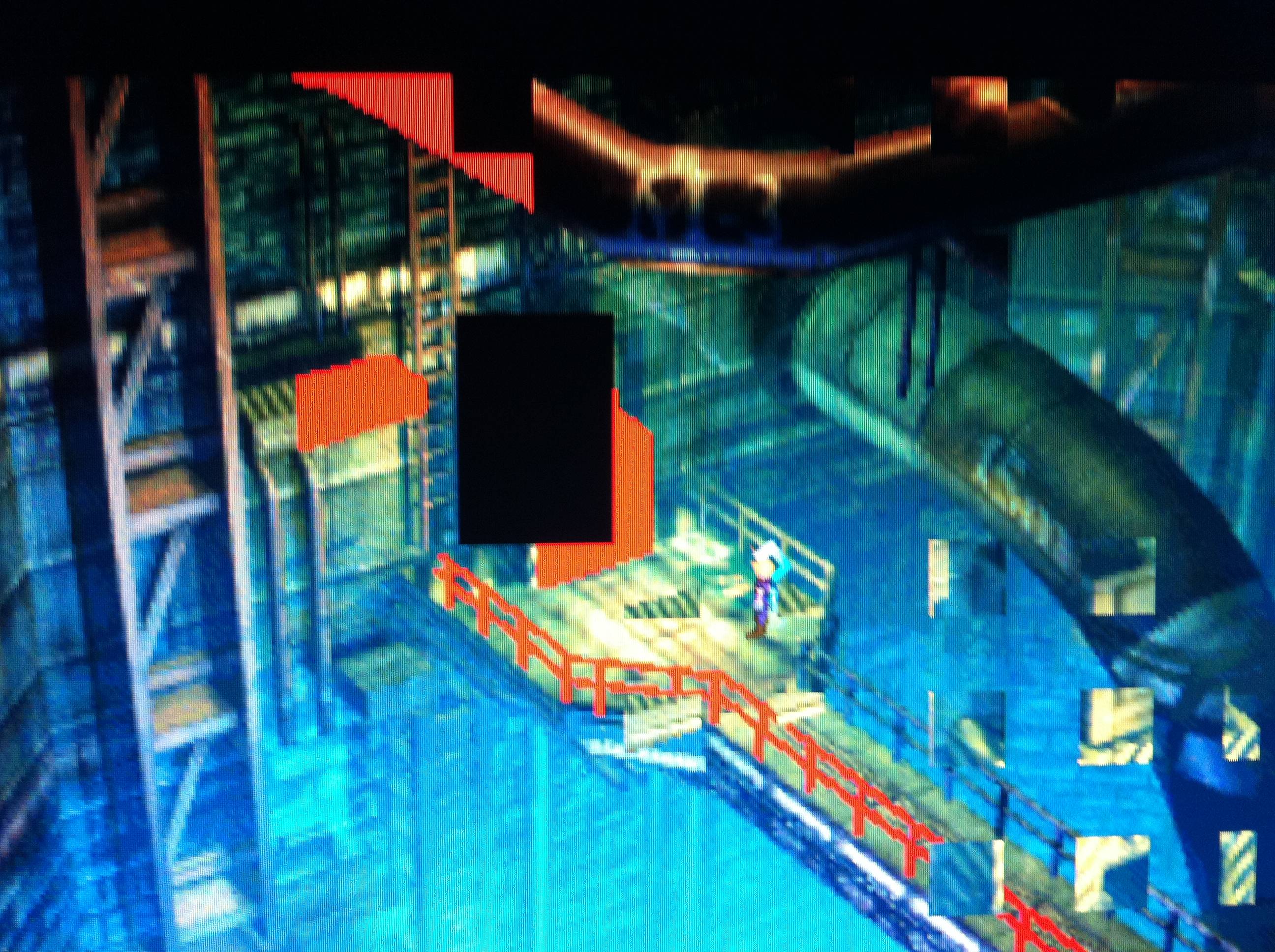
Just set up ff7 and the graphics are all messed up, not sure why, but it wouldn't let me take a screen shot (when i pasted it into paint it just comes out as a huge black screen)

so anyways i took a pic on my phone; apologize for the quality, but the only thing wrong is visible (some of the textures are just ref or green shapes, and there are random black squares, and some textures are cut into a grid of some sort like in the bottom right corner of the pic):
ipopj.jpg


app.log
Code: [Select]
Code:
INFO: FF7/FF8 OpenGL driver version 0.7.11bINFO: Auto-detected version: FF7 1.02 US EnglishINFO: NVIDIA Corporation GeForce GTX 570/PCI/SSE2 4.1.0INFO: OpenGL 2.0 support detectedINFO: Found swap_control extensionGLITCH: Unable to turn on vsyncINFO: Max texture size: 16384x16384INFO: Number of texture units: 4INFO: Original resolution 640x480, window size 1920x1080, output resolution 1440x1080, internal resolution 1920x1440INFO: FBO extension detected, using fast scaling/postprocessing pathINFO: Shader limits: varying 60, vert uniform 4096, frag uniform 2048INFO: FFMpeg movie player plugin loadedINFO: FFMpeg version SVN-r25886, Copyright (c) 2000-2010 Fabrice Bellard, et al.LOCK UNLOCK TEST MATRIX INITIALIZE INITIALIZE DD/D3D END initializing sound...creating dsound primary bufferreading audio fileloading static soundssound initializedINITIALIZING MIDI...selecting device 0:Microsoft GS Wavetable Synth, mid=1, pid=27,midi data type: GENERAL MIDIusing midi data file: C:\Program Files (x86)\Square Soft, Inc.\Final Fantasy VII\Data\midi\midi.lgpmidiOutGetVolume returned: ffffffffMIDI INITIALIZEDset music volume: 127MIDI set volume: 127100% of 127 = 127set music volume: 127MIDI set master volume: 3MIDI set volume: 1273% of 127 = 3Entering MAINExiting MAINSTART OF CREDITS!!!INFO: E:\FF7\Movies\eidoslogo.avi; truemotion2/pcm_u8 320x240, 15.000000 FPS, duration: 10.133333, frames: 152set music volume trans: 127->0, step=60MIDI set volume trans: 127->0; step=60MIDI stop - OKMIDI stop - OKEND OF CREDITS!!!Entering MAINset music volume: 127MIDI set volume: 1273% of 127 = 3Exiting MAINSTART OF MENU SYSTEM!!!END OF MENU SYSTEM!!!Entering MAINExiting MAINField StartMIDI play: 6reading midi file: MAKORO.midcurrent volume: 127MIDI is playing SUCCESSFULLY!!!Entering MAINExiting MAINSTART OF MENU SYSTEM!!!END OF MENU SYSTEM!!!Entering MAINExiting MAINField StartWM_CLOSE Field QuitMIDI stop - OKresetting MIDI driver volume - OKUNINITIALIZE DD
config
Code: [Select]
Code:
# ff7_opengl-0.7.10b config file## USER OPTIONS #### If you just want to play the game, these are the only options you'll want to change.# set the window size (or fullscreen resolution) of FF7# 0 means use original resolution (whatever ff7.exe provides)# preserve_aspect adds black borders as needed to preserve a 4:3 aspect ratiowindow_size_x = 1920window_size_y = 1080preserve_aspect = yesfullscreen = yes# mod directory# subdirectroy of mods/ where textures will be loaded from# does not affect the old external textures feature, those should still go in textures/mod_path = none# check your driver settings if this option doesn't seem to workenable_vsync = yes# limit snowboard, coaster and highway minigames to refresh rate / 2, i.e. 30fps for a 60hz display mode# vsync must be enabled and working for this to have any effectminigame_framelimiter = on# same thing, but for the battle swirlbattleswirl_framelimiter = off# allow FF7 to use linear filtering for its textures# some things look slightly better with this option on, but alot of textures just lose their detaillinear_filter = off# plugin used to play music, the FF7Music plugin MUST be enabled for FF7Music to work.# If no music plugin is loaded the game will play MIDI as usual but FF7Music will NOT work.#music_plugin = plugins/ff7music.fgp## ENHANCEMENTS #### All the little extras that weren't part of the original game, default options include only trivial bug fixes.# make all dialog boxes transparent, same effect as the transparent dialog boxes YAMP patchtransparent_dialogs = off# allow max hp/mp to go over 9999, same effect as the YAMP patch by dziugobreak_9999limit = no# include armor in magic defense calculationmdef_fix = yes# expand battle viewport to cover entire screen and make the battle menu transparentnew_battle_interface = off# post-processing shader, used to apply fullscreen effectspost_source = shaders/bloom2.postenable_postprocessing = no## ADVANCED OPTIONS #### Don't fiddle with these unless you know what you're doing.# use shaders, if available and supported# turn shaders off to use the OpenGL 1.1 backenduse_shaders = yes# prevent glitches due to rounding errors by rendering in the nearest (larger, if supported)# multiple of the original resolution and up/down-scalingprevent_rounding_errors = yes# enable alpha blending for textures without an existing blending effectfancy_transparency = on# display frames per second counter in upper right cornershow_fps = no# display some real-time debug informationshow_stats = no# store external textures in a compressed cache for increased performance# compression is not lossless, some artifacts may appear when this option is in use# texture cache does NOT update automatically if the source image changes, however, deleting anything from the cache# will cause that file to be recreated from the sourcecompress_textures = yes# use pixel buffer objects to speed up texture loading# will probably crash horribly on ATI cards but should work for NVIDIA usersuse_pbo = no# replace FF7's default framelimiter timer sourceuse_new_timer = yes# use a more stable (but less accurate) timer to control FF7's framelimiter# this option has no effect unless the use_new_timer option is onuse_stable_timer = no# plugin used to play movies, FFMpeg is the only choice for nowmovie_plugin = plugins/ffmpeg_movies.fgp## MODDER OPTIONS #### These options are mostly useful to modders and should not be enabled during normal play.# read files directly instead of using LGP archives# for example; if FF7 is looking for aaab.rsd in char.lgp, this option will make it open direct/char/aaab.rsd first,# if this file doesn't exist it will look for the original in the LGP archivedirect_mode = off# show every failed attempt at loading a .png textureshow_missing_textures = no


EDIT: For some reason i decided to change to direct3D then software then back to custom and now it works perfectly, I'm not entirely sure what was wrong
 
Last edited:
I apologise if this has come up already, it's just driving me barmy.

I'm trying to run the Open GL driver with Kula Wende AC Mod. What's happening is some of the characters are no longer appearing correctly. Is helping me with this a breach of copyright? If it is apologies, I'll just keep schtoom.

I have to compromise with full screen and some of my mods not showing correctly, or 640x480 and everything showing fine, but looking kind of naff!

Any help folks? I'd really appreciate it. I feel like a moron with this stuff!

Thank you.
 
Unfortunately, Sadly, Sickeningly, NO ONE will help you with those phenomenal KulaWende AC mods OR APZ's absolutely amazing(and necessary) Cloud on this forum.  They are......get this.......apparently illegal in some way.  Maybe because they are too high quality and put 95% of the models available now to absolute shame.  The KulaWende mod, I believe, is the ONLY release where you can acquire a higher quality Tifa, Aeris, Cid, Vincent, Red 13,and CaitSith battle AND field models.  Maybe someday more models will be completed but they too will probably be deemed illegal someway somehow and be removed, so just Google it for now and you'll find lots of help out there, and enjoy playing FFVII with a full set of characters modded. :-X
 
Well, they are, they both use content illegally ripped from retail games.
 
Your flevel file IS broken, but that might be something you couldn't notice. 4 files are broken inside.

Enable your postprocessing.
A little late reply on my part here, but I remembered this just now. So...

My flevel isn't broken, otherwise that would be something Makou Reactor would notice. I just think that it says so because I'm not using Aali's LGP tools. (and the reason for that: it didn't compress the files as supposed to in the flevel.lgp)
Also, the 4 files thing isn't right, it just repeated that message because I switched rooms 4 times.

Anyway, let's talk about the real issue.

Postprocessing didn't solve the fullscreen failure. It still reverted back to default resolution window mode.

Code: [Select]
Code:
INFO: FF7/FF8 OpenGL driver version 0.7.11bINFO: Auto-detected version: FF7 1.02 US EnglishERROR: failed to set fullscreen modeINFO: Intel Intel 965/963 Graphics Media Accelerator 2.0.0 - Build 7.15.10.1666INFO: PBO not supportedINFO: Found swap_control extensionINFO: Max texture size: 2048x2048INFO: Number of texture units: 8INFO: Original resolution 640x480, window size 640x480, output resolution 640x480, internal resolution 640x480INFO: FBO extension detected, using fast scaling/postprocessing pathINFO: FFMpeg movie player plugin loadedINFO: FFMpeg version SVN-r25886, Copyright (c) 2000-2010 Fabrice Bellard, et al.INFO: No shaders, codecs with YUV output will be slow.INFO: FF7Music helper plugin loadedLOCK UNLOCK TEST MATRIX INITIALIZE INITIALIZE DD/D3D END initializing sound...creating dsound primary bufferreading audio fileloading static soundssound initializedset music volume: 127set music volume: 127Entering MAINExiting MAINSTART OF CREDITS!!!INFO: d:\square soft, inc\final fantasy vii\movies\eidoslogo.avi; truemotion2/pcm_u8 320x240, 15.000000 FPS, duration: 10.133333, frames: 152INFO: d:\square soft, inc\final fantasy vii\movies\sqlogo.avi; h264/aac 1280x896, 15.000000 FPS, duration: 14.533333, frames: 218INFO: slow output format from video codec h264; 0set music volume trans: 127->0, step=60END OF CREDITS!!!Entering MAINset music volume: 127Exiting MAINSTART OF MENU SYSTEM!!!WM_CLOSE END OF MENU SYSTEM!!!Field QuitUNINITIALIZE DD END UNINITIALIZE DD
I also went to my accelerator settings and restored the defaults, but no luck. And I don't think I ever modified those...

What to do, what to do. I swear, it worked just fine before, then suddenly it stops working for no apparent reason.
I DID update to version 0.7.11b recently, and I think around the same time it stopped working in fullscreen. But I also recall playing the game post-updating, so there's a conflict. Ideas, anyone?
 
Status
Not open for further replies.
Back
Top