Change prelude credits

  • Thread starter Thread starter Tenko Kuugen
  • Start date Start date
Status
Not open for further replies.
I modified the size to 1024 by 1024.....but still nothing. I can't figure out how to turn the trick.
 
by any chance are you using Menu Overhaul by DLBP?

If you're using it.. try clearing the cache.. I'm not sure if this only works when you have DLBp mod.. but if you see a cache folder in your mod folder try clearing the content anyway..

I tried using that image and it works for me, its a bit low quality and not the right ratio, so its a bit messed up..

buster00.jpg


I advise you either edit the image or find another preferably higher res..
 
Last edited:
I'm using DLBP's mod.. I had to clear the cache first to make it work.. but honestly I don't like that image, lol find another one.. this one a bit low res..
 
I didnt use the menu overhaul. I did clear out my cache however. Instead of the TA Buster Sword at the main menu, I now have a pic of Cloud and Sephiroth fighting, I recognize that from a certain mod. Needless to say, I want to use another png, but its not loading. Do I have to use the menu overhaul mod to use a custom menu?

EDIT: Finally got it to work. Recleared out my cache...and changed the name of the PNG from buster_00.png to just "buster_00." That seems to have done the trick. Thanks guys.

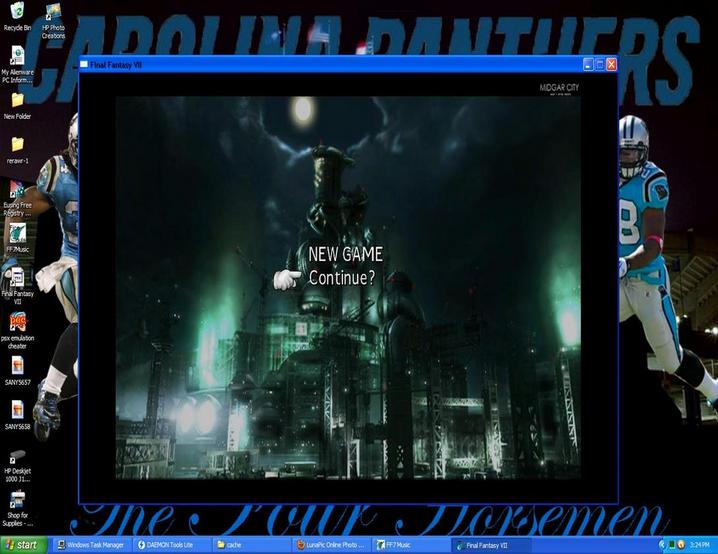
The Buster Sword png I had looked great when it was small, but when I had to upscale it, it came out horrible. As such, I decided to use another png as my menu. This is how it looks now:

qKWKn.jpg


I chose Midgar, because I felt it was the best place to start. It also doesn't give away too much of the plot, as much as say, the menu I saw of Cloud  inheriting the Buster Sword from Zack. The game starts with Midgar and evolves into what it becomes once you reach Shinra HQ.
 
Last edited:
cloud and sephiroth fighting.. looks like kulawende's..

lol.. of course it's just buster_00, the .png is a file type extension.. it's already there if the image is a png type.. no wonder it didn't work it'll read buster_00.png.png, you must have set your computer to hide known file extension, well congratz on your new start menu background.. case closed.

[EDIT: removed image it might start another off topic discussion]

 
Last edited:
Can we go back to my question of how to cut up the prelude image to make it work?
 
Status
Not open for further replies.
Back
Top