[FF7][FAQ] 7th Heaven Frequently Asked Questions

  • Thread starter Thread starter EQ2Alyza
  • Start date Start date
Status
Not open for further replies.
Hey thanks for the ff8 mods/video tutorial McIndus :D. I also love strawberries but I bought too many last time and couldn't eat them all before they started to get moldy :( .

@EQ2Alyza  Not sure about google drive. I didn't see any download error messages. Final Heaven updated some files last time I used it but I'm not even sure how to check to see what was specifically updated. I think I have it on auto-download.

We love you, EQ2Alyza.  Thank you so much for all of your hard work! 
If only people didn't feel so entitled.

I love strawberries too!
 
Last edited:
An issue I'm having is my "Settings" box is too small, I can't really see the last two check boxes to get the right settings I believe.  Any way I can change the size of the settings box?
I had this problem as well. I think what I did was downscaled my monitors' resolution and then reapplied the native resolution and it was fixed. It was like a week ago so I don't remember for sure but that was how I think I fixed it.
 
Well at least others aren't having issues downloading mods from the catalog.

Code: [Select]
Code:
Error Downloading Gameplay - Difficulty and Story Patch Test: System.ComponentModel.AsyncCompletedEventsArg
That is the message I get for every mod in the catalog. I can just import manually to test mods, but I don't have the ability to test downloads anymore until I can resolve what appears to be my own personal issue. I have noooooo clue what is going on though since all I did was come home from work Monday and this happened. It's on both my laptop and desktop, so gosh forbid, I hope it's not something with my ISP. I just don't get it :|

Waiting for Iros to respond to give me any information on that error message.
 
Code: [Select]
Code:
Error Downloading Field Textures: System.ComponentModel.AsyncCompletedEventsArg
I'm having the same error. Was wondering if there was a site I could just download these current packages from and then just see if I can open them with 7th Heaven?
 
Last edited:
Hi guys, i'm having these issues.

This error pop up when im trying to import an .iro archive.

System.NullReferenceException: Referencia a objeto no establecida como instancia de un objeto.
   en Iros._7th.Workshop.fImportMod.ImportMod(String source, String name, Boolean iroMode, Boolean noCopy) en c:\Iros\7thWorkshop\fImportMod.cs:línea 91
   en Iros._7th.Workshop.fImportMod.bOK_Click(Object sender, EventArgs e) en c:\Iros\7thWorkshop\fImportMod.cs:línea 120
   en System.Windows.Forms.Control.OnClick(EventArgs e)
   en System.Windows.Forms.Button.OnClick(EventArgs e)
   en System.Windows.Forms.Button.OnMouseUp(MouseEventArgs mevent)
   en System.Windows.Forms.Control.WmMouseUp(Message& m, MouseButtons button, Int32 clicks)
   en System.Windows.Forms.Control.WndProc(Message& m)
   en System.Windows.Forms.ButtonBase.WndProc(Message& m)
   en System.Windows.Forms.Button.WndProc(Message& m)
   en System.Windows.Forms.Control.ControlNativeWindow.OnMessage(Message& m)
   en System.Windows.Forms.Control.ControlNativeWindow.WndProc(Message& m)
   en System.Windows.Forms.NativeWindow.Callback(IntPtr hWnd, Int32 msg, IntPtr wparam, IntPtr lparam)
Okay, now i just cant use the program after these pop-ups.

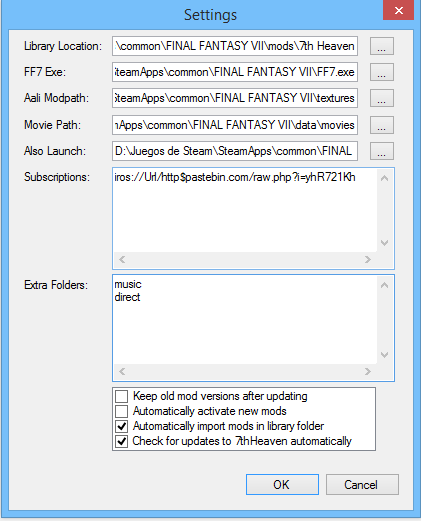
GyjX5Jw.png

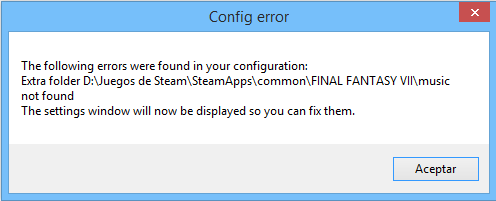
y6rFRxg.png


And this is the error.

System.NullReferenceException: Referencia a objeto no establecida como instancia de un objeto.
   en Iros._7th.Workshop.fImportMod.ImportMod(String source, String name, Boolean iroMode, Boolean noCopy) en c:\Iros\7thWorkshop\fImportMod.cs:línea 91
   en Iros._7th.Workshop.fLibrary.fLibrary_Load(Object sender, EventArgs e) en c:\Iros\7thWorkshop\fLibrary.cs:línea 151
   en System.Windows.Forms.Form.OnLoad(EventArgs e)
   en System.Windows.Forms.Form.OnCreateControl()
   en System.Windows.Forms.Control.CreateControl(Boolean fIgnoreVisible)
   en System.Windows.Forms.Control.CreateControl()
   en System.Windows.Forms.Control.WmShowWindow(Message& m)
   en System.Windows.Forms.Control.WndProc(Message& m)
   en System.Windows.Forms.ScrollableControl.WndProc(Message& m)
   en System.Windows.Forms.ContainerControl.WndProc(Message& m)
   en System.Windows.Forms.Form.WmShowWindow(Message& m)
   en System.Windows.Forms.Form.WndProc(Message& m)
   en System.Windows.Forms.Control.ControlNativeWindow.OnMessage(Message& m)
   en System.Windows.Forms.Control.ControlNativeWindow.WndProc(Message& m)
   en System.Windows.Forms.NativeWindow.Callback(IntPtr hWnd, Int32 msg, IntPtr wparam, IntPtr lparam)
Edit: Btw, i cant either donwload the files from google, not only from this post, all of the files that i tryed to download via google are down too.
 
Last edited:
Two problems with your installation I noticed. On my 7th heaven config I didn't put any info into "also launch". Second problem is did you use the converter made for 7th heaven and not the one made for bootleg? Cause I think it should of created a music/vgmstream folder and it looks like you're missing that. It could also be that you didn't run the converter as administrator and you have User account control and/or Windows Smartscreen and/or a  anti-virus that false positived and quarantined stuff, even my anti-virus tried to quarantine 7th heaven.
 
Code: [Select]
Code:
Error Downloading Field Textures: System.ComponentModel.AsyncCompletedEventsArg
I'm having the same error. Was wondering if there was a site I could just download these current packages from and then just see if I can open them with 7th Heaven?
I can't do that because the issue is with Google Drive's limits on accessing the files. You would get a message about the view/download quota being exceeded and to wait 24hrs to try again. I was finally able to download again this evening (thankfully), but it took me over 72hrs of waiting before it opened again :|

Two problems with your installation I noticed. On my 7th heaven config I didn't put any info into "also launch". Second problem is did you use the converter made for 7th heaven and not the one made for bootleg? Cause I think it should of created a music/vgmstream folder and it looks like you're missing that. It could also be that you didn't run the converter as administrator and you have User account control and/or Windows Smartscreen and/or a  anti-virus that false positived and quarantined stuff, even my anti-virus tried to quarantine 7th heaven.
Ditto. You need to also change Aali Modpath to ...\mods\textures.
 
Last edited:
Thank you guys, i thought that the converter it's the same, as i said, the link was down atleast yerterday, the converter of the first post i mean, i've used the converter from the bootleg already, should i re-install the game with the 7th converter?
 
I would say wait for Alyza to answer that, most likely yes but when you uninstall and start from scratch you need to make sure you've cleanly uninstalled it and removed the registry keys. I'm guessing maybe if you knew the filenames of all the textures and music mods you downloaded, manually created the proper folders and move them into there it could work. Alternatively you could probably uninstall those mods, setup your directories correctly and then re-install them, this will also take a long time because since both your music and texture folders are incorrect (and pretty much most of these mods affect textures, you will probably have to re-install most of them since it looks like you have them mixed up in your main textures folder and not in the mods folder) but I would say wait for Alyza to answer.

If you want to uninstall without waiting follow these steps for a clean start.

-First download https://www.ff7catalog.com/threads/9781/ There is the link, it usually deletes a handful of registries left over after uninstall.

- I would then check your steam folder and if the ff7 folder is still there after uninstall delete it.

-Then run CCcleaner https://www.piriform.com/CCLEANER. Then you're good to go.

Like i said though when you run the 7th heaven converter, right click run as administrator on the executable. Also to turn off UAC either permanently or temporarily type in UAC into your search box. Select Change user account control settings, move the slider to never notify. Disable your anti-virus for the converter and then afterward the converter has finished re-enable your anti-virus add an exception to the 7thheaven.exe and check to make sure it's not quarantined. I know this might seem like a pain in the ass but it's worth it and once you get it setup you can just activate/de-activate mods since they are injected now, no more uninstalling if you want to use a different mod.
 
Last edited:
Thanks for your help dude, actually, i just re-installed the game, using the tools from the links, using the 7th converter, it works!.

If someone who had installed the bootleg version and dont want to lose some mods, just download the ulgp tool from here.
It's really easy to use, just dumb the files that you want, for example, you dont want lost some battle models, then you just have to dump the battle.lgp and then encode it again wue you've reinstalled your game.

Thanks again for the help guys.
 
I figured out what the problem was. When you upgrade windows 8 to windows 8.1 it can set your windows DPI higher. So basically my laptops resolution is 1920x1080 but since the screen is like 17 or 19 inches(i forget but kinda small compared to some monitors) it sets the DPI to 125% zoom to make the icons and text look bigger. This can be fixed under the resolution options, by setting it to small 100%.

Thanks for your help dude, actually, i just re-installed the game, using the tools from the links, using the 7th converter, it works!.

If someone who had installed the bootleg version and dont want to lose some mods, just download the ulgp tool from here.
It's really easy to use, just dumb the files that you want, for example, you dont want lost some battle models, then you just have to dump the battle.lgp and then encode it again wue you've reinstalled your game.

Thanks again for the help guys.
 
Last edited:
Running FF7_GameConverter_7H.exe  doesn't result in a "FF7.exe" in the game directory (Steam), "FF7_en.exe" is still there and loads the launcher when clicked.
Every time I run FF7_GameConverter_7H.exe it indicates the patch is not yet applied, and auto finds my Steam directory.
The CMD window quickly closes with no other error message after pressing enter.

Also OP links to 7thHeaven_1.37.zip, it is up to v1.39 now.
 
Last edited:
I figured out what the problem was. When you upgrade windows 8 to windows 8.1 it can set your windows DPI higher. So basically my laptops resolution is 1920x1080 but since the screen is like 17 or 19 inches(i forget but kinda small compared to some monitors) it sets the DPI to 125% zoom to make the icons and text look bigger. This can be fixed under the resolution options, by setting it to small 100%.
Thanks, hopefully this doesn't happen often, but if it does then I'll add it to the Troubleshooting and FAQ section.

Running FF7_GameConverter_7H.exe  doesn't result in a "FF7.exe" in the game directory (Steam), "FF7_en.exe" is still there and loads the launcher when clicked.
Every time I run FF7_GameConverter_7H.exe it indicates the patch is not yet applied, and auto finds my Steam directory.
The CMD window quickly closes with no other error message after pressing enter.

Also OP links to 7thHeaven_1.37.zip, it is up to v1.39 now.
Check out the FF7_GC.log and see what it's doing. If you can't figure it out, post it here. 7H has an auto-update feature if it's enabled in the Settings. OP will be updated, just not sometimes immediately after a new version is released.
 
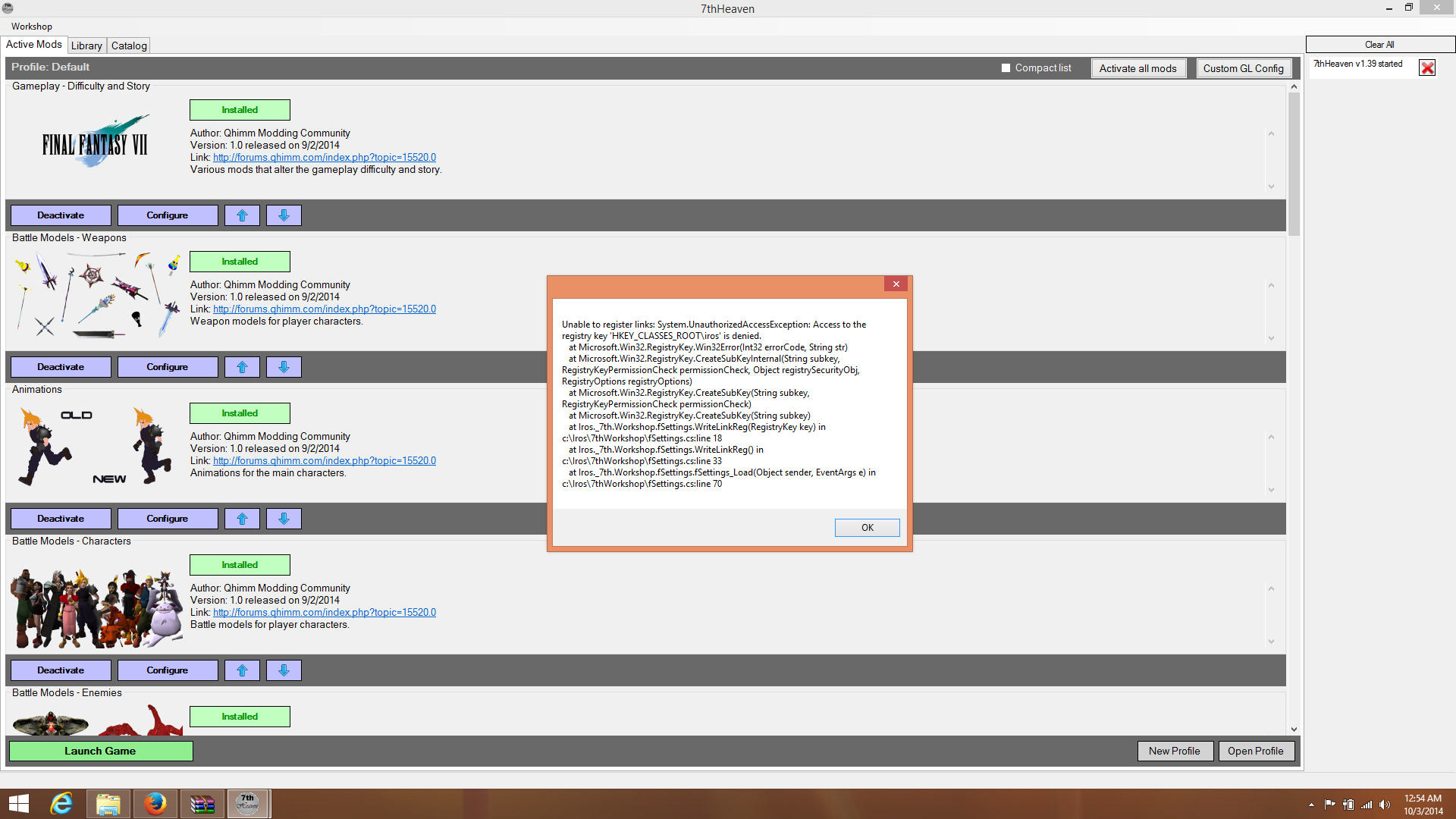
Thanks Elyza.  Sorry but another question. So I just updated to 1.39 and when i copied and pasted the files and ran 7th heaven it asked if I wanted to use Windows Subscription links again. Can you explain to me what that means? When I clicked yes it gave me this error.  But all the mods worked, I am just kinda worried if it will stop mods from updating in the future,.

http://i.imgur.com/T8FMXNm.png
T8FMXNm.png
 
Last edited:
Check out the FF7_GC.log and see what it's doing. If you can't figure it out, post it here. 7H has an auto-update feature if it's enabled in the Settings. OP will be updated, just not sometimes immediately after a new version is released.
No log file is generated, the best I can tell the cmd window is simply closing after pressing enter.

update: tried the standard version of the convertor, same issue. Log file is generated with that one, but it just stops at the installation found and nothing is printed afterwards.
The log after just pressing enter:
--------------------------------------------------------------------------------
FF7 GameConverter, Version 0.11
Creator: Kompass63
Editor: EQ2Alyza

Start running at    Date: Sat 10/04/2014    Time: 12:52:35.84
Active code page: 437
ActualPath D:\Downloads\FF7_GameConverter_0.11

You are running "Windows 7 Ultimate" on a 64 Bit Operating System (AMD64)
Real Management 64Bit NATIV

This patch is not yet applied.

Steam is installed in "D:\Program Files (x86)\Steam\steamapps\common\FINAL FANTASY VII"

Installation path found at...

"D:\Program Files (x86)\Steam\steamapps\common\FINAL FANTASY VII"

If an installation path IS found, press ENTER.
If an installation path IN NOT found, TYPE IT IN and press ENTER.
That's it, window just closes.
 
Last edited:
Thanks Elyza.  Sorry but another question. So I just updated to 1.39 and when i copied and pasted the files and ran 7th heaven it asked if I wanted to use Windows Subscription links again. Can you explain to me what that means? When I clicked yes it gave me this error.  But all the mods worked, I am just kinda worried if it will stop mods from updating in the future,.

http://i.imgur.com/T8FMXNm.png
T8FMXNm.png
It's denying access for the tool to write the registry keys. Try disabling the UAC and running FF7GC as an administrator.

No log file is generated, the best I can tell the cmd window is simply closing after pressing enter.

update: tried the standard version of the convertor, same issue. Log file is generated with that one, but it just stops at the installation found and nothing is printed afterwards.
The log after just pressing enter:
That's it, window just closes.
Hmm, Program Files (x86) may be the issue, although I've never seen it located in a D: drive letter before. I'm not super Windows savvy, but I thought it always installed its initial system folders to the C: letter drive. Uninstall the game through Steam, clean the registry with THIS, and try installing to D:\Games\Final Fantasy VII through the Steam interface. See how FF7GC reacts to that.
 
Hey EQ2Alyza,

I just wondered if you are going to be updating the game play to support New Threat 1.2?
 
Hey EQ2Alyza,

I just wondered if you are going to be updating the game play to support New Threat 1.2?
I haven't sent Alyza the files yet; I'm trying to fix something that wasn't ready for release first.
 
Status
Not open for further replies.
Back
Top