[FF7][FAQ] 7th Heaven Frequently Asked Questions

  • Thread starter Thread starter EQ2Alyza
  • Start date Start date
Status
Not open for further replies.
I got the MO to run fine but I have a question about the movies.  When I have the movie mod installed it plays all of the correct updated movies, however if I install one manually into the game directory then it still plays the movie associated with the mod.  Only when I deactivate the movies mod will it allow me to add my own.  Is there a trick to getting them all to cooperate together?

EDIT:
I'm also having problems with the Field Texture Mod. I'm getting an error: Glitch Palette write to external texture field....
7th Heaven overwrites the default file structure if it has files for it. You have to made a 7th Heaven ready mod and load it before the movie mod to use other movies.
 
Okay so your graphics card is Nvidia Geforce GT 750m? I also use this card. Is your laptop SLI, do you have another GT 750m? I'm no expert with computers but I'm wondering if your card might be forcing SLI and its causing graphical glitches. Don't worry if it is, it's simple to fix this.
I don't know what you mean by SLI, but the only other graphics card on this laptop is the Intel Integrated one, and yes, I'm sure the game's not using that.

Is your computer running windows 8.1? If it is I have some more ideas on what might be causing this.
Windows 8.0. Can't update because an earlier update to Windows 8 corrupted my profile and when I fixed the profile, the files for all the Windows apps were completely missing (including the Store, which there's apparently no way to repair).

Also have you used Geforce experience to update your graphics card drivers? The latest version for the GT 750m is 344.75 which does not match up with the number you gave us. It could be you had a bad installation of your old driver. When the new one installs don't run anything else while it goes.
Last time I tried to update, my computer bluescreened and I had to reinstall the old driver in safe mode. If the driver's bad, then it's never shown itself as such before now.

Also don't use Red Werewolf I remember reading earlier that it was causing some major issues for other people as well. Try leaving just that disabled. I have had some graphical glitches due to the menu overhaul at times but nothing major or persistent.
Thing is, each of those mods causes the glitch independently, not just in combination with each other.

One more thing, try checking full screen but unchecking  V-Sync and new timer. Also do you know what the refresh rate of your monitor is? Usually its 60hz 120hz or 144hz.
No luck, and I haven't a clue.

With Red Werewolf, did you click on Configure and select the option that corresponds with what you selected in Gameplay - Difficulty and Story? The drop-down menus are identical so that the flevel/scene work with Red Werewolf correctly. Having different options selected will not work; however, I did not put together those patches nor test them all in a full playthrough. 32 different difficulty and story mods are too much for one person to test. It could be that Wolfman and cmh175 didn't patch them correctly.
Yes, they were both set to the same thing, which is to say, absolutely nothing. They were both on "no change".

Side note: Any idea which of the mods, if any, would cause the game to crash upon trying to start the motorcycle chase minigame? Like, as soon as I hit start to begin the scene, the game throws an error and asks if I want to make an emergency save (an emergency save that loads me immediately into the following fight with everyone on 1 HP, which means an instant game over). I ended up just using the unmodded game to go through that segment, because I didn't feel like troubleshooting 2 dozen mods, or however many are in the catalogue provided in the OP. I know it's not Battle Models - Enemies, because I tried playing with that mod off, and it crashed anyways.
 
Last edited:
7th Heaven overwrites the default file structure if it has files for it. You have to made a 7th Heaven ready mod and load it before the movie mod to use other movies.
Thank you for the reply. So unless I have a mod packed with the specific movies I want then using the movies mod already within the catalog isn't going to help. Ok. What about backing up the files in the movie directory and then add them individually?  Is there a place to download the HQ movie files and I can just add them that way?

Alternately, is there a tutorial or easy way to package and create a mod to be used in 7th heaven?
 
I don't know what you mean by SLI, but the only other graphics card on this laptop is the Intel Integrated one, and yes, I'm sure the game's not using that.
Hi Leafia, SLI just means two graphics cards of the same model working together to render scenes to improve your FPS(Frames per second) and graphical fidelity/power.

Windows 8.0. Can't update because an earlier update to Windows 8 corrupted my profile and when I fixed the profile, the files for all the Windows apps were completely missing (including the Store, which there's apparently no way to repair).
Last time I tried to update, my computer bluescreened and I had to reinstall the old driver in safe mode. If the driver's bad, then it's never shown itself as such before now.
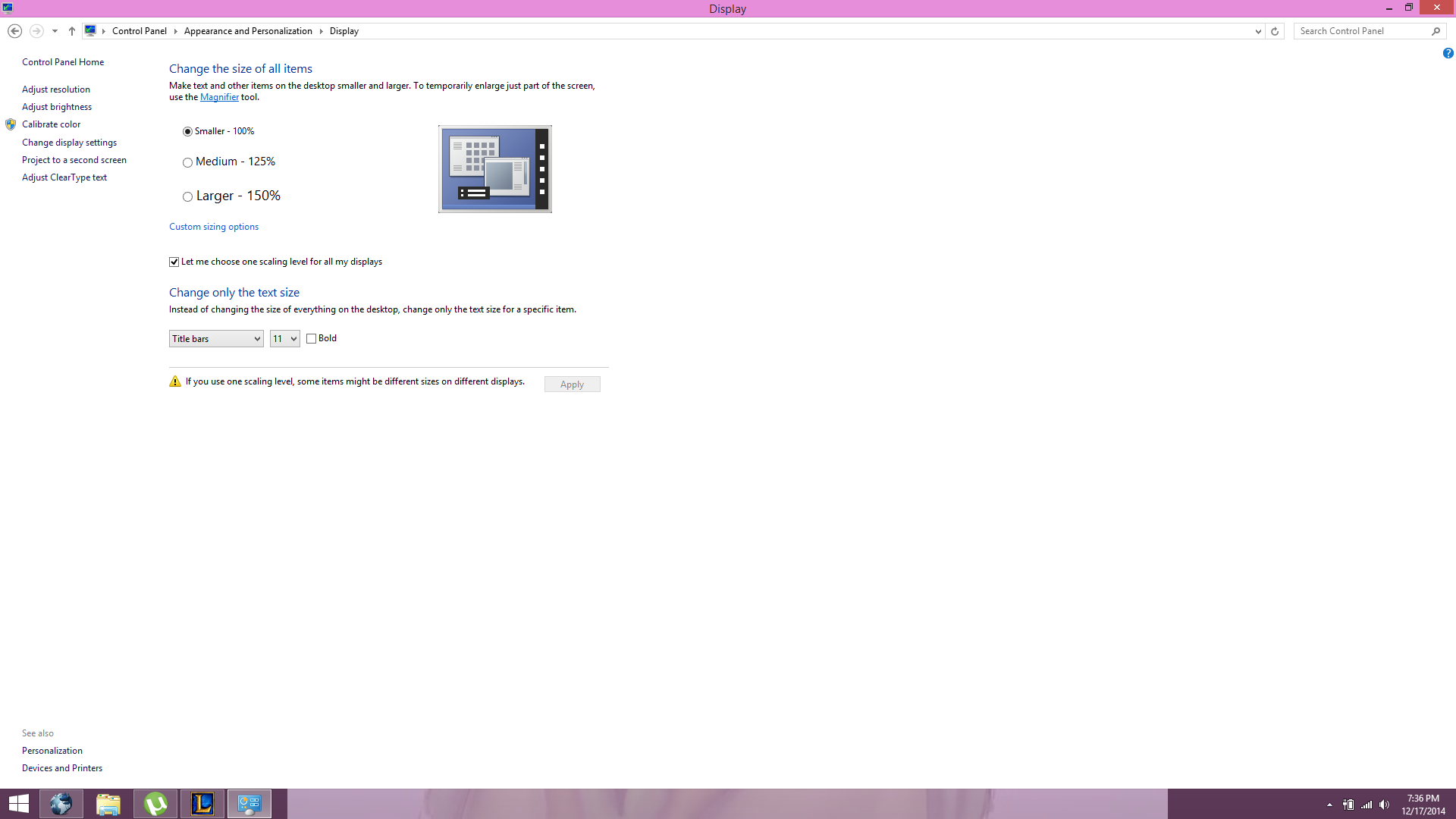
Okay first of all try this and see if it fixes any of the font issues you are having.
-Right click anywhere on your desktop and select "Personalize"
-On the bottom left it should say "See Also" Under that click "Display".
-Make sure your settings are like this and then see if that fixes anything in game if you changed your settings to match these.
Xmnhdzb.png


Okay, this may require a bit of your time but I think I may be able to point you in the right direction to fix your APP store and any corrupted files you may have on your computer :D. Which in turn may allow you to upgrade your drivers and fix your graphical glitches.
http://support.microsoft.com/kb/929833/en-us
Please read that and follow it step for step! My windows store was also corrupted when I used updated to 8.1 and then used CCCleaner and I may have deleted some important registries or hidden folders. This helped me fix it.

Once you have repaired the core system files that are damaged on your computer it might be safe to update your windows to 8.1 and/or your graphics driver. Keep in mind when you upgrade to windows 8.1 it will set your icons back to large again and you will need to set them back to small like I showed in the picture above. When I had them on large/medium this was causing graphical issues for me.

Edit: Oh also Leafia, do you remember what the error message you received was when your computer blue screened? Was it Driver_State_Power_failure followed by a bunch of numbers/letters? This could be an indication of a few things.
 
Last edited:
Okay first of all try this and see if it fixes any of the font issues you are having.
-Right click anywhere on your desktop and select "Personalize"
-On the bottom left it should say "See Also" Under that click "Display".
-Make sure your settings are like this and then see if that fixes anything in game if you changed your settings to match these.
No dice.

Okay, this may require a bit of your time but I think I may be able to point you in the right direction to fix your APP store and any corrupted files you may have on your computer :D. Which in turn may allow you to upgrade your drivers and fix your graphical glitches.
http://support.microsoft.com/kb/929833/en-us
Please read that and follow it step for step! My windows store was also corrupted when I used updated to 8.1 and then used CCCleaner and I may have deleted some important registries or hidden folders. This helped me fix it.
Tried that already, didn't help any.

Once you have repaired the core system files that are damaged on your computer it might be safe to update your windows to 8.1 and/or your graphics driver. Keep in mind when you upgrade to windows 8.1 it will set your icons back to large again and you will need to set them back to small like I showed in the picture above. When I had them on large/medium this was causing graphical issues for me.
Honestly I don't see why I should update to 8.1 anyhow. Does it really add anything besides compatibility issues?

Edit: Oh also Leafia, do you remember what the error message you received was when your computer blue screened? Was it Driver_State_Power_failure followed by a bunch of numbers/letters? This could be an indication of a few things.
Nope. I went ahead and tried updating, and it worked this time. Still didn't help, though.
 
This is the 7H catalog, so of course it comes with the textures. For those textures to work, he needs make sure his Workshop -> Settings -> Aali Modpath: is pointing to [gamedir]\mods\Textures and that that folder actually exists. It should exist if FF7_GameConverter_7H.exe was used.
@Leafia_Barrett
Check if the path is correct in the FF7opengl.cfg
Code: [Select]
Code:
# mod directory# subdirectroy of mods/ where textures will be loaded frommod_path = Textures
You use the new battle menu, which can't work with the normal files and needs its high res fonts. This has nothing to do with your system setup.
 
@Leafia_Barrett
Check if the path is correct in the FF7opengl.cfg
Code: [Select]
Code:
# mod directory# subdirectroy of mods/ where textures will be loaded frommod_path = Textures
You use the new battle menu, which can't work with the normal files and needs its high res fonts. This has nothing to do with your system setup.
Yep, it's correct.

Is there a reason that Menu - Background and Avatars has no effect at all, even with no other mods activated?
 
Last edited:
I want to start this by saying, you rock. i havent been on this site in years for FF7 modding and cannot be happier with what you've accomplished with this program. so. you rock. just sayin.

anyway, to the meat of the issue. I am and am not having a problem.

I followed the instructions, setup my paths in 7H settings, downloaded/activated mods,etc. and..... none of them seem to be working after i start the game. on the upside i do have music! yay since a lot of people seem to not have music play.

so basically what IS happening: game loads up like normal. i THINK the field textures after jumping off the train are sharper so that one MAY be working, didnt get too far in to check other things, and the soldiers, along with avalanche, barret, and cloud, are full-size models instead of lego people or chibis. so thats happening. but they're not the custom models i selected. also the text is squished up. like its riding up alongside each letter making it difficult to read. getting into a battle it looks like the cloud model and buster sword model i selected is working, but the enemy soldiers are vanilla, the background is vanilla, and near the characters' status bar im getting a bunch of weird glitchy looking things (left and right arrows, a red eye thing of some sort, squares of colored pixels, etc.) and along with that the menu overhaul isnt seeming to be working. tried to take a screenshot in game but im on a laptop w/o a numpad and it wouldnt let me do the fN key shortcut to prtscrn.

i have imgur links to my mod list and my 7H path settings:

mod load order: http://imgur.com/71mOZzZ

7th Heaven path settings: http://imgur.com/0F8YuMf


if you want me to put up anything else just let me know. or if my load order is whack or something. just hoping to get this running soon and satisfying my ff7 itch :P

**EDIT** so i was reading through some other replies and i dont know if its the source of all my problems but i just realized one big eff up i did. i didnt know the game converter was different between this and bootleg. i started earlier today trying to get bootleg, got tired of waiting hours for the torrent, and decided this looked easier. so im going to try nuking my ff7 folder and using the CORRECT game converter and see if this fixes my issues.

**EDIT #2** ok so i fixed my goof and did it using the correct game converter and now it seems that most of the mods are working. whats happening now though is that now im not getting music, but looking at some other comments i think i see what i need to do to fix that. also the game is now running really slow. reaaaaaaaaaally slow. and there was a blip that popped up after i started and proceeded to the next area to speak to the avalanche members that said something like glitch with blahblah path name field textures.

**EDIT 3** well i tinkered around and now its not running nearly as slow, but still having issues with field textures. and now weirdly when i just decided to open the launcher again, after not changing anything, my arrow keys wouldnt work all of a sudden. it would accept my ENTER to skip the eidos and square logos, but when it got to New Game/Continue? screen, i couldnt select anything. arrow keys wont work and now when i pressed enter on the default option (continue?) its supposed to give an error beep since there is no save file, but this time it didnt. i dont know if maybe its just freezing on that screen?

 
Last edited:
Hey there, I'll see if i can help some of your issues as they sound similar to what I went through when I originally used bootleg so had no sound.

but first things first your order is wrong, Battle Models - Weapons needs to be the first thing on your list, not - characters. This is in the setup explanation.

"Miscellaneous - Red Werewolf
Miscellaneous - CHaOS (Character Overhaul Seven)
Gameplay - Difficulty and Story
Battle Models - Weapons
Any order thereafter (I go alphabetically)"

In your configuration window you have set it up wrong, Aali's path should "[Game directory]\mods\Textures" and you forgot the slash after FF7 anyway. So assuming you installed back the same way it should be "C:\Games\FF7\mods\Textures"

Also the extras folder should be
music
direct

not data/music as it will look in data on its own.

The issues with the file errors you will see at the bottom sometimes you can ignore, they aren't game breaking and it is usually just an external texture that hasn't been pulled or is missing.

Anyway if after correcting all of that you still have no sound uninstalled FF7, Then run regedit.exe as admin and search for Final Fantasy, actually you might have to search for FF7 and then delete every single registry, only takes a few minus (F3 searches for the next existence of that name) and then reinstall FF7 and use the game converter and you should be fine. Bootleg seems to strawberry with something relating to sound and location in the registry.

as for the slow down, it might be worth you posting screenshots of your OpenGL settings as you made quite a few mistakes before :)
 
thanks for the reply :)

ok i fixed the load order.

fixed the silly data/music

i forgot to put that i already fixed the \mods\textures pathing. it was because i used the bootleg one originally so it didnt create a textures folder.

i made an imgur link for my open gl settings: http://imgur.com/uuygmKs


only other thing im having an issue with now was in my last edit: the arrow keys suddenly not working when i get to the new game/continue? menu. it recognizes my input when i press enter to skip the eidos/square/credits but after that nothing, so i cant tell if its suddenly freezing there or if my input isnt working.
 
Hello I'm new to the modding scene so if I sound like a noob, sorry in advance.
I tried the "Battle Models - Characters" mod and some of the characters turn out looking like gray silhouettes like Tifa by Bloodshot.
Am I doing something wrong?
 
thanks for the reply :)

ok i fixed the load order.

fixed the silly data/music

i forgot to put that i already fixed the \mods\textures pathing. it was because i used the bootleg one originally so it didnt create a textures folder.

i made an imgur link for my open gl settings: http://imgur.com/uuygmKs


only other thing im having an issue with now was in my last edit: the arrow keys suddenly not working when i get to the new game/continue? menu. it recognizes my input when i press enter to skip the eidos/square/credits but after that nothing, so i cant tell if its suddenly freezing there or if my input isnt working.
So does that mean all your other issues are fixed including your sound working?

I'll assume you are playing this on a PC? I use a controller so my help here will be limited but I know if I have a controller plugged in my arrow keys don't work.

Also ran you ran the GameConverter did you say Yes or N to the keyboard numpad question?
 
Hello I'm new to the modding scene so if I sound like a noob, sorry in advance.
I tried the "Battle Models - Characters" mod and some of the characters turn out looking like gray silhouettes like Tifa by Bloodshot.
Am I doing something wrong?
can you post your load order for the mods?
 
can you post your load order for the mods?
I'm using the load order the OP said to do which is

"Gameplay - Difficulty and Story
Battle Models - Weapons
Any order thereafter..."
 
I'm using the load order the OP said to do which is

"Gameplay - Difficulty and Story
Battle Models - Weapons
Any order thereafter..."
It sounds like the mod is calling missing texture. Can you play a scene where this happen then post your app.log from within the FF7 directory, though this is more Alyza field so dunno if I can be of much help
 
So does that mean all your other issues are fixed including your sound working?

I'll assume you are playing this on a PC? I use a controller so my help here will be limited but I know if I have a controller plugged in my arrow keys don't work.

Also ran you ran the GameConverter did you say Yes or N to the keyboard numpad question?
well since i cant get past the new game menu i dont know for sure yet. i did everything specified though so hopefully. and yes when i ran the converter i said yes to the numpad patch thing.

it WAS working. basically i ran the game, worked fine (minus the other issues i needed to fix) then i turned it off, came back 10 minutes later to actually play it, and suddenly the arrow keys wouldnt work.

and this started before i fixed the other stuff. there was literally no change between the last time it worked and the first time it didnt. and looking in the app.log it doesnt say anything useful. it shows the menu come up, then it shows me closing the game, says menu end and then the game closed. i mean if it will fix this i can plug a ps3 or 4 controller into my laptop but i'd rather play with keyboard if i can. maybe in the morning i can try the controller, then get into the train station and try to change my config and see what happens.
 
Last edited:
well since i cant get past the new game menu i dont know for sure yet. i did everything specified though so hopefully. and yes when i ran the converter i said yes to the numpad patch thing.

it WAS working. basically i ran the game, worked fine (minus the other issues i needed to fix) then i turned it off, came back 10 minutes later to actually play it, and suddenly the arrow keys wouldnt work.

and this started before i fixed the other stuff. there was literally no change between the last time it worked and the first time it didnt. and looking in the app.log it doesnt say anything useful. it shows the menu come up, then it shows me closing the game, says menu end and then the game closed. i mean if it will fix this i can plug a ps3 or 4 controller into my laptop but i'd rather play with keyboard if i can. maybe in the morning i can try the controller, then get into the train station and try to change my config and see what happens.
going to sound silly but do you have num lock turned on? again I have a full sized keyboard so always say no but try with a controller.

You'll know if the sound works if you hear the prelude music so you don't to actually start a new game, just let the two logo movies play and then let the prelude show up :)
 
oh yeah i forgot theres music there. i usually skip it so i forgot xD

and nope. dont have a full keyboard so no numlock. i wish thats all it was lol. if it doesnt work tonight ill just have to try a controller in the morning.

EDIT: some potentially helpful information. i had a thought and tried to change the start menu mod to a different start menu, and when i pulled the game up again, not only did i have the same arrow keys not working issue, but the start menu didnt change.

going from there i closed the game, deactivated the 'Menus- Backgrounds, Avatars' mod entirely, restarted 7th heaven, confirmed it was not active, then launched the game.

still the same modded picture, still same problem. also just tried running the game without the mod manager, and the same problem happens. i think ill start with redoing the install in the morning.

so i think something there screwed up. unfortunately from there i dont know how to fix it.
 
Last edited:
oh yeah i forgot theres music there. i usually skip it so i forgot xD

and nope. dont have a full keyboard so no numlock. i wish thats all it was lol. if it doesnt work tonight ill just have to try a controller in the morning.

EDIT: some potentially helpful information. i had a thought and tried to change the start menu mod to a different start menu, and when i pulled the game up again, not only did i have the same arrow keys not working issue, but the start menu didnt change.

going from there i closed the game, deactivated the 'Menus- Backgrounds, Avatars' mod entirely, restarted 7th heaven, confirmed it was not active, then launched the game.

still the same modded picture, still same problem.

so i think something there screwed up. unfortunately from there i dont know how to fix it.
did you have sound though?

I use the mod with no issues and it doesn't play around with how the menu's function, just what is displayed so they shouldn't effect your keyboard. Wehn you do use it do you get the background you choose? Can you start a game and upload you APP.log?
 
no i didnt have sound. and i even launched the game straight from the ff7.exe instead of 7th heaven and it still had the same problem, along with the same mod image, so i think ultimately i might've goofed and my install got corrupted somehow.
 
Status
Not open for further replies.
Back
Top