[FF7][FAQ] 7th Heaven Frequently Asked Questions

  • Thread starter Thread starter EQ2Alyza
  • Start date Start date
Status
Not open for further replies.
The problem there is that I make the switches and it still messes up, I might not be doing it right. e.o  xD The sound driver from my TV's speakers go from Nvidia and my GPU sound driver is Realtek High definition Audio.
 
Last edited:
go to physics on nvidia panel and select automatic selection PROCESSOR and see if the nvidia gpu is selected
go to configure digital audio (i am using portuguese interface, dunno if is like this)
and see if your tv is selected on HDMI option. "SONY AVAMP" in my case
at worst case you will have to configure the audio on option 2 "configure devices whatever..."
 
Last edited:
I will look around on it.  I was just testing the Alienware X51 I got on my TV just for fun with multiple displays.
 
Based on the issue you are having with the audio drivers, I found what seems to be a fix for me with a similar issue.

I have my soundcard in which my speakers are plugged into, and I have my headset which is USB. I regularly switch between them depending on the time of day/night that I am gaming and whether or not my girlfriend is home. This caused a bit of an issue because the FF7Config only gives you the option to select one output for sound, and re-running the config tool breaks 7th Heaven. There was a workaround provided which involved running the game converter again to redo the config files, but that is time consuming and annoying to do every time you want to switch outputs. It should be as simple as switching the output on the PC (which I have setup through a macro on my keyboard).

So here's what I did to fix the issue:

Start > Run > regedit.exe

From there, go to (this is on a 64bit win 8.1 install) computer > hkey_local_machine > software > wow6432node > square soft, inc. > final fantasy vii > 1.00 > sound

You'll find 4 registry entries here: default, options, sfxvolume, sound_guid

All you have to do is right-click and delete the sound_guid registry entry. This will make ff7.exe check to the PC's active sound output device every time you launch the game. I've tested this on numerous occasions and it always works without issue.

If anyone finds this causes a bug, feel free to correct me.
 
Hm, I will try it out.  I have always wanted to run the game on my TV since I have the proper capabilities now, love the new rig and all it can do. Win 8.1 is what i'm using so this will be interesting. Thank you.
 
i use a 40 inch lcd screen and a home theater. having no problems with sounds. just follow the hints and you will experience a good and pretty game on big screen. and let us be prepared to the upcoming ff7 remake on pc. i hope it will not be ps4 exclusive
 
is there maybe a link to these iro files i can download manually? Because 7th heaven keeps crashing every time i try to download mods. I get a repeated error message saying 'underlying connection closed, could not establish trust relationship..' and i can't read the rest because the window is too small

edit: Updated to v.1.49 and now all downloads are just stuck on 'calculating'
 
Last edited:
the characters battle models was not working anymore, i desactivated and activated and nothing. so i deleted the battle models files from steam folder. and now it shows installed on 7 heaven menu, but it's not in the folder. when i try active it, the program crashs. is there anyway to download it again ?
 
I got to where you have to fight bosses on the train at North Corel then my game instaly crashes when I got to the final boss.

And here's what the app log say. Anybody knows what seems to be the problem here?

Code: [Select]
Code:
INFO: FF7/FF8 OpenGL driver version 0.7.11bINFO: Auto-detected version: FF7 1.02 US EnglishINFO: NVIDIA Corporation GeForce GTX 980/PCIe/SSE2 4.5.0 NVIDIA 353.06INFO: OpenGL 2.0 support detectedINFO: Using PBOINFO: Found swap_control extensionINFO: Max texture size: 16384x16384INFO: Number of texture units: 4INFO: Original resolution 640x480, window size 1920x1080, output resolution 1440x1080, internal resolution 3840x2160INFO: FBO extension detected, using fast scaling/postprocessing pathINFO: Shader limits: varying 124, vert uniform 4096, frag uniform 2048INFO: FFMpeg movie player plugin loadedINFO: FFMpeg version SVN-r25886, Copyright (c) 2000-2010 Fabrice Bellard, et al.INFO: FF7Music helper plugin loadedINFO: Loading external library Kranmer.dllLOCK UNLOCK TEST MATRIX INITIALIZE INITIALIZE DD/D3D END initializing sound...creating dsound primary bufferreading audio fileloading static soundssound initializedINFO: tried to load x:\Program Files (x86)\Square Enix\FINAL FANTASY VII\/mods/bootleg/flevel/sibuki1_00.png, failedINFO: tried to load x:\Program Files (x86)\Square Enix\FINAL FANTASY VII\/mods/bootleg/flevel/sibuki2_00.png, failedINFO: tried to load x:\Program Files (x86)\Square Enix\FINAL FANTASY VII\/mods/bootleg/flevel/sibuki3_00.png, failedINFO: tried to load x:\Program Files (x86)\Square Enix\FINAL FANTASY VII\/mods/bootleg/flevel/sibuki4_00.png, failedset music volume: 127set music volume: 127Entering MAINExiting MAINSTART OF CREDITS!!!INFO: x:\Program Files (x86)\Square Enix\FINAL FANTASY VII\movies\eidoslogo.avi; h264/aac 1280x960, 15.000000 FPS, duration: 10.193000, frames: 153set music volume trans: 127->0, step=60END OF CREDITS!!!Entering MAINset music volume: 127Exiting MAINSTART OF MENU SYSTEM!!!END OF MENU SYSTEM!!!Entering MAINExiting MAINField StartINFO: tried to load x:\Program Files (x86)\Square Enix\FINAL FANTASY VII\/mods/bootleg/char/AABB_00.png, failedINFO: tried to load x:\Program Files (x86)\Square Enix\FINAL FANTASY VII\/mods/bootleg/flevel/c_eye2_00.png, failedINFO: tried to load x:\Program Files (x86)\Square Enix\FINAL FANTASY VII\/mods/bootleg/flevel/c_eye2r_00.png, failedINFO: tried to load x:\Program Files (x86)\Square Enix\FINAL FANTASY VII\/mods/bootleg/char/ABEB_00.png, failedINFO: tried to load x:\Program Files (x86)\Square Enix\FINAL FANTASY VII\/mods/bootleg/char/ABEC_00.png, failedINFO: tried to load x:\Program Files (x86)\Square Enix\FINAL FANTASY VII\/mods/bootleg/char/ABED_00.png, failedINFO: tried to load x:\Program Files (x86)\Square Enix\FINAL FANTASY VII\/mods/bootleg/flevel/ci_eye2_00.png, failedINFO: tried to load x:\Program Files (x86)\Square Enix\FINAL FANTASY VII\/mods/bootleg/flevel/ci_eye2r_00.png, failedINFO: tried to load x:\Program Files (x86)\Square Enix\FINAL FANTASY VII\/mods/bootleg/field/zcoal_2/zcoal_2_00_01.png, falling back to palette 0INFO: tried to load x:\Program Files (x86)\Square Enix\FINAL FANTASY VII\/mods/bootleg/field/zcoal_2/zcoal_2_00_02.png, falling back to palette 0INFO: tried to load x:\Program Files (x86)\Square Enix\FINAL FANTASY VII\/mods/bootleg/field/zcoal_2/zcoal_2_00_03.png, falling back to palette 0INFO: tried to load x:\Program Files (x86)\Square Enix\FINAL FANTASY VII\/mods/bootleg/field/zcoal_2/zcoal_2_00_05.png, falling back to palette 0INFO: tried to load x:\Program Files (x86)\Square Enix\FINAL FANTASY VII\/mods/bootleg/field/zcoal_2/zcoal_2_01_03.png, falling back to palette 0INFO: tried to load x:\Program Files (x86)\Square Enix\FINAL FANTASY VII\/mods/bootleg/field/zcoal_2/zcoal_2_01_05.png, falling back to palette 0INFO: tried to load x:\Program Files (x86)\Square Enix\FINAL FANTASY VII\/mods/bootleg/field/zcoal_2/zcoal_2_02_06.png, falling back to palette 0INFO: tried to load x:\Program Files (x86)\Square Enix\FINAL FANTASY VII\/mods/bootleg/field/zcoal_2/zcoal_2_03_07.png, falling back to palette 0INFO: tried to load x:\Program Files (x86)\Square Enix\FINAL FANTASY VII\/mods/bootleg/field/zcoal_2/zcoal_2_04_08.png, falling back to palette 0INFO: tried to load x:\Program Files (x86)\Square Enix\FINAL FANTASY VII\/mods/bootleg/field/zcoal_2/zcoal_2_04_09.png, falling back to palette 0INFO: tried to load x:\Program Files (x86)\Square Enix\FINAL FANTASY VII\/mods/bootleg/field/zcoal_2/zcoal_2_00_04.png, falling back to palette 0INFO: tried to load x:\Program Files (x86)\Square Enix\FINAL FANTASY VII\/mods/bootleg/field/zcoal_2/zcoal_2_01_04.png, falling back to palette 0Field QuitEntering MAINExiting MAINEntering FRAME_INITIALIZE SWIRLExitting FRAME_INITIALIZE SWIRLSwirl sound_effect1stop_soundEnd of Swirl sound_effect1Entering FRAME_QUIT SWIRLExitting FRAME_QUIT SWIRLEntering MAINExiting MAIN[BATTLE] Entering FRAME_INITIALIZE[BATTLE] Scene# 1004INFO: tried to load x:\Program Files (x86)\Square Enix\FINAL FANTASY VII\/mods/bootleg/menu/ketcy2a_00.png, failedINFO: tried to load x:\Program Files (x86)\Square Enix\FINAL FANTASY VII\/mods/bootleg/menu/ketcy2b_00.png, failedINFO: tried to load x:\Program Files (x86)\Square Enix\FINAL FANTASY VII\/mods/bootleg/menu/coloc_00.png, failed[BATTLE] Exitting FRAME_INITIALIZEERROR: unhandled exception

 
Last edited:
Uh, I think the issue might be related to the fact that you installed in "Program Files."
 
Uh, I think the issue might be related to the fact that you installed in "Program Files."
Where should I install the mod files then?

I've been running it without issue up until now so if that's the case then I'll try to change to another disks or folder.
 
I would reinstall the game into C:\Games\Final Fantasy 7. BECAUSE , if you install into a program folder, the computer will control everything, not you. So you'll lose important files for the game. I think.
 
This is going to sound stupid especially coming from someone new but
Is there anyway to combine Tifa's Bootleg and 7th Heaven?
or can I throw a suggestion to have some of the character field/battle models be the PRP models
 
is there maybe a link to these iro files i can download manually? Because 7th heaven keeps crashing every time i try to download mods. I get a repeated error message saying 'underlying connection closed, could not establish trust relationship..' and i can't read the rest because the window is too small

edit: Updated to v.1.49 and now all downloads are just stuck on 'calculating'
I'm not sure what's causing this since downloads are working on my end. Perhaps a firewall?

the characters battle models was not working anymore, i desactivated and activated and nothing. so i deleted the battle models files from steam folder. and now it shows installed on 7 heaven menu, but it's not in the folder. when i try active it, the program crashs. is there anyway to download it again ?
You didn't uninstall the proper way. Check the FAQ section on the first page for how to do that. Once they are uninstalled from 7H, the download link will reappear in the Catalog.

I got to where you have to fight bosses on the train at North Corel then my game instaly crashes when I got to the final boss.

And here's what the app log say. Anybody knows what seems to be the problem here?

Code: [Select]
Code:
INFO: FF7/FF8 OpenGL driver version 0.7.11bINFO: Auto-detected version: FF7 1.02 US EnglishINFO: NVIDIA Corporation GeForce GTX 980/PCIe/SSE2 4.5.0 NVIDIA 353.06INFO: OpenGL 2.0 support detectedINFO: Using PBOINFO: Found swap_control extensionINFO: Max texture size: 16384x16384INFO: Number of texture units: 4INFO: Original resolution 640x480, window size 1920x1080, output resolution 1440x1080, internal resolution 3840x2160INFO: FBO extension detected, using fast scaling/postprocessing pathINFO: Shader limits: varying 124, vert uniform 4096, frag uniform 2048INFO: FFMpeg movie player plugin loadedINFO: FFMpeg version SVN-r25886, Copyright (c) 2000-2010 Fabrice Bellard, et al.INFO: FF7Music helper plugin loadedINFO: Loading external library Kranmer.dllLOCK UNLOCK TEST MATRIX INITIALIZE INITIALIZE DD/D3D END initializing sound...creating dsound primary bufferreading audio fileloading static soundssound initializedINFO: tried to load x:\Program Files (x86)\Square Enix\FINAL FANTASY VII\/mods/bootleg/flevel/sibuki1_00.png, failedINFO: tried to load x:\Program Files (x86)\Square Enix\FINAL FANTASY VII\/mods/bootleg/flevel/sibuki2_00.png, failedINFO: tried to load x:\Program Files (x86)\Square Enix\FINAL FANTASY VII\/mods/bootleg/flevel/sibuki3_00.png, failedINFO: tried to load x:\Program Files (x86)\Square Enix\FINAL FANTASY VII\/mods/bootleg/flevel/sibuki4_00.png, failedset music volume: 127set music volume: 127Entering MAINExiting MAINSTART OF CREDITS!!!INFO: x:\Program Files (x86)\Square Enix\FINAL FANTASY VII\movies\eidoslogo.avi; h264/aac 1280x960, 15.000000 FPS, duration: 10.193000, frames: 153set music volume trans: 127->0, step=60END OF CREDITS!!!Entering MAINset music volume: 127Exiting MAINSTART OF MENU SYSTEM!!!END OF MENU SYSTEM!!!Entering MAINExiting MAINField StartINFO: tried to load x:\Program Files (x86)\Square Enix\FINAL FANTASY VII\/mods/bootleg/char/AABB_00.png, failedINFO: tried to load x:\Program Files (x86)\Square Enix\FINAL FANTASY VII\/mods/bootleg/flevel/c_eye2_00.png, failedINFO: tried to load x:\Program Files (x86)\Square Enix\FINAL FANTASY VII\/mods/bootleg/flevel/c_eye2r_00.png, failedINFO: tried to load x:\Program Files (x86)\Square Enix\FINAL FANTASY VII\/mods/bootleg/char/ABEB_00.png, failedINFO: tried to load x:\Program Files (x86)\Square Enix\FINAL FANTASY VII\/mods/bootleg/char/ABEC_00.png, failedINFO: tried to load x:\Program Files (x86)\Square Enix\FINAL FANTASY VII\/mods/bootleg/char/ABED_00.png, failedINFO: tried to load x:\Program Files (x86)\Square Enix\FINAL FANTASY VII\/mods/bootleg/flevel/ci_eye2_00.png, failedINFO: tried to load x:\Program Files (x86)\Square Enix\FINAL FANTASY VII\/mods/bootleg/flevel/ci_eye2r_00.png, failedINFO: tried to load x:\Program Files (x86)\Square Enix\FINAL FANTASY VII\/mods/bootleg/field/zcoal_2/zcoal_2_00_01.png, falling back to palette 0INFO: tried to load x:\Program Files (x86)\Square Enix\FINAL FANTASY VII\/mods/bootleg/field/zcoal_2/zcoal_2_00_02.png, falling back to palette 0INFO: tried to load x:\Program Files (x86)\Square Enix\FINAL FANTASY VII\/mods/bootleg/field/zcoal_2/zcoal_2_00_03.png, falling back to palette 0INFO: tried to load x:\Program Files (x86)\Square Enix\FINAL FANTASY VII\/mods/bootleg/field/zcoal_2/zcoal_2_00_05.png, falling back to palette 0INFO: tried to load x:\Program Files (x86)\Square Enix\FINAL FANTASY VII\/mods/bootleg/field/zcoal_2/zcoal_2_01_03.png, falling back to palette 0INFO: tried to load x:\Program Files (x86)\Square Enix\FINAL FANTASY VII\/mods/bootleg/field/zcoal_2/zcoal_2_01_05.png, falling back to palette 0INFO: tried to load x:\Program Files (x86)\Square Enix\FINAL FANTASY VII\/mods/bootleg/field/zcoal_2/zcoal_2_02_06.png, falling back to palette 0INFO: tried to load x:\Program Files (x86)\Square Enix\FINAL FANTASY VII\/mods/bootleg/field/zcoal_2/zcoal_2_03_07.png, falling back to palette 0INFO: tried to load x:\Program Files (x86)\Square Enix\FINAL FANTASY VII\/mods/bootleg/field/zcoal_2/zcoal_2_04_08.png, falling back to palette 0INFO: tried to load x:\Program Files (x86)\Square Enix\FINAL FANTASY VII\/mods/bootleg/field/zcoal_2/zcoal_2_04_09.png, falling back to palette 0INFO: tried to load x:\Program Files (x86)\Square Enix\FINAL FANTASY VII\/mods/bootleg/field/zcoal_2/zcoal_2_00_04.png, falling back to palette 0INFO: tried to load x:\Program Files (x86)\Square Enix\FINAL FANTASY VII\/mods/bootleg/field/zcoal_2/zcoal_2_01_04.png, falling back to palette 0Field QuitEntering MAINExiting MAINEntering FRAME_INITIALIZE SWIRLExitting FRAME_INITIALIZE SWIRLSwirl sound_effect1stop_soundEnd of Swirl sound_effect1Entering FRAME_QUIT SWIRLExitting FRAME_QUIT SWIRLEntering MAINExiting MAIN[BATTLE] Entering FRAME_INITIALIZE[BATTLE] Scene# 1004INFO: tried to load x:\Program Files (x86)\Square Enix\FINAL FANTASY VII\/mods/bootleg/menu/ketcy2a_00.png, failedINFO: tried to load x:\Program Files (x86)\Square Enix\FINAL FANTASY VII\/mods/bootleg/menu/ketcy2b_00.png, failedINFO: tried to load x:\Program Files (x86)\Square Enix\FINAL FANTASY VII\/mods/bootleg/menu/coloc_00.png, failed[BATTLE] Exitting FRAME_INITIALIZEERROR: unhandled exception
Are you using 7H over top of Bootleg? Your mods folder is pointing to bootleg, which is not what the game converter sets it up to be if you used it from STEP 1. Also, you're using Aali's Driver v0.7.11b, which is used for Bootleg and not for 7H.

This is going to sound stupid especially coming from someone new but
Is there anyway to combine Tifa's Bootleg and 7th Heaven?
or can I throw a suggestion to have some of the character field/battle models be the PRP models
No, there's no way without having issues. Put your requests here: https://www.ff7catalog.com/threads/10852/
 
Last edited:
I'm not sure what's causing this since downloads are working on my end. Perhaps a firewall?

You didn't uninstall the proper way. Check the FAQ section on the first page for how to do that. Once they are uninstalled from 7H, the download link will reappear in the Catalog.

Are you using 7H over top of Bootleg? Your mods folder is pointing to bootleg, which is not what the game converter sets it up to be if you used it from STEP 1. Also, you're using Aali's Driver v0.7.11b, which is used for Bootleg and not for 7H.

No, there's no way without having issues. Put your requests here: https://www.ff7catalog.com/threads/10852/
Nope, not a firewall issue, I'm totally stumped because it started happening out of nowhere after not booting up 7th heaven in awhile
 
Try going into C:\Users\<username>\AppData\Roaming\7thWorkshop and deleting everything. When you start up 7H, you will need to redo all your Settings again.
 
Try going into C:\Users\<username>\AppData\Roaming\7thWorkshop and deleting everything. When you start up 7H, you will need to redo all your Settings again.
Hello EQ2Alyza is there an ETA on a new version of this mod please.
 
Sorry, but I can't predict a time because I work on something and run into a tangle every now and then that delays me.
 
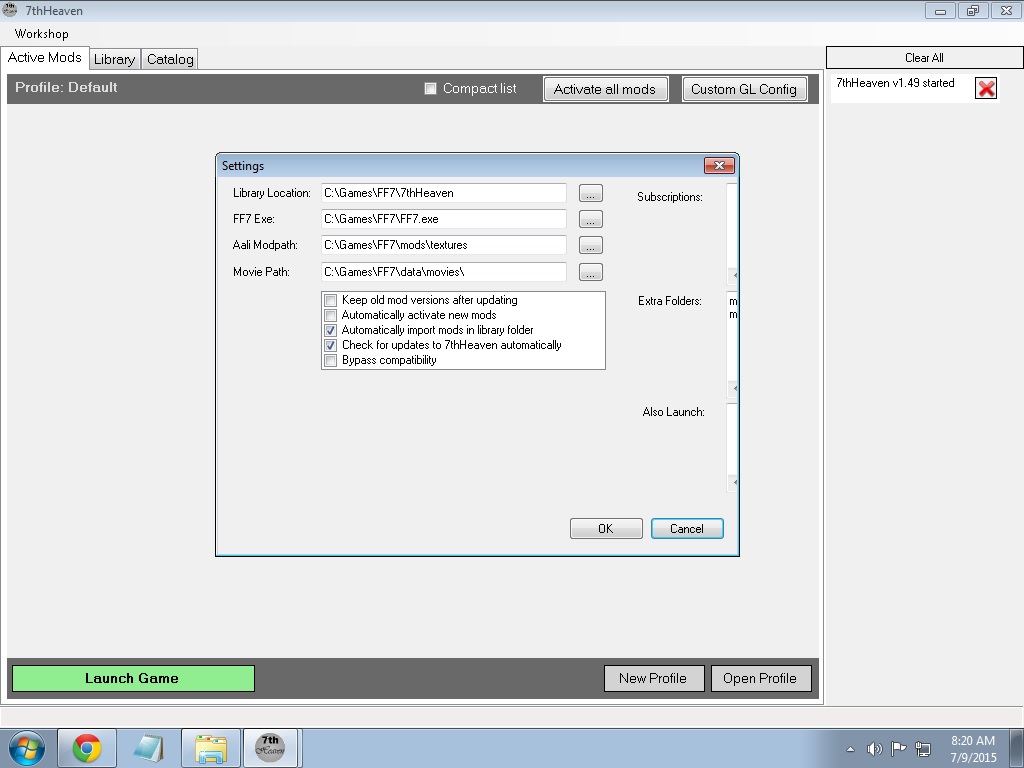
Why am i getting this weird dialog when i click WORKSHOP > SETTINGS...

hJ40eRE.jpg


I cant see where i can change the SUBSCRIPTION setting.. hhmmm... pls help :(
 
I'm back from my vacation. Installed the music and sounds pack. Problem. With either VGMSTREAM or FF7MUSIC plugin, the game is completely mute. Without the plugins enabled, I get the new sound effects, but not the new music, just the old music. What am I doing wrong?
 
Status
Not open for further replies.
Back
Top