[FF7] Original and Outdated Tutorial - Bootleg Configurator

  • Thread starter Thread starter PitBrat
  • Start date Start date
Status
Not open for further replies.
@strife98: This is the solution for your second computer.

[list type=decimal]
[*]The cause of the main problem is still the same, you have installed
the mods from your Desktop. This is not good.
=> causes privilege errors ==> the mod is not found/installed  :o

Your installation is totally broken.
You must do a new installation.

The TIFA errors are a result of the broken installation.
The memory is eaten up by these errors.

You have not the same problem(s) on this computer as on
the first one, because you used a different BFE setup.
[*]Backup your save games (.\save\save*.ff7)
[*]Deinstall FF7 completely
[*]Don't place your mods (Mod Source) onto your Desktop.
Create a folder on your C: partition (e.g. C:\Bootleg) and move
all mods + BFE.exe + Bootleg.exe into it.
[*]Start your installation
[*]ff7_opengl.cfg

window_size_x = 640  <= ! Try this resolution
window_size_y = 480  <= ! for the first start

fullscreen = yes

use_shaders        = no  <== only if you have graphic problems
compress_textures  = no           "
fancy_transparency = off          try this also
[*]Time to play   ;)
[/list]


Does FF7 now work on your computer #1 ?
 
Last edited:
Thanks for the link to the TestFiles.exe file. At least I know my files aren't damaged now. I also managed to bypass the laptop keyboard problem. It turns out you can just press Esc to go directly to the Select option and continue from the naming screen. However, I have two remaining problems.

1. My battle interface looks like this:
http://img442.imageshack.us/img442/1911/ff7battleerror.png
How do I fix this?

2. I installed the FF7Music mod, but there's no music, only the sound effects. However, all of the files in the BF.exe mod list are green and TestFiles.exe told me all the files were fine. Do you know what's going on?
 
Klaw117:

[list type=decimal]
[*]I need the following data for further analysis:
(upload the ZIP'd files onto MediaFire)


  • Used options (BFE.exe -> Presets:SAVE)
  • Bootleg.log
  • FF7 \ APP.log
    ( FF7 \ FF7Music \ APP.log )
  • FF7 \ FF7Music \ FF7Music.log
  • ff7_opengl.cfg
  • Run dxdiag.exe -> SAVE:DxDiag.txt
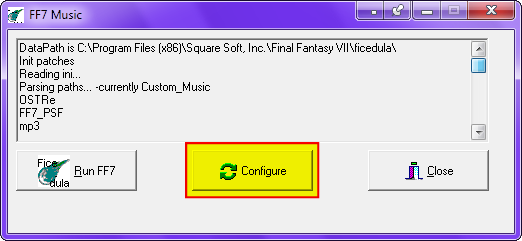
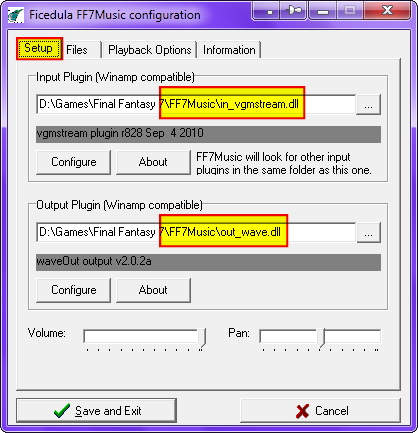
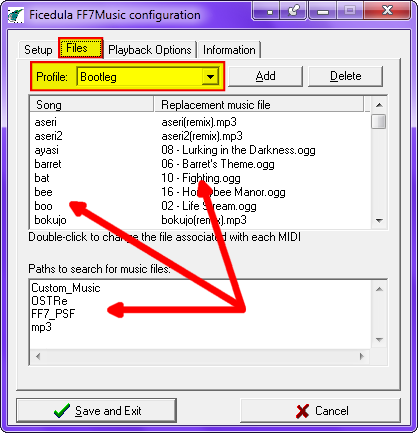
[*]Execute .\FF7Music\FF7Music.exe and compare your setup with my screenshots:

      
[/list]
I'm playing on my laptop. plugging into my TV via HDMI and for some reason my TV speakers automatically mute FF7Music, but not FF7, hence the reason why sound wasn't working but music was.
 
Last edited:
Thanks for the link to the TestFiles.exe file. At least I know my files aren't damaged now. I also managed to bypass the laptop keyboard problem. It turns out you can just press Esc to go directly to the Select option and continue from the naming screen. However, I have two remaining problems.

1. My battle interface looks like this:
http://img442.imageshack.us/img442/1911/ff7battleerror.png
How do I fix this?
I also had this problem. I think what Leonhart said is correct, but if not try going into the bootleg configuration and running it in safe mode and see if the error continues.
 
UGerstl and Leonhart, your posts actually solved my problem. For some reason, in the FF7Music configuration, the profile was on OST Remastered instead of Bootleg while fixing the OpenGL cfg file fixed the battle interface (at least I think it did. It looks better than before: http://img17.imageshack.us/img17/4035/ff7battleproper.png). My problems are now fixed and FF7 is playable. Thanks a lot for your help!

I will point out though that there are some unstable points that causes the game to hang (and in my case, it destroyed the installation). When customizing the controls, I ran into one point where the game semi-froze on me. The music and everything else was fine, but my controls were non-responsive, so I used the Task Manager to end the game. When I restarted, my controls refused to work again, so I couldn't load a save file, forcing me to completely reinstall FF7 and the mods. I got around that this time by being really careful while customizing the controls after reinstalling.

Basically, what I noticed that exiting via the Task Manager will destroy the installation, although if the game hangs and your controls become unresponsive for some reason, forcing you to quit via the Task Manager, you might as well just reinstall everything because the controls refuse to work again when you restart the game.
 
@Klaw117: To avoid loosing your important data, forced by a complete new installation,
                     you should backup these files now:
                     (Don't forget to make a new backup when changes were made.)

  • .\ff7_opengl.cfg
  • .\ff7input.cfg
  • .\FF7Music\FF7MUSIC.ini
  • .\FF7Music\plugin.ini
  • .\save\save*.ff7
 
Last edited:
Modifying & Compiling LGP Archive
    NOTE: To prepare the .lgp archives, copy and replace model files as instructed.
        Afterward, use lgp.exe to compile the archives.  Please remain patient while compiling.
            Field files go in C:\temp\char\
            Battle files go in C:\temp\battle\
            Minigame files go in C:\temp\mini\
            World files go in C:\temp\world\
            Magic files go in C:\temp\magic\
            Flevel files go in C:\temp\flevel\
I was confused by this part. Do I simply copy the files? For example, copy the files from the Field directory to C:\temp\char\?
 
@Kinoss: You know that the Bootleg.exe does all automatically ?
                And that BFE.exe is the setup program for Bootleg.exe ?
                (BFE = Bootleg Front End)
 
:-o Do you mean that all the steps in the tutorial on the first page are done using a program? I've been doing everything manually!

EDIT: Lol, found it on the second page https://www.ff7catalog.com/posts/145196/
Pit Brat is even more awesome now!   :mrgreen:
 
Last edited:
@Kinoss: Oh dude. I think you are the first one who did this. ;D
                I have send you a PM for more informations.
 
@Kinoss: Man congratulations for your patience being the installer...  :-X
 
Last edited:
Cutscenes and Movies


movies.part1.rar - movies.part4.rar             Leonhart7413    Modified Intro Movies                   Qhimm 01 02 03 04                                 
First of all thank you so much for accepting my selection... I feel really honored since I'm a newb for your forum.

Second I worked all night to prepare my new preview ;) ;) I would just love to listen to your opinion (and that's just the preview :P). I promise to make it blow your mind when it's finished... just be patient...I have cleared the sound with some filters for the original version. Here's the link on youtube
Going to sleep!
 
I've followed every step of your install instructions to the letter up to the "Run BFE.exe" part.  Every time I try to run the BFE.exe, I get this error message: "BFE.exe - Application Error.  The application failed to initialize properly (0xc0000135). Click OK to terminate the application."  After the first several failed attempts to run BFE.exe as explained in your tutorial and install instructions I had given up, and just installed a handful of mods that I found appealing. 

I can't quite figure out where I'm going wrong with this.

To be honest, I'd rather not have the large list of mods in my game, but it seems (or it has been suggested to me) that this is the only "easy" way to install the Aeris Revival patch.  I'm installing on a Windows XP SP2 system, I have all the "required" mods in a folder along with Bootleg.exe and BFE.exe.  As I said, BFE.exe won't initialize.  I'm not very familiar with the various editing tools used for FF7 files and mods, and after reading through your tutorial is seems there are more than a few bugs and/or compatibility issues between several mods within the install.  Being a "noob" as far as mods and editing goes, this presents me with a serious obstacle.

I suppose I will just have to attempt manually installing Ultima Espio's patch.

Scratch that nonsense.  Creating the new char.lgp and flevel.lgp was a breaze with DarkFang's "explain like I'm 5" lgp/unlgp instructions.  https://www.ff7catalog.com/threads/6709/

On to Makou Reactor now.
 
Last edited:
@Syntrel: This problem is very simple to solve.
                ==> Bootleg_Readme.txt
...
Q:Why does BFE.exe generate an application error?

A:Make sure you have the .NET Framework installed.
    Use Windows Update to install the latest version of the .NET Framework.
...
Q:Why does BFE.exe fail to run with the error
     "The application failed to initialize properly (0xc0000135)"?

A:You need to install the Microsoft .NET Framework 2.0 from:
     http://www.microsoft.com/download/en/details.aspx?id=19
...
 
Last edited:
:'( Link mediafire Final Fantasy VII Remix part 9 is dead . Please fix it. Sorry my English bad
 
@taolachaos:

   MediaFire doesn't like my file today (02/25/2012).
   I re-uploaded it three times, but with no luck.

   I have uploaded this file onto Google Docs:

       Final_Fantasy_VII_Remix_v2-5-1_Installer.part09.rar


Edit 02/27/2012

MediaFire has solved their problems and the file is available again.
 
Last edited:
Status
Not open for further replies.
Back
Top