
[FF7 PC 98/Steam] Tetsuya Nomura Alternate Artwork Avatar Pack

  • Thread starter Thread starter wictoriously
  • Start date Start date
Status
Not open for further replies.
W

wictoriously

Guest
Tetsuya Nomura Alternate Artwork Avatar Pack
by Wictoriously
---
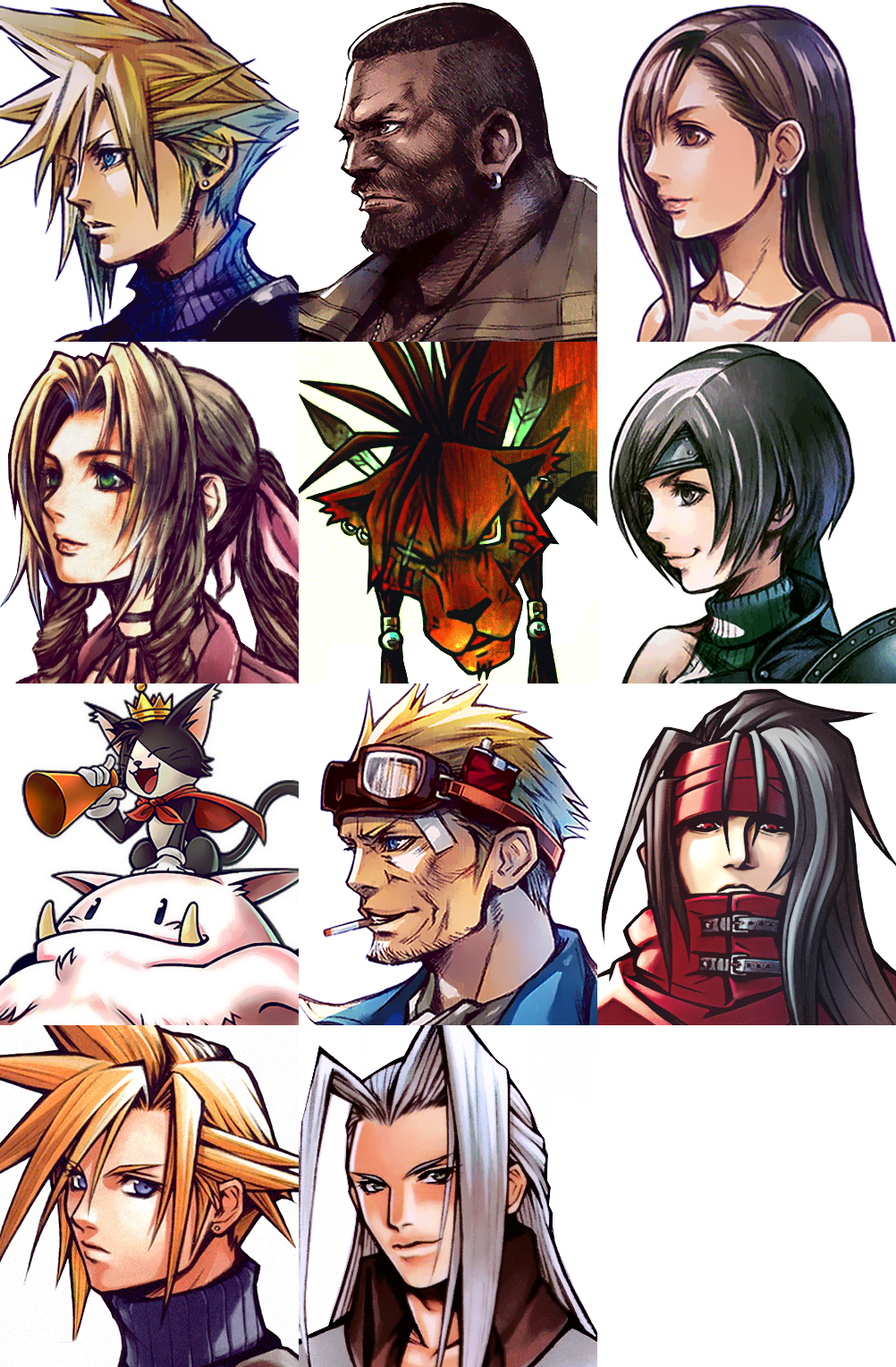
Hello, all! This is my first FF7 mod I created for myself and I thought maybe some other people would be interested in using it!
This mod features alternate artwork done by Tetsuya Nomura himself from FF7 G-Bike, Crisis Core, Opera Omnia, and Ehrgeiz (with the exception of Red XIII & Aerith, who is a photoshop Frankenstein creation).

Credit for Aerith's body goes to benteja @ deviantart.

Qi4ypwA.png


Download Here

 
Last edited:
To install it, you must do one of the following:

1. Have a converted game with Reunion R06 and place the folder I have created into the appropriate CUSTOM folder (you must have this set up in the Reunion options).
2. Have a converted game and/or 1998 copy of the game with the data unpacked and setup for texture/model replacements.
3. If you have 7th Heaven installed, you can use the included tool to pack my folder up as a .iro and put it into the 7th Heaven Mods folder. Make sure it's in the correct order to work.

If you want to learn how to do these, please search for help on the forum. There are plenty of tutorials on how to use texture replacements.
 
Here is the link for those interested :
-snip-

PS: As this is your work, I can remove the link if you request it.
The usual way of going about things is to ask first, link second ;)
 
3. If you have 7th Heaven installed, you can use the included tool to pack my folder up as a .iro and put it into the 7th Heaven Mods folder. Make sure it's in the correct order to work.

If you want to learn how to do these, please search for help on the forum. There are plenty of tutorials on how to use texture replacements.
I can't find a single guide on here on how to do it, I'm you're correct in your belief that they exist, however, searching "how to use texture replacements" isn't yielding the correct results unless I'm overlooking it. I spent about thirty minutes searching.

EDIT: Nevermind, I figured it out.
 
Last edited:
There is an issue with Reiletuag version. Basically while buying in the materia shop etc. The animation will affect badly the avatars. Plus some pictures are lower in quality (per example Aerith, Barret, Red.)

This is not happening with wictoriously version which is perfect as it is.
 
Last edited:
I love this avatar pack!

I'd personally use Reiletuag's transparent version but it seems like it has some issues, according to what Kurado says. Hopefully the problem can be fixed.
 
Would be nice to have wictoriously's version with transparent background

Thanks for the mod!
 
Last edited:
I can't find a single guide on here on how to do it, I'm you're correct in your belief that they exist, however, searching "how to use texture replacements" isn't yielding the correct results unless I'm overlooking it. I spent about thirty minutes searching.

EDIT: Nevermind, I figured it out.
Can someone explain it to the rest of us? Do we just use the pack tool on the Wictor folder?

EDIT: Figured it out. In your FF7 game directory, you need a folder called "Mods". You then need a "Textures" folder inside that. Lastly, place the "Menu" folder for this mod into the Textures folder.
 
Last edited:
I installed 7th heaven and downloaded this awesome pack of avatar. However, I can't install them 'cause after I copy in my ff7 directory, the game doesn't read it. Is there a way to turn this pack in .ico and load them on 7th heaven? Can someone please explain me how to do that?
 
I've generated an IRO of this mod, but am brand new here and am unsure of the etiquette in just posting a link to it. 

EDIT:  I made my version transparent without borders.  So far it doesn't seem to have the issue reported with Reiletuag's.
 
Last edited:
I've generated an IRO of this mod, but am brand new here and am unsure of the etiquette in just posting a link to it. 

EDIT:  I made my version transparent without borders.  So far it doesn't seem to have the issue reported with Reiletuag's.
Mind uploading or PM-ing me the file?
 
I can't find a single guide on here on how to do it, I'm you're correct in your belief that they exist, however, searching "how to use texture replacements" isn't yielding the correct results unless I'm overlooking it. I spent about thirty minutes searching.

EDIT: Nevermind, I figured it out.
Can you help me?
I believe I was able to successfully create the .iro file and load it with 7th heaven. But i can't make the new textures appear in my game.
 
Status
Not open for further replies.
Back
Top