FF7 PC: Problem with Battle Screen and Music

  • Thread starter Thread starter realmain
  • Start date Start date
Status
Not open for further replies.
R

realmain

Guest
When I get into a Battle, I see black bars. The HP and MP numbers are in an odd area. And it doesn't say Cloud, it says Ex-soldier instead. I used bootleg to install my FF7. Also, the music does not play while in battle or on field, the only thing that makes sounds the sound effects. The only time I have music is during the FMV's. Is there anyway to fix these?

28j8w9e.jpg
 
I don't believe you use bootleg but don't know what modifications have there.
1-see what have you installed and understand what changes.
2-you never played ff7 to know in what part Ex-soldier name should be replaced for Cloud?
3-the music problem should be ff7 music not responding.
 
Last edited:
Hi realmain,

you can give Cloud a name later in the game.   ;)


Graphic problem

Open ff7_opengl.cfg with any text editor (Notepad, ...)
and alter this parameter:

   break_9999limit = no


Sound problem

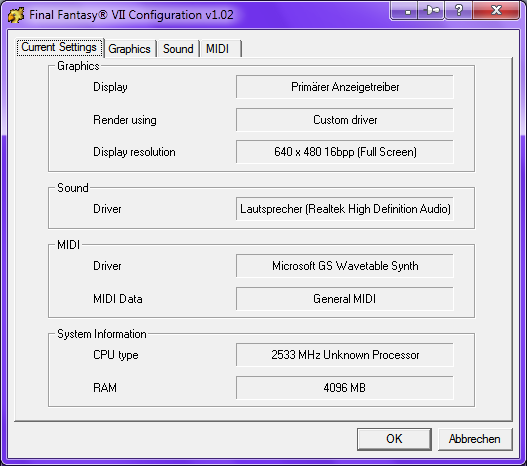
  • Run FF7Config.exe as Administrator
    ( Hint: right-click FF7Config.exe => Run as Administrator )
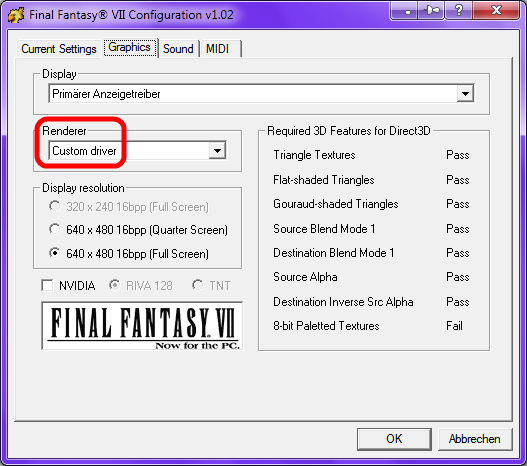
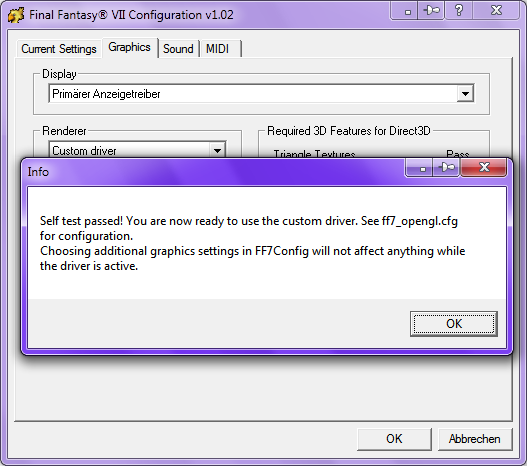
  • Graphics: Renderer = Custom driver

       
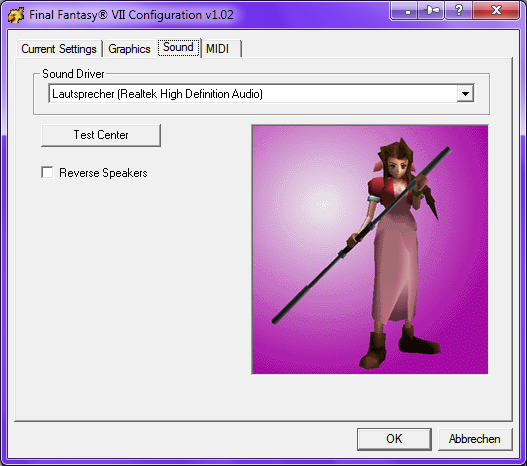
  • Sound: select Sound Driver
                => Test Center/Left/Right

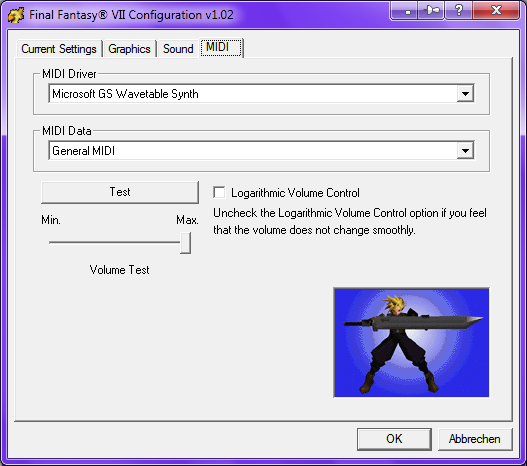
  • MIDI:MIDI Driver=Microsoft GS Wavetable Synth
            MIDI Data  =General MIDI

            => Test
                 => Min./Max. Volume Test
                      => Logarithmic Volume Control on/off

  • Result


Open ff7_opengl.cfg with any text editor (Notepad, ...)
and remove the # from this line :

#music_plugin = plugins/ff7music.fgp


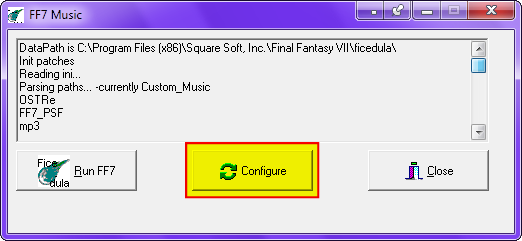
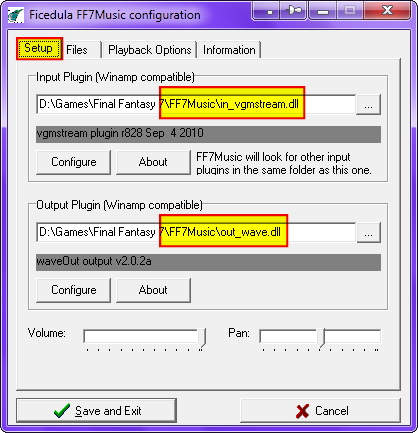
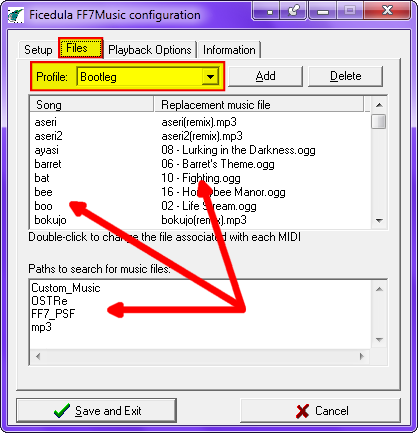
Run .\FF7Music\FF7Music.exe as Administrator and compare your setup with my screenshots:


realmain, after following UGerstl's suggestion first, if that doesn't work, could you open up the folder that ff7music is installed to and see if there's a folder in there called "OSTRe"? If there is, can you check if it's got a bunch of OGG and MP3 files in there?

I've gotten a few reports of the remastered OST not installing correctly with the latest ff7music update. If those files are missing, I suggest downloading this file, putting it in the same folder as the installer, and running the installer again.

PitBrat, if you're reading this, do you think you could revert to requiring 1.51.12 until I regain access to my files and I can push out a fix? The current ff7music installer is a pile of turds and more people than ever are having problems with it.
 
Sorry for this really long post.

1. I am dumb, I forgot all about his name being Ex-Soldier in the beginning > >" haven't played in like 7 years.

2. Thx for the break_9999limit = no. It fixed my screen. Also, since the break_9999limit = no, would the Break 9999 Limit work if I installed Menu with Break-9999HP Limit patch in M004d.exe? Because I forgot to check it while installing.

I also just realized that my M004d.exe is really M004c.exe, found out after I re-ran it to check something.  Should I download and install the new M005?
I got my M004d.exe via bootleg link.

I realized that I don't like the battle menu, is it possible to change it back to the vanilla one? I am assuming that M004d.exe is the one that changed my battle menu. Should I run M004d.exe, and check Uninstall this mod [Will OVERRIDE ALL options above] and Restore all files from the backup folder. Then download and install using the M005 unchecking the battle menu option?

ff7-1.jpg


3. In my C:\Program Files\Square Soft, Inc\Final Fantasy VII\FF7Music I cannot find the FF7Music.exe. But it does pop up when I run Run FFVII-Bootleg.bat, When I installed, on my desktop had FF7 BootLoader and Final Fantasy VII. Final Fantasy VII shortcut opens "C:\Program Files\Square Soft, Inc\Final Fantasy VII\Run FFVII-Bootleg.bat". For some reason, it pops up both the game itself and the FF7Music.exe.

4. I realized from looking in Configure of FF7Music.exe, I do not have in_vgmstream.dll or out_wave.dll. I also checked C:\Program Files\Square Soft, Inc\Final Fantasy VII\FF7Music and it does not have it in there.
ff7MusicConfig-1.jpg


FF7MusicFolder-1.jpg


Here is my FF7 Folder
FF7Folder-1-1.jpg


5. I tried reinstalling my ff7music_install_15112.exe  (373 MB) but it doesn't work. It says:
ErrorFF7Music-1.jpg


I am assuming that`s a problem.

I downloaded it from: https://rapidshare.com/files/3788309481/ff7music_install_15112.exe which was where bootleg linked me to.

If I need to re-install this, can someone please give me an alternative link to download this file from? I looked at https://www.ff7catalog.com/threads/7082/ but the file is only 3.4 MB but is newer than mines (15113 instead of 15112). I assume that my file has all the music with it.

6. These are my bootleg options and files

BootlegSetup.jpg


BootlegFiles.jpg
 
Last edited:
@realmain: You have more than one big problem.


[list type=decimal]
[*]Forget your installation => delete C:\Program Files\Square Soft, Inc\Final Fantasy VII\*.*
[*]To prevent privilege errors install FF7 to this Location :  C:\Games\FF7

Hint :  Final Fantasy 7, english, Maximum Install
[*]Download FF7Music from this MediaFire folder :  FF7Music Installer (Covarr)

You must extract the .EXE in the RAR-archive so that BFE can find the file !

Hint :  FF7Music 1.51.13 is not supported in Bootleg 0037
[*]Download M004 :  M004d.exe

Hint :  M005 is not supported in Bootleg 0037

Also, since the break_9999limit = no, would the Break 9999 Limit work if I installed Menu with Break-9999HP Limit patch in M004d.exe? Because I forgot to check it while installing.
You had the graphic problem because you installed M004 and selected the Break-9999HP
Limit patch
and you set break_9999limit = yes in ff7_opengl.cfg . Use only the option in M004 !

I also just realized that my M004d.exe is really M004c.exe
It is a simple typo or better said DLPB has forgotten to change it.   ;)
[*]Test all your downloaded files => TestFiles.exe  (Automatic)
[*]Bootleg options:


  • don't select Game options: Battle Scenes as PNG and
                                                Battle Scenes as LGP

    Hint :  Select only the PNG version and read the displayed info text.
  • To prevent privilege errors use these Locations :

       Destination Location  :  C:\Games\FF7

       Mod Source                :  C:\Bootleg\Mods

       Bootleg.exe Location :  C:\Bootleg

       Temporary Files         :  C:\Bootleg\Temp
[/list]
 
Forget your installation => delete C:\Program Files\Square Soft, Inc\Final Fantasy VII\*.*
What do you mean by ~\Final Fantasy\*.*?
Should I uninstall Final Fantasy VII and delete the Final Fantasy VII Folder after that?

Also, I want to go back to the vanilla battle menu, how would I do that? What would I not install?
 
Last edited:
Absolutely right.   ;D


You have selected the right option in BFE :  Game Options: Menu Overhaul:Style Switcher

Read this posting for more informations :  Menu Overhaul Project
 
Last edited:
My TestFiles.exe says:
There were errors.
106 files was passed checksum validation
53 files were not found

So I assume all of my files should work properly.

How do I switch styles? Is there a hotkey for it? And is it possible to change the hotkey is there is one?

Also in my Bootleg0037 Folder, should I delete the LastUsed.bp and the BFE.ini? Or maybe I should just delete my Bootleg0037 folder and unzip the Bootleg0037.zip?
 
Last edited:
Do NOT download M004.  It will wreck the world map text, which is the reason I no longer support it.
 
TestFiles.exe: Select all lines and post them using the # button => [ code ] ... [ /code ]


Read the displayed text box :  BFE.exe :  Game Options: Menu Overhaul:Style Switcher


Also in my Bootleg0037 Folder, should I delete the LastUsed.bp and the BFE.ini? Or maybe I should just delete my Bootleg0037 folder and unzip the Bootleg0037.zip?
Don't delete anything. Don't touch it.
 
Last edited:
TestFiles.exe:

Code: [Select]
Code:
Testing files in digest: C:\Bootleg0037\Mods\checksums.exfSUMMARY:There were errors. 106 files passed checksum validation. 53 files were not found.53 FILES NOT FOUND: 1280smooth.part1.rar 1280smooth.part2.rar 1280smooth.part3.rar 1280smooth.part4.rar 1280smooth.part5.rar 1280smooth.part6.rar 640sharp.part1.rar 640sharp.part2.rar 640sharp.part3.rar 640smooth.part1.rar 640smooth.part2.rar 640smooth.part3.rar cloudswords_installer.rar eidoslogo.avi FacePalmer.zip ff7_enhanced_movies_1.zip ff7_enhanced_movies_2.zip Field Files Pack 1.rar Field Files Pack 2.rar Field Files Pack 3.rar Field Files Pack 4.rar Field Files Pack 5.rar Final_Fantasy_VII_Remix_v2-5-1_Installer.exe Final_Fantasy_VII_Remix_v2-5-1_Installer.part01.rar Final_Fantasy_VII_Remix_v2-5-1_Installer.part02.rar Final_Fantasy_VII_Remix_v2-5-1_Installer.part03.rar Final_Fantasy_VII_Remix_v2-5-1_Installer.part04.rar Final_Fantasy_VII_Remix_v2-5-1_Installer.part05.rar Final_Fantasy_VII_Remix_v2-5-1_Installer.part06.rar Final_Fantasy_VII_Remix_v2-5-1_Installer.part07.rar Final_Fantasy_VII_Remix_v2-5-1_Installer.part08.rar Final_Fantasy_VII_Remix_v2-5-1_Installer.part09.rar Final_Fantasy_VII_Remix_v2-5-1_Installer.part10.rar Final_Fantasy_VII_Remix_v2-5-1_Installer.part11.rar Final_Fantasy_VII_Remix_v2-5-1_Installer.part12.rar Final_Fantasy_VII_Remix_v2-5-1_Installer.part13.rar FMVRes-1.bin FMVRes-2.bin FMVRes-3.bin FMVRes-4.bin FMVRes-5.bin FMVRes-6.bin FMVRes.exe HQ_opening_credits.zip hq_vids_2.7z magochocobo_ff7pack3.part1.rar magochocobo_ff7pack3.part2.rar missing_hq.zip MOVIE.zip New_opening.7z NoCaitFMV.exe RetFMV.exe yarLson Field Upscale Project v0.35.zipDETAILED REPORT:OK MD5 1272687090.rarOK MD5 1280sharp.part1.rarOK MD5 1280sharp.part2.rarOK MD5 1280sharp.part3.rarOK MD5 1280sharp.part4.rarOK MD5 1280sharp.part5.rarOK MD5 1280sharp.part6.rarOK MD5 1280sharp.part7.rarOK MD5 1280sharp.part8.rarOK MD5 1280sharp.part9.rarFile does not exist:  1280smooth.part1.rarFile does not exist:  1280smooth.part2.rarFile does not exist:  1280smooth.part3.rarFile does not exist:  1280smooth.part4.rarFile does not exist:  1280smooth.part5.rarFile does not exist:  1280smooth.part6.rarFile does not exist:  640sharp.part1.rarFile does not exist:  640sharp.part2.rarFile does not exist:  640sharp.part3.rarFile does not exist:  640smooth.part1.rarFile does not exist:  640smooth.part2.rarFile does not exist:  640smooth.part3.rarOK MD5 Aeris_Patch_23_March_2011.rarOK MD5 Avalanche GUI v2.0.8.exeOK MD5 Avalanche High Res.exeOK MD5 Battle Scene enhacement lgp use.zipFile does not exist:  cloudswords_installer.rarOK MD5 corel prison and bonus.rarFile does not exist:  eidoslogo.aviOK MD5 FacePalmer.part01.rarOK MD5 FacePalmer.part02.rarOK MD5 FacePalmer.part03.rarOK MD5 FacePalmer.part04.rarOK MD5 FacePalmer.part05.rarOK MD5 FacePalmer.part06.rarOK MD5 FacePalmer.part07.rarOK MD5 FacePalmer.part08.rarOK MD5 FacePalmer.part09.rarOK MD5 FacePalmer.part10.rarOK MD5 FacePalmer.part11.rarOK MD5 FacePalmer.part12.rarOK MD5 FacePalmer.part13.rarOK MD5 FacePalmer.part14.rarOK MD5 FacePalmer.part15.rarOK MD5 FacePalmer.part16.rarOK MD5 FacePalmer.part17.rarOK MD5 FacePalmer.part18.rarOK MD5 FacePalmer.part19.rarOK MD5 FacePalmer.part20.rarFile does not exist:  FacePalmer.zipOK MD5 ff7music_install_15112.exeFile does not exist:  ff7_enhanced_movies_1.zipFile does not exist:  ff7_enhanced_movies_2.zipOK MD5 ff7_opengl-0.7.11b.zipFile does not exist:  Field Files Pack 1.rarFile does not exist:  Field Files Pack 2.rarFile does not exist:  Field Files Pack 3.rarFile does not exist:  Field Files Pack 4.rarFile does not exist:  Field Files Pack 5.rarFile does not exist:  Final_Fantasy_VII_Remix_v2-5-1_Installer.exeFile does not exist:  Final_Fantasy_VII_Remix_v2-5-1_Installer.part01.rarFile does not exist:  Final_Fantasy_VII_Remix_v2-5-1_Installer.part02.rarFile does not exist:  Final_Fantasy_VII_Remix_v2-5-1_Installer.part03.rarFile does not exist:  Final_Fantasy_VII_Remix_v2-5-1_Installer.part04.rarFile does not exist:  Final_Fantasy_VII_Remix_v2-5-1_Installer.part05.rarFile does not exist:  Final_Fantasy_VII_Remix_v2-5-1_Installer.part06.rarFile does not exist:  Final_Fantasy_VII_Remix_v2-5-1_Installer.part07.rarFile does not exist:  Final_Fantasy_VII_Remix_v2-5-1_Installer.part08.rarFile does not exist:  Final_Fantasy_VII_Remix_v2-5-1_Installer.part09.rarOK MD5 Final_Fantasy_VII_Remix_v2-5-1_Installer.part1.rarFile does not exist:  Final_Fantasy_VII_Remix_v2-5-1_Installer.part10.rarFile does not exist:  Final_Fantasy_VII_Remix_v2-5-1_Installer.part11.rarFile does not exist:  Final_Fantasy_VII_Remix_v2-5-1_Installer.part12.rarFile does not exist:  Final_Fantasy_VII_Remix_v2-5-1_Installer.part13.rarOK MD5 Final_Fantasy_VII_Remix_v2-5-1_Installer.part2.rarOK MD5 Final_Fantasy_VII_Remix_v2-5-1_Installer.part3.rarOK MD5 Final_Fantasy_VII_Remix_v2-5-1_Installer.part4.rarOK MD5 FL-BSE v0.1.1 UPD.zipOK MD5 FL-BSE v0.1.zipOK MD5 FL-WME Beta.exeFile does not exist:  FMVRes-1.binFile does not exist:  FMVRes-2.binFile does not exist:  FMVRes-3.binFile does not exist:  FMVRes-4.binFile does not exist:  FMVRes-5.binFile does not exist:  FMVRes-6.binFile does not exist:  FMVRes.exeOK MD5 Gjoerulv-1.0.5.rarFile does not exist:  HQ_opening_credits.zipFile does not exist:  hq_vids_2.7zOK MD5 M004d.exeOK MD5 Magochocobo Battle Scenes (lgp use).rarOK MD5 magochocobo ff7 battle pack 2.rarOK MD5 magochocobo png battle files.rarFile does not exist:  magochocobo_ff7pack3.part1.rarFile does not exist:  magochocobo_ff7pack3.part2.rarOK MD5 magochocobo_ff7pack3.rarOK MD5 magochocobo_ff7_pack 3 lpg.rarFile does not exist:  missing_hq.zipFile does not exist:  MOVIE.zipFile does not exist:  New_opening.7zFile does not exist:  NoCaitFMV.exeFile does not exist:  RetFMV.exeOK MD5 tank_and_pirate_ship.zipOK MD5 Trish(aka Mike)'s custom model pack.7zFile does not exist:  yarLson Field Upscale Project v0.35.zip
 
Last edited:
My Display Text Box for Style Switcher says:
StyleSwitcher-1.jpg


I don't see the vanilla one, only FFIX and FFX. Also, when you install M004d.exe, you can only choose FFIX OR FFX right? So not all the hot keys would work. Or does it install both, but when you choose the option in M004d.exe, it just means that it will use that until I switch styles?
 
Sorry, my fault.
( There are too many options and every user wants a different one  :o )

You must bite in the bad apple and disable the complete Menu Overhaul in Game Options.
   => Menu Overhaul + Style Switcher + Colorized Items
 
Do you mean uncheck Menu Overhaul, Style Switcher, and Colorized Items?

What if I want to use the Gypt to skip FMVs, Save anywhere, Break-9999HP Limit patch option in M004d.exe?

I just realized that Break-9999HP Limit patch says HP, does that mean that it doesn't break the MP Limit or the Damage Limit?
 
[list type=decimal]
[*]Yes, all of them.
[*]I wrote :  You must bite in the bad apple
[*]Right.
[/list]
 
can i use m005 manually uncheck the menu and battle menu and install the gypt and save anywhere?

I think i shouldn't use the 9999 break anyways,  makes game less vanilla.
 
You can try it but it is not supported by anyone yet.

Any files altered with past revisions should be replaced with originals.  It is recommended to install this project last.  After a first install, repeat installs should work fine.
Only PitBrat can bind M005 correctly into the Bootleg installer.
The newest version 0038 is WIP.
Please don't ask me when it is done.
 
Status
Not open for further replies.
Back
Top