[FF7] Tutorial for Bootleg - Tifa's Bootleg

  • Thread starter Thread starter EQ2Alyza
  • Start date Start date
Status
Not open for further replies.
Thanks for the amazing guide!! Really looking forward replaying this gem with some updated graphics HOWEVER
i'm stuck with a problem
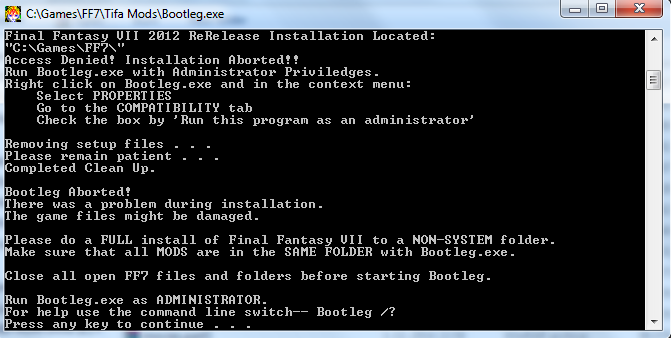
d1AxvVO.png


The thing is I've set both programs to run as admin in compatibility turned my UAC off all my mods are GREEN etc
but still I get this message of run the program as ADMIN :( Anyone know what possibly could be wrong
It's the installation you have the game in.  You have to install the game into your Hard drive, in a new folder not in the games folder but the hard drive itself . For instance. C:\FF7epic\Final Fantasy VII .  When you create that folder, whatever antivirus you have, you need to set the exclusions for scans so it doesn't interrupt. Right click and select properties on the installed folder,  Turn off your anti virus before running bootleg. Where it says "Read-Only" click it so it's OFF or emptied. Apply, and include subfolders. 


Edit - Forgive the ignorance, looked at the photo and saw you did have the 2012 release.
 
Last edited:
This error means Bootleg cannot write to the folder. In 95% of the cases this means it's not running as admin, but this can also mean the folder is read-only. Check to disable if that's the case.
 
This error means Bootleg cannot write to the folder. In 95% of the cases this means it's not running as admin, but this can also mean the folder is read-only. Check to disable if that's the case.
HABBABOI D:< I was gunna explain that. xD <333
 
This error means Bootleg cannot write to the folder. In 95% of the cases this means it's not running as admin, but this can also mean the folder is read-only. Check to disable if that's the case.
Alrighty my problem is  getting really annoying now so I uncheck the read only option right it says do you want to apply changes to subfolders and files I press ok it's unchecked now I press ok to close the properties then when I check the properties again ITS FRIGGIN checked again!? Somehow it keeps rechecking the read-only thing

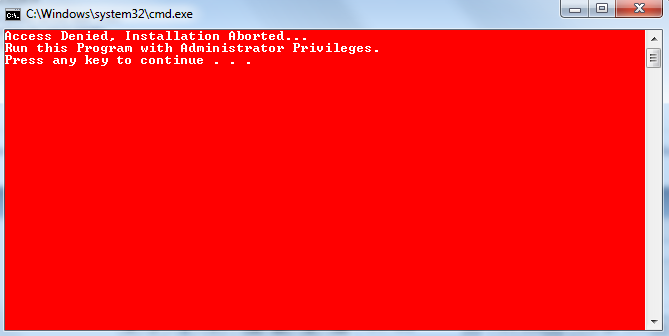
Trying with a new install I get a problem with the FF7_GameConverter_BC as well saying
8f8NM89.png
sigh going from bad to worse somehow when I was so close ;p the gameconverter is absolutely needed right or?
 
The Game Converter is not mandatory, Bootleg will work without it.

Try to open the command line and type the following: 'attrib "path of the game" -R /S /D', if that doesn't work try creating a brand new folder.
 
Hmm oke so somehow I got it work !! Woohoo but... As always there's another problem going on at some point in the install thing he gets to the music install I select that I want the original PS music the setup starts but never goes past 15%ish the setup is just stuck there even if I just press "x" to not install the bootleg says: installing anxious heart original soundtrack and it's stuck there :( ... so close to the finishline but not yet there
 
Last edited:
Be patient, you can't force things to go your way.
I've waited literally more than 30min and it didn't go past the 15% mark ever :( how long did it take for you?
 
The Game Converter is not mandatory, Bootleg will work without it.

Try to open the command line and type the following: 'attrib "path of the game" -R /S /D', if that doesn't work try creating a brand new folder.
It's needed for at least the Steam version since Kranmer's doesn't support it.
 
Yes, but he has the Square Enix store, which is internally supported by Bootleg.
 
I've waited literally more than 30min and it didn't go past the 15% mark ever :( how long did it take for you?
With the way I have mine set up, with help from VGR and Alyza, it took no less than three minutes for the FF7music to install. The total time it took for everything to install was an hour. Honestly, I think it's something with your computer. It shouldn't take that long. Are you running on a Windows Vista, Seven, or Eight?
 
Windows 7 64bit
Im trying to wiggle myself through the settings I've set the music on PSF Midi when the music setup comes and I close it does install the PSF Midi in the Bootleg window but then after some time it gets to a point where it says
Copying dummy textures and now it's stuck at that part :(
 
Windows 7 64bit
Im trying to wiggle myself through the settings I've set the music on PSF Midi when the music setup comes and I close it does install the PSF Midi in the Bootleg window but then after some time it gets to a point where it says
Copying dummy textures and now it's stuck at that part :(
Hmm...do you have any internet browser open while installing bootleg?
 
What would that even change?
Well it could also be that with the internet ports open it's conflicting with the installation, in my theory. Before I gained some knowledge with this project I did tests and running the internet Explorers like the original IE. Chrome, Firefox or whatever can conflict with things. xP Just trying to figure out a solution for his issue.
 
Ports being open or not would not matter. Ports matter for incoming connections, not outcoming ones.
 
Hello! I am new here and i am having a problem. I followed all the instructions and installed everything but whenever i click run ff7 i get a black screen. sometimes it loads the select new game or continue screen but when i click new game, i just get a black screen. Please help!
 
Ok, been a long time FF7 player but 1st time I'd have played with mods. Installed the mods to the right directory, all the mods I've selected from the BFE.exe are all OK, I selected FULL and changed a couple of the field models to my preference. The game loads and plays, but it then crashes at the first battle! I have tried numerous different configs of the game but still the same happens again and again.

INFO: FF7/FF8 OpenGL driver version 0.7.11b
INFO: Auto-detected version: FF7 1.02 US English
INFO: NVIDIA Corporation GeForce GTX 670/PCIe/SSE2 4.4.0 NVIDIA 344.65
INFO: OpenGL 2.0 support detected
INFO: Using PBO
INFO: Found swap_control extension
INFO: Max texture size: 16384x16384
INFO: Number of texture units: 4
INFO: Original resolution 640x480, window size 1920x1080, output resolution 1920x1080, internal resolution 3840x2160
INFO: FBO extension detected, using fast scaling/postprocessing path
INFO: Shader limits: varying 124, vert uniform 4096, frag uniform 2048
INFO: FFMpeg movie player plugin loaded
INFO: FFMpeg version SVN-r25886, Copyright (c) 2000-2010 Fabrice Bellard, et al.
INFO: FF7Music helper plugin loaded
LOCK UNLOCK TEST
MATRIX INITIALIZE
INITIALIZE DD/D3D END
initializing sound...
creating dsound primary buffer
reading audio file
loading static sounds
sound initialized
set music volume: 127
Entering MAIN
Exiting MAIN
START OF CREDITS!!!
INFO: E:\Games\FINAL FANTASY VII\movies\eidoslogo.avi; indeo5/pcm_s16le 640x480, 30.000000 FPS, duration: 12.933333, frames: 388
INFO: slow output format from video codec indeo5; 6
set music volume trans: 127->0, step=60
END OF CREDITS!!!
Entering MAIN
set music volume: 127
Exiting MAIN
START OF MENU SYSTEM!!!
END OF MENU SYSTEM!!!
Entering MAIN
Exiting MAIN
Field Start
INFO: E:\Games\FINAL FANTASY VII\movies\opening.avi; h264/aac 1280x896, 15.000000 FPS, duration: 119.466667, frames: 1792
INFO: slow output format from video codec h264; 12
Entering MAIN
Exiting MAIN
START OF MENU SYSTEM!!!
END OF MENU SYSTEM!!!
Entering MAIN
Exiting MAIN
Field Start
Entering MAIN
Exiting MAIN
START OF MENU SYSTEM!!!
END OF MENU SYSTEM!!!
Entering MAIN
Exiting MAIN
Field Start
Entering MAIN
Exiting MAIN
START OF MENU SYSTEM!!!
END OF MENU SYSTEM!!!
Entering MAIN
Exiting MAIN
Field Start
Field Quit
Entering MAIN
Exiting MAIN
Entering FRAME_INITIALIZE SWIRL
Exitting FRAME_INITIALIZE SWIRL
Swirl sound_effect1
stop_sound
End of Swirl sound_effect1
Entering FRAME_QUIT SWIRL
Exitting FRAME_QUIT SWIRL
Entering MAIN
Exiting MAIN
[BATTLE] Entering FRAME_INITIALIZE
[BATTLE] Scene# 300
[BATTLE] Exitting FRAME_INITIALIZE
ERROR: failed to find file battle/OPAA (LGP) (path: FF7/DATA/BATTLE/EFFECT/HITMARK)
ERROR: offset error: STAGE09.D OPAA
ERROR: could not open file STAGE09.D
ERROR: unhandled exception

EDIT: 7th Heaven doesn't seem to have as many different mods as Bootleg, I'd love to run a harder version (similar to Hardcore mod) with maxed out graphics and updated UI etc. What's best?

Any ideas?
 
Last edited:
Please post the contents of your "LastUsed.bp" and "bootleg.log" files found in the Bootleg directory.
 
Status
Not open for further replies.
Back
Top