[FF7] Tutorial for Bootleg - Tifa's Bootleg

  • Thread starter Thread starter EQ2Alyza
  • Start date Start date
Status
Not open for further replies.
As I understand it the proper way to do it is to rename the wrap file for ff7config.exe and then name it back.
When you are in ff7config.exe u need to set custom renderer and your sound settings then go ahead and rename the wrap file back and see if itl let you play... That's what I heard from someone who heard it from his aunt's cousin, anyway.
 
.......You lost me at wrap file. I have never heard of this and do not know where/how to change it. Sorry :/
 
Yah... I don't get the whole story on this nvidia driver issue/wrap.dll rename. What I do know is that EQ2Alyza says the whole series of recent drivers Nvidia has put out are difficult to work with, and to roll back to a previous set for compatibility with bootleg40ff7. If this is like an FPS issue where you can't stand to rollback you'll have to ask an Nvidia expert like CleverNameHere about getting the hot drivers to work. Anyway, in theory renaming the wrap.dll file you mentioned to _somethingwrap.dll and then running ff7config.exe should allow you to set the custom driver properly. After which you can supposedly just rename that .dll file back to it's original name and then play the game. The thread where this gets reported is like really hard to find.
 
Last edited:
The Nvidia 32x.xx drivers have many problems. The excessive number of updates in the last two months is confirmation. Use the 314.22 driver for best reliability.
 
So I tried getting the 314.22 driver but it doesn't work with my graphics card. 314.22 is for GEforce and mine is a Quadro k1000m. I was using an older driver but the update is 320.49 and I installed that. Now when I open ff7.exe it just goes all black and nothing happens, it doesn't close, the software renderer message comes up though. I was using the 311.50 driver before. Ahh I have no idea what to do, I'm probably doomed to never play this...I know the Nvd3d9wrap.dll file name, when I change it ff7config.exe lets me set the custom driver. But when I change the name back, ff7config.exe wont even open.
 
I know the Nvd3d9wrap.dll file name, when I change it ff7config.exe lets me set the custom driver. But when I change the name back, ff7config.exe wont even open.
Good. This is normal behavior except for the black screen but you've made progress. Once ff7config.exe is set, you don't need to open it anymore, so that's why you can name the dll file back. Now try turning shaders off PBO VBO, set your resolution to what it should be all in bootloader.exe. Turning shaders off should help, at the very worst, and if not repost your new APP.log after trying. It may tell us more info.
 
Nothing seems to have changed...


INFO: FF7/FF8 OpenGL driver version 0.7.11b
INFO: Auto-detected version: FF7 1.02 US English
ERROR: failed to set fullscreen mode
INFO: Microsoft Corporation GDI Generic 1.1.0
INFO: GDI software renderer detected
INFO: No OpenGL 2.0 support detected, shaders won't be available
INFO: VBO not supported
INFO: PBO not supported
INFO: Subtractive blending not supported
INFO: No swap_control extension, cannot control framerate
INFO: NPOT textures not supported
INFO: Max texture size: 1024x1024
INFO: Number of texture units: 1
INFO: Original resolution 640x480, window size 640x480, output resolution 640x480, internal resolution 640x480
INFO: FFMpeg movie player plugin loaded
INFO: FFMpeg version SVN-r25886, Copyright (c) 2000-2010 Fabrice Bellard, et al.
INFO: No shaders, codecs with YUV output will be slow.
INFO: FF7Music helper plugin loaded
LOCK UNLOCK TEST
MATRIX INITIALIZE
INITIALIZE DD/D3D END
initializing sound...
creating dsound primary buffer
reading audio file
loading static sounds
sound initialized
 
in that app.log u can see its not attempting to use the custom renderer. either ff7config didn't get set right, your drivers aren't installed properly or you need to reset the nvidia profiler for ff7.exe. test another game to ensure your drivers are ok.
 
Other games work fine, as I said before, when I change the name of the .dll back it seems ff7config.exe resets as well. I didn't open it this time but I'm sure that's what happened again. Ff7config.exe and my nvidia don't seem to want to work together.
 
Has anyone tried setting the nvidia profiler for ff7config.exe?  :? I'm sure people did, just throwing the bottles and cans at it now... Might try switching to safe mode on the movie plugin also!
 
Last edited:
No that didn't do anything...
Thank you guys for trying though, I can see you guys put a lot of work into this and although I cant play it I still appreciate it!
 
INFO: Microsoft Corporation GDI Generic 1.1.0
INFO: GDI software renderer detected
This means NO driver from NVIDIA is active.
It is a standard driver from the Win7 DVD, which does not support OpenGL 2.0.

It should appear something like the
INFO: NVIDIA Corporation GeForce GTX 670/PCIe/SSE2 4.3.0
With you will be written Quadro k1000 and not GeForce GTX 670.

In some cases, it is important to READ what you click on!
 
Last edited:
I don't know why it won't use my Nvidia card. It's on, it's working, other games use it, but this won't...AM I NOT GOOD ENOUGH FOR YOU BOOTLEG?!
 
Hi there,

I tried following your advise to change the ReTranslation+Canon names but it's not working, I get an error after MO.exe has finished saying certain files aren't the original ones. I am currently going through the 63 pages in this topic to see if this has been addressed already, so forgive me if I've repeated a question that's already been answered :D
 
I get an error after MO.exe has finished saying certain files aren't the original ones.
This is mentioned in the bootleg readme. It's normal. It means the files had been touched because some text had already been fixed.

I selected ReTranslation + Canon Names/Items, but the names/items are still ReTranslated (e.g. Reno=Leno or Phoenix Down=Phoenix Tail).

    1. Make a backup of your ...\mods\Bootleg folder.
    2. Re-install Menu Overhaul with ReTranslation and Canon Names/Items checked.
    3. Go to your FF7 folder and find the \mods\DK folder. Copy everything inside the DK folder to your \mods\Bootleg folder. Overwrite everything when asked.
    4. Open up Bootloader Configure and change the Mod Path to "Bootleg" OR open ff7_opengl.cfg with Notepad and edit mod_path = Bootleg. Be sure to save the file.
That fix does work, mostly. I'm pretty sure all of the canon items names should go back to normal, though I haven't exactly tested the whole game... would be easy to do just give yourself 99 of everything and check the list. The only real issue, as I understand it is that some of the Canon names do not go back to normal. Like Marin/Marlene. This is one that doesn't bother me at all. Pardon me if your name is Marlene but ick. Marin is nicer. 

Here's the thing to remember about the Retranslation--it's a small preview of a project that has taken a long time--the dialogue changes don't go very far into the story. There's no point in installing unless you just want the preview of the dialogue or you want the item/name changes. Otherwise, considering you're trying to keep to Canon, you're probably best unchecking the retranslation completely. You'll see a couple (and I mean a couple in the whole game) weird spots where timers are off, if you have any trouble with that you can always reinstall menu overhaul whenever you want over again and do the retranslation to fix a broken timer box and then put it back again after. Menu Overhaul is one of the few mods we have around here that can be reinstalled like that, because it keeps original backup files to use.
 
Not sure if I've said thank you or not for the amazing collection of projects that is Bootleg and the tutorial on getting it running, so...

THANKS!  :mrgreen:

Absolutely loving it.
 
This is mentioned in the bootleg readme. It's normal. It means the files had been touched because some text had already been fixed.

That fix does work, mostly. I'm pretty sure all of the canon items names should go back to normal, though I haven't exactly tested the whole game... would be easy to do just give yourself 99 of everything and check the list. The only real issue, as I understand it is that some of the Canon names do not go back to normal. Like Marin/Marlene. This is one that doesn't bother me at all. Pardon me if your name is Marlene but ick. Marin is nicer. 

Here's the thing to remember about the Retranslation--it's a small preview of a project that has taken a long time--the dialogue changes don't go very far into the story. There's no point in installing unless you just want the preview of the dialogue or you want the item/name changes. Otherwise, considering you're trying to keep to Canon, you're probably best unchecking the retranslation completely. You'll see a couple (and I mean a couple in the whole game) weird spots where timers are off, if you have any trouble with that you can always reinstall menu overhaul whenever you want over again and do the retranslation to fix a broken timer box and then put it back again after. Menu Overhaul is one of the few mods we have around here that can be reinstalled like that, because it keeps original backup files to use.
The canon and American spelling options don't work in this release. I still have "Leno" and "Colours". I forget what DLPB had said when I'd asked about it, but all those options will be restored on his next release.
 
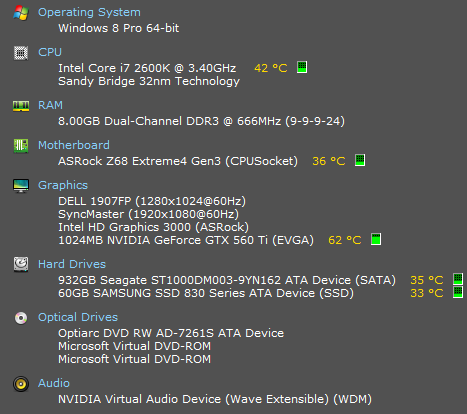
Hey there, can anyone help me? I installed everything correctly, and when I tried to run the game the keyboard is remapped and I can't use the arrow keys anymore nor can I access the menu. I also have a problem with the sound not working, and I installed the Remastered FF7 OST.

here is what I gathered from APP

INFO: FF7/FF8 OpenGL driver version 0.7.11b
INFO: Auto-detected version: FF7 1.02 US English
INFO: NVIDIA Corporation GeForce GTX 560 Ti/PCIe/SSE2 4.3.0
INFO: OpenGL 2.0 support detected
INFO: Using PBO
INFO: Found swap_control extension
INFO: Max texture size: 16384x16384
INFO: Number of texture units: 4
INFO: Original resolution 640x480, window size 1280x960, output resolution 1280x960, internal resolution 1280x960
INFO: Shader limits: varying 124, vert uniform 4096, frag uniform 2048
INFO: FFMpeg movie player plugin loaded
INFO: FFMpeg version SVN-r25886, Copyright (c) 2000-2010 Fabrice Bellard, et al.
INFO: FF7Music helper plugin loaded
INFO: Loading external library Multi.dll
LOCK UNLOCK TEST
MATRIX INITIALIZE
INITIALIZE DD/D3D END
ERROR: could not open file D:\Games\FINAL FANTASY VII\ff7input.cfg
initializing sound...
creating dsound primary buffer
reading audio file
loading static sounds
sound initialized
set music volume: 127
Entering MAIN
Exiting MAIN
START OF CREDITS!!!
INFO: D:\Games\FINAL FANTASY VII\movies\eidoslogo.avi; indeo5/pcm_s16le 640x480, 30.000000 FPS, duration: 12.933333, frames: 388
INFO: slow output format from video codec indeo5; 6
set music volume trans: 127->0, step=60
END OF CREDITS!!!
Entering MAIN
set music volume: 127
Exiting MAIN
START OF MENU SYSTEM!!!
END OF MENU SYSTEM!!!
Entering MAIN
Exiting MAIN
Field Start
INFO: D:\Games\FINAL FANTASY VII\movies\opening.avi; h264/aac 1280x896, 15.000000 FPS, duration: 119.533333, frames: 1793
WM_CLOSE
Field Quit
UNINITIALIZE DD
END UNINITIALIZE DD

UIPtRLH.png
 
Two guesses: Either you're using a pc and selected laptop keyboard option in bootleg, or you're using a laptop and didn't select the keyboard option.

It looks like you have a pc. The controls now use the side number keys. I don't remember them all though because I use a controller. Ok is the enter button though at least, and menus.... + maybe.

http://www.finalfantasy7pc.com/game-info/game-controls/

Final_Fantasy_7_PC_Stock_Controls.jpg
 
Last edited:
Status
Not open for further replies.
Back
Top