
E
EagleGuy
Guest
Me again. I'm sure I installed everything right this time, but I'm still getting three errors. Well, the first probably isn't an error, but more a nuisance that can't be avoided since I have a sh*t tier PC. FF7Music tends to be pretty slow. For example, I'll win a battle, and then the Fanfare won't load up for a few seconds. It's worth noting that I use all PSFs, but this problem was persistent with just using mp3s as well. Again, though, my processor is only about 2.4Ghz (single core, of course) so that's more than likely my fault. Another thing; Cloud equips the Masamune on the overworld. Not when overtop of a prerendered background, but just when he's on the overworld map. It's weird that that's the only place that happens. Not a big deal, though. But what is a big deal is Tifa's battle model; it's completely borked. I set PRP Classic for all field models except Cloud (Bloodshot swordless), but I used the newer, upgraded stuff for the battle models. You can see what all I used in APP.LOG (...I think), but the point is that I chose Grimmy's AC Tifa for her battle model. Now, not only is it not displaying hi-poly goodness from Grimmy, but the face is completely borked!
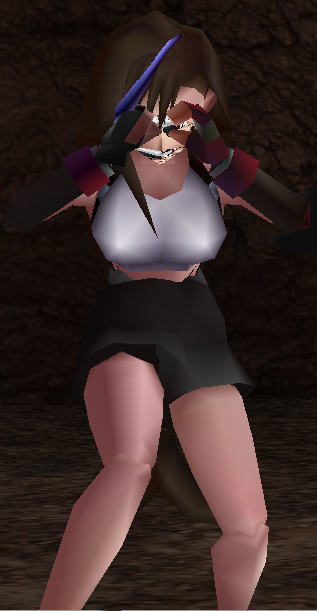
I guess it wouldn't be too bad if it just displayed the original Tifa model, but could it at least not be broken? And how could I get it to display the new one without redoing Bootleg YET AGAIN? Could I just manually install the model? In doing so, could I configure it to only display during battles?
EDIT: Sorry! Forgot to dump my APP.LOG!
Code: [Select]
I guess it wouldn't be too bad if it just displayed the original Tifa model, but could it at least not be broken? And how could I get it to display the new one without redoing Bootleg YET AGAIN? Could I just manually install the model? In doing so, could I configure it to only display during battles?
EDIT: Sorry! Forgot to dump my APP.LOG!
Code: [Select]
Code:
INFO: FF7/FF8 OpenGL driver version 0.7.11bINFO: Auto-detected version: FF7 1.02 US EnglishINFO: NVIDIA Corporation GeForce 6150SE nForce 430/integrated/SSE2 2.1.2INFO: OpenGL 2.0 support detectedINFO: Using PBOINFO: Found swap_control extensionINFO: Max texture size: 4096x4096INFO: Number of texture units: 4INFO: Original resolution 640x480, window size 1280x960, output resolution 1280x960, internal resolution 1280x960INFO: Shader limits: varying 32, vert uniform 1024, frag uniform 2048INFO: FFMpeg movie player plugin loadedINFO: FFMpeg version SVN-r25886, Copyright (c) 2000-2010 Fabrice Bellard, et al.INFO: FF7Music helper plugin loadedLOCK UNLOCK TEST MATRIX INITIALIZE INITIALIZE DD/D3D END initializing sound...creating dsound primary bufferreading audio fileloading static soundssound initializedset music volume: 127set music volume: 127Entering MAINExiting MAINSTART OF CREDITS!!!INFO: c:\Games\FF7\movies\eidoslogo.avi; h264/aac 1280x960, 15.000000 FPS, duration: 10.193000, frames: 153set music volume trans: 127->0, step=60END OF CREDITS!!!Entering MAINset music volume: 127Exiting MAINSTART OF MENU SYSTEM!!!END OF MENU SYSTEM!!!Entering MAINExiting MAIN-=-=[START OF WORLD MAP!!!]=-=-stop_soundcross play music: 0set music volume trans: 127->0, step=4set music volume: 127stop_sound-=-=[END OF WORLD MAP!!!]=-=-Entering MAINExiting MAINEntering FRAME_INITIALIZE SWIRLExitting FRAME_INITIALIZE SWIRLSwirl sound_effect1stop_soundEnd of Swirl sound_effect1Entering FRAME_QUIT SWIRLExitting FRAME_QUIT SWIRLEntering MAINExiting MAIN[BATTLE] Entering FRAME_INITIALIZE[BATTLE] Scene# 132[BATTLE] Exitting FRAME_INITIALIZE[BATTLE] Begin main battle loopWM_CLOSE [BATTLE] Entering FRAME_QUIT[BATTLE] endof battle.[BATTLE] Exitting FRAME_QUITField QuitUNINITIALIZE DD END UNINITIALIZE DD
Last edited: