[FF7PC-98] FF7Music Installer (1.51.13)(Discontinued, use Anxious Heart)

  • Thread starter Thread starter Covarr
  • Start date Start date
Status
Not open for further replies.
i have everything updated and installed. all the videos are playing perfectly, but theyre playing without sound, and all my midis playing fine. its only the mp3 that isnt playing at all

 
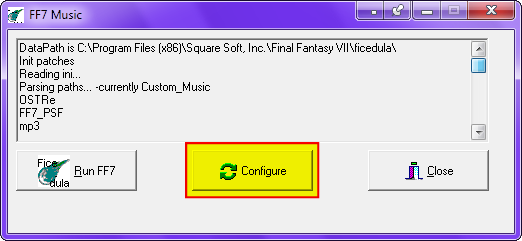
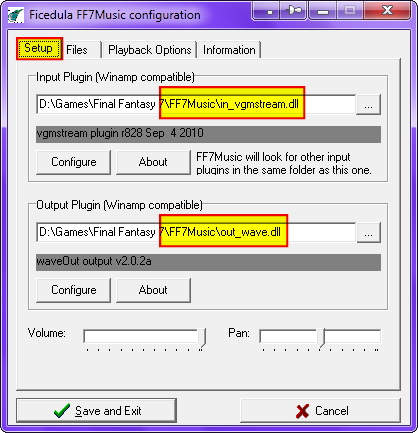
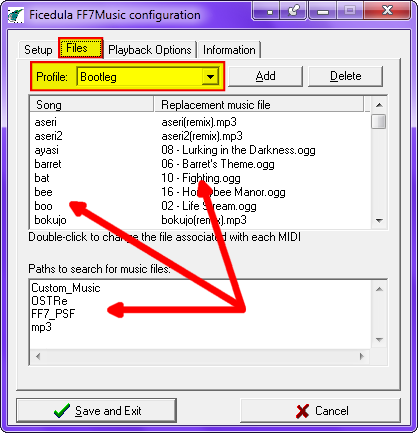
@Juvi: Execute .\FF7Music\FF7Music.exe and compare your setup with my screenshots:


Last edited:
I want the music, but not the graphics, do I HAVE to use aavi's graphic driver?
 
I want the music, but not the graphics, do I HAVE to use aavi's graphic driver?
YES. the game on a "modern" os is mostly broken with out it.
 
doesn't seem to work for me, no music whatsoever, i can't seem to find the remastered ost that the installer downloaded, not entirely sure what went wrong to be honest, everything installed properly it took the necessary time to download the ost and then no sound for the game...well just thought I'd say something, thanks anyway
 
The remastered soundtrack should be in ff7music's install directory, in a folder called "OSTRe". If it's not, then I've messed something up in my new installer (no surprise). Double check there, and if it's not there I might be able to help you out.
 
I checked there already, I figured it was there since it was called OSTre.

What worries me is, it took all that time to download and the ost was nowhere to be found

edit:
also I tried every single profile and no music to speak of
 
Last edited:
I also had a issue with the installer not automatically downloading OSTre.
Maybe one of the firewalls blocked the installer.

I had to download OSTre manually and place it in the the folder with the installer.
 
Hi Covarr,

i have compared your new installer (1.51.13) with the old version (1.51.12)
and found some issues.


[list type=decimal]
[*]It is not possible to install the new version without an Internet connection.
ff7music_install_15113.png

[*]These temporary (%Temp%) files were not deleted after the installation:

  • 7za.exe
  • ff7musiccurrentversion.txt
  • OSTRe.7z   <= !
[*]FF7 \FF7Music\Ficedula\FF7MUSIC.ini  +
               FF7 \Ficedula\FF7MUSIC.ini

is             : Profile=Remastered
should be: Profile=OSTRemastered


This should be altered to avoid NO sound errors:

is             : InputPlugin=in_vgmstream.dll
should be: InputPlugin= FF7 \FF7Music\in_vgmstream.dll

is             : OutputPlugin=out_wave.dll
should be: OutputPlugin= FF7 \FF7Music\out_wave.dll
[/list]
 
PitBrat, I will look into the auto-downloading. I'm not really sure why it's failing, but I think I know where to start looking, in any case.

UGerstl, I watch this thread like a hawk, (in fact, I read all new posts on the site whenever I have a chance). You don't need to tell me this in here AND via PM, I will see it either way. I have noted all the issues you mentioned and will look into them.
 
Hi Covarr,

sorry for double PM+Posting. I do this normally to be sure that the corresponding
user reads my analysis. Very often only the PM is read and not the posting.


What worries me is, it took all that time to download and the ost was nowhere to be found
The problem is, that the download of OSTRe.7z is placed in the temporary
(%Temp%) folder and not in the folder where the installer is located.
 
The problem is, that the download of OSTRe.7z is placed in the temporary
(%Temp%) folder and not in the folder where the installer is located.
No, this is not the problem. the 7z extractor also goes in the temp folder, and should be extracting in there as well. What the installer is designed to do is extract it in there, and then copy or move the extracted files over to where they need to be. (and then cleaning up after itself)

If the files aren't going where they're supposed to, I have messed something up for sure, but using the temp folder was not the mistake, as it's designed to work from temp OR same directory.

Jimmyto, is OSTRe.7z in your Temp directory? (I dunno 'bout XP or Vista, but in Windows 7 this can easily be accessed by typing %temp% into the start menu. If so, you have the songs and they just need moved/extracted to the correct location.
 
Last edited:
Is the problem system a Vista machine?
Maybe that pesky UAC/DEP is diverting files from a system folder to VIRTUAL STORE.
 
Not likely. The installer requests admin when it runs, which should prevent that.
 
The problem is, that the download of OSTRe.7z is placed in the temporary
(%Temp%) folder and not in the folder where the installer is located.
Tested with this configuration:

  • Windows 7 Home Premium, 64 bit, German
    + Service Pack 1
  • UAC: off
  • DEP: standard
  • Administrator: yes
  • Firewall: no
  • Antivirus program: no
  • Virtual system: yes (VMware)
  • User and system variable of temporary folder changed
    %TMP% + %TEMP% = C:\Temp


Test 02

User variable of temporary folder changed

  • %TMP%   = C:\Tmp
  • %TEMP% = C:\Temp

Where can OSTRe.7z be found ?

[list type=decimal]
[*]download  = %TMP%
[*]installation = %TMP%
[/list]

Article:  Where Does Windows Store Temporary Files and How to Change TEMP Folder Location?
 
I am aware of this. As I said, I used the temp folder ON PURPOSE, so as not to clutter other folders with temporary files; it's what the TEMP folder is there for. The problem isn't that I used it, but that I messed up a copy operation afterwards.
 
@Covarr: Please understand me right, i made a mistake !
                The result of my first test (%TEMP%) is false.
                Your installer uses the %TMP% variable.
 
it's not on the temp folder, that's what i get for cleaning that folder as often as posible :(
 
Status
Not open for further replies.
Back
Top