[FF7PC-98] Re:Sampled - High Resolution Pre-Rendered Backgrounds (v2.0)

  • Thread starter Thread starter yarLson
  • Start date Start date
Status
Not open for further replies.
About 15s for one png file with my [email protected].
As it's usable in commandline, you can easily make a batch file for it and let your computer do the job.
Waifu doesn't seem to use png transparency so you have to edit the waifu resized files to restore transparency (gimp for exemple) and it can take some time
I didn't notice that last bit until just now. If this algorithm can't preserve transparency thankfully that is not too much of an issue since all layers have to be merged into a black background before resize anyhow and then cut out automatically by the script using some clever masking and resizing tricks. Looking at the options for noise reduction seems to give significantly less smudge however I am away from my desktop again so I have no means of testing that right now. Hoping it works better
 
I don't mind playing around with the script. I just haven't yet fully understood how the internals of the fields work. I can extract the backgrounds manually using Makou Reactor but without some automation to do that for all fields x all parameters x all states I'm going nowhere.
Use Palmer to work with fields makou reactor is not required and I am not even sure it can do the job properly
 
Use Palmer to work with fields makou reactor is not required and I am not even sure it can do the job properly
Do you have a copy of Palmer 0.8b that you can upload for us? Aali's link is not working in the Palmer thread.
 
Do you have a copy of Palmer 0.8b that you can upload for us? Aali's link is not working in the Palmer thread.
crud that's not good i probably don't have it anymore I may have it in a very messy folder that contains some of my old work I'll have to sift through it when I have more time.
 
Do you have a copy of Palmer 0.8b that you can upload for us? Aali's link is not working in the Palmer thread.
https://www.ff7catalog.com/posts/79602/

I have tested waifu, too. It gives nearly the same result as Blow Up 3 and that for free (on the other hand it needs much longer for a 4x upscale). I would like to see how some fields would look with it in game.
 
Last edited:
https://www.ff7catalog.com/posts/79602/

I have tested waifu, too. It gives nearly the same result as Blow Up 3 and that for free (on the other hand it needs much longer for a 4x upscale). I would like to see how some fields would look with it in game.
After reviewing the test samples (I always use the same two images) and comparing to literally every other algorithm I have gotten my hands on since the original project began over five years ago the results are far any away sharper than anything else available.

As I've always said over and over what really matter is in game tests.  The scaling and proportion of the scenes in game is handled a bit differently than just looking at the plain image and we need something that conforms to that scaling nicely. 

Personally I never liked the results I got with Blow Up 3 and wouldn't reccomend it.  That said  I haven't gotten a chance to test this waifu2x in game yet so anything can happen.  Just because it produces ecxeptionally sharp results doesn't mean it's going to look decent in game but having gotten familiar with the command line tool I am fairly optimistic. 

I'd say the best chance for success us going to be with a level one noise removal. Level two removes too much detail and no noise removal is far too noisy and a smudgey.
 
I sincerely hope you can get a nice in game result with this new method, yarLson. And welcome back!
 
I'll do my best but I have been extremely busy and my wife has been using our desktop a lot lately for several projects she has going on so I still haven't gotten a chance but I will.
 
yarLson,

considering the limitations of Aali's driver, I was wondering if it'd not be best to leave out from the package those screens with lighting issues at transition?

I am so looking forward to a new version of Sampled! :)

Thanks!
 
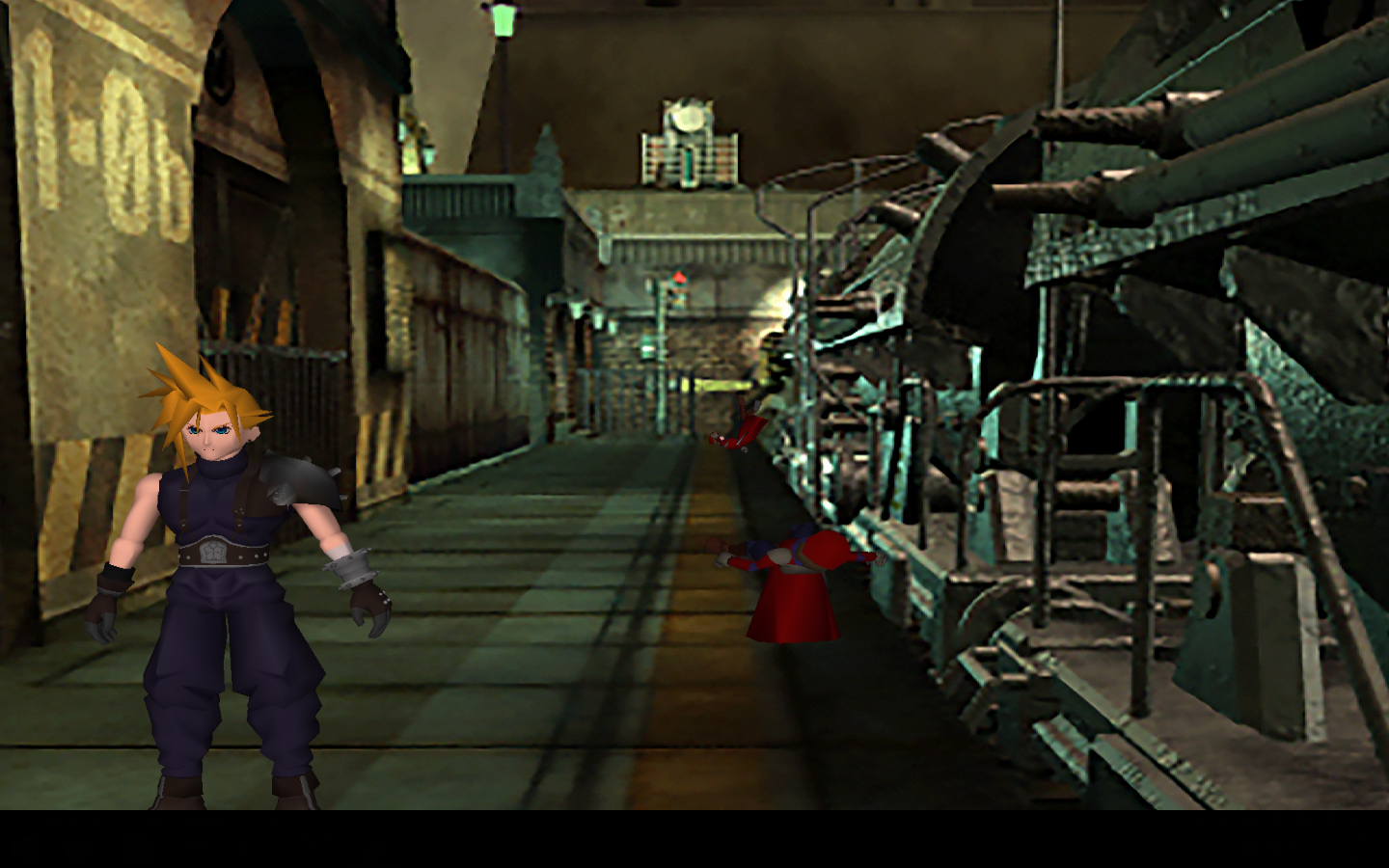
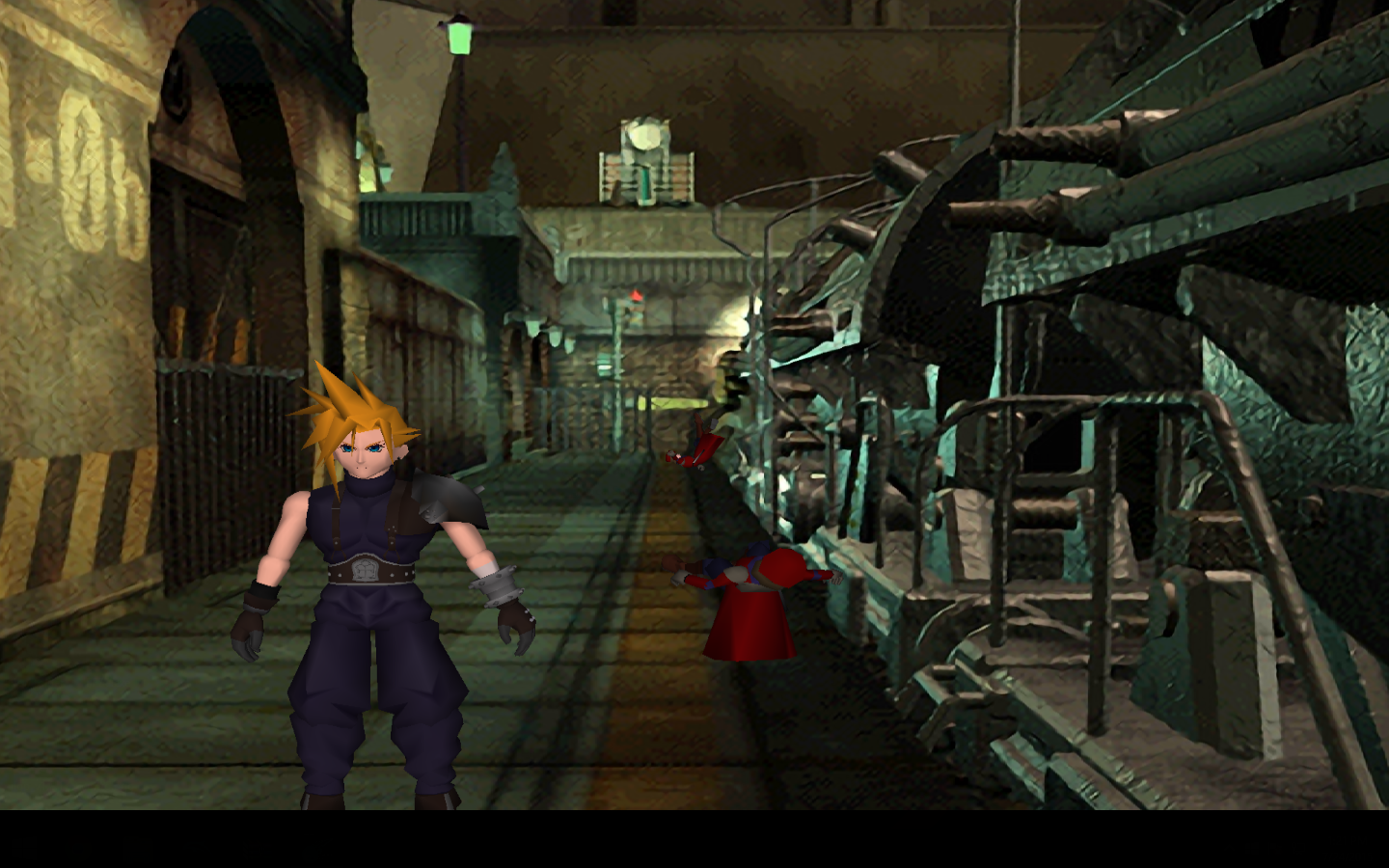
Here's my old method
45cixyc.png


And the new waifu2x
EDe82kY.png


So what does everyone think?
 
They each have their pros and cons, but I think Waifu looks better. If nothing else, it does MUCH better with sharp edges.
 
I agree the new one is better.  But what ever happened to a post processing shader
 
To respond to all three of you. One a demo would be kinda a pain in the ass right now since I haven't figured out how to fit this into the script yet. Although I will upgrade this scene later so you can test it.  Also post processing shaders turned out to be a nightmare withaali's driver however you can do some pretty awesome stuff with reshade if you haven't tried it yet.  Finally I agree I ended up deciding that no noise reduction is best and that is exactly what your seeing in the samples above.
 
Here's my old method
45cixyc.png


And the new waifu2x
EDe82kY.png


So what does everyone think?
Wow look at the doors to the right of 1-Ob. Huge improvement there, and minor improvements everywhere else. A lot more detail on the train, a lot sharper.
 
Hello.
I'm working in field upscale with waifu but have a bug to re-import some field in palmer, they are giving me a "parallax background layer" error

Any idea ?

thanks
 
Status
Not open for further replies.
Back
Top