[FF7PC-98/Steam] Multiple mods and Modding Framework-The Reunion [R06f]

  • Thread starter Thread starter DLPB_
  • Start date Start date
Status
Not open for further replies.
Hey DLPB, I see you've decided to try and continue your slanderous behavior in this thread. Please stop lying to your users and the rest of the community. The screenshot I posted comes from an import tracer. Aali.dll is a (forward-linked) dependency of your DLL, and this is in violation of the GPL. You are not using it as a module, you are linking with it. Since GPL propagates through linking and is a contaminating license, this means that DDraw.dll, and all future versions of DDraw.dll, are GPL'd software and any copyright holder (myself, Nax, TO) among others can easily have the source seized by the court and made public at any time. Again, let me reiterate, Due to GPL being a contaminating license, all future versions of this project are GPL'd and by not releasing them under the terms of the license, you are in violation of the GPL.

So, DLPB, You must remove all code in violation of the GPL (which includes DDraw.dll, both in its current an all future versions) from any distribution channel to remain in compliance with the GPL. This is the position you are in and it is a serious one. I advise you treat it as such.

This is my peace-offering: Publicly apologize to the people in this community that you have wrongfully slandered. Immediately (in accordance with moderator judgment) remove Reunion from distribution as currently implemented. Then, out of respect for the people who love your work, I will not strike you (although I very clearly could) for future versions of your code provided that when you repost your code, it includes a link to the full source for your fork of the Aali driver, and that any other DLL's included on it have no static or dynamic linking, or otherwise prohibited relationships with a modification of  Aali's source, which I will verify.

The next time you mention me or TrueOdin, or any other member of this community in a slanderous way, I will copyright strike you, and have your code force-ably seized by law enforcement and any references to it scrubbed as a copyright holder.

Consider this a notice.
 
Also, to the members of this forum and thread.  As has been pointed our persistently to the mods and with documentation - no law breaking is taking place.  This crazy vendetta by Quantumpencil must stop and I ask that the mods please stop this awful and obvious bullying.
 
Forgive (again) the intrusion.

If what DLPB has done is clearly a copyright infringement, I would advise the accusers to bring their proof to the appropriate institution so that the matter is resolved super partes in the interest of justice and legal compliance.

Otherwise the unpleasant sensation is that we are witnessing a rather vicious attack to a popular and well established modification to discredit both. Even if a breach of contract is confirmed, I'm quite positive DLPB was moved by no malicious intent. He's always credited every source and contributor since the very beginning of his project and that should suggest good faith.

I urge everyone involved to consider taking a step back and try to coexist inside this community because no good is going to come out of this and we end users will all be affected negatively one way or the other.

Thanks.
 
Last edited:
It's best to leave it Salk :)  Until my last days on this forum, I'm going to hold my end of the bargain and stay here and do what I like doing - mod for the betterment of FF7 players.  The mods already agreed with me yesterday that I have 3 days to remove the "offending code".

let's get this train back on the track ;)
 
Any ETA on merging Beacause with New Threat? Just curious cause I would absolutely love to play using both. New Threat's gameplay changes are amazing, and Beacause does so much more for the script...
 
Hi all, probably a simple quick question, but when installing Retranslation I did not choose the Incorrect Names. I read things backwards in the readme's and would prefer the old "Reno" vs "Zeno", etc. Is there a way I can toggle this now with what's installed already? Without losing my save data or messing anything else up. (I'm not sure how this might interact with Barret being Barrett right now too since he's playable? I would prefer Barret). Or can I reinstall the mod and just select those two options (Incorrect Character/Place Names), without messing things up?

Other than that no issues and I'm digging all the other improvements.
 
Yup, just reinstall.  Nothing will be touched apart from BASE folder.  Anything in there will go.
 
Oh and you'll need to revisit options.ini so maybe copy it somewhere.  Don't do that when upgrading though :P
 
Oof, guess I'll just decide between this and New Threat for now and replay when they work together.
Do both - ;)  New Threat is more fun - New Translation is to experience original game as it was intended.
 
Yup, just reinstall.  Nothing will be touched apart from BASE folder.  Anything in there will go.
Thanks! Yep it worked fine. Fixed a weird issue I had with my controller rapid firing inputs too, pretty sure that was just on my end though.

Now I look forward to some of the infamous plot beats making more sense this time around.  8)
 
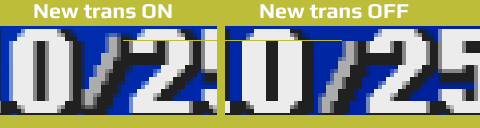
A tiny issue :) or a feature...
With new translation ON the slash symbol in party menu is slightly higher than original one. All mods are off.
Screens is under the spoiler

New_translation OFF
FYnfkM2.jpg


New_translation ON
lmvdWtI.jpg


Comparison

DBy7IjO.png


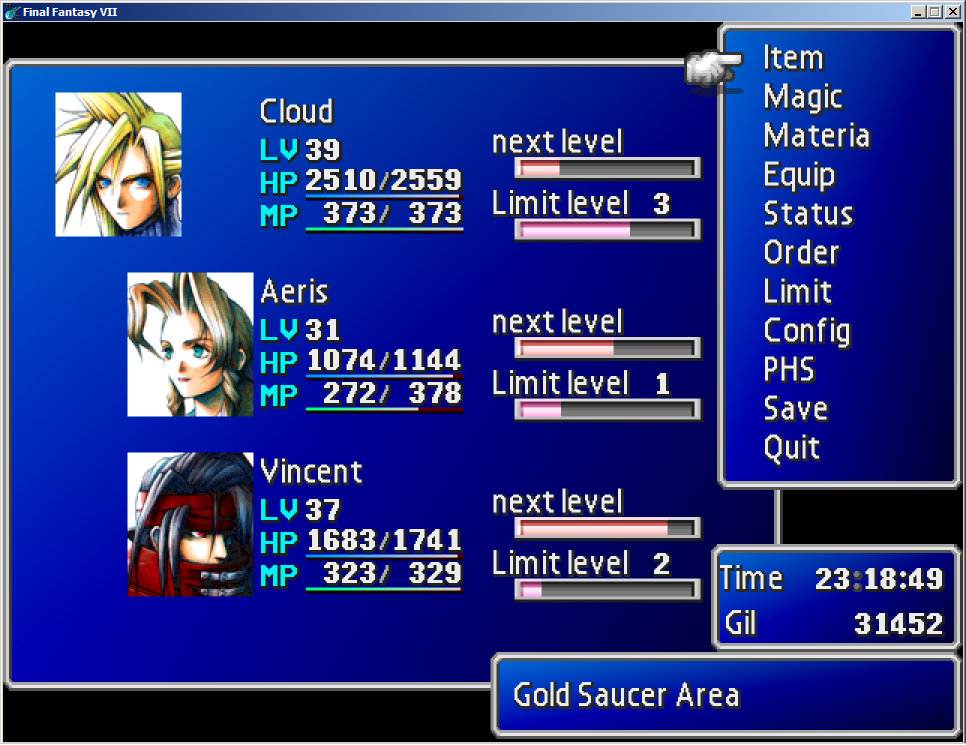
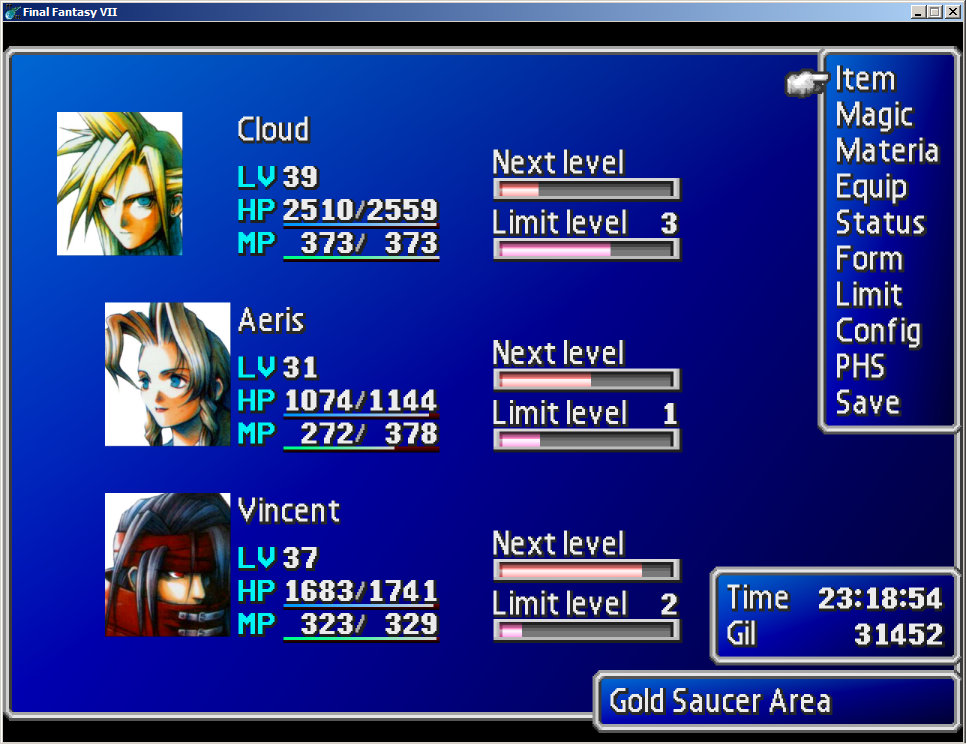
And just wonder, is it a feature of Reunion to make game brighter? Can I turn it off? Look screens:

Original game (Reunion OFF):
gMUc7gn.jpg


Reunion ON
FYnfkM2.jpg
 
Last edited:
Thanks for all the hard work in making these mods. The scope of The Reunion is pretty amazing.

I have a question: I'm probably missing something pretty obvious, but when I start the game, it plays in a small window on the left-hand side of my monitor and I can't resize it at all. I've tried everything I can think of in the settings: unchecking 'full screen', unchecking 'keep aspect ratio', changing the resolution. The window's always the same size, maybe 3 inches in diameter.

It was running in fullscreen OK when I tested the game before installing the mods, so I'm assuming this is a mod thing.

Is there anything I can do to increase the size of the window while I play?
 
The only issue I'm having now is alignment issues with "Barrett" text boxes. I wonder if it's supposed to be Barret now with the settings I changed, but since I reinstalled Reunion mid game it wasn't able to change one of the playable characters?

Is there a way to edit his name somewhere? Think I read I might have to use a hex editor.

In Reunion | BASE | New Translation | Text | Exe.txt, I was able to find "Barret"... but not "Barrett" which is how he was named in my game. Hmm...

Anyone think this is causing the alignment issue and could there be a way to fix it?
 
you shouldn't use fixed length names unless you've read readme and have are starting a new game and are not changing default names.  it's intended only for very specific usage
 
Hi!
I really like this reunion mod, however I have one issue with it that is preventing me from fully enjoying it.
In the base game, and for other mod loaders, you are allowed to select a sound device for the game to output to specifically. The sound device you select does not have to be your primary sound device. So if I wanted to listen to the game through a specific set of speakers hooked up to a distinct soundcard, in all other builds of this game, I am able to do that. Reunion specifically does not allow this, and will always target the primary soundcard for windows. If you try to change it, the second the game makes any noise at all, it will automatically switch back to the primary card. This is a bit of a frustrating issue for me, as I tend to use multiple audio devices for specific purposes regarding recording footage of games, for mixing purposes. So, simply changing my primary card during playtime is not really a desired solution.

Is there a reason why the Reunion mod does this? I cannot find any settings for this in your options.ini, the bug submission document, or really anywhere. I assume there is something in the .dll files causing this, and that's beyond my ability to modify.
Would it be possible to re-enable this feature for this mod, that the base game had in its config? This mod seems to ignore the FF7config's sound device too.

I know you do not like discussing it, but 7th Heaven also is able to set the sound device rather painlessly. I would use that, but your mod also has better audio quality than anything 7th Heaven has, and I would love to be able to experience it properly. I really wish to play this game without the low-quality crackles introduced in the base game. You seem aware of audio issues in the base game from your post history regarding this subject, and your fixes are really good too. If there is a way for this to happen, that'd be amazing.

tldr; I would like to be able to set what sound device the mod uses. Can this be done?
 
Status
Not open for further replies.
Back
Top