[FF7PC][FF7_SYW_Unified] 1.16 (2025/10/17) - PC installer + Steam deck + iros

  • Thread starter Thread starter satsuki
  • Start date Start date
Status
Not open for further replies.
Hey satsuki,

I recently got an OLED Steam Deck and I still can't get this mod to work. However, with 7thDeck:

https://github.com/dotaxis/7thDeck

I can get 7th heaven installed + install your mods manually within minutes. I'm sure it's not as good as your AIO installer, but can you foresee any obvious issue with these mods working together?

https://i.imgur.com/EMlH0hh.png

It seems to work fine from what testing I have done.

I'd love to be able to get the AIO to work, but I'm at my wits end. It's always one error or another :/
As i don't own a steam deck i can't realy help you, but lots of deck's user have been able to install it with the step by step explaination in page 1
 
I understand that, but what I'm asking is if those mods I'm using in the image will be compatible. As far as I know, those are the ones included with your mod pack here
 
One issue I'm having on PC.

So I have my desktop connected to a 4KTV. The recommended text size scale on Windows with this setup is 300%. However, the SYW mod config window ends up being too big and I'm unable to resize the window to see all the options and the launch game button. Setting the text scaling to 200 - 250% can make the window more viewable, but I would prefer to keep the scaling at 300%. More of a nice-to-have, but it would be great if the mod config window could be manually resized and auto-scaled with the resize so the launch game button isn't obscured by certain PC resolutions.
 
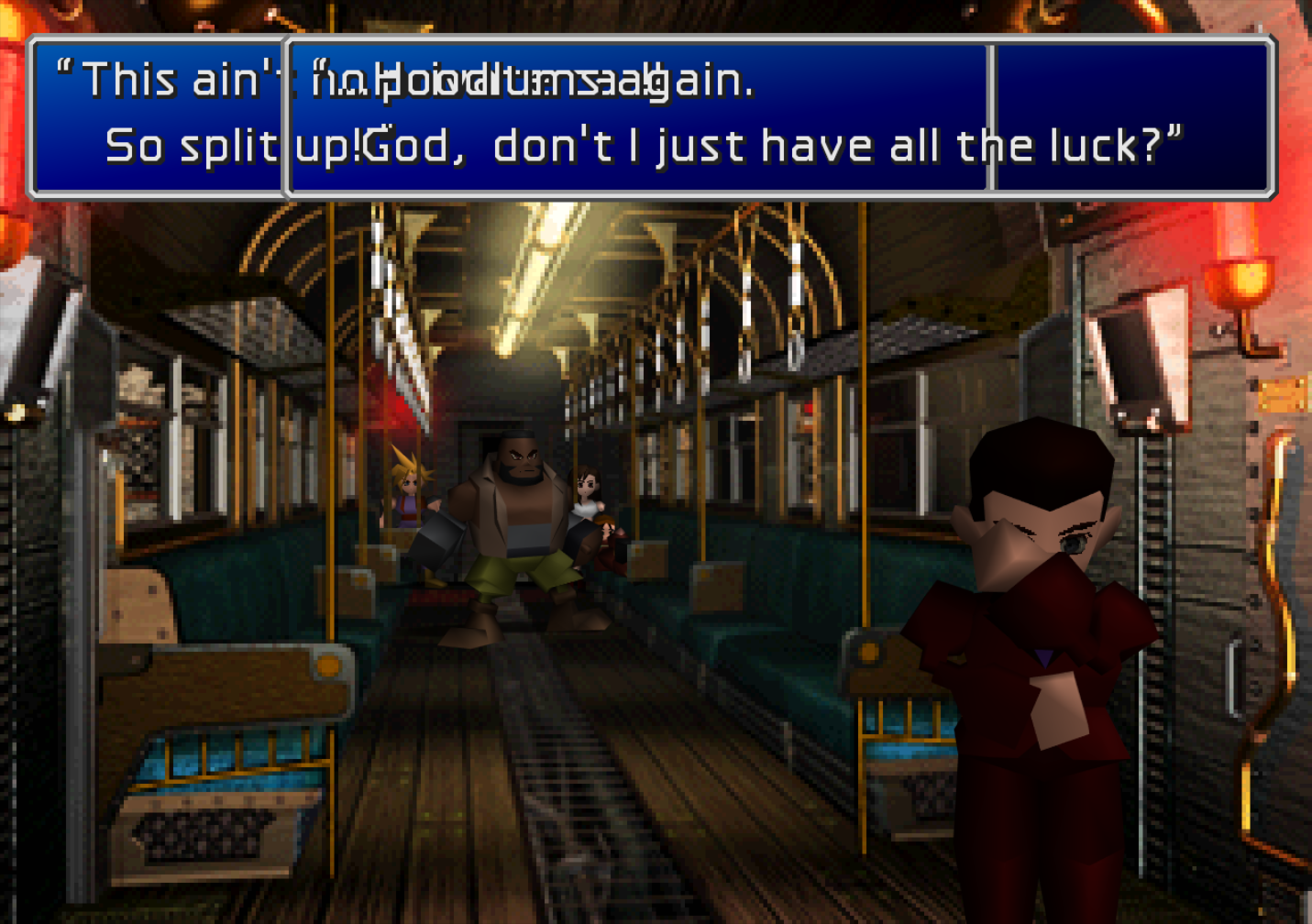
Hi, I've been having an issue where the HD fonts and icons setting on the UI mod is causing overlapping text boxes to display incorrectly, as shown below. This issue also occurred with V5 of the mod. I'm playing on PC using the Steam version with 7th Heaven. Any help or advice would be appreciated.
BbarMFI.png
 
Last edited:
I understand that, but what I'm asking is if those mods I'm using in the image will be compatible. As far as I know, those are the ones included with your mod pack here
not sure as i don't use 7th myself but seems right to me
 
One issue I'm having on PC.

So I have my desktop connected to a 4KTV. The recommended text size scale on Windows with this setup is 300%. However, the SYW mod config window ends up being too big and I'm unable to resize the window to see all the options and the launch game button. Setting the text scaling to 200 - 250% can make the window more viewable, but I would prefer to keep the scaling at 300%. More of a nice-to-have, but it would be great if the mod config window could be manually resized and auto-scaled with the resize so the launch game button isn't obscured by certain PC resolutions.
300% for a 4k resolution is overkill, 200% is a good value.
My pack's UI is arround 1000x650 px (with menu bar), so can be fully visible even on a 1024x768 screen resolution at 100%.
It's its not visible on a 3840x2160 resolution display ... well the scale size you use is just way too big
 
not sure as i don't use 7th myself but seems right to me
Thanks, it has been working perfectly for 4hrs so far.

Also, 7th Heaven (7thdeck) launches the Steam version, so achievements are intact. For anyone else who is having issues, I highly recommend this route.
 
Noted, satsuki. I'll make sure to use smaller scaling on Windows when using the 4KTV.

The mod has been working great on Windows. I just left Midgar and I've come across a few issues:

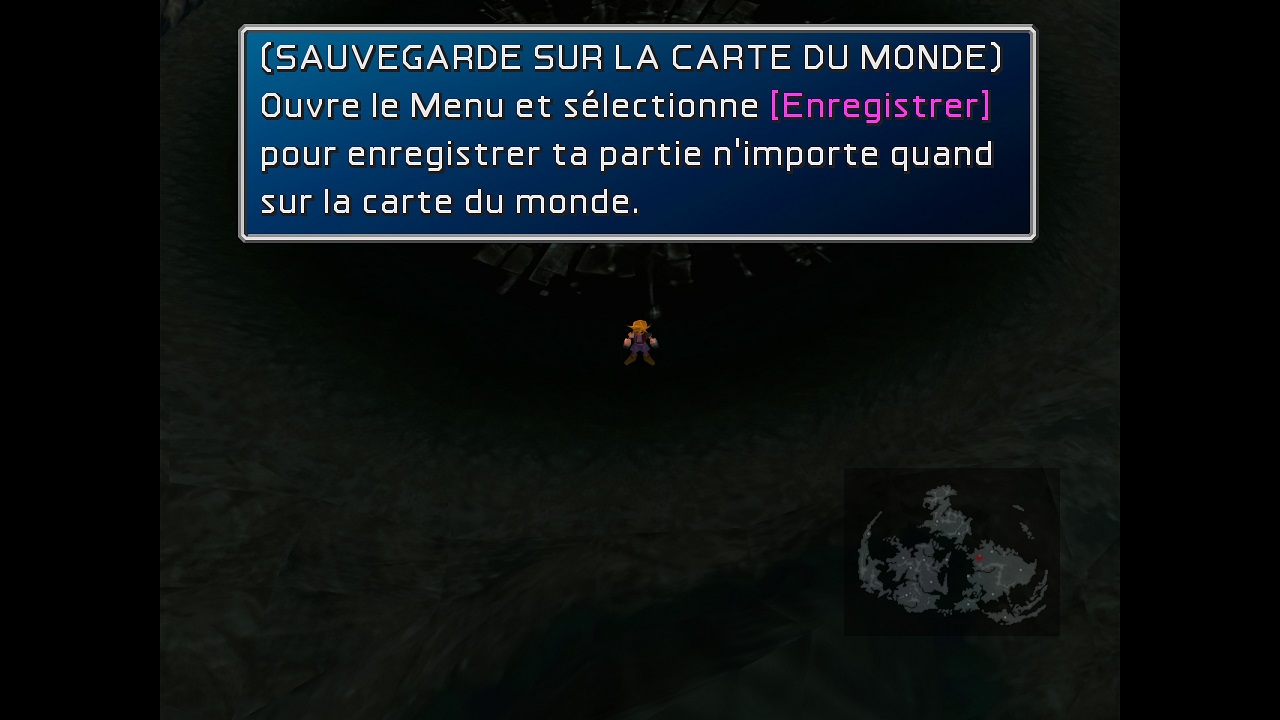
1. On the World Map, the text is in French despite playing the game in English.
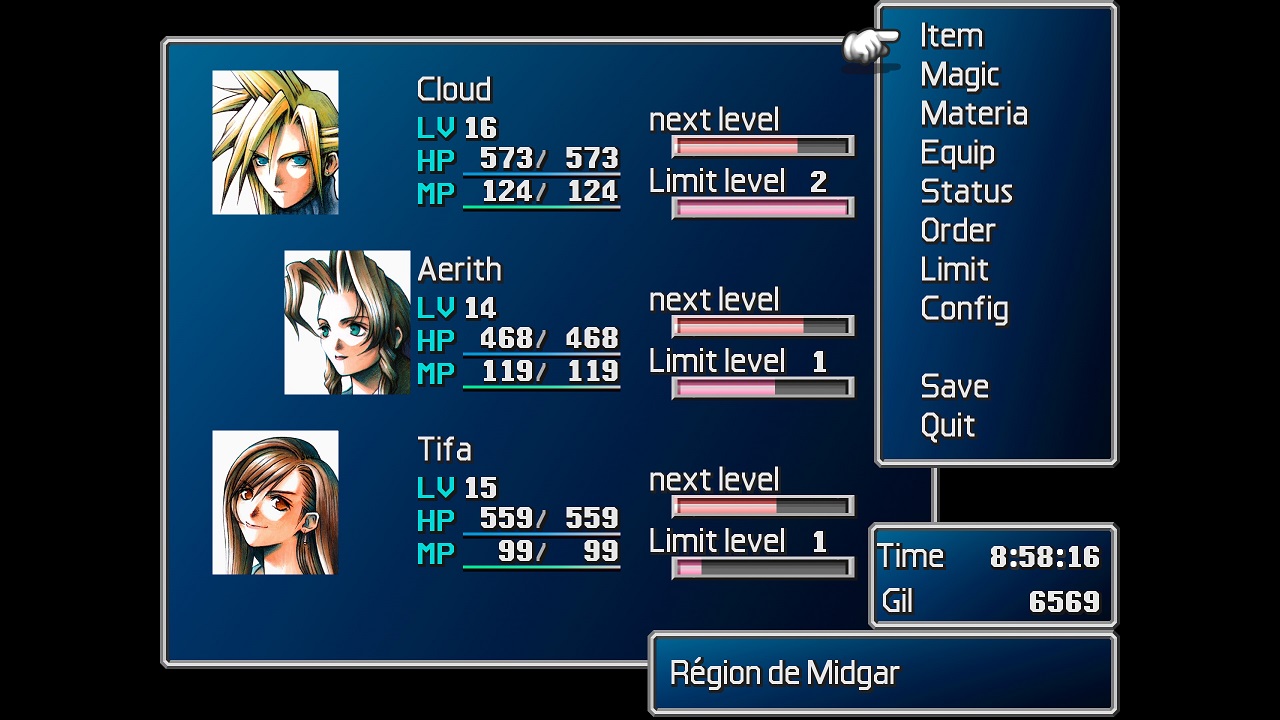
2. In the menu, the location name is in French despite playing the game in English.
3. During the motorcycle FMV, I didn't really hear any sound effects, mostly just the music.

Example of "HD videos 30fps" selected from drop-down and no cutscene audio besides music (I am unable to select the original versions of the FMVs to compare, config drop-down only gives HD 30fps or Modernized Cosmos Videos): https://imgur.com/bG4gUnz

French text in English version: (EDIT: Just saw you are aware of the bug and will fix it ^^;;)

c3YSbWe.jpg


pbeDWjS.jpg
 
Last edited:
@SayonaraVandalHearts
1-2 :
just read the 1° post and you'll see :
Known bugs :
Pack:
-condor minigame background misaligned (error from me) - fixed in upcomming v1.04.
-opening credits and worl map location/text are not using the selected game language - fixed in upcomming v1.04.
3 :
if you read the Cutscenes description:
Considering their poor quality, the original video of the game are not in this pack
I tested and have both fx sounds and musics, just check the volumes in game setting after loading game
 
\Mods\SYW\Textures\snowboard\eg_00.dds should be fg_00.dds (fg_k_00.dds already exists)
\Mods\UIs\01-Aavock\Files\Textures\menu\ file window.bin in this folder
\Mods\UIs\01-Aavock\FilesLang\F\Textures\menu\ file window.bin in this folder
\Mods\UIs\01-Aavock\FilesLang\G\Textures\menu\ file window.bin in this folder
\Mods\SYW\Textures\snowboard\time1_00.dds should be ftime1_00.dds (ftime1_00.dds already exists)
\Mods\SYW\Textures\snowboard\time2_00.dds should be ftime2_00.dds (ftime2_00.dds already exists)
\Mods\SYW\Textures\snowboard\etime1_00.dds should be time1_00.dds
\Mods\SYW\Textures\snowboard\etime2_00.dds should be time2_00.dds
\Mods\SYW\Textures\snowboard\eita_k_00.dds should be fita_k_00.dds (fita_k_00.dds already exists)
\Mods\SYW\Textures\snowboard\ correct eita_k_00.dds not exist
 
Last edited:
Update 1.04 in page 1 :

AIO pack :
-Added link to the pack's git source code in the about pannel.
-Added steam deck oled preset to correct bad colors.
-Updated FFNx 1.16.0.30.
-Updated some german and spanish texture files.
-Updated oled SteamDeck's profile.
-Fixed the condor minigame background (revert back to 1.02 version).
-Fixed opening credit and worldmap didn't apply choosen game language.


IROS :
-Updated some german textures in fonts and menu iro (v1.04)
-Updates some german texture in minigames iro (v1.04)


Now German textures are as accurate as possible in both AIO pack and IROS thanks to jtd.
 
Last edited:
I've tried the new SteamDeck OLED preset, but the Vulkan renderer introduces some really bizarre transparency into UI elements and 3d models.  Booting from desktop mode will d3d11 is still the best experience.
 
Version 1.04 is working perfectly so far using only the FF7_SYW_Unified launcher, no 7th Heaven at all (I'm only at the first visit to Junon in the game though).

The fort condor battles minigame has a spelling error. After you destroy an enemy, a message displays on the screen that 'the enemy was destroyed' but the spelling of 'destroyed' is incorrect and is being spelled as 'destryed' missing the 'o'. Maybe this is the wrong topic to post this comment in and if so, may someone direct me to where I should address this? It's not anything critical but if time and effort were put in to upscale the minigame, it would be nice to have correct spelling.

I'm using the 4x3 aspect ratio in full-screen mode. Aside from battles and a few other scenarios, the screen is usually cropped in the middle with slim black bars at the top and bottom and of course the black bars on the sides. I understand the bars on the sides and why they're there, but is there a 7th Heaven mod or some other "trick" that anyone is aware of which can "fill" the screen so that there are no black bars on the top and bottom? I am aware of 'reshade' but I don't want to have to keep toggling the setting on and off if the screen is sometimes cut off.
 
Last edited:
HI. I just discovered this awesome megapatch! But I'm Italian, and to summarize the question I would like to ask you if it is possible to create a mod/translation option in Italian. I would be willing to give compensation. I hope for your friendly positive feedback.
 
Version 1.04 is working perfectly so far using only the FF7_SYW_Unified launcher, no 7th Heaven at all (I'm only at the first visit to Junon in the game though).

The fort condor battles minigame has a spelling error. After you destroy an enemy, a message displays on the screen that 'the enemy was destroyed' but the spelling of 'destroyed' is incorrect and is being spelled as 'destryed' missing the 'o'. Maybe this is the wrong topic to post this comment in and if so, may someone direct me to where I should address this? It's not anything critical but if time and effort were put in to upscale the minigame, it would be nice to have correct spelling.

I'm using the 4x3 aspect ratio in full-screen mode. Aside from battles and a few other scenarios, the screen is usually cropped in the middle with slim black bars at the top and bottom and of course the black bars on the sides. I understand the bars on the sides and why they're there, but is there a 7th Heaven mod or some other "trick" that anyone is aware of which can "fill" the screen so that there are no black bars on the top and bottom? I am aware of 'reshade' but I don't want to have to keep toggling the setting on and off if the screen is sometimes cut off.
-i'll check the spelling this texture file have some typo, it'll be corrected in 1.05 update for both AIO and IRO (don't know when, i don't have much time ATM)
-no solution for the black bars ATM (maybe come latter)
 
Last edited:
HI. I just discovered this awesome megapatch! But I'm Italian, and to summarize the question I would like to ask you if it is possible to create a mod/translation option in Italian. I would be willing to give compensation. I hope for your friendly positive feedback.
As i don't speak italian myself i can't translate game nor UI.
If one day an italian translation is complete i may add it
 
\Mods\SYW\Textures\snowboard\eg_00.dds should be fg_00.dds (fg_k_00.dds already exists)
\Mods\UIs\01-Aavock\Files\Textures\menu\ file window.bin in this folder
\Mods\UIs\01-Aavock\FilesLang\F\Textures\menu\ file window.bin in this folder
\Mods\UIs\01-Aavock\FilesLang\G\Textures\menu\ file window.bin in this folder
\Mods\SYW\Textures\snowboard\time1_00.dds should be ftime1_00.dds (ftime1_00.dds already exists)
\Mods\SYW\Textures\snowboard\time2_00.dds should be ftime2_00.dds (ftime2_00.dds already exists)
\Mods\SYW\Textures\snowboard\etime1_00.dds should be time1_00.dds
\Mods\SYW\Textures\snowboard\etime2_00.dds should be time2_00.dds
\Mods\SYW\Textures\snowboard\eita_k_00.dds should be fita_k_00.dds (fita_k_00.dds already exists)
\Mods\SYW\Textures\snowboard\ correct eita_k_00.dds not exist
more miss:
\Mods\SYW\Textures\snowboard\ea_00.dds should be ea_k_00.dds
\Mods\SYW\Textures\snowboard\eb_00.dds should be eb_k_00.dds
\Mods\SYW\Textures\snowboard\ec_00.dds should be ec_k_00.dds
\Mods\SYW\Textures\snowboard\estamp0_00.dds should be fstamp0_00.dds (fstamp0_00.dds already exists)
\Mods\SYW\Textures\snowboard\estamp1_00.dds should be fstamp0_00.dds (fstamp1_00.dds already exists)
\Mods\SYW\Textures\snowboard\ correct estamp0_00 not exist
\Mods\SYW\Textures\snowboard\ correct estamp1_00 not exist
 
We can start by doing as little as possible.
Let me explain: for now, shall we try to insert the translation of only the textual part of the game? No UI, No Graphics, No minigames.
Please, we care a lot, all Italian users. Through
sites like WeTransfer can share with you the 2/3 types of Italian translation that exist. I repeat for my part, I am ready to give good compensation.
 
more miss:
\Mods\SYW\Textures\snowboard\ea_00.dds should be ea_k_00.dds
\Mods\SYW\Textures\snowboard\eb_00.dds should be eb_k_00.dds
\Mods\SYW\Textures\snowboard\ec_00.dds should be ec_k_00.dds
\Mods\SYW\Textures\snowboard\estamp0_00.dds should be fstamp0_00.dds (fstamp0_00.dds already exists)
\Mods\SYW\Textures\snowboard\estamp1_00.dds should be fstamp0_00.dds (fstamp1_00.dds already exists)
\Mods\SYW\Textures\snowboard\ correct estamp0_00 not exist
\Mods\SYW\Textures\snowboard\ correct estamp1_00 not exist
Do you see any bug/ missing textues ingame ?
 
We can start by doing as little as possible.
Let me explain: for now, shall we try to insert the translation of only the textual part of the game? No UI, No Graphics, No minigames.
Please, we care a lot, all Italian users. Through
sites like WeTransfer can share with you the 2/3 types of Italian translation that exist. I repeat for my part, I am ready to give good compensation.
That not the point of compensation.
It'll be a lots of work to complete and i don't have enought time about that.
If a translation is 100% complete i could add it, but i won't add partial stuff witch'll require frequents update each time a change appens.
And if No UI, No Graphics, No minigames there's no point about the AIO pack, you can juste share le translation so users can use it with their steam folder, no ?
 
Status
Not open for further replies.
Back
Top