
[FF7PC][FF7_SYW_Unified] 1.16 (2025/10/17) - PC installer + Steam deck + iros

  • Thread starter Thread starter satsuki
  • Start date Start date
Status
Not open for further replies.
Yah, not using your launcher, using 7th Heaven. To be frank, the advice is to replace those textures in the magic textures you're using because the ones in your pack don't look right. Thanks again.
don't looks right for you ! not for everyone, if so i'would have lots of complain about it, it's not the case.
yes with some effort you can make your own iro for those texture so you can place them in the right order in 7th and even share it for other user who would like to use them to overide the file used by my texture... https://7thheaven.rocks/help/modhelp.html
you don't even have to mod my iro mod, just need to make your own and place it in the right order in 7th to overide one only files you need.
seems it's always easiyer to complain than to take the time to make a mod witch can profit to all users ....
 
Last edited:
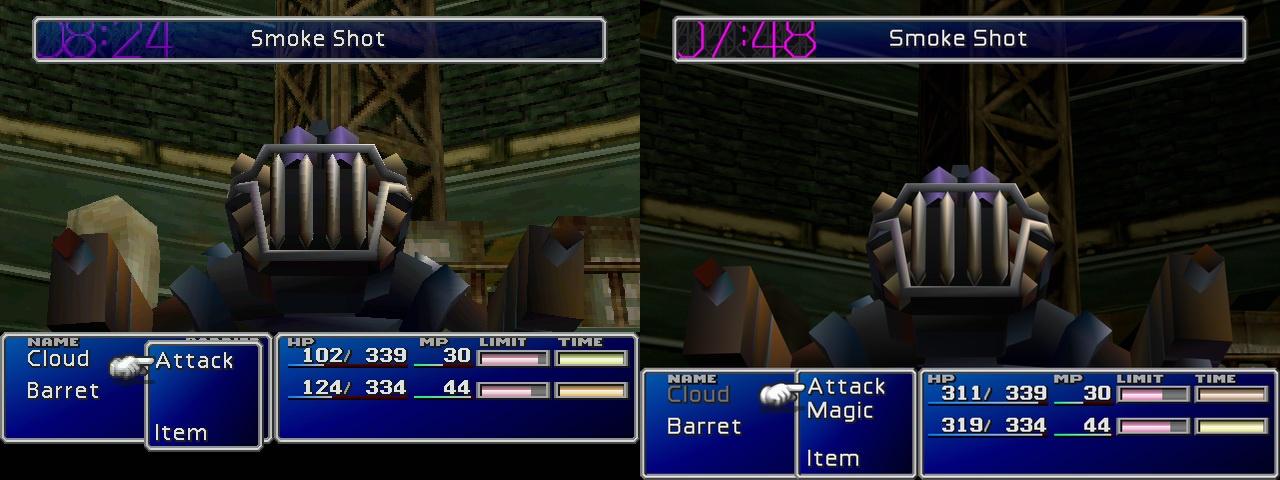
pack included "after_1_00.dds", but iro not included "after_1_00.dds"

After the first boss battle, the countdown has no transparent color.
(The left is the original version and the right is UI Remastered.)
6gJJlGY.jpeg
 
pack included "after_1_00.dds", but iro not included "after_1_00.dds"

After the first boss battle, the countdown has no transparent color.
(The left is the original version and the right is UI Remastered.)
6gJJlGY.jpeg
I'll look at this iro file
About transparency at it's only related to the countdown, it's not related to my pack but the way FFNx deal with external texture transparency
 
Ok i managed to get it work with my AIO pack
Is something like this is ok with you (i need to check the speling but if you want another description, i can add it instead) ?
Hi Satsuki, first of all thank you for the amazing work you all did, i'm loving the revamped visuals and musics.
I'm trying to get Caledor mod for italian translation work but without success. First i've tried to pass directly the Caledor files into the data folder in your game folder, but the result is an half translated game: i've arrived at the train graveyard, all dialogues are translated except the part with President Shinra, Heidegger and Reeve; all the rest of the game still in english.
Then i've uninstalled all and reinstalled, trying to get it work with 7th heaven but even if I activate the mod in it, it didn't show up when launcing the game with FF7_SYW_Unified. I see all translated into italian only if i start the game from 7th heaven but in that case none of the mods of Satsuki pack are active.
There is a way to get it work like you shown in the img? I'm new to FF7 mods, so i'm not so aware about what is AIO, IRO and how to put all together.

Thanks for your attention!
 
Hi satsuki, from what I'm reading on the OP the installer now works with PC 1998 (non-Steam), is that correct?
 
@GIUJO
the italian translation will be included in next release, you'll just have to install thre AIO pack and select the option

@ssjkakaroto
it's a standalone, steam install, 1998 version or psx cd is only requiered to validate the install
 
Thanks for all your hard work satsuki. I just installed SYW Unified.

Question, without using 7th Heaven, how would I add the Tsunamods Echo-S 7 for voices audio to SYW Unified?
 
Thanks for all your hard work satsuki. I just installed SYW Unified.

Question, without using 7th Heaven, how would I add the Tsunamods Echo-S 7 for voices audio to SYW Unified?
you can't ATM
 
I'm having issues getting the Fields Textures part of the mod through 7th Heaven. The download speed for just that one alone is always less than 10KBps and after around an hour I get the message that the download ended unexpectedly. It was on a fresh install of FF7 Steam version and fresh install of 7th Heaven. I've tried reinstalling both just in case, closing 7th Heaven and reopening, It's not my net speed cause I can DL 1080p movies in like 20 seconds.
 
To install them manualy it's amost as easy as using a ".iro" file :
-Download the .7z file
-Extract it (with 7zip for exemple)
-In 7th use the "Import Mod" button, then "From Folder" and select the folder where you have extracted the mod (do it for each mod you want to import).
Hi

A guy from this forum send me the link to this mod because it's exactly what I'm searching for. I can't install ff7 mods with 7th heaven because I play in another room with STEAM LINK and 7th heaven is not compatible with this, because steam link can't open the game throught another software and must open the game from the game executable.

This mod allows to install the mods directly on the folder on the game and uses the executable of the game so it's perfect.

The problem is that the FF7_SYW_Unified.V1.03.exe file has not one but 3 virus alerts on virustotal.com and the 1.04 update has too. It's impossible for me (and for sure for more people) to install content with virustotal.com alerts on my computer so please... can you release a "portable" version of your mod that allows to install it without any executable? I'll be very happy if you do that. The executable does not help, you can simply paste a small guide of where to put all the content and that's all.

Please...

Thank you.
 
@fuzzmustard
server is saturated ATM, need to way or try one of the direct's link mirror

@psaez
i won't release a portable version, it's not the goal of the pack, if some antivirus see false positive, i can't do anything about it
1/68 for update and 3/68 for main installer ins't that bad as it's only suspicion and from no realy quality antivirus... if you don't trust me just don't use my work ^^
ps: the pack main exe is also seen as 1/68 false positive so a portable version won't change that ...
 
Last edited:
@fuzzmustard
server is saturated ATM, need to way or try one of the direct's link mirror

@psaez
i won't release a portable version, it's not the goal of the pack, if some antivirus see false positive, i can't do anything about it
1/68 for update and 3/68 for main installer ins't that bad as it's only suspicion and from no realy quality antivirus... if you don't trust me just don't use my work ^^
ps: the pack main exe is also seen as 1/68 false positive so a portable version won't change that ...
Is it easy to intall the mods of your package manually in the steam ff7 install? Do I have the possibility to achieve it by some way? any help will be appreciated
 
hi!
did you manage to reproduce the cosmo memory cutscenes audio track is not working(the regular audio plays instead)?
if you did, will it be fixed in 1.05?
 
@psaez
Manual ff7 modding is not that easy, try to use 7th heaven if you don't wan't to use my pack, most of my work are available with it

@DAnima
The only FMV where i was capable to reproduce this bug is the intro FMV and yes for this one it'll be corrected in 1.0.5
 
I'm getting an error when booting the game one Steam Deck. After I hit play and when the boot gets to 'Generate FFNx Configuration' I get an error message that follows

Code: [Select]
Code:
See the end of this message for details on invoking just-in-time (JIT) debugging instead of this dialog box.************** Exception Text **************System.ArgumentOutOfRangeException: Length cannot be less than zero. (Parameter 'length')   at System.String.Substring(Int32 startIndex, Int32 length)   at FF7_SYW_Unified.FF7U.ffnxTomlGenerate() in D:\Docs\Programation\Csharp\Sources\FF7Unified\FF7_SYW_Unified\src\FFNx.cs:line 321   at FF7_SYW_Unified.FF7U.menuLaunchGame_Click(Object sender, EventArgs e) in D:\Docs\Programation\Csharp\Sources\FF7Unified\FF7_SYW_Unified\src\FF7U.cs:line 136   at System.Windows.Forms.Control.OnClick(EventArgs e)   at System.Windows.Forms.Control.WmMouseUp(Message& m, MouseButtons button, Int32 clicks)   at System.Windows.Forms.Control.WndProc(Message& m)   at System.Windows.Forms.Label.WndProc(Message& m)   at System.Windows.Forms.Control.ControlNativeWindow.OnMessage(Message& m)   at System.Windows.Forms.Control.ControlNativeWindow.WndProc(Message& m)   at System.Windows.Forms.NativeWindow.Callback(IntPtr hWnd, WM msg, IntPtr wparam, IntPtr lparam)************** Loaded Assemblies **************System.Private.CoreLib    Assembly Version: 6.0.0.0    Win32 Version: n/a    CodeBase: ----------------------------------------FF7_SYW_Unified    Assembly Version: 1.0.0.0    Win32 Version: n/a    CodeBase: ----------------------------------------System.Runtime    Assembly Version: 6.0.0.0    Win32 Version: n/a    CodeBase: ----------------------------------------System.Windows.Forms    Assembly Version: 6.0.2.0    Win32 Version: n/a    CodeBase: ----------------------------------------System.ComponentModel.Primitives    Assembly Version: 6.0.0.0    Win32 Version: n/a    CodeBase: ----------------------------------------System.Windows.Forms.Primitives    Assembly Version: 6.0.2.0    Win32 Version: n/a    CodeBase: ----------------------------------------System.Runtime.InteropServices    Assembly Version: 6.0.0.0    Win32 Version: n/a    CodeBase: ----------------------------------------System.Drawing.Primitives    Assembly Version: 6.0.0.0    Win32 Version: n/a    CodeBase: ----------------------------------------System.Collections.Specialized    Assembly Version: 6.0.0.0    Win32 Version: n/a    CodeBase: ----------------------------------------System.Threading    Assembly Version: 6.0.0.0    Win32 Version: n/a    CodeBase: ----------------------------------------System.Diagnostics.TraceSource    Assembly Version: 6.0.0.0    Win32 Version: n/a    CodeBase: ----------------------------------------System.Collections    Assembly Version: 6.0.0.0    Win32 Version: n/a    CodeBase: ----------------------------------------System.Drawing.Common    Assembly Version: 6.0.0.0    Win32 Version: n/a    CodeBase: ----------------------------------------Microsoft.Win32.Primitives    Assembly Version: 6.0.0.0    Win32 Version: n/a    CodeBase: ----------------------------------------System.ComponentModel.EventBasedAsync    Assembly Version: 6.0.0.0    Win32 Version: n/a    CodeBase: ----------------------------------------System.Threading.Thread    Assembly Version: 6.0.0.0    Win32 Version: n/a    CodeBase: ----------------------------------------Accessibility    Assembly Version: 4.0.0.0    Win32 Version: n/a    CodeBase: ----------------------------------------System.ComponentModel.TypeConverter    Assembly Version: 6.0.0.0    Win32 Version: n/a    CodeBase: ----------------------------------------System.Numerics.Vectors    Assembly Version: 6.0.0.0    Win32 Version: n/a    CodeBase: ----------------------------------------System.Memory    Assembly Version: 6.0.0.0    Win32 Version: n/a    CodeBase: ----------------------------------------System.Diagnostics.FileVersionInfo    Assembly Version: 6.0.0.0    Win32 Version: n/a    CodeBase: ----------------------------------------System.Resources.Extensions    Assembly Version: 6.0.0.0    Win32 Version: n/a    CodeBase: ----------------------------------------System.Drawing    Assembly Version: 6.0.2.0    Win32 Version: n/a    CodeBase: ----------------------------------------System.ObjectModel    Assembly Version: 6.0.0.0    Win32 Version: n/a    CodeBase: ----------------------------------------System.Linq    Assembly Version: 6.0.0.0    Win32 Version: n/a    CodeBase: ----------------------------------------Microsoft.Win32.SystemEvents    Assembly Version: 6.0.0.0    Win32 Version: n/a    CodeBase: ----------------------------------------System.ComponentModel    Assembly Version: 6.0.0.0    Win32 Version: n/a    CodeBase: ----------------------------------------System.Collections.NonGeneric    Assembly Version: 6.0.0.0    Win32 Version: n/a    CodeBase: ----------------------------------------System.Private.Uri    Assembly Version: 6.0.0.0    Win32 Version: n/a    CodeBase: ----------------------------------------System.Xml.ReaderWriter    Assembly Version: 6.0.0.0    Win32 Version: n/a    CodeBase: ----------------------------------------System.Private.Xml    Assembly Version: 6.0.0.0    Win32 Version: n/a    CodeBase: ----------------------------------------System.Text.Encoding.Extensions    Assembly Version: 6.0.0.0    Win32 Version: n/a    CodeBase: ----------------------------------------System.Text.Encoding.CodePages    Assembly Version: 6.0.0.0    Win32 Version: n/a    CodeBase: ----------------------------------------System.Management    Assembly Version: 4.0.0.0    Win32 Version: n/a    CodeBase: ----------------------------------------Microsoft.Win32.Registry    Assembly Version: 6.0.0.0    Win32 Version: n/a    CodeBase: ----------------------------------------System.Runtime.Loader    Assembly Version: 6.0.0.0    Win32 Version: n/a    CodeBase: ----------------------------------------System.Diagnostics.StackTrace    Assembly Version: 6.0.0.0    Win32 Version: n/a    CodeBase: ----------------------------------------System.Reflection.Metadata    Assembly Version: 6.0.0.0    Win32 Version: n/a    CodeBase: ----------------------------------------System.Collections.Immutable    Assembly Version: 6.0.0.0    Win32 Version: n/a    CodeBase: ----------------------------------------System.IO.MemoryMappedFiles    Assembly Version: 6.0.0.0    Win32 Version: n/a    CodeBase: ----------------------------------------System.Runtime.CompilerServices.Unsafe    Assembly Version: 6.0.0.0    Win32 Version: n/a    CodeBase: ----------------------------------------System.Diagnostics.Process    Assembly Version: 6.0.0.0    Win32 Version: n/a    CodeBase: ----------------------------------------System.Threading.Thrhttp://forums.qhimm.com/Smileys/akyhne/cry.gifeadPool    Assembly Version: 6.0.0.0    Win32 Version: n/a    CodeBase: ----------------------------------------************** JIT Debugging **************
After that it just hangs on that stage of startup.

I was getting this exact same error over and over and over when installing SYW Unified on steamdeck, was driving me crazy!!! Kept freezing on the 'Generate FFNx Configuration' portion of lauching the game, never successfully launching, throwing out all these types of errors like the one you mentioned. Followed the steamdeck installations to a tee and was still getting the error. 

After doing some digging I noticed that in the 1.0.4 changelog for SYW, the FFNx was updated to 1.16.0.30. Because of where the launch was freezing it made me think that it was related to this upgrade of FFNx, so I tried doing a fresh install of 1.0.3 and opted to exclude running the 1.04 update and voila! No more errors and the game launches perfectly!!

So if anyone else's game is freezing on the 'Generate FFNx Configuration' during launch on steamdeck, try installing just the 1.0.3 and exclude the 1.0.4. Looks like the 1.16.0.30 version of FFNx is causing issues on steamdeck right now.

Hope this helps someone!
 
Hi everyone!

Satsuki: I cannot begin to express how amazing your project is, and how grateful I am to be playing FF7 in this manner. For me, this is the definitive way to experience the game in 2024. Thank you!!

I have just got this up and running on my Steam Deck OLED (1TB, with the etched screen) and I'm thrilled. I'm running SYW Unified 1.04.

I'm experiencing one graphical issue for which I'm wondering if there's a fix:

I am able to see the lines where some polys meet on characters and some areas of backgrounds. I can reduce this by turning supersampling and AA to x8, but doesn't solve completely. This occurs at any display type or size, and with all 3d model options. Doesn't happen in any other game, so I don't think it's the screen.


Could anyone provide advice, please?
 
Last edited:
Hi everyone!

Satsuki: I cannot begin to express how amazing your project is, and how grateful I am to be playing FF7 in this manner. For me, this is the definitive way to experience the game in 2024. Thank you!!

I have just got this up and running on my Steam Deck OLED (1TB, with the etched screen) and I'm thrilled. I'm running SYW Unified 1.04.

I'm experiencing one graphical issue for which I'm wondering if there's a fix:

I am able to see the lines where some polys meet on characters and some areas of backgrounds. I can reduce this by turning supersampling and AA to x8, but doesn't solve completely. This occurs at any display type or size, and with all 3d model options. Doesn't happen in any other game, so I don't think it's the screen.


Could anyone provide advice, please?
play the game on desktop mode and not game mode and it'll solve that ^^
 
play the game on desktop mode and not game mode and it'll solve that ^^
Thank you. I have created a Steam shortcut via Lutris pointing at the ff7.exe as directed, and launched the game via Steam in desktop mode, but the problem remains!
 
Last edited:
could you try on a computer, if it's working then it'steam's deck related, you can try to change de rendering, d3d11, vulkan ... as i own no deck for testing i can solve that on my side
 
could you try on a computer, if it's working then it'steam's deck related, you can try to change de rendering, d3d11, vulkan ... as i own no deck for testing i can solve that on my side
On my PC, everything is fine, even when using Steam Deck OLED preset.

Further testing on Deck:

Game Mode, Steam Deck OLED preset:

OpenGL - Backgrounds load, but models invisible.
D3D9 - No picture (but game is running, can hear sound response to button press).
D3D11 - No problem with poly lines, but colours wrong.
D3D12 - No problem with poly lines, but colours wrong.
Vulkan - Original problem with poly lines, but colours correct.

Dekstop mode, Steam Deck OLED preset:

OpenGL - No response to controls at New Game/Continue screen.
D3D9 - Satsuki splash screen & audio appears, then no picture or audio response to button press.
D3D11 - ** No graphical problems **; intermittent, very minor input lag.
D3D12 - ** Perfect! **
Vulkan - Original problem with poly lines returns.

So, my problem is solved with D3D12 in Desktop mode.

Maybe a Vulkan issue?

Doesn't matter to me, but FYI the game fails to launch when Steam Achievements option is selected, even in Desktop mode with Steam open.

If I can ever help you by testing on my Steam Deck OLED, please let me know and I will try to assist :-)

Thank you for your help!
 
Status
Not open for further replies.
Back
Top