
[FF7PC][FF7_SYW_Unified] 1.16 (2025/10/17) - PC installer + Steam deck + iros

  • Thread starter Thread starter satsuki
  • Start date Start date
Status
Not open for further replies.
Hello!

Two of us recently installed the update today. I installed the update from V1.05>V1.15 while they installed from V1.14>V1.15.

It seems the update causes the game to not boot for both of us. Both of our games were previously working before updating to V1.15.

Is there a way to resolve this or to downgrade to V1.14 until then? Thanks for your time.  :)
 
Hello!

Two of us recently installed the update today. I installed the update from V1.05>V1.15 while they installed from V1.14>V1.15.

It seems the update causes the game to not boot for both of us. Both of our games were previously working before updating to V1.15.

Is there a way to resolve this or to downgrade to V1.14 until then? Thanks for your time.  :)
you can't get back to 1.14.
As you're the first one to report this bug i assume it's related to your setup.
Backup the save then delete and do a full 1.15 reinstall, it'll work
 
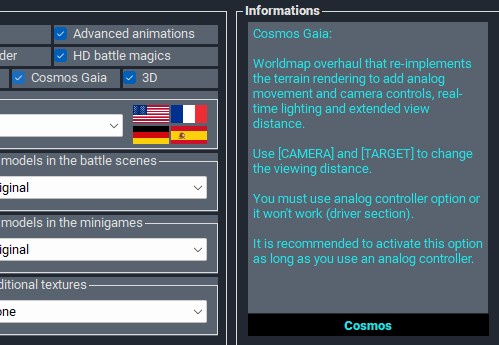
Why is the “Cosmo Gaia” mod not applicable?
Will there be an update in the future?
 
Why is the “Cosmo Gaia” mod not applicable?
Will there be an update in the future?
it's working already and for long time ....
pmQJO9z.jpeg
 
It does not flag, it does not enable, to me as well as to another friend of mine. Is there perhaps some other option that conflicts and that you have to deactivate first?

THE VIDEO OF THE TEST HERE:
 
It does not flag, it does not enable, to me as well as to another friend of mine. Is there perhaps some other option that conflicts and that you have to deactivate first?

THE VIDEO OF THE TEST HERE:
Have you read the help part ? you must enable analog controler
 
Has anyone managed to get this to work on the latest steam deck update and latest lutris?
It fails to launch the unified.exe
What version of wine in lutris is working?
 
These are not confusing versions. You can quickly go through them, see what you like and insert it. Some of these things that I have collected in these versions are getting lost in time and on the web completely, this may be the only opportunity. At least the Advent Children style characters and the remade World-Map.


These are not confusing versions. You can quickly go through them, see what you like and insert it. Some of these things that I have collected in these versions are getting lost in time and on the web completely, this may be the only opportunity. At least the Advent Children style characters and the remade World-Map.


With a 40h+ full time job + a 10 month old baby i don't have any time for that, plus my pack's goal is to be as consistant as possible between models and parts of the game, so it won't suit in it.
if you want to add part to my pack, just read the help part, there's a guide on how to do it
 
Guys can anyone help me with this? Implement these characters with this redone world map in satsuki syw pack?
 
Hello ,

Can i use this mod with saving cloud steam ?
I mean i want to play with 2 different pc with the same save.
Its possible with cloud ?

Thank you
 
Hello ,

Can i use this mod with saving cloud steam ?
I mean i want to play with 2 different pc with the same save.
Its possible with cloud ?

Thank you
no, unless you copy the save files from one pc to another.
also once installed it's 100% portable, so you can copy the game to a fast enought usb3 drive/key, and play it from here from one pc to another
 
Need help with Steam Installation.

Hey guys,
I had 7th Heaven installed last year.
I deleted everything and reinstalled a fresh Steam version FF7.
I've been trying several days to install the Unified 1.15 and follow the step by step guide.

I got as far as this:
- Modify the location of the executable, select the update, and repeat the process to install it.
- After the update is installed, right-click on your game in Lutris and click Configure.
- Change the location of the executable and select the game's executable: FF7_SYW_Unified.exe, and save your changes.
- Right-click again on the game, then click Create Steam shortcut.
- Switch to Gaming Mode and run the game. Remember to adjust your controller profile to support the mouse; it will be much more convenient than using touch controls.
- Launch the game from the mod's configuration menu and exit.

1. I was able to install a) FF7_SYW_Unified and b) 1.15 update to home/deck/Desktop/FF7 SYW 1.15/drive_c/FF7_SYW_Unified/ folder

2. When I switch the FF7_SYW_Unified.exe from that folder back to Lutris (as instructed) to add to Steamdeck and run in Game mode, the action failes. I don't get anywhere. No extra screens.

3. I followed the instruction to the letter to ensure I get the "Winetricks" and "dotnet48" in Lutric.


Please help me figure out which step have I missed and why I can't run the confic or the main game.

Thanks,
Ben
 
When you say that this new round of FMV have "more accurate colors," what exactly do you mean?

Did you locate better sources? Use a different method to extract the videos? Use a different upscaler that better preserves color? Made a color adjustment in your avisynth scripts?

In that last case, please share an example script so I know exactly what you did.

(I ask because I'm again working on colorimetry updates for FFNx, and I want to make sure to get these perfect.)
 
I'm having two problems:

1. I'm trying to run this through Wine (no Steam, no Lutris, just straight-up wine staging 10.12 with DXVK) on a desktop PC (not a Steamdeck) and I'm getting a whole bunch of "window class name is not valid" errors. I can click through the errors and the parts of the UI that do get drawn work. I just can't see or do anything related to those windows.

If someone has this fully working on Linux (desktop, steamdeck, or otherwise), please kindly let me know exactly what you library overrides are.

2. If you launch the game via ff7.exe, as recommended in the steamdeck instructions, the trainer doesn't launch. So no dynamic weapons, etc. What's the proper launch order -- trainer first, or FF7 first? (FYI: It should be possible to launch the trainer inside Steam by using a bat file that launches both ff7 and the trainer.)
 
I installed FF7_SYW_Unified 1.15 using the latest steam version of the game and everything works great except I am having one problem, I have all language setting I know of set to english but the regions of areas are coming up in french. Like grassland says region de prairie or something like that, same with midgar when I save near midgar it showing the french name for midgar. I have searched around and have not found a solution. Does anyone know how to fix this?
 
Status
Not open for further replies.
Back
Top