[FF7PC] Post bug reports here [use The Reunion thread instead]

  • Thread starter Thread starter DLPB_
  • Start date Start date
Status
Not open for further replies.
I'm on it.  Certainly changing those values (model light and global light) has a big impact in game.  If I can track down what is using it where, we may be able to tweak it.
 
It looks like the y and z coordinate of the light source may have gotten reversed.
 
I'm not seeing much difference (I can't see any actually :P ) when reversing the Y Z.  I do see a good improvement when increasing the global light, though.
Got a before and after?  If it is a Y Z issue, then that can prob be fixed in exe.
 
I was speaking in theory. It looks like some pair of coordinates got reversed.
 
Yeah, I agree. I've started mixing and matching. But if this fails, it may just be as Kal said and the whole thing is crapped out.
 
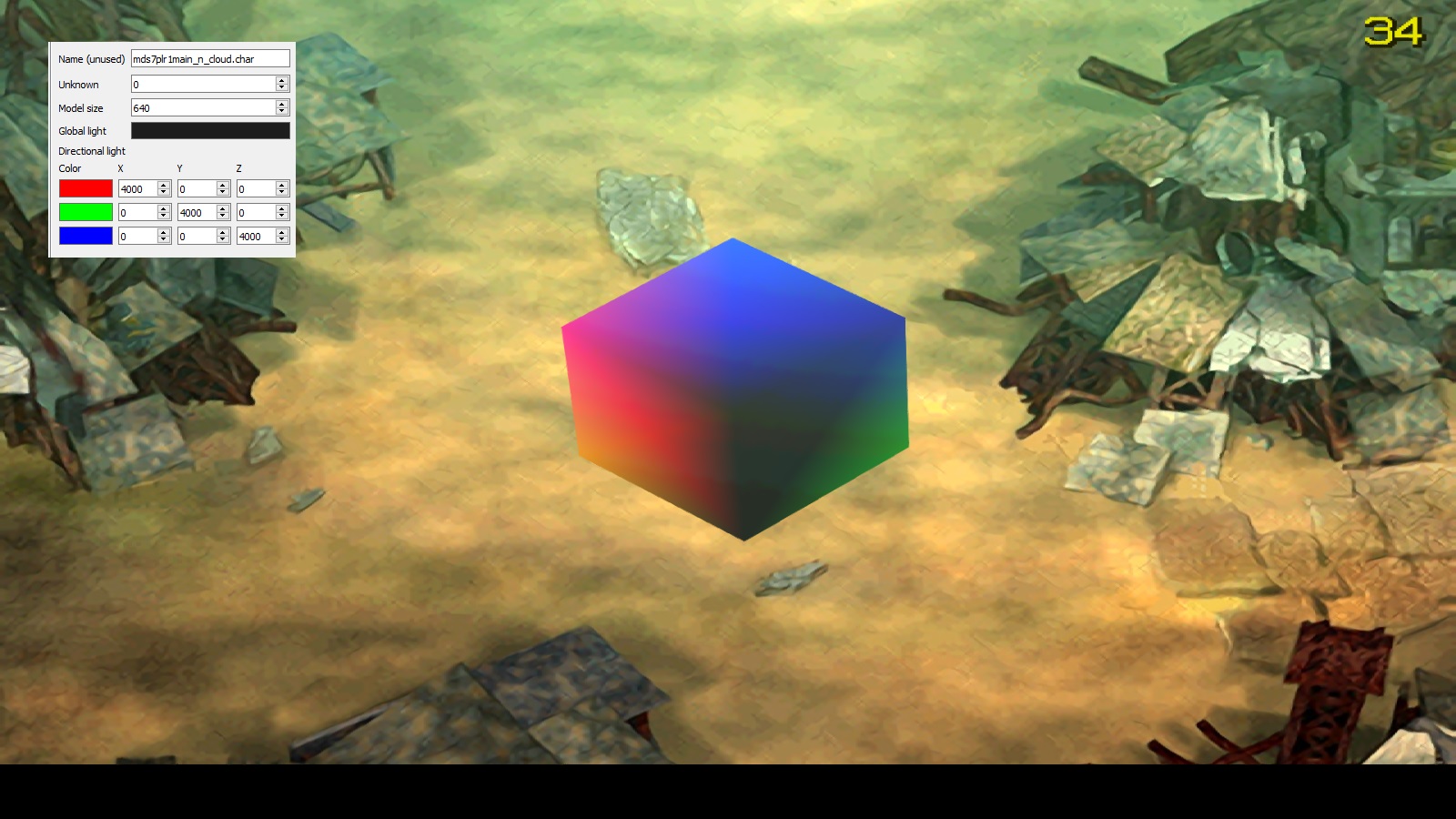
I guess I knew what's going on. See this:
fXotPfk.jpg

(seen from the models position: Red comes from the right, green from below behind and blue from upper behind)

The light is calculated by the camera position.

The PSOne has a co-processor called the Graphics Transform Engine, which is meant to perform many 3D operations like matrix-vector multiplication, lighting and fog. It was fixed-point
  • (aka: integer) based and couldn't work with floating point numbers. The X, Y and Z coordinates of vectors are stored as 16-bit values: 1-bit for sign, 3-bits for integral part and 12-bits for the decimal part. It only supported 3x3 rotation matrices with translation being a separate operation using vectors with 32-bit XYZ integer components (no fractional parts).


This seems to be one reason behind the wobbliness: while drawing a scene, the objects's polygons must be transformed from their local space into world space (at the very least one rotate and one translate command) and then from world into camera space (another rotate and translate). Since translation is integer-only (no fractional), it will "snap" around, the severity depending on the scale of the scene elements. Also, if you have multiple rotations and translations stacking on top of each other, the precision errors will build up quickly.
If I'm correct, then every shader effect should be rendered in the world space. Though, I don't know if the PC version does render in that way.  :-[
 
Last edited:
The double transform itself is nothing unusual, are you saying the PC and PS1 versions apply lighting at different stages?
 
That would explain why swapping the values between the axis doesn't work and how such a bug could occur. I guess the port team didn't notice that there was a difference in the look.
 
Are we sure that's what is causing the fault?  Could it not just be a mix up of the X Y Z values - or the global light not being processed correctly?  What happens if you mess about with the X Y Z order?
 
Did that already and you won't get any good result. That's why I got the idea with the colored light and the cube to see where actually the axis are. I post tomorrow more pictures which show only one axis (color at the time) and another scene.

Edit:
Now where I think about it maybe the the game was meant to use the field orientation but wrongly use the orientation of the camera. ???
 
Last edited:
What is your global light set to in your test?  Black 0 0 0?  I guess I'd need a way to put the model into the game too though.  Someone else like Green_Goblin would have to do this test for us for the PSX version.

Why did they even do this anyway?  Why do all models have differerent light on different fields?  Was all this nonsense really necessary?
 
Last edited:
The Global light is uninteresting because it only handles the brightness of the model.
Here some pictures with only one color active:


x-axis

Code:
[IMG]http://i.imgur.com/ei3C9Cz.jpg[/IMG] | [IMG]http://i.imgur.com/xLXEEAd.jpg[/IMG]
positive value | negative value

y-axis

Code:
[IMG]http://i.imgur.com/Qm2rGw2.jpg[/IMG] | [IMG]http://i.imgur.com/ZADHJsF.jpg[/IMG]
positive value | negative value

z-axis

Code:
[IMG]http://i.imgur.com/gyuKGU8.jpg[/IMG] | [IMG]http://i.imgur.com/YVrFOm2.jpg[/IMG]
positive value | negative value
Here is the cube for testing (inside is the Cloud model, Kimera refused for some reason to use only the cube attached to the skeleton).
https://mega.nz/#!GdVzCYZa!7cD9leLanRd8WjPAd881QHjYxZl1TKuUr_1Y7Hizv10
 
I may be being thick here since I don't understand this stuff well enough, but where is the bug?  How should these look?
 
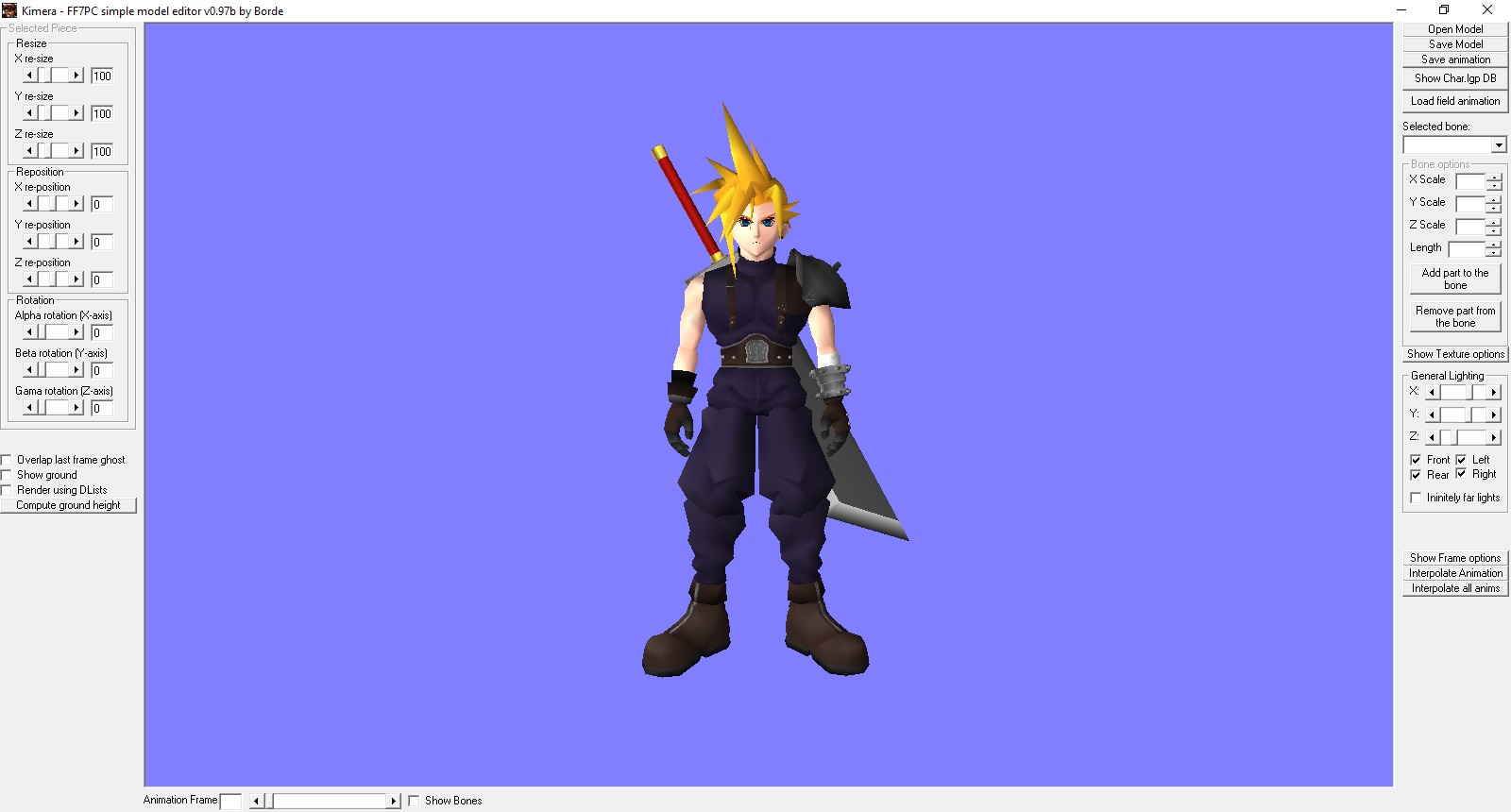
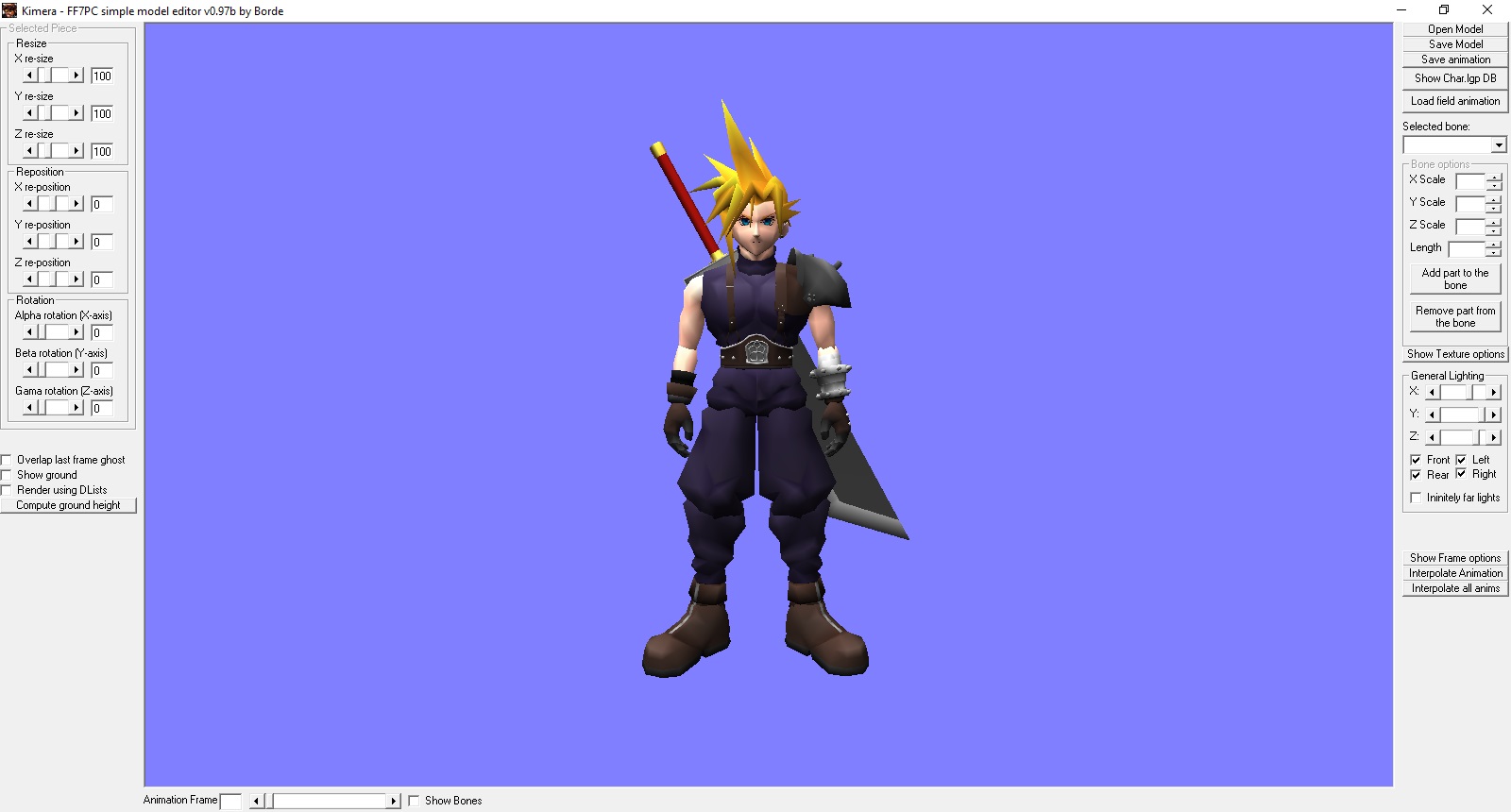
That's the big problem, I don't know where the bug has its origin. The values in the flevel.lgp are the same as on the psx files. The y and z seems to be wrong displayed. The y value should come from above of the model, but on PC it comes from the front. Let me demonstrate it with Kimera
PC
iEk8fOi.jpg


PSX
nayOUgX.jpg


From the tests I made the light is somehow connected to the camera. Now is the question, is that behavior wrong or does have the PSX different values for the camera when calculating the light?
I simply cannot imagine that they added some factors or mixed something up. It seems more practical to me that they didn't understand what the PSX did do and they have written their own way to implement the light.

As I said it's a very minor bug, which we can't solve yet at last I have no time to deal with it further. But maybe when MR gets the preview for the light we can fix it manually.
 
Looking at your pics again, it does look like Z and Y are wrong way around?  The Z should go inside and out, not up and down. Depends how it decides what X Y Z is.  We need to see this test on the PSX somehow.


Kal... do all the colours work fine too with each direction?  If you test all three X with red 4000, then all three Y with 4000  etc (but one at a time).
 
Last edited:
I'm beginning to wonder whether the PC version is actually correct colour and the PSX is wrong due to how it is forced to use colour. PC can have a full range, whereas the PSX could not, right?  Sep's hair is more correct in PC for example - and certainly is correct to the model itself, which is all grey. The sin colour looks right in PC too.

I am experimenting now changing light using the engine... so I may be able to get the psx look eventually anyway.
 
If it helps, here's what a frame rendering looks like in ff7 when using Aali's opengl driver:
gliInterceptLog.txt

(I'm using a modified version of glintercept to add FF7 related data)
and the shaders that were in memory at the time:
Code: [Select]
Code:
//== PROGRAM LINK STATUS = TRUE//== PROGRAM VALIDATE STATUS = TRUE//======================================================//   Vertex Shader 2 //======================================================//== SHADER COMPILE STATUS = TRUE#version 110uniform int vertextype;uniform bool fb_texture;uniform int blend_mode;uniform mat4 d3dprojection_matrix;uniform mat4 d3dviewport_matrix;void main(){ vec4 pos = gl_Vertex;  gl_FrontColor.rgba = gl_Color.bgra;  // TLVERTEX if(vertextype == 3) {  pos.w = 1.0 / pos.w;  pos.xyz *= pos.w;  pos = gl_ProjectionMatrix * pos; } // LVERTEX and VERTEX else {  pos = d3dviewport_matrix * d3dprojection_matrix * gl_ModelViewMatrix * pos;    if(gl_FrontColor.a > 0.5) gl_FrontColor.a = 0.5; }  // BLEND_NONE if(blend_mode == 4) gl_FrontColor.a = 1.0; // BLEND_25P else if(blend_mode == 3) gl_FrontColor.a = 0.25;  gl_TexCoord[0] = gl_MultiTexCoord0;  if(fb_texture) gl_TexCoord[0].t = 1.0 - gl_TexCoord[0].t;  gl_Position = pos;}//======================================================//   Fragment Shader 3 //======================================================//== SHADER COMPILE STATUS = TRUE#version 110uniform int vertextype;uniform sampler2D tex;uniform bool texture;uniform bool fb_texture;uniform bool modulate_alpha;void main(){ vec4 color = gl_Color; vec4 texture_color;  texture_color = texture2D(tex, gl_TexCoord[0].st);  if(texture) {  if(fb_texture && texture_color.rgb == vec3(0.0, 0.0, 0.0)) discard;    if(texture_color.a == 0.0) discard;    color *= texture_color;    if(!modulate_alpha) color.a = texture_color.a; }  gl_FragColor = color;}
interestingly, I can't see any calls to the lighting functions in opengl, so I wonder if the lighting calcs are just done with the shader.
 
Last edited:
The function I posted above seems to handle all light calcs. Not sure if that relates to a shader calc somewhere.
 
Status
Not open for further replies.
Back
Top
