[FF7PC] Unified Model Installer (Discontinued, use Bootleg)

  • Thread starter Thread starter DLPB_
  • Start date Start date
Status
Not open for further replies.
Already responded on the other forum, but I'll try to look into it sometime this weekend when I have a few hours free to tinker around with it.  If it's a problem with the model and not the game, it shouldn't be too troublesome.
 
Thanks!  And pretty sure it is the model... the game is picky about the model when using transparency mode.

I dunno how Squallff8 has done his, but his fare even worse... parts disappear.  With prp, only sephiroth has an issue.
 
Well, I started looking at that sephiroth model.  But I have no idea what I'm looking for.  Are the models too transparent or something?
I know there used to be a problem with sephiroth's hair looking weird or something, but that was because the modelers opted to use 2 pieces for it instead of 1 like the original.  That can be easily remedied by either making it 1 piece again, or opening the P editor and deleting the faces that make a wall between the two pieces.


I saw a post a while back about his head being missing, my guess there is  the new model is using the alpha blend option.
 
The head missing one is Squallff8's sephiroth.  Squallff8 models all have glitches with missing body parts when transparency is on.  Perhaps as you say alpha blend is on, though Pitbrat would  need to confirm that.

With PRP (the model I sent), only the hair is wrong and looks like you know how to fix that already  8-)  Can you send me back a fixed model from the files I sent?
 
Last edited:
Oh, well that was just a theory,  I guess I'll boot up that save and check to see if it works
 
lol so check it, the reason his hair is always so predominant when he is translucent is because of how dark it is.   When I edited the color to be R 196 G 196 and B 196 this is what I came up with...
shorthair.jpg


His hair disappears when shading is applied.   Therefore, it is my assumption that the lighter the color, the more see through, the darker the less see through.   I'll do one final experiment to verify.

EDIT: Nevermind.  Apparently coloring the files at all in kimera causes them to disappear when transparency is added (though I stick to my dark color hypothesis, just look at aerith's bangs through her ribbon).   I may try editing him tomorrow using an older version of Kimera...
 
Last edited:
I have a problem. The Aerith HD battle and field model shows up as white with no textures when I use the custom driver, but when I use the direct3d driver the field and battle model work. what is going on?
 
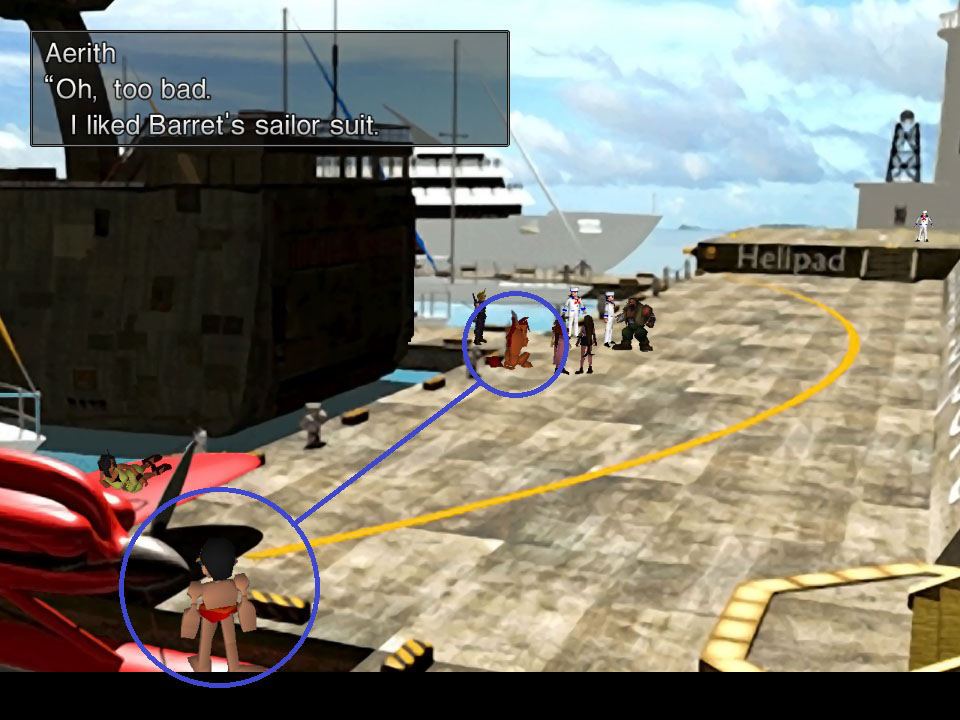
Updating from U02b to U03 I encountered a small problem.

TqnEE.jpg


Selecting both PRP and Squallff8 options under FIELD, Red XIII's model and the man on the seaplane in Costa del Sol don't update. Both were fine while I was using U02b, but are no longer after installing U03. I'm not sure if this was a small oversight when adding Kela51's Red XIII model to the installer, or not.

Regardless, Kela51's Red XIII model works when selected as expected. Just that Red XIII and the Costa del Sol man retain their original models when selecting PRP and/or Squallff8.

EDIT: Couldn't remedy the problem even with a clean install of FFVII. Also, the Chocobo carriage w/ Tifa on it (leaving for Wall Market) doesn't update either.

 
Last edited:
Updating from U02b to U03 I encountered a small problem.

TqnEE.jpg


Selecting both PRP and Squallff8 options under FIELD, Red XIII's model and the man on the seaplane in Costa del Sol don't update. Both were fine while I was using U02b, but are no longer after installing U03. I'm not sure if this was a small oversight when adding Kela51's Red XIII model to the installer, or not.

Regardless, Kela51's Red XIII model works when selected as expected. Just that Red XIII and the Costa del Sol man retain their original models when selecting PRP and/or Squallff8.

EDIT: Couldn't remedy the problem even with a clean install of FFVII. Also, the Chocobo carriage w/ Tifa on it (leaving for Wall Market) doesn't update either.
I ran into those problems as well with U02.  I don't use Squall's models.
 
I looked into the issues.  When i select PRP squallff8 and kela redxiii, it works fine.

try again and this time place a clean char.lgp into backup-dlpb folder before running installer.  If that does not work, I need to know exactly what changes you make compared to DLPB selection.
 
Last edited:
This looks like its coming out awesome, thank you. Do you have a list anywhere of what models are still missing, or do they each have a handed model atm?
 
I am having problems with the field models in the game. Cant seem to get any of them working. I am new to all of this so I may just be doing something wrong. It doesnt really seem like anything I am doing is working properly.

I personally dont mind the old graphics of the game (as I played it back when it came out) however my girl friend is new to gaming and really wants to play but cant get past the bad graphics. Any help would be really appreciated!
 
i checked the new Red XIII battle model in Kimira96b, did the same thing with the field model and find it nothing but white model think the texures need to be reapplied before releasing it again but i dunno how to do that. if killika could do that and fix it i think everyone will be happy
 
I am having problems with the field models in the game. Cant seem to get any of them working. I am new to all of this so I may just be doing something wrong. It doesnt really seem like anything I am doing is working properly.

I personally dont mind the old graphics of the game (as I played it back when it came out) however my girl friend is new to gaming and really wants to play but cant get past the bad graphics. Any help would be really appreciated!
Hey there!

I'm new too, but I managed to get the field models working, at least as far as I can tell (I just started the game again so I haven't seen all the models yet)

Here's what I did.

I downloaded UMI and put it my C:\Program Files (x86)\Square Enix\FINAL FANTASY VII folder. Then when I installed it, it gave me an error that my game isn't installed correctly (I think it has to do with the fact that I have the "re-release"  of the game.)

When I had to select a destination folder I selected the C:\Program Files (x86)\Square Enix\FINAL FANTASY VII folder again.

DLPB's selection is the "standard" selection and when I used this (just clicked next) it installed the field models for me.

Right now I'm trying to install the battle models. Can't seem to find the yuffie, cait sith and cid ones, but I'll cross that bridge when I get there.

Hope this helps.
 
I know why it isnt updating files...  the battle.lgp location is now different with new PC.  I cannot be bothered updating it either.  I suggest you just use Kramner's New to Old converter when it comes out :)  Alternatively,

place battle.lgp inside \data\battle
place magic.lgp inside \data\battle
char.lgp inside data\field
minigame folder inside data

Then run the installer, choose folder that ff7_en.exe is in and install.  Then place the above files back to their original location.
 
This thread is not to be used anymore to discuss the new PC game.  I do not support it.
 
Hate to be a pest, but I have a request / suggestion should a future release happen at some point.

It'd be rather nice if the installer could store a user's choices once they click the install button, and upon a re-install, load that up as a "last settings" option at the top.

Reason being, it's anywhere between hard to impossible to find images of most of these models, so knowing just what you're going to get isn't easy, and it's also a bit hard to remember from one install to the next exactly which you picked last time through in order to try to get the options you're happy with.

If not, no big deal, and I certainly wouldn't go crank out a new version for this alone in any case.  Just figured I'd ask.  :)
 
Status
Not open for further replies.
Back
Top