[FF8:Remastered] Tripod: Remastered v1.1 - Triple Triad HD Custom Textures

  • Thread starter Thread starter Mcindus
  • Start date Start date
Status
Not open for further replies.
M

Mcindus

Guest
Tripod: Remastered v1.1
For use with 2019 FF8 Remastered PC version (Working on other ports)

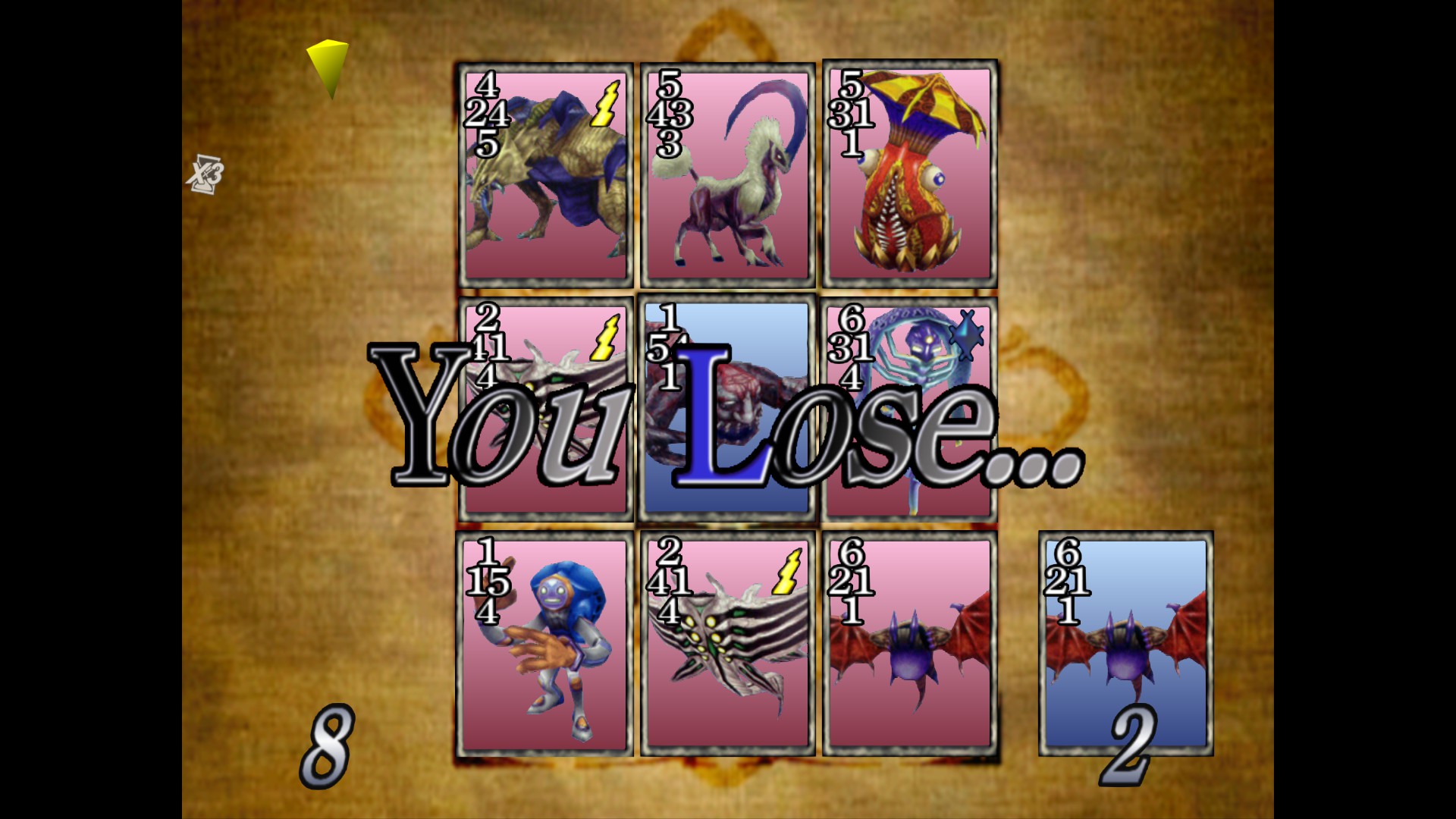
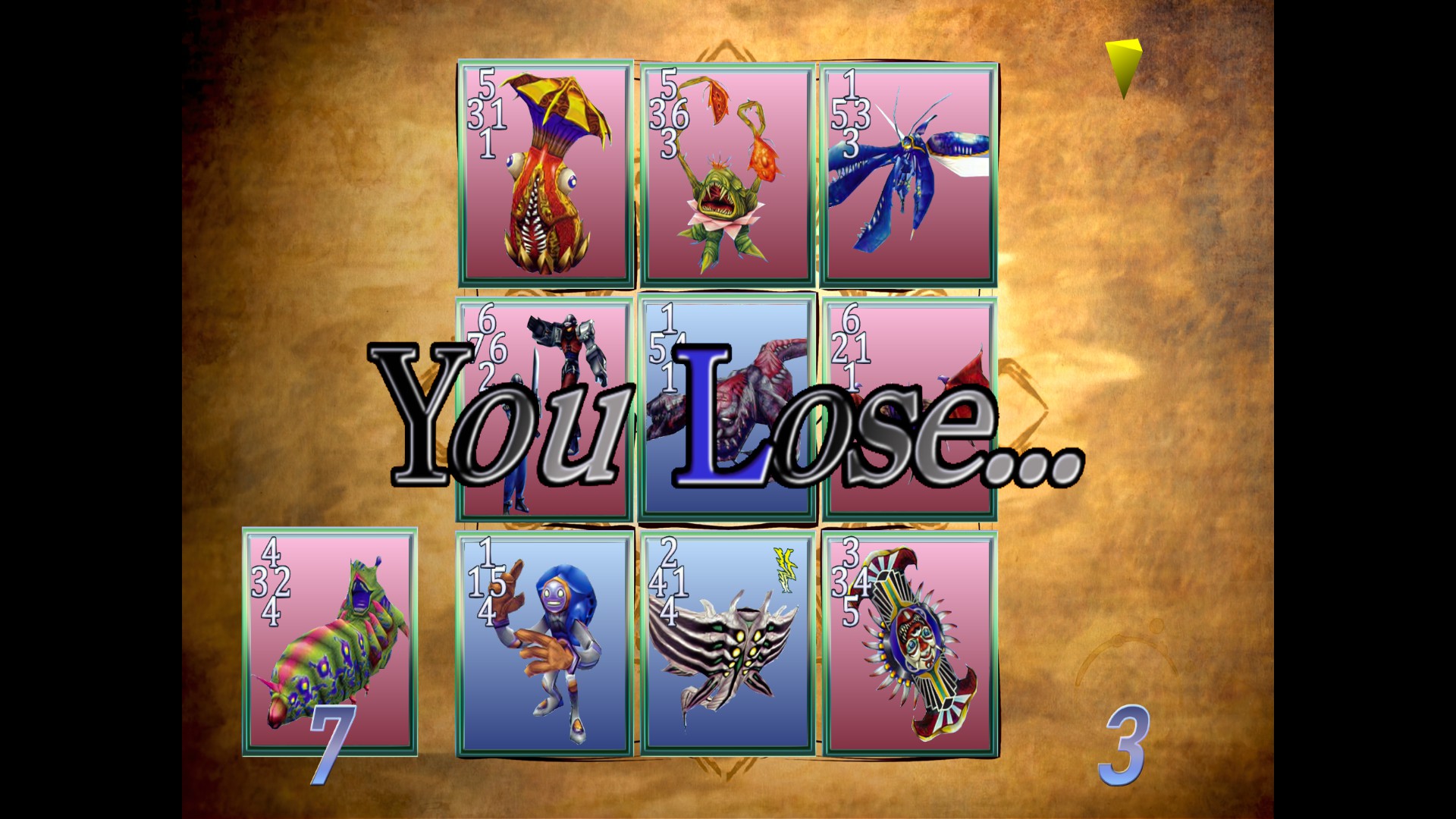
This mod replaces the Triple Triad card game textures (*cough*) with mine from the old Tripod mod, yet upscaled to 2048x2048 pixel resolution!


EA61B75215AD4FDEE117602013C668DD527C08E3


Mod Contains:

New Upscaled cards from previous mod
New Borders for menu and 'normal' cards created by me.
New Character "special" borders created by hikashi (thank you!) with minor edits by be to 'fit' the border theme
New Number Fonts for cards and stack sizes!
New animation sprite for the 'earth' element. (all other anims are mine from old Tripod mod)
Anim sprite alignment fixes!
2048x2048 Background 'splash' Mat (from old Tripod mod, but higher resolution)
2048x2048 Custom Game Mat (from old Tripod mod, but higher resolution)
'You Win, Draw, and You Lose' text that matches the original vanilla version almost exactly, yet HD (CURRENTLY BROKEN -- v1.0 had a 'halo' around 'you lose' and 'draw' so I reverted to original text here for now.

DOWNLOAD LINKS:
Tripod: Remastered v1.1 (DEMASTER)
Tripod: Remastered v1.1 (zzz Archive)

New/Old
ronkBk3.jpg
hmQoFtj.jpg


In the future, this mod will contain different border options, and there will be an 'ultimate' version that a few of us are going to compile, with much better art, and many different options!

Thanks to Sebanisu and Maki for making the mods possible!

Created 9/16/2019
-MCINDUS-​
 
Last edited:
mcindus I hope you will also make the new texture version for the 2013 version etc ? ^^
 
@Mcindus i tried the procedure you explained and double checked every single step but the game still crash on startup , it appear an error message that say "unknown error", and i also tried to manually inject each single modded texture, i don't know if this happen because the game doesn't accept a bigger main.zzz file or if it block the modded textures , but if the injection worked for you it mean that you forgot to write in the instruction the step that allow the game to actually accept the modifications
 
I updated the zzzDeArchive. You might want to "Verify integrity of game files..." in the game's options of steam. Then give it another try. The new version has logging so you can copy the log.txt and send it if you still have issues. And a new hopefully bug free Windows GUI. So if the Command prompt interface was giving you trouble maybe the new UI will be easier to use.

Possible issue in Command prompt interface:
I had to change the order of the console ui to accept multiple file adds. So Mcindus's instructions might need updated, read the prompts. I highlighted them yellow to hopefully stick out. I've been working on updates all week. Sorry about that.
 
I updated the zzzDeArchive. You might want to "Verify integrity of game files..." in the game's options of steam. Then give it another try. The new version has logging so you can copy the log.txt and send it if you still have issues. And a new hopefully bug free Windows GUI. So if the Command prompt interface was giving you trouble maybe the new UI will be easier to use.

Possible issue in Command prompt interface:
I had to change the order of the console ui to accept multiple file adds. So Mcindus's instructions might need updated, read the prompts. I highlighted them yellow to hopefully stick out. I've been working on updates all week. Sorry about that.
thanks , but fortunately i don't have any problem with the prompt unpacked and with those three options, infact since the creation of that prompt program i managed to rebuild the main.zzz countless times , the problem only occur with this mod for the new textures , and that's quite the reason why i am asking help , because even after doing correctly all that mecindus said , the game keep crashing, like i said the problem isn't the merge option , it is quite the fact that the game see some new textures , infact i also tried to manually inject the modded textures by using your program in order to extract the .zzz archivie of this mod , so the problem is something in the game , not in the program or in the modded files :\ ; i tried just now the updated version of your unpacker, this time the file mantain the same size and appearently the program succesfully marged the new textures , but when i go in to the game , the new textures just doesn't appear , so clearly the problem is some missing step that we must know about , even this time i tried to manually apply the textures, and even this time the game just crashed, so at this point the possibilities are that macindus and all the other people involved admit that they made the mod to work only for them , or, remember what they forgot to tell us to do, because again , whatever is the method used to inject the new textures , the game keep refusing them, like , we must know about a certain modification to the exe of the game that must be done in order to not reject the modded textures
 
Last edited:
I'm gonna try again with a clean main.zzz and a fresh d/l of mod see if I messed something up.

I was able to install no issues. I recorded a video of it. Sorry for no vocals I don't have a mic.

Just found the edit button on youtube. So I trimmed out some of the dead parts of the video where I was trying to find or close things or beat a random battle. Though that'll take some time for youtube to process. Edits are live :D
 
Last edited:
I'm gonna try again with a clean main.zzz and a fresh d/l of mod see if I messed something up.

I was able to install no issues. I recorded a video of it. Sorry for no vocals I don't have a mic.
thanks for this demonstration, now i know were my mistake was: i initially selected the triple triad mod as source archive , and the main.zzz as the input archive, but in truth i must do the opposite, thanks again , now it is working even for me and i can't wait for all the other variations of the modded textures, but still there is something that i need to ask you, why the game just crash if i manually inject the modded textures? to make things clear, i initially also tried to decompress the triple triad .zzz archivie , and put each modded texture in place of the original ones in their respective folder, but with such an accurate procedure nothing could possible go wrong , so why that manual procedure didn't worked for me ? and more important , even you and macindus only use the automatic procedure or you can actually effort to manually replace each single texture ? ; i give a look at the folders, and actually there are the icons from the ps4 version, so at this point a mod for the buttons icons would only require to switch the respective files with the icons so the game will  use the ones from the ps4 version :D
 
Last edited:
The way to make your own mod, or to manually merge. Extract the main.zzz to a folder. Change the files you want or extract another zzz into the same folder. And then Write a new zzz of that folder. Then replace the main.zzz in your FF8R directory. (The Replacing can be done automatically via the windows gui. Just click Set button next to main.zzz. Then execute.)

If it's crashing you might be a subfolder/file not being in correct path or something.

I think the game maybe case sensitive too. Unsure of that.

The sub folder structure must be 100% the same for any file used by the game or it'll crash.

Also remember to wait till it is done or it might not work. I copied the zzz out of the folder before it was done baking and I was like why is the file smaller and crashes. And I had got some prerelease mods for testing and they had the wrong folder structure in them so even the pros can do it wrong. :P

And if possible I use the most automated procedure possible to save me time and reduce the possible issues with doing things manually.
 
Last edited:
The way to make your own mod, or to manually merge. Extract the main.zzz to a folder. Change the files you want or extract another zzz into the same folder. And then Write a new zzz of that folder. Then replace the main.zzz in your FF8R directory. (The Replacing can be done automatically via the windows gui. Just click Set button next to main.zzz. Then execute.)

If it's crashing you might be a subfolder/file not being in correct path or something.

I think the game maybe case sensitive too. Unsure of that.

The sub folder structure must be 100% the same for any file used by the game or it'll crash.

Also remember to wait till it is done or it might not work. I copied the zzz out of the folder before it was done baking and I was like why is the file smaller and crashes. And I had got some prerelease mods for testing and they had the wrong folder structure in them so even the pros can do it wrong. :P

And if possible I use the most automated procedure possible to save me time and reduce the possible issues with doing things manually.
i see , and it is very strange because i never touched the name of the files , and of course , never touched the structure of the folders , and of course i never closed the prompt window until the end of the process (when the program say to press any key to close the window), there is another strange thing that happen when i decompress the archive: i get a .png file called "null" , but i don't know if it is an addictional file that get created or if with any decompression there is one more texture that get corrupted,  what do you think about it ? also i noticed that the program tend to not finish the extraction if the path of the main.zzz file is too long , and , i get again the crash of the game and the "an unknown error etc" after extracting a marged main.zzz , of course before try to recreate the archive i deleted the "null" .png file , but still the game crash, and i can swear that i not even dreamed about change a name , or change a folder structure , i barely browsed and opened some images in order to take a look at them
 
Last edited:
I wonder if you can still cause this to happen maybe you can grab the log.txt and post it somewhere like pastebin or something.

log.txt is created in the zzzdearchive folder. It will be started over every time you run the program. You must exit the program to make sure the log.txt has been finished writing to.

I need to try to cause this to happen on my computer. Sounds like there is a bug in zzzdearchive, if you are getting a file named null. Though It's hard to tell what that could be, if I cannot get the same bug to happen on my machine.

If main.zzz's path extraction is too long. You might try extracting to C:\foldername. I like to use D:\ext. I'll add a check for path too long and prevent the process from starting if it'd detected.
 
Last edited:
I wonder if you can still cause this to happen maybe you can grab the log.txt and post it somewhere like pastebin or something.

log.txt is created in the zzzdearchive folder. It will be started over every time you run the program. You must exit the program to make sure the log.txt has been finished writing to.

I need to try to cause this to happen on my computer. Sounds like there is a bug in zzzdearchive, if you are getting a file named null. Though It's hard to tell what that could be, if I cannot get the same bug to happen on my machine.

If main.zzz's path extraction is too long. You might try extracting to C:\foldername. I like to use D:\ext

sure, here is the log file https://www.sendspace.com/file/81zkci , so in short: i can use the marge option correctly to add the modded textures with the UI updated version of your program , and i can compress and decompress the base non modded archive with the original textures , but when i decompress the archive that was modified with the marge option to get the modded textures , i get that "null" png file , and the game crash on startup even if i recreate the main.zzz immediately and without do any change , it is like the main.zzz get corrupted during the extraction, and i can swear that i never dared to interrupt the process of extraction , infact i only start to do something when the program tell that the extraction is ended and the program switch to the folder of the main.zzz archive that got extracted ,still when i take a look at the log file , it suddenly stop to show the progress , before the end of the extraction , you watched the log file ? you now know where is the problem ? it is important because if this problem doesn't get solved then it will be impossible to recreate an updater main.zzz, for now the only thing that work is the merge option
 
Last edited:
sure, here is the log file https://www.sendspace.com/file/81zkci , so in short: i can use the marge option correctly to add the modded textures with the UI updated version of your program , and i can compress and decompress the base non modded archive with the original textures , but when i decompress the archive that was modified with the marge option to get the modded textures , i get that "null" png file , and the game crash on startup even if i recreate the main.zzz immediately and without do any change , it is like the main.zzz get corrupted during the extraction, and i can swear that i never dared to interrupt the process of extraction , infact i only start to do something when the program tell that the extraction is ended and the program switch to the folder of the main.zzz archive that got extracted ,still when i take a look at the log file , it suddenly stop to show the progress , before the end of the extraction , you watched the log file ? you now know where is the problem ? it is important because if this problem doesn't get solved then it will be impossible to recreate an updater main.zzz, for now the only thing that work is the merge option
I added the length checker it'll be in the next version. Per google the max path length is 260. Your folder you keep the main.zzz in is 176. And the longest path in main.zzz is 79. So 176+79+1 = 256. It's a limit of most windows things including the libraries in C# I use to code this.

The null.png is actually a real file. I dunno what it's used for, but it exists in main.zzz

Can you get a screenshot of the error box that ff8 gives you? I cannot get mine to crash. :P

What I did was I unpacked a main.zzz that I had previously merged to a folder and repacked it. *shrugs*

Also the log was incomplete mine is like 56039 lines heh though mine is unpacking and repacking. *shrugs*
Though mine also incomplete... I guess i need to fix that too. must not be writing everything before exit.

I feel like it isn't the biggest issue.

You could also download qt-zzz and try them out see if you get the same issue.

You can mod the game with merge so I'll consider that a win for now. :)
 
Last edited:
I added the length checker it'll be in the next version. Per google the max path length is 260. Your folder you keep the main.zzz in is 176. And the longest path in main.zzz is 79. So 176+79+1 = 256. It's a limit of most windows things including the libraries in C# I use to code this.

The null.png is actually a real file. I dunno what it's used for, but it exists in main.zzz

Can you get a screenshot of the error box that ff8 gives you? I cannot get mine to crash. :P

What I did was I unpacked a main.zzz that I had previously merged to a folder and repacked it. *shrugs*

Also the log was incomplete mine is like 56039 lines heh though mine is unpacking and repacking. *shrugs*
Though mine also incomplete... I guess i need to fix that too. must not be writing everything before exit.

I feel like it isn't the biggest issue.

You could also download qt-zzz and try them out see if you get the same issue.

You can mod the game with merge so I'll consider that a win for now. :)
@Sebanisu

thanks for the incoming update for that program, the "null.png" really is a file used by the game that doesn't get correctly extracted, and now i know why i get that error message   https://www.sendspace.com/file/yg0x89 (tell me if the link doesn't work and i will reupload the image), it is because i delete the "null.png", infact when i give it a try recreating the main.zzz with also the null.png inside , the game proceed , but it doesn't mean that it won't cause any problem while in game since it is still a missing file, but the point is that the crash on startup occur if you recreate the archive without that null.png, also sorry for the late reply , it is because of the time difference , i was sleeping , sorry again , i wasn't deliberately ignoring you especially because i really care about mod this game especially now that we can finally inject the modded textures inside the game
 
zzzDeArchive does a hash of the files and verifies they are a correct match on write and merge. But it currently doesn't on extract. So I'll add that to the next version to prove that a file extracted is the correct file.

If you open main.zzz in a hex editor and search for null.png you'll find the header entry for it.
In the original main.zzz entry for null.png:
The first 8 bytes after the filename are the offset to the file (1229669125 bytes from start) and the following 4 bytes are the size (169 bytes).
If you seek in the hex editor to that offset location. You can see what the null.png's hex looks like and compare it to the one that was extracted.
Code: [Select]
Code:
Verified (d:\ext\textures\null.png) sha1(831A30B039DE0EFBE25B695F980FD3061C4B30B1)
Just added the verification code I'll see about releasing tomorrow. But it came out fine for me.

Sadly the error message you gave me doesn't tell us much. Most of the error's I've gotten give me a filename that is missing or something.
 
Last edited:
zzzDeArchive does a hash of the files and verifies they are a correct match on write and merge. But it currently doesn't on extract. So I'll add that to the next version to prove that a file extracted is the correct file.

If you open main.zzz in a hex editor and search for null.png you'll find the header entry for it.
In the original main.zzz entry for null.png:
The first 8 bytes after the filename are the offset to the file (1229669125 bytes from start) and the following 4 bytes are the size (169 bytes).
If you seek in the hex editor to that offset location. You can see what the null.png's hex looks like and compare it to the one that was extracted.

Sadly the error message you gave me doesn't tell us much. Most of the error's I've gotten give me a filename that is missing or something.
i see , in any case this "null.png" keep begin extracted from the original archive, but this mean that the original game actually have a "null.png" right ? also if i understood you correctly, that file should be 8 bytes size , not 4 bytes , it mean that the current version of the extractor only take out half of that file, infact remember that some days ago i got an error message that said something like "unable to read null.png" but i thought that "null" was like a temporary name for a file that should have a different name , about the other .zzz extractor , i prefer your because it is more practical to use , the other .zzz extractor only open and immediately close a prompt screen whatever i click on or if i paste the main.zzz on it , so i will always use your version of the extractor ; the extracter 4 bytes null.png basically appear like a microscopic image , a little square composed by two while little squares and two little black squares
 
Last edited:
I think i confused you. I probably was over explaining or something :P
Inside the ZZZ files there is 2 main sections. HEADER and DATA
HEADER:
Code: [Select]
Code:
4 * byte: number of filesfileinfo * number of files.
Fileinfo:
Code: [Select]
Code:
4 * byte: length of pathlength of path * byte: path8 * byte: offset to data from start of file.4 * byte: size of file.
What I was saying is the 8 bytes could be used to find the location in the file of the null.png so you could compare what they look like in a hex editor.

Here's a dump of the MediaInfo for this png. I dunno what it's for but if it's there it must be important. *shrugs*

Code: [Select]
Code:
GeneralComplete name                            : D:\ext\textures\null.pngFormat                                   : PNGFormat/Info                              : Portable Network GraphicFile size                                : 169 BytesImageFormat                                   : PNGFormat/Info                              : Portable Network GraphicFormat_Compression                       : LZ77Width                                    : 4 pixelsHeight                                   : 4 pixelsBit depth                                : 32 bitsCompression mode                         : LosslessStream size                              : 169 Bytes (100%)
 
oh ok so i misunderstood , still i remember that with the first version of the unpacker, the one with only the prompt page , this null-png never appeared in the "textures" folder , it started to appear there with the latest released update of the unpacker and also with my first failed attempts to inject the modded textures (before you released the update and explained me with that video how to correctly apply the modded textures), as for the mediainfo about that file , i don't know what to say , it mention a "network" function , but i am sure that this game doesn't have any online feature besides the link with the achivements list in the steam client program , also according to you what is the reason why initially the extractor never showed this "null.png" in the "textures" folder ?
 
Png stand for portable network graphics. That's just spelling it out.

Sent from my Pixel XL using Tapatalk
 
Png stand for portable network graphics. That's just spelling it out.

Sent from my Pixel XL using Tapatalk
oh ok ok , but what about the fact that initially that null.png never appeared in the textures folder ? why all of a sudden is appearing now ? and it is really supposed to be a microscopic black and white square ? or it is just a little bug that occur during the extraction ? i need to know all this because even if the game doesn't crash on startup it is still strange that all of a sudden we get this image that initially never appeared after the extraction , what do you think about all this ? :O 

in short: knowing that the game doesn't crash on startup with the null.png inside the textures folder, i need to know if i can keep recreating the main.zzz without any problem or if it is better to wait until you discover more about this file ; there is another strange fact about the textures , maybe it is because i didn't searched properly , but i didn't found anywere the textures of the world map, could they be compressed inside one for those packs that are smaller than one mb ? also consider that english is my second language , so if you don't fully understand me just tell me ok ? it is still better to not continue the conversation and solve the problem
 
Last edited:
Status
Not open for further replies.
Back
Top