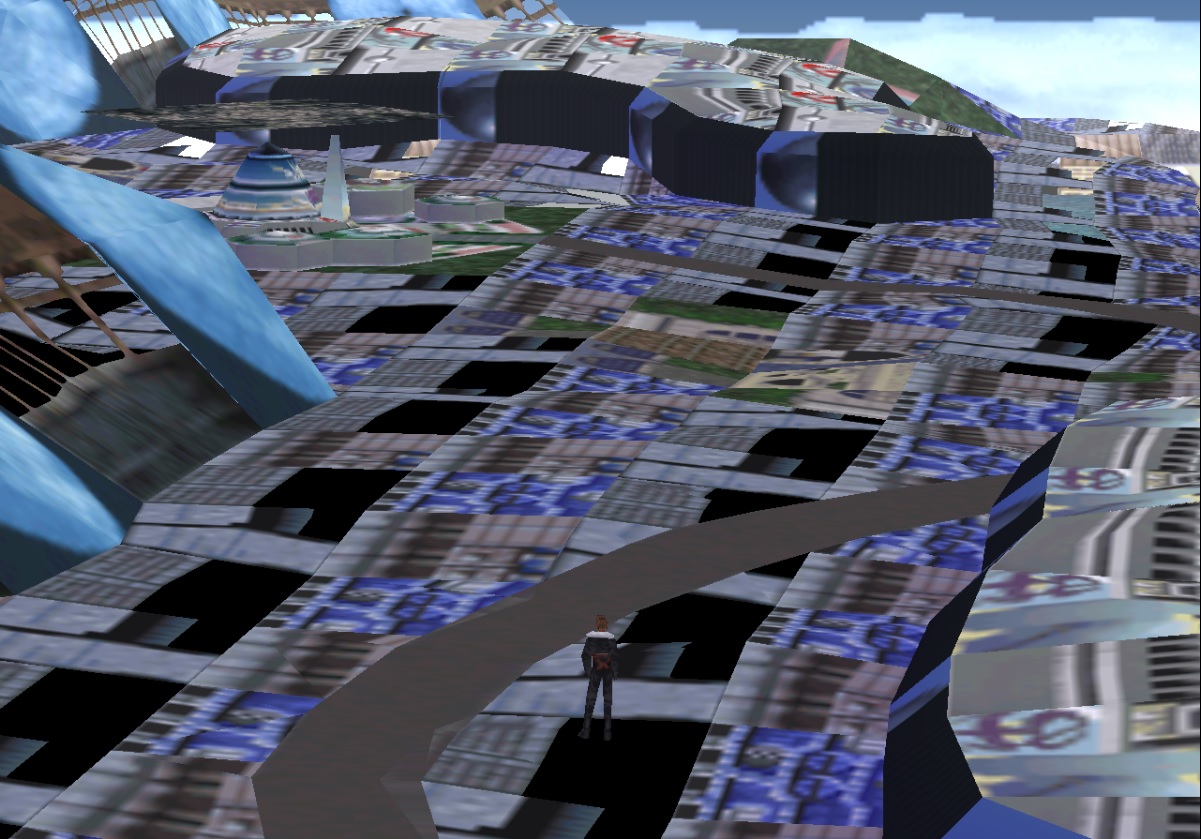
[FF8] world map and objects (world.fs)

  • Thread starter Thread starter Halfer
  • Start date Start date
Status
Not open for further replies.
H

Halfer

Guest
a8b92ad4d55c9d77a1136e3e27287f8a.png


First off, huge thanks to MakiPL for inspiring me and hopefully others with his research on ff8 battle fields. Since he's making a very good and much faster progress than i managed to make I decided to hop on to world map data. This concerns wmx.obj for now since I haven't looked on to the other files yet.

Remember that this info may be inaccurate in some parts since it is a huge file (33MB) and it is a pain in the neck to scroll through. However I'll talk about how to handle this file quicker at the end.

Insight:

For now (not sure), the world map seems to consist of 768 sections. Each section contains 16 blocks and each block can have different amount of triangles. Luckily, the sea mesh seems to have 32 triangles  (formation told later) so we can do tests on that more easily. Here are pictures with 1 section/16 blocks and 1 block with 32 triangles:
08fab4522ad4da3433558e5bf1801cca.png
3933d32ff14ac88a58c62589045ab4b9.png


Header:

Header consists of 68 bytes. Each section contains the same header structure.

  • First 4 bytes are still unknown since changing these don't seem to do anything.
  • Rest 64 bytes indicates the offset of blocks after the header
9196f85953c06068de6c85ff17f32047.png


Data:

Possible render/collision options:
This is very complicated.
After the header, the first 4 bytes seems to remove the whole corresponding block when set to "00 00 00 00", also it creates a collision over it so it can't be fled over. Setting it something else messes with uv's as well as geometry and may cause the game to crash or freeze. Setting it to "30 30 30 30" also affects the next block for some reason. The collision is also changed and in this particular example you can go under the world (something like in ff7 :D).


Triangle data:

The data for 1 triangle is 16 bytes long starting after possible render/collision options.

The next 4 bytes are for triangle vertices. zeroing these gives the following results for one triangle:
693f5c73cfecaa814c2f1fd011e84124.png


Here are the marked triangle vertices:                                                                        And here's how they are formed:

48189adec5ca94522f4a47d8bbd48fb0.png
92ee9bc9731cd4280217803737fd3797.png


Unknown still:

The next 8 bytes are still unknown, feel free to look at it!
Also the data between in-game blocks in a section is still unknown.

Ground type?

The last 4 bytes for one triangle data seems to contain UV data reference for the corresponding triangle. This is also how I made the example photos for this thread. Changing the value for this changes the triangles type. The marked bytes, when set to "88 88 88 88" gives the ground the type as in in-game example photos:
2dbef39bac5c29232491fbc40ebded00.png

Also landing on this ground is possible, but as I tested I found out that you can reference to any type of ground with this and I managed to get probably a cliff type where I were unable to land with ragnarok.

Padding:

Following the data for one section comes a bunch of zeros. This is called padding. The data and padding are 36864 or 0x9000 bytes for every section.

How to manage the file:

Since this file is huge I found out a little solution for managing it. One reason for the size of this file is padding. The header, data and padding seems to be fixed amount of 36864 bytes or 0x9000 bytes for easier reading in hex editor. This helps a lot since each section is therefore 0x9000 bytes long (including padding) and for next section you just add 0x9000 bytes more from the beginning of previous section to get for next section.

How to know which section you are editing in game:

This is still TODO. However I think there is 768 sections, but i'm not sure if one section can be larger or smaller than I showcased. For what I know, the first section in the file is top left corner section in-game and the next sections goes horizontally to the top right corner of the in-game map. This way of thinking isn't true in the vertical way however:

If there was 768 sections in the world map and the aspect ratio would be 4:3 like the world map picture, it would mean that the sections would be 32x24. Here's a picture of first block from 12th section of file which possible render/collision options are nullified:
130ae765eb7138d9603ddf97d3444a10.png


You can see that it is pretty accurately in place.
If we want 12th section vertically it would be (12x32=) 384th section in file, however it isn't correct so the 768 section hypothesis isn't correct.

Although it isn't correct we can use the first horizontal line and maybe the second one for testing purposes with this hypothesis.

Lastly:

I hope this helps someone with their research on this and someone manages to do something huge with this!

Also the very last section includes the model for great salt lake, its train station and little part of the bridge. Just remember if you replace the first section or any other section with this that there is 36864 or 0x9000 bytes in the section including padding.
 
Last edited:
Nice work, once this is cracked FF7-9 WM's will be reversed so can come up with sane design to support them all in QGears :)
 
OdBu1vW.jpg

*HEY! This shot is a bit old and uses 1/2 of texture. :D

Phew.

World map objects VT calculation:

Code: [Select]
Code:
                const float newSzerU = 256.0f; //CHANGE height * 2                const float newWysok = 256.0f; //CHANGE width * 2                float UU1 = (float)U1v / newSzerU;                float VV1 = 1.0f - (V1v / newWysok);                float UU2 = (float)U2v / newSzerU;                float VV2 = 1.0f - (V2v / newWysok);                float UU3 = (float)U3v / newSzerU;                float VV3 = 1.0f - (V3v / newWysok);                float UU4 = (float)U4v / newSzerU;                float VV4 = 1.0f - (V4v / newWysok);
After model there's of course well known: MODULO(Offset)+4
Balamb halo (or ring, whatever you call it) is second model just after Balamb. Ah, can't wait to see what's next. :)

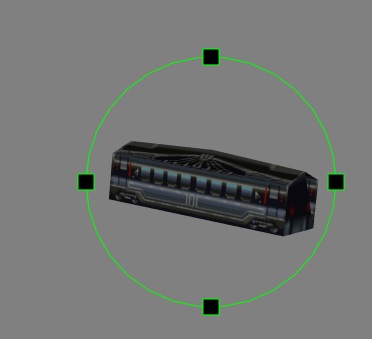
Train. :3
 
Last edited:
AWWWWWW :3

That's amazing to see finally!

Anyway..am I wrong or there are some triangular holes?..maybe some triangular mesh are missing?

Thanks so much for what you're doing :)
 
Yea. Just like the stage meshes, these are divided on quads and triangles. It's only textured quad mesh on picture above. :3
I'm just laaaazy. :D I'm lending you train mesh and need to go for now. :C

K0epbMg.jpg


Currently examined:
FFVIII_Steam/data/lang-en/world.fs/wmset.obj/
offset;description;TIM_texturePosition;TextureWidth/Height;
("0x3cfc", "Balamb Garden"); #51 (128/64)
("0x4a24", "Balamb Ring/Halo"); #51 (128/64)
("0x4bb0", "Train 1"); #52 (32/64)
("0x51cc", "Train 2"); #53 (16/64)
 
I love trains!

:D

Actually from the preview I cant understand if this is more or less detailed than the background model.. (I guess "less" but I could be wrong).
 
Glad to see you again Maki :D and great work!

I feel pretty bad for not being able to contribute frequently (lately at all) on cracking the files. I have so much work in school and right now I'm in middle of moving places and well the change of PC has knocked me a little back, but once I get the files and FF8 installed again and settle down in my new apartment, I'm good to get back in FF8 :D
 
I coded an analyzer for ripper. This is complete list of models and it's offsets:

wmset.obj (Steam 2013) SHA1: 31516E8E2452FF65EF6009BB86AB0D7CC58D0E22
Offsets are int.
Code: [Select]
Code:
1. 15612 - Balamb Garden2. 18980 - Balamb Garden Ring3. 19376 - Train 14. 20940 - Train 25. 212566. 228207. 231368. 241009. 2433610. 2449211. 2608812. 2770013. 2928814. 2944415. 3114016. 3317217. 3648418. 3688019. 3832020. 3971221. 4114422. 4260423. 4390424. 4488425. 4596826. 4936027. 5510028. 6080829. 6558830. 6664031. 6703632. 6789633. 68388
First texture is at: 413048 (EDIT: Was 429980, but Balamb uses two times the same texture, and due to file specific it needs to be repeated two times. 413048 is correct entry.)

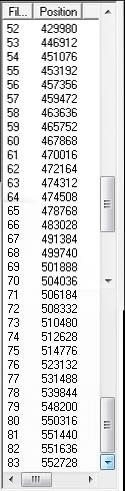
Texture offset list:
Where: 52 is 1 in index, and 83 is 31 in index.
IRIkmsZ.jpg


Could someone please calculate SHA1 from wmset.obj file from 2000PC release? (lang_en).
 
Last edited:
This is SHA1 for wmset.obj old PC release: 31516E8E2452FF65EF6009BB86AB0D7CC58D0E22 according to this site http://onlinemd5.com/

Seems to be same as steam release. I think the files are untouched, only executable is modified in steam release.
 
Last edited:
Thanks Halfer!
That's cool files are the same! :)
Now I can do a entry table for each model.
 
Title updated to not only deal with world map but the whole world container.
 
@up - Okay. :)

---

Wmset.obj is using 8BPP and 4BPP textures, with various resolution and CLUT size +  Clut sets. The problem is some 4BPP textures ARE animated / or just are changing textures, or just work as battle stages do. No TIM documentation says about animated sets. I found out, that it's saved as big-endian two bytes before CLUT. Like every byte there is little-endian, but this one is big-endian and should be reordered in code. Really, really weird. This should be calculated like this then:

Code: [Select]
Code:
            //Getting # set            String CLUT_sets = filebuffer[lookuped+16].ToString("X2");            CLUT_sets = CLUT_sets.Substring(0, 1);            if (BPP == 8)            {                if(int.Parse(CLUT_sets)>1)                    tempres = tempres + 20 + (int.Parse(CLUT_sets) * 32);                else                    tempres = tempres + 20 + (CLUTs * 32);            }            else            {                if (int.Parse(CLUT_sets) > 1)                    tempres = tempres + 20 + (int.Parse(CLUT_sets) * 512);                else                    tempres = tempres + 20 + (CLUTs * 512);            }            tempres += 8; //Padding + origin rot            UInt16 width = BitConverter.ToUInt16(filebuffer, tempres);            UInt16 height = BitConverter.ToUInt16(filebuffer, tempres + 2);
 
Last edited:
I'm not sure whether you're already aware of this (especially since I don't know exactly how you're using the textures after loading them), but you have to be careful with UV calculation. I believe the UVs are given for the texture pages, rather than the individual textures, and not all textures have coordinates perfectly aligned at the corners of the texture pages. When working with an extracted texture, you have to account for that difference.
 
I'm currently working on it. Sometimes I need to divide bytes by 256, sometimes by 64 or even 32. I need to find some dependency on it.  This is currently problem number 1.
 
Oops:
wKimjpQ.jpg


List of files that the game can run without:

Code: [Select]
Code:
music0.obj - ??music1.obj - ??music2.obj - ??music3.obj - ??music4.obj - ??music5.obj - ??rail.obj - ??texl.obj - Destroys whole world textures. See image above.wmset.obj - Contains towns, objects etc. but is NOT used by the game!
Crash:
Code: [Select]
Code:
wmsetXX.obj - where XX is language code. This one is actually used in-game.wmx.obj - Well... :D
I updated wmsetus on wiki:
http://wiki.qhimm.com/view/FF8/WorldMap_wmsetxx

It appears, that wmset does not containg towns. It's not confirmed though!
 
Last edited:
Okay, I had spare time to look on the files again and I found an interesting thing in the geometry forming.

In the files it seems that some parts of geometries are duplicated over itself meaning that there is 2 layers overlapping with each other. This led me to remember that in some thread there was discussion about this in some form, but I don't seem to recall/find it anymore. If somebody remembers which thread it was, I would appreciate to know too. I'm pretty sure it was here on Qhimm at least.

EDIT: Good news, I now know how the geometry is read from the file and I'll write an update tomorrow regarding on it.
 
Last edited:
As mentioned in the first post, each section is size of 0x9000h with padding and it represents small are on map (see first post).

Sections start with offsets of blocks which are formed inside section. On each offset the block starts with 4 bytes long header.

Code: [Select]
Code:
struct{        u32 unknown (sections always starts with 4 bytes which affect nothing)        u32 block_offset[amount of blocks]; // (first offset value/4-1) = amount of blocks        header headerData ;        face faceData[amount of faces];        vertex verticeData[amount of vertices];        shadows data[size differs]; // possible shadowing, on continents this sometimes match the amount of vertices.        padding; // to next 0x9000h offset} Section       
Code: [Select]
Code:
struct{        u8 face_count; (mostly triangles or quads)        u8 vertex_count;        u8 shadow_count;  // shaders or something related to make shadows        u8 unknown, never used??}header, size = 4 bytes
Code: [Select]
Code:
struct{        u8 vertexIndices[6];        u8 tex_coordX for v 0;        u8 tex_coordY for v 0;        u8 tex_coordX for v 1;        u8 tex_coordY for v 1;        u8 tex_coordX for v 2;        u8 tex_coordY for v 2;        u8 face type related [3]    // (texture page, type, etc...)         s8 collision; //needs a bit research} Facesize = 16 bytes
Code: [Select]
Code:
struct{        s16 coordinates[3]; // in form of XZY or YZX        s16 unknown, unused (optional W dimension probably)} Vertex
Code: [Select]
Code:
struct{        s16 or u16 unknown data [3]  // shadow possibly on XYZ (XZY) coordinate.        u16 always zeros ??} Shadows, under inspection still.
EDIT: texture related values may not be correct since they are not yet inspected properly.
 
Last edited:
Status
Not open for further replies.
Back
Top