[FF8] .x battle fields

  • Thread starter Thread starter Halfer
  • Start date Start date
Status
Not open for further replies.
Ok here is the byte data I reversed to get the top image, gfs,particle effects and spell effects all seem to be affected as well


8toe2cU.png
 
You reversed portion of face indices data. Still, don't know why altering this destroys the other elements. I'll take a closer look at this after this UV's. Currently, I discovered 50% of UV structure, also it does have Brightness settings in it! So the game doesn't itself have lightning data, but just controls the lightning by UV brightness. Nice one Square!

Update: Face indices are QUAD's probably.

DAT Battle model file and Stage file are having some similiar things. This is the same system geometry is build as in DAT as in .X file.

01 00 00 00 - number of objects (but it's inside object itself, so it's always 1, or not*)
08 00 00 00 - Offset of object start
and offset 0x8 for this is 4 bytes of not Face indices/UV, but triangles/quads.
Of course read backward.


X Y Z is 16Bit Signed int.


Extreme milestone!
I'm going to run an "milestone like" test, if it pass, then the full geometry would be done.
Yup. It's done now. The .X file's geometry section has just been cracked.
 
Last edited:
Amazing work!  Such progress on VIII in such a short amount of time.

Now Crestian and I have more incentive to finish the background textures.
 
Well done Maki, this will lead to great things in the future, I'm not sure about the dat files source code better off asking the noesis author
 
But, before we "dance" still there's some rendering problem
77nhn85zl0k1.jpg


They are quad, but well... I need to browse old topics about .DAT files, I think they had the same problem.
Ignore the shadowing, it's renderer.
 
I will link you this thread

https://www.ff7catalog.com/threads/5310/

Satoh in there explains why half is missing on reply#60, this was a ps1 game after all something to do with storing data efficiently
Oh! And that's what I was searching for. I even browsed this topic, but just missed it. Thanks Yagami. Still can't find a good workaround for this.
 
Would it work to process it twice per quad?
tri1(Vertice1,Vertice2,Vertice3)
tri2(Vertice1,Vertice5,Vertice3)
- one quad
tri3(Vertice4,Vertice5,Vertice6)
tri4(Vertice4,getdata8,Vertice6)

that is I wonder on the edges of the mesh, if there isn't stored an additional vertices but not all three so the last row of that quad would be
3+1 instead of 3+2 offset?
 
Last edited:
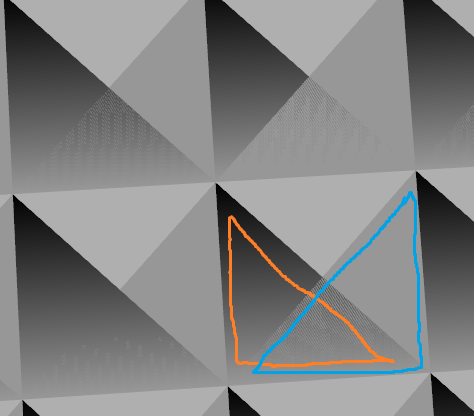
Looks to me like the triangles overlap, miscalculation somewhere?

zwPgNJW.png
 
Looks to me like the triangles overlap, miscalculation somewhere?

zwPgNJW.png
If the blue triangle be mirrored vertically, this should work just fine. I'll take a smaller object, and see which one should have +/- 1 face index.
Maybe every second one needs mirroring? If so, then this could be easy to mod, however if it's more complitaced, then.. well, it's going to be more complicated then. xD
 
Last edited:
Hmph, I don't know. It's neither backface culling and rendered "glitch". Maybe if We would write the viewer we'd make a special workaround for this, but...

I imported it into 3DS Max, and the face is just rotated 90o, or the vertex should be mirrored horizontally. Also the QUAD/Face translation:

t67ti8m1c8uf.jpg
,
npxqonz8unfe.jpg
,
003w6jg4o16w.jpg


After numerous tests I found it. Correct ABCD is:

ABD
ACD

So quad:
Code: [Select]
Code:
f 394 395 416 417
will be:
Code: [Select]
Code:
f 394 395 417f 394 416 417
 
Last edited:
Nice work, this means reading mesh without U/V and texture information is fully reversed now?
 
Nice work, this means reading mesh without U/V and texture information is fully reversed now?

Yup, UV info is stored in quad info, so getting working texture for it is just a little work to do. :)

Just a little update. My Quad>Triangle conversion is lil' bad. Instead of Quad to triangle shakotay2 on Xentax pointed a nice, clear way to fix model just by changing quad order from ABCD to ABDC. Looks fine:
*Ignore missing quad, that's my fault.
dh4xqknqegsl.jpg


EDIT: Imported to Excel, and changed columns to automate ASAP my work. Here's full model:
ofy1hr0m8axu.jpg
.

:)


EDIT2: I was just debugging process, had fun with noclip mod I've made, and after that I just noticed the amazing memory viewer with real-time value editing. So, I could see how's the camera made. If geometry is fully done (only texturing left), then this time let's have some fun with the camera. :) I'm on it.

EDIT3: I can in real-time alter camera, but it's still going to fixed location. Still, need to find that "fixed location" address that makes the camera go everytime there.
 
Last edited:
Oh man, that thread caught my attention indeed... Finally someone is researching battlefield scenes. I think the .X files has much to do with the scene.out file...
 
...here is an example of messed up UV/texture coordinates using Crestian's Railroad texture for Balamb town -

railroadbaduv.png
Hey guys - I know this is off-topic, but it has to do with the UV/Walkmesh - and since that seems to be a hot topic, I'm posting this here in the hopes that someone knows what's going on with the UV/Walkmesh in the open world areas.  You cracked that .x file in NO time and you're work is really interesting to watch unfold! 
As you can see, the railroad texture doesn't line up with the tiles near it, but the textures are correct.  If you look closely at the front (or back) of the train station, you can see where the textures combine and the town model warps into the upper corner.  You can easily see this on the Balamb Garden texture as well - textures are zoomed too closely and edges are blown out of proportion in places.  Kaldarasha believes that the walkmesh may be 'doubled' over itself? The PSX version does not do this.

Here is to your amazing-ness.  I hope this can be solved - it would help the texture replacement process become so much more worthwhile.
 
Of course I'm going to work on worldmap next. :)
Didn't touch the walkmesh yet, but as far as I just fast looked on those files is:

Wmrail is set of points. Probably points telling where tracks should go, just like splinemesh in UnrealEngine, but I'm not sure yet.
Wmtex is just a file containing textures only
Wmset is a file containing balamb garden model, train models, probably towns, consist similiar geometry data as levels and characters.
Wmsetus - almost same as above, but does have some differences?
And that biggest 20 MB file. Didn't test it out, but appears it doesn't have any textures in it.

I'll finish this .x file (texture support, and tool for it), then I'll start on worldmap.
 
Great MakiPL, I'm glad that you can understand this so well and are willing to make tools for editing these files! Looking forward to these tools! :D.

P.S. I also wonder if we can someday change the restriction of texture sizes and other limits in the FF8 somehow.
 
Of course I'm going to work on worldmap next. :)
Didn't touch the walkmesh yet, but as far as I just fast looked on those files is:

Wmrail is set of points. Probably points telling where tracks should go, just like splinemesh in UnrealEngine, but I'm not sure yet.
Wmtex is just a file containing textures only
Wmset is a file containing balamb garden model, train models, probably towns, consist similiar geometry data as levels and characters.
Wmsetus - almost same as above, but does have some differences?
And that biggest 20 MB file. Didn't test it out, but appears it doesn't have any textures in it.

I'll finish this .x file (texture support, and tool for it), then I'll start on worldmap. 
Wow, we'll take your word for it. That will be a really amazing tool indeed.
 
Status
Not open for further replies.
Back
Top