
[FF9]2016 release

  • Thread starter Thread starter makipl
  • Start date Start date
Status
Not open for further replies.
Hey Meru, I as well contacted Al to ensure a compatibility with Memoria.
Here're the following things I can share:

- Memoria is able to read the layered psd. :)
- For multiple scenes just add all the layers from the first background and right afterwards all from the second background (and so on) so you have one file with ALL the layers from the other backgrounds as well.
- For the multiple Language Titles Al don't have a finished solution as of now, but he's thinking of pulling the corresponding language layers from a suffix EN, IT, JP etc... so I think as of now, leave the layers as they're and after Al told us how'll be handling the language layers we can address them fairly easy.
- As Memoria will read the folders from a override folder we settled upon renaming the folder to the corresponding file name for FFIX. For example the field "Alexandria steeple" would be renamed to "(Alexandria Steeple) FBG_N01_ALXT_MAP026_AT_SIN_0". Information in the () brackets are ignored but it helps us a lot later on.

If you have ideas and/or better solutions please touch base with Al. :)
 
Thanks for explanation, Fraggoso!

So from what I get, there will be a folder that will have a few hundred PSDs... I count this as "loose files" and fundamentally dislike this approach. I prefer when textures are contained in unity archive, so I'll probably stick with HW. But I see possible good sides about this approach too. Generally you only need to rasterize all PSD layers and they should be ready to use.

Multiple languages and scenes are not a problem then.

That still leaves one biggest issue there. Layer order in my psd's (and probably yours too). I don't really want to create a copy of my psd's and re-arrange layers in them...
 
Thanks for explanation, Fraggoso!

So from what I get, there will be a folder that will have a few hundred PSDs... I count this as "loose files" and fundamentally dislike this approach. I prefer when textures are contained in unity archive, so I'll probably stick with HW. But I see possible good sides about this approach too. Generally you only need to rasterize all PSD layers and they should be ready to use.

Multiple languages and scenes are not a problem then.

That still leaves one biggest issue there. Layer order in my psd's (and probably yours too). I don't really want to create a copy of my psd's and re-arrange layers in them...
Let me explain a little more. :)
One Folder = Rename to the Fieldname and put one psd in it = Finish

So not one folder containing all psd's. :)

The order layout is the same as with HW so you don't need to rearrange anything besides the multi scene ones which needs all layers in one psd.
Besides that it's really about renaming your folder to correspond with the field name.

I hope that's a bit more clear now. :)
 
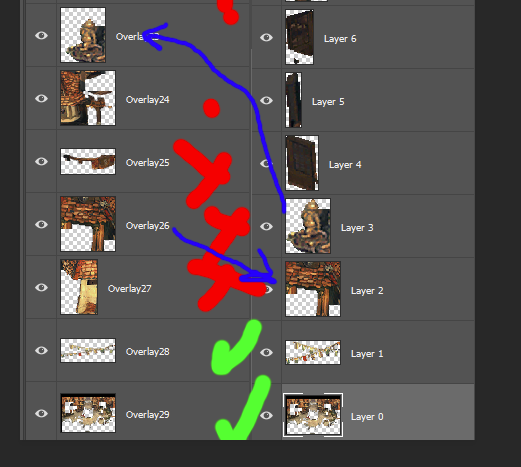
Well I just posted my psd above for the sake of comparison and the layer order is different from the one Albeoris posted... Is it not? Pls check it out.

One Folder = Rename to the Fieldname and put one psd in it = Finish
I got this. But what happens after this? Memoria will read the files and update p0data1X.bin archives, after which I can delete PSD's? If so that's cool.

Edit: I can put the question differently.For user to apply the mod, do I have to distribute PSDs? If yes, this is what I "fundamentally dislike".

Edit2:
Bottom layers in File posted by Albeoris https://i.imgur.com/7IZdrq9.png
Bottom layers in my file (that I converted from tiff without any additional modifications): https://i.imgur.com/1WG3HKD.png
 
Last edited:
Well I just posted my psd above for the sake of comparison and the layer order is different from the one Albeoris posted... Is it not? Pls check it out.
I got this. But what happens after this? Memoria will read the files and update p0data1X.bin archives, after which I can delete PSD's? If so that's cool.

Edit: I can put the question differently.For user to apply the mod, do I have to distribute PSDs? If yes, this is what I "fundamentally dislike".

Edit2:
Bottom layers in File posted by Albeoris https://i.imgur.com/7IZdrq9.png
Bottom layers in my file (that I converted from tiff without any additional modifications): https://i.imgur.com/1WG3HKD.png
1) PSD -> Tiled Atlas -> Scene. You can share PSD or Tiled Atlas. Mods will be distributed in a format compatible with the Nexus Mod Manager.
2) Right now we have a same order of the numbering of layers. 0 - bottom. It's not a problem. :)
 
1) I plan to distribute patched files on my own in a way that is not compatible with nexus mod manager. I will have my own patcher that will directly modify game files. So I was trying to figure out if this would be possible to do with memoria
2) How is it the same? I even posted screenshots? 3rd layer from the bottom and up is different. I am not talking about layer names but layer content. FOr the same layer number the image data is not the same.

Edit:
GanXH4w.png
 
Last edited:
1) I plan to distribute patched files on my own in a way that is not compatible with nexus mod manager. I will have my own patcher that will directly modify game files. So I was trying to figure out if this would be possible to do with memoria
2) How is it the same? I even posted screenshots? 3rd layer from the bottom and up is different. I am not talking about layer names but layer content. FOr the same layer number the image data is not the same.
1) Unfortunately, this is contrary to our policy. Your changes will conflict with mods other players. In addition, you cannot control the order of loading mods (any player's mod will overwrite your changes), and a player cannot delete your mod. Any game update will erase your mod and force the user to download 200-3000 mb from the steam. It's a realy bad idea!
2) Hm. Thank you, I will see how HW order layers. Maybe by Z. It's very strange but not the problem. We will use the same order.
 
@Meru If you don't want to distribute your psd files, this'll not work as Memoria will override the scenes on the fly instead of them being repacked into the unity container.
@Al Please look into the sorting as this is not a trivial point of making the backgrounds compatible with memoria without doing anything twice. ;) If you need files to check the sorting I can oblige here.
 
1) Unfortunately, this is contrary to our policy. Your changes will conflict with mods other players. In addition, you cannot control the order of loading mods (any player's mod will overwrite your changes), and a player cannot delete your mod. Any game update will erase your mod and force the user to download 200-3000 mb from the steam. It's a realy bad idea!
2) Hm. Thank you, I will see how HW order layers. Maybe by Z. It's very strange but not the problem. We will use the same order.
1) I see. I just wanted to clarify how are you going to do it.
I don't think that Square will update this game in the future, maybe once at best (someone mentioned there was some kind of update that never went live).
As for conflicts with other mods, I don't find this to be a problem. If there will be other mods that I will use, maybe I''ll add support for them in one way or another. From what I see, this is just a matter of creating correct AssemblyCsharp.dll that will be able to support more mods. Or something like that. Other than that, if people don't like this approach, they are free to not use my mod.

Edit: mod load order should not be an issue. I don't plan to do any mods or anything that will affect gameplay. In case of textures, whatever someone uses my  textures or does not use them. I don't see why would someone want to use half of my textures and half of some other textures. And even if there is a reason for that, I don't want to assist people in doing so. If, for example, there will be a mod that changes the story of the "I Want to be your canary" and while doing so it adds some changes to the Prima Vista stage textures - I don't want my mod to be used together with that so it is up to the user to figure out how to achieve that.

2) Maybe this has something to do with it?
Hades Workshop export the layers of the backgrounds by depth
@Meru If you don't want to distribute your psd files, this'll not work as Memoria will override the scenes on the fly instead of them being repacked into the unity container.
Yes, I already got the idea. In this case I will not use memoria.
 
Last edited:
There is two settings in the HW:
"Sort layers by depth" and "Revert layer ordering"

You have checked the first. Yes, Memoria will can read this files by the meta in the field's folder.
 
There is two settings in the HW:
"Sort layers by depth" and "Revert layer ordering"

You have checked the first. Yes, Memoria will can read this files by the meta in the field's folder.
Not sure what do you mean. These settings are for import. HW -> tiff export is not influenced by these settings (if it is, that would be very badly designed). I did checked first. If i wouldn't, it wouldn't read layers correctly. Sorting by depth is the default. But this does not matter for Memoria. Only Export is relevant. There is no sorting choice for export (and it is not needed as export must match the one of PSX). And that export does not match the one Memoria expects by default.
But as long as there is a way to read it, it doesn't matter, I suppose.
Edit: I am leaving this export discussion in hands of Fraggoso, since at this point, he is the one interested in having his backgrounds work with Memoria.
 
Last edited:
The patch is actually pretty huge (in terms of the amount of changes, not size). 100+ files were changed. They changed a bit of everything, effects, shaders, system... that includes one background texture.
 
The patch is actually pretty huge (in terms of the amount of changes, not size). 100+ files were changed. They changed a bit of everything, effects, shaders, system... that includes one background texture.
Can you tell us what background texture they changed? :)
 
you are working on backgrounds, shouldn't you know that without me telling?
Anyway I believe this is one of the Hilda Garde 3 images. I haven't looked at it since I'm pretty far from that. Should be this one fbg_n53_hlg3_mapv50_g3_brg_0

Edit: the difference is actually so small I barely noticed it. They added 58 pixels to one of the layers. Perhaps they covered some kind of seam or something. I don't even have a savedata there yet.
 
Last edited:
you are working on backgrounds, shouldn't you know that without me telling?
Anyway I believe this is one of the Hilda Garde 3 images. I haven't looked at it since I'm pretty far from that. Should be this one fbg_n53_hlg3_mapv50_g3_brg_0
If I ask don't you think I'm clueless?
I'm by no means any professional with all the insights to steam/ffix the unity contaiiners etc... I'm just tinkering with the backgrounds because no one else did.
 
MovieMaterial.cs - Game speed and FMVs fix
BGANIM_DEF.cs - Frame rate and animation fix
BGSCENE_DEF.cs, FieldMap.cs, WalkMesh.cs - Combine meshes
CardUI.cs - Max collector's level fix
EventEngine.cs - Shadows, movemnt, changing row, camera fixes
SharedDataBytesStorage.cs - Saves for PCE-Store version is now placed at the "My Documents/My Games" folder
Also many small fixes for mobile platforms. Input. Pause in the music.

Memoria was updated:
https://yadi.sk/d/QbZQdNqHvJBSe
 
Status
Not open for further replies.
Back
Top