[FF9 PC] UI Stuff -> See Moguri update

  • Thread starter Thread starter snouz
  • Start date Start date
Status
Not open for further replies.
-changed the look of portrait borders https://i.imgur.com/lvQ8kIl.jpg -> Opinions?
It looks good. Just as an experiment, I'd check how it looks with the emboss effect inverted, so that the portraits are set deeper in the UI. I know that's inconsistent with other interface elements, but somehow it might look good for character portraits, specifically.
 
Just wanna throw my hat over the wall and mention that V1 of UI worked with previous build of the game before steam loused it up. 2.27.2017 update i believe it is. also using most recent build of Moguri  (Logo and Name Enter Both Showed Correctly)
 
Last edited:
OK, here's what UI V2 (fixed) looks like with Memoria (Moguri release).

https://imgur.com/a/gKcBRLx

Title screen looks perfect now. :)

A similar issue remains with the name entry screen (grey bar over name input).

There's a mod that can fix your save, that's what I did.
------------>  https://www.ff7catalog.com/threads/7672/ (it's called memoria but it's another tool)
Didn't work for me, but I guess, I'll just stick to Memoria, since you're fixing the glitches now.

Edit: Btw, I'd love for the packaged release to offer both the original Steam font and Moguri's Garnet font. Would that be possible by way of memoria.ini options?
 
Last edited:
I believe this one goes here.

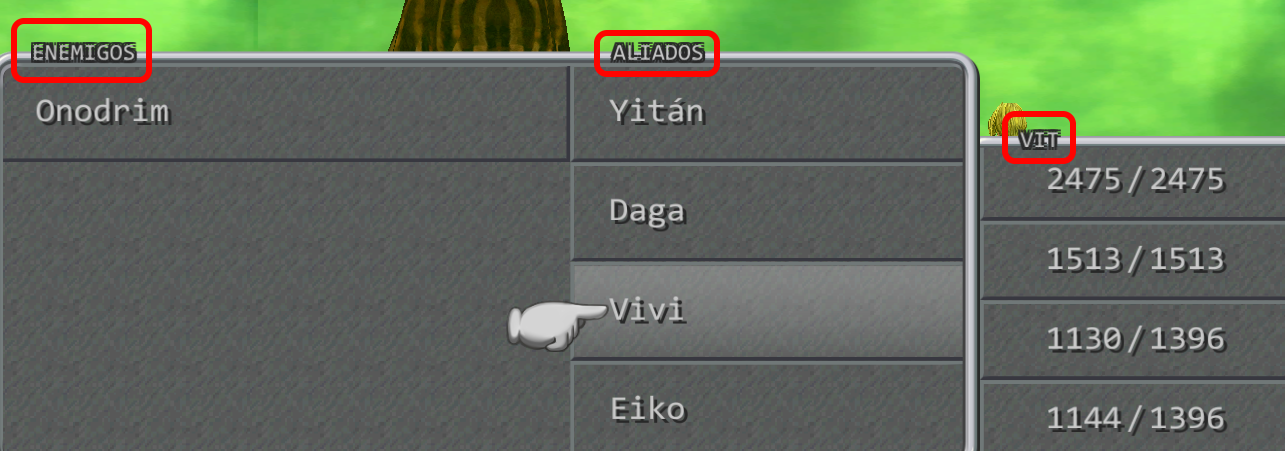
I2mIQpS.png


Look at the title of the boxes. The black border around the white text looks off, there are missing pixels in the border and you can see the green background.

Maybe you can take a look at these glitches! :)
 
I believe this one goes here.

I2mIQpS.png


Look at the title of the boxes. The black border around the white text looks off, there are missing pixels in the border and you can see the green background.

Maybe you can take a look at these glitches! :)
I searched every image, I believe these are not fixed images, but the font with dynamically rendered borders. I just checked, the normal font doesn't produce that (or maybe a bit but almost unnoticeable). Are you using the font in Moguri, or another one altogether?

For reference, with normal font: https://i.imgur.com/Nqd6uV7.jpg
 
that looks very good ... thank you very much for your work with it, I'll run it through again on the PC
 
Status
Not open for further replies.
Back
Top