[FF9PC-Steam] Improved Backgrounds Mod

  • Thread starter Thread starter Fraggoso
  • Start date Start date
Status
Not open for further replies.
F

Fraggoso

Guest
Hi everyone.
I've started on a Backgrounds replacement mod for FFIX for quite some time now and I'm finished around 50% right now.

Here's a quick video of an early WIP.

And yes, I've started a discussion on the steam forum as well:
https://steamcommunity.com/app/377840/discussions/0/142261352660457538

The mod will be compatible with Hades Workshop and I'll try my best to implement it in Memoria as well.
Everything is going smoothly, still I can't give out an ETA.

Edit:

Mod released! :D

https://drive.google.com/open?id=0B9iOUmoUbwc4eHJSb3EwOWZNMEE (Version 1.1)
https://drive.google.com/open?id=0B9iOUmoUbwc4Si1DNk4wNl9Rb1E (csharp.dll file)

Installguide:

- Backup in your FFIX install directoy under "StreamingAssets" the bin files p0data11 till p0data19.
- Backup in x64\FF9_Data\Managed the Assembly-CSharp.dll file.
- Download the 7z and unpack it directly into you Final Fantasy IX install directory where "StreamingAssets" and "x64" sit.

Play! :D

If you don't want to use it anymore just copy over the old bin files as well as well as the Assembly-CSharp.dll.

I know Meru is working on the Backgrounds, too. As he's using a complete different tool set that I'm and we also have other ways of implement the mod, we're not collaborating in any way so please don't ask.
 
Last edited:
Are you doing all the masks right away? I started to work on BGs when you was at Ice Cavern, I think. So you have to be past disc2 by now. I am mid-disc2 and only did the most ugly masks so far :D

Cleyra is probably gonna be a real pain in the ass in terms of these masks that would need to be created even though I don't want it for now. I was gonna do some part of Cleyra but couldn't bring myself to open the folder with textures... Maybe tomorrow  :mrgreen:
 
Last edited:
I've finished almost all on disc 3, should be around 70% completed and I learned a lot on mask on the way.
I'm not saying it, but I would start over and clean up everything prior to disc 3 but I don't know if I can motivate myself to do so... <.<°

@dclem What do you mean? It replaces the ugly steam backgrounds with (my taste) better ones. ^^
 
Fraggoso
I also neglected some things on disc1 and will probably come back there to fix them... But that is not related to masks, I only do masks for like 1 background per zone, and sometimes not even full background. I tried various things for masks but they still don't match the hand-made ones.
 
I'll make some more tests today regarding that and hopefully I get a perfect mask.
I'll let you know if it's feasible to do.
 
Perfect one is not possible (only if hand-drawn) because upscaled image is too big and too distorted. Even original PSX masks are far from perfect. But they work there cause of overally low resolution.
Personally I will still be doing most of them after all the backgrounds are in.
 
I'm trying another solution which needs an in between step but initial test are promising atm.
How do you use the PSX masks as a background btw.? When I import them via HQ I have gray seams everywhere (atm).
 
I think you misunderstood. I do not use them I said they are bad.

They can not be processed with waifu. They need a totally different approach. But they will still suck. Very rarely they can be made into something useful. Like here
EFFCrDc.png

Most of the time I keep PC masks. The plan was to do the masks as a 2nd pass.

Edit: but PC masks are beyond help. I wouldn't want to even touch them. The only place for them is a trash bin.
 
Last edited:
What do you think, Meru?
http://screenshotcomparison.com/comparison/202947

It's not perfect, yeah but still better then PSX as well as Steam seams (at least for my taste).
I've to test them in game but at least from the picture the masks seems very fitting.
I think this looks something like 4x nearest neighbor + Smooth 3px + Expand 2px applied to the PSX mask or something close to that.
It may work in some cases, but will not work for other cases. Most likely it will have to be tweaked for every other image. For some images it won't work at all. Like the ones with some trees/leaves or other high-detail stuff. So this may result in too much tinkering to produce sub-optimal results. I better just draw it by hand...
I can say that photoshop itself, unfortunately, does not have anything that is capable to produce mask that will satisfy me. There is other software that _sometimes_ can, but only sometimes.

I meant the steamfiles. Like p0data5.bin or something.
p0data11-19
 
The thing is that I don't want to draw the mask and automate as much as I can or else this Mod will never be released.
Like we say here in Germany: One death you have to die. Or "You will have to opt for the lesser evil."

The PC seams are ugly, let's trashcan them ASAP.
PSX is too blocky but at least way better then the PC ones.

I'll give it some further testing with leaves and fine detail and see how it goes.
 
The thing is that I don't want to draw the mask and automate as much as I can or else this Mod will never be released.
Like we say here in Germany: One death you have to die. Or "You will have to opt for the lesser evil."

The PC seams are ugly, let's trashcan them ASAP.
PSX is too blocky but at least way better then the PC ones.

I'll give it some further testing with leaves and fine detail and see how it goes.
Yea I agree with that. This is exactly why I decided to do these masks, transparent objects and text as a 2nd pass, how good they will be done will depend on how much motivation I have left. It could be that I'll end up using some more automated thing too. I can't say for sure. But at least like 5% will be hand-drawn anyway.

Edit: Try Mountain/Summit background for testing mask stuff
 
Last edited:
I'll try that out tomorrow.
Today I tried the field with the weeping blossoms (I'm in bed and forgot the name of it) and it looked ones really good. At least better as with psx and pc seams. It still needs some tweaking but I'll give it a try and test it ingame. :)
 
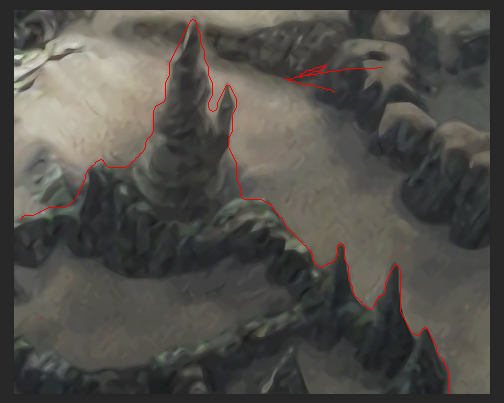
Here is one case from Cleyra. Thing where arrow points is way to off. It may be possible to make it look better by tweaking the settings, but then other parts will be bad. (This is based on PSX mask too.)

7GYZ6Ky.png
 
I didn't test summit,will do that today.
But I tested other fields and the result is a little bit better then using the psx mask 1:1 but on the other hand other things gets worse.
Still I'll go with that approach now as it doesn't need a lot more time. Maybe I can write a phyton Script do to the daunting tasks.

Edit 1:
I made some adjustments to my workflow and now I can present you the results:
http://screenshotcomparison.com/comparison/203111/

This time it preserves more of the details and I like it more then the old one.
I have to redo the first 200 Backgrounds (from 800) but that will come after I finished the whole project. ^^
 
Last edited:
Looks cool. Good luck!

What a coincidence haha. In my case things that I do not want to verify with eyes are also done with python or javascript.

I have to redo some older images too. Not sure how much. Sometimes I just skipped something, sometimes it was pretty hard to figure out what part comes from where (because image was exported "by depth") and I probably made some mistakes there. Some gears in Lindblum is a one example of that.
 
I know what you mean regarding the depth.
I also looked over a let's play to see how things work so I know what to push to the foreground for filtering.  ;)
I also tried to fix several area like the both engine rooms from prima Vista. The psx / steam version got some layers wrong and animation is playing behind another where it shouldn't.
 
Status
Not open for further replies.
Back
Top