[HD Remake] WIP Sector 5 slums

  • Thread starter Thread starter Mayo Master
  • Start date Start date
Status
Not open for further replies.
Hi folks,

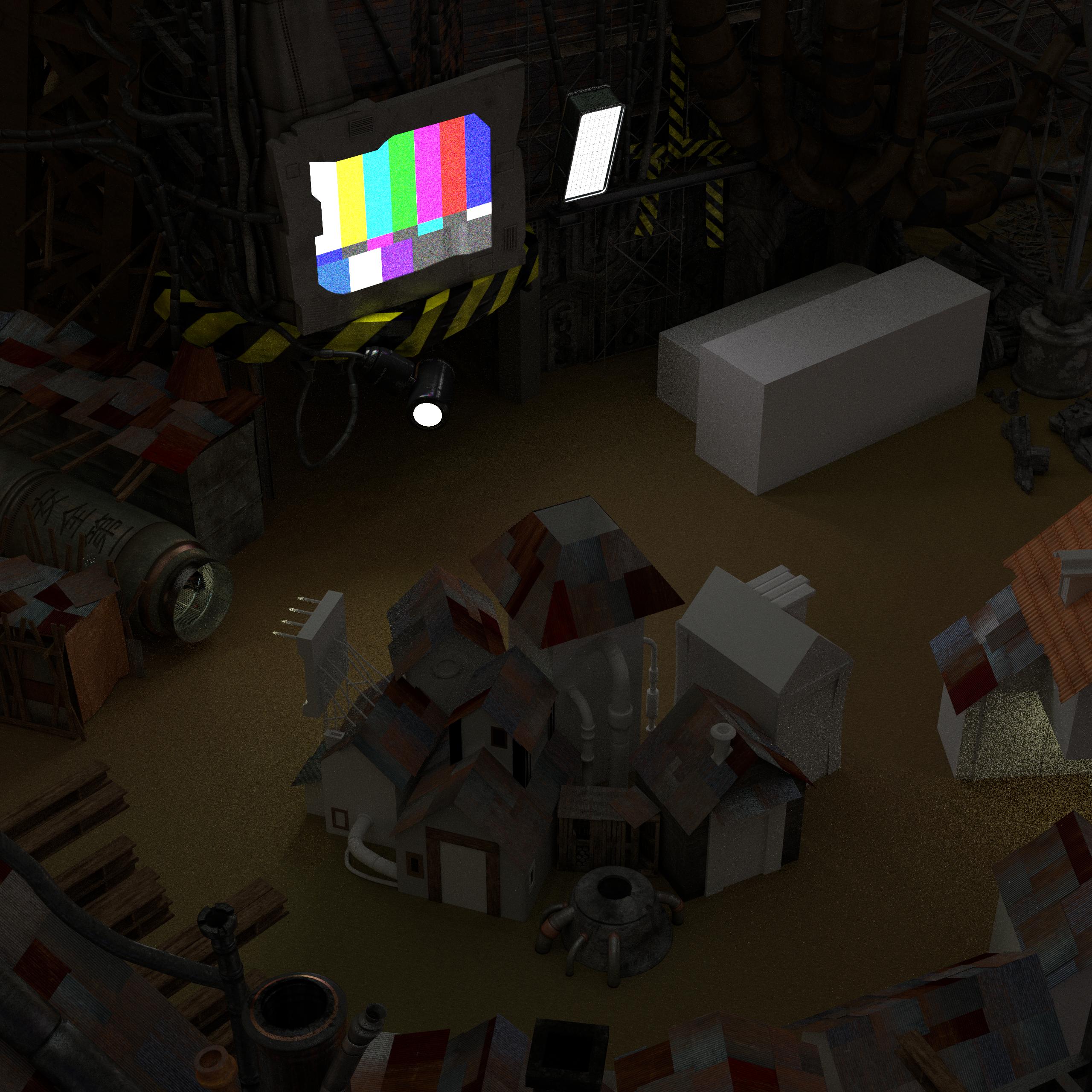
Just posting a progress update here. I'm pretty much done with the modelling of the background (not the texturing though). The Blender file is getting pretty heavy. The render is full res. Enjoy!

cpv3.png
 
Hi folks!

For my big scene of the Sector 5 slums, I have yet to make a number of elements which are actually involved in other scenes (shops, man in pipe, bus...). Thus, I thought it was a good time for me to revise these other scenes, namely to be able to render them with Cycles.
I am almost done with mds5_dk, aka "the man in pipe" or "this guy are sick" scene. Here's an update on this one:
k3tj.png


Compared with the initial version using Blender's internal render, there are lots of improvements. Everything is retextured, and I can use indirect lighting, objects as light source (like the TV screen), etc. I'm happy it didn't take me too long to revisit that one. I have a couple of things yet to tweak: namely I want to make light interactions with the outer shell of the pipe, and I have to fix the lighting (not enough illumination as a whole, and I have to find a way to reduce noise - I used a meshed light bulb as a light source instead of using a point light source, which seems to create lots of noise). I may have to redo a smoke simulation, as well.

I hope you like it.
 
With the superbowl on, the last picture looks so ironic! :D
 
Last edited:
Thanks guys! Good to see you're still checking this place. TA has felt pretty lonely, of late.
 
I'm always watching... that sounded creepy. I am incredibly impressed by your artwork and love watching it progress. I would probably would have tried my hand at blender by now if it weren't for the obfuscating terminology and time/system constraints
 
Hi folks!

I wanted to post an update on the big scene of the Sector 5 Slums, mds5_1. I did manage to import mds5_dk in it at the same scale, it's looking pretty cool. In addition to that, I modelled the outside of the rocket booster, and did quite a bit of texturing. I have also started to fiddle with the lighting, I could use some input there. The trick is: I don't believe there's a point in replicating the original lighting scene, because the original is off (in terms of colors and light sources). An example: you have some lights located inside chimneys. My aim is rather to convey the "feel" of the original, but with more realistic lighting.
Here's my light setup: I made a quick "dummy Midgar model" on a separate file, and made a render at daytime while setting the camera in a location corresponding to the Sector 5 slums. I took that render as an Enviro light source. The strength of this light source is fairly dim (this light source alone would only make a picture with RGB values around 10 or less). In addition to that I made an array of lights as if there was an array of lamps below Midgar's plate. That is providing most of the light in the scene. I intend to make the rest of the lighting with physical light sources (meaning: street lights, floodlights which are actually in the scene). I thought of inserting a Plate object way up, to create more light bounces, but it seems to have little effect on luminosity while introducing a lot of noise. If you believe I'm on the right track, or if you have suggestions, let me know.

Anyway, here's the image (full res at 200 samples)
A3tB97m.jpg


By the way, I'm not happy imageshack doesn't host stuff for free anymore  :(
 
Nice work Mayo.
it's wonderfull to see the inside of the rocket from the other scene :)

With regards to lighting, Midgar is a funny place...
It's always dark and cloudy, no 'sunny' or daylight picture exists, except the one with Red looking from a distance..
So if you look at the top plate, it is already very dark. You can imagine when having a plate above you, at about 50 meters,
there's not a lot of light left. I would say use any trick at your disposal to balance between reality and fantasy. That would
mean, use any shortcut to lower noise and rendering-times  ::)

As for imageshack, I switched over a long time ago to flickr, works fine for me.

Anyway, I hope you don't feel too lonely here, as I know, many are watching us....  :P

Keep it up, and enjoy as you go.
 8-)
 
Nice work Mayo.
it's wonderfull to see the inside of the rocket from the other scene :)
With regards to lighting, Midgar is a funny place...
It's always dark and cloudy, no 'sunny' or daylight picture exists, except the one with Red looking from a distance..
So if you look at the top plate, it is already very dark. You can imagine when having a plate above you, at about 50 meters,
there's not a lot of light left. I would say use any trick at your disposal to balance between reality and fantasy. That would
mean, use any shortcut to lower noise and rendering-times  ::)
As for imageshack, I switched over a long time ago to flickr, works fine for me.
Anyway, I hope you don't feel too lonely here, as I know, many are watching us....  :P
Keep it up, and enjoy as you go.
 8-)
About seeing the inside of the rocket: when remaking these scenes, I really wanted to have consistency between the inside and the outside of the locations. I think that seeing the inside of places you can go to from the outside helps the immersion, and creating a believable environment. It's something I'd like to be systematic. Similarly, I'll import the other shops into the big scene. The weapon shop made inside the bus will be challenging, because the inside doesn't match the outside at all (in the original scenes). I'll have to make a bunch of revisions. The downside of this method is the size of the outdoor scene, which begins to be considerably huge. I think my object count is around 5000, and the Blender file size around 150 Mb  :o  (and I have no particle system!) I also intend to carry out something similar for Aerith's house.
About Midgar's lighting: it is definitely odd, and personally I tended to believe that all the events taking place on the top of the plate where going on during night time. There's pretty much no instance of Midgar getting daylight, even atop the plate. The only time you actually see it is when watching Advent Children :P  That is, to the exception of Aerith's house and the Church. In my dream-remake, there would be variations in light to account for the passing of time, and getting all the Midgar scenes atop the Plate could get a very different feel if done during daytime.
As for the lighting of my current scene, based on what you mentioned, I believe I'm on the right track.
Oh, and I opened an imgur account :P
 
Anyway, I hope you don't feel too lonely here, as I know, many are watching us....  :P
Haha, well you guys do do some pretty awesome work. I regret that I haven't had the time to properly learn Blender and do some work myself. I wanted to last semester and ended up putting in extra time learning After Effects for a class.

That scene is looking awesome. If anybody doesn't agree wholeheartedly with your consistency idea, that last image should sell 'em.

As for imageshack, that's super lame. I had just used it last week and thought it was still free, but I just checked, and apparently I'm on a free trial that's just about up :(.
 
I regret that I haven't had the time to properly learn Blender and do some work myself. I wanted to last semester and ended up putting in extra time learning After Effects for a class.
Well, just so you know: we have some 650 scenes left to do, so it's never too late to start learning and help us :)
 
Hi folks!

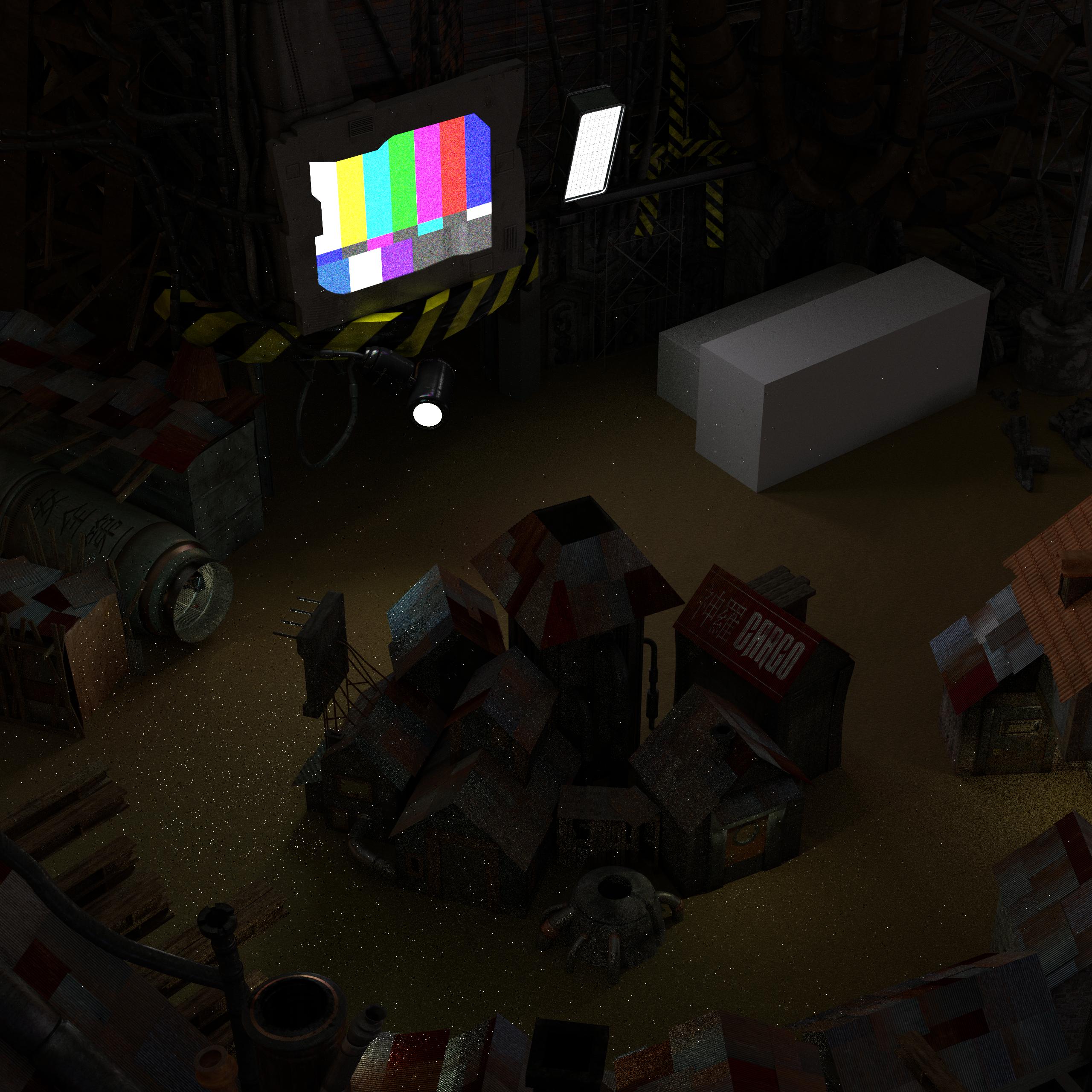
Time for a progress update... namely, all the houses are textured now.
B9MBCPX.jpg


What remains to be done for that scene:
- Make all the broken asphalt
- Make the bus and tents (but that's making a whole new scene)
- Add debris and trash here and there
- Incorporate other scenes (item shop to be retextured, materia shop and random home to be made from scratch).
- Fine tune the lighting (I think I have the good locations for the lights, I have to tune the intensity a little).

I'll be probably moving to the other scenes to be incorporated in this one.

I hope you enjoy!
 
Great stuff, I look forward to being able to run around and check out the houses and shops here and really get to see the work put into this.

Well, just so you know: we have some 650 scenes left to do, so it's never too late to start learning and help us :)
Good to know lol. I'm trying to learn a bunch of stuff in Maya, mostly objects and weapons right now and character models soon. I'll see what I can do to contribute when I'm ready for something as advanced as this. At least do a few to really learn landscapes. People really underestimate how intricate landscape modeling is.

How are you guys going about textures? Are you working off templates or something to try to maintain consistency or is each artist doing their own thing?
 
This is just awesome, great work!

Cost aside, is there a clear cut advantage to using maya over blender or vice versa? The workflow's appear to look totally different, I assume the rendering engines are totally different as well
 
Asking me, Blender can be less intensive on your computer (depending on what you're doing at least) easier to pick up and learn, and of course is free. Maya is more difficult to start out with and learn all the tools, but it's incredibly powerful and intuitive. It also has plugins for many other applications like photoshop and zbrush, so transferring your work back and forth is very easy. After starting with Maya I couldn't imagine using anything else. You can get the student edition for free if you have a student email account, doesn't matter what school or major.
 
Good to know lol. I'm trying to learn a bunch of stuff in Maya, mostly objects and weapons right now and character models soon. I'll see what I can do to contribute when I'm ready for something as advanced as this. At least do a few to really learn landscapes. People really underestimate how intricate landscape modeling is.
Well, whenever you feel like modelling field screens, we'll be happy to see your contribution. When that time comes, I recommend you check out my shortlist of "Scenes for newbies" that I drafted in the "beginner eager to learn" thread. They're mostly small indoor scenes, I would not advise taking a landscape scene right away. SpooX and I know that nature modelling is really challenging. Besides, it's also among the most demanding in terms of computational resources (particles systems everywhere and crazy poly counts, among other things).
How are you guys going about textures? Are you working off templates or something to try to maintain consistency or is each artist doing their own thing?
So far, everybody has been doing their own textures. However, there's a bit of consistency because most of our textures come from cgtextures.com. That being said, SpooX and I were just speaking of sharing resources: it would be indeed much better if we pool textures and maps. At the moment we have no organization whatsoever regarding this topic, maybe it's time to get started. The file repository may be a good platform for sharing. In addition, we could benefit from the efforts of 2D artists who wouldn't be involved in 3d modelling.
 
Hi folks,

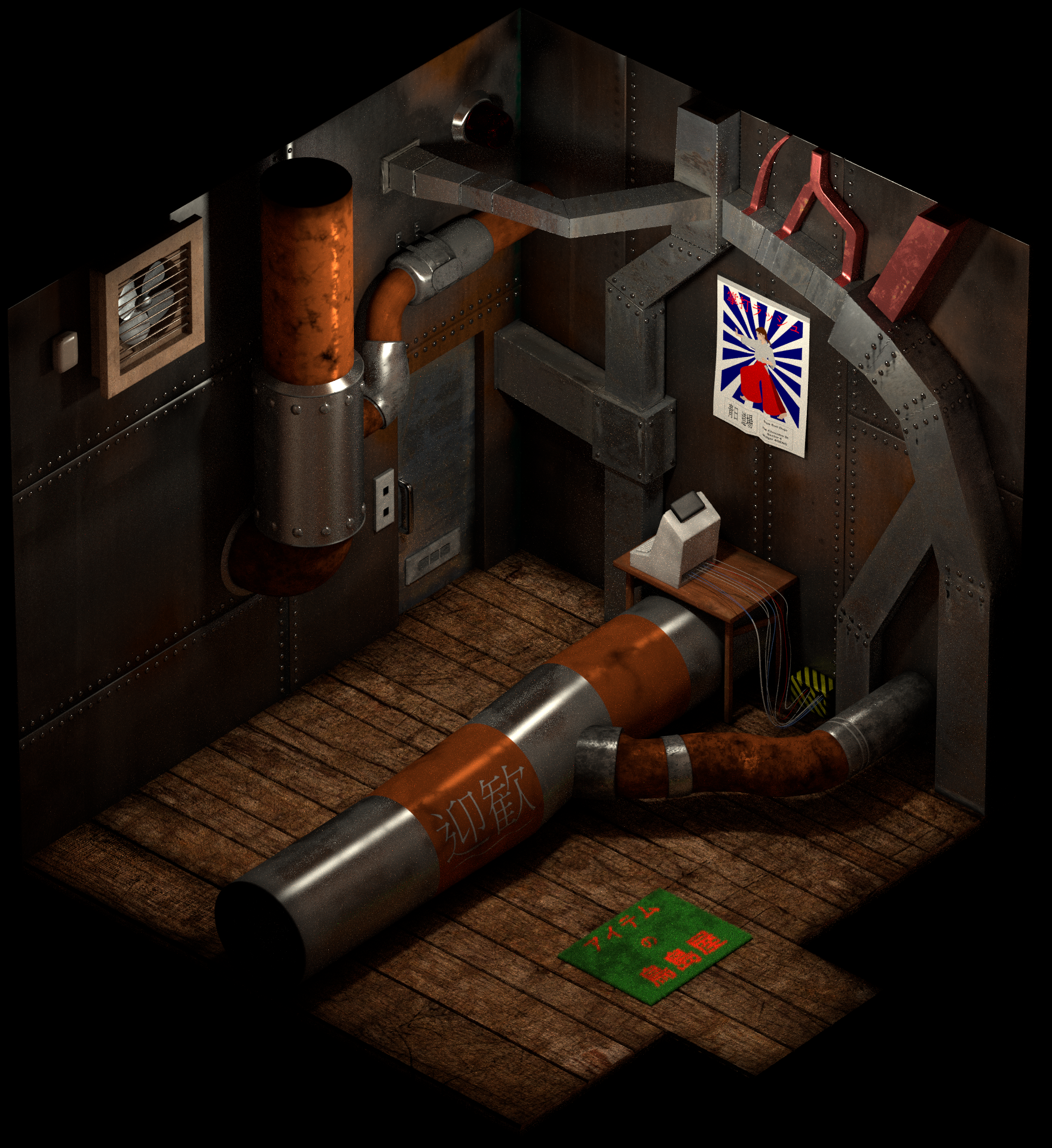
Time for a progress update. I've spent some time re-texturing mds5_i (item shop of Sector 5 slums) so that it would be re-rendered using Cycles. I've done most of it, as you can see on the picture (I left out the objects that were not yet textured):
7Rfu6wN.png


Things left to do: a piece of furniture on the bottom left corner, some jars, a medkit, a shelf with various objects on it, and a bunch of cardboard boxes.
Additionally, I've done two other things on that scene:
- I revised the till, namely rescaled it. Originally it was way too big, compared with the size of the characters. I had to revise all the cables attached to it. I also moved it because the way the till was set wasn't easily accessible.
- I made the import of that scene in the main outdoor scene of the Sector 5 slums. It can be seen when opening the door of the item shop (not much is seen beyond some wood boards and the doormat, actually).
 
Status
Not open for further replies.
Back
Top