
HELP! Error Starting FF7 (CODE 5)

  • Thread starter Thread starter PoisonJohnny
  • Start date Start date
Status
Not open for further replies.
Thank you! It fixed it. However it does mess up the resolution so that the game isnt fully displayed :-(
Post up your ff7_opengl.cfg file and a screenshot... could be either wonky resolution settings or a DPI issue.
 
Right click the 7thheaven and set and set the compatibility to run as as administrator. apply and close.
Then find the FF7 exe you are using eg.. ff7_bc right click and set compatibility to run in 640x480.
Thanks. I also have to swap my DPI setting back to 100% in order for the game to run correctly; else it loads in the bottom right of the screen with a portion of it cut off.

Is there something I can set so that I don't have to adjust DPI manually every time I want to load the game? Already a pita having to load up daemon tools with the blank disc ISO in order for 7th Heaven not to say I need to put in a disc, despite my copy of the game being a legit purchase on Steam of the 2013 version. Seems the Game Converter thing made it require that. I thought it would be only for initially running the converter, but nope... It's apparently required for every time you play as well.
 
Right click the 7thheaven and set and set the compatibility to run as as administrator. apply and close.
Then find the FF7 exe you are using eg.. ff7_bc right click and set compatibility to run in 640x480. Don't worry the opengl plugin will override this anyway.
Next go back into 7thheaven and try launching the game.
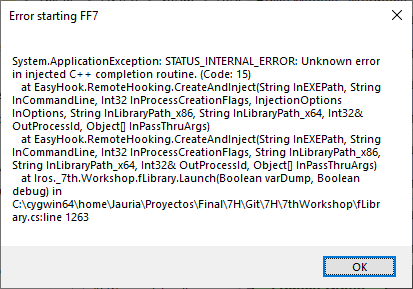
ive just tried this but now i get code 15
 
Could you screen shot it for us?  I can't remember ever seeing (or hearing about) a C:15 before.
 
W5powfe.png
 
Leor1c, two likely problems...
- The paths being referenced in the error indicate you're running a dev version of 7H, not the one Alyza linked to in the tutorial (unless she's changed it and I didn't catch it).
- After talking with a couple people, it seems as if Code 15 references an invalid drive.  It could be that you had FF7DISC1.ISO mounted as E: when you ran the converter, but now it's completely missing, or at a different letter.  Posting the contents of FF7_GC.LOG might help us figure out where the game expects to find it.
 
--------------------------------------------------------------------------------
FF7 GameConverter, Version 7th Heaven
Creator: Kompass63
Editor: EQ2Alyza

Start running at    Date: 12/09/2019    Time: 11:35:27.54
Active code page: 850
ActualPath C:\Users\*****\AppData\Local\Temp\7ZipSfx.000


You are running "Windows 10 Home" on a 64 Bit Operating System (AMD64)

Real Management 32Bit WOW64

This patch is not yet applied.


Installation path found at...

""

If an installation path IS found, press ENTER.

If an installation path IN NOT found, TYPE IT IN and press ENTER.

EXAMPLE: "C:\Games\Final Fantasy VII" (parenthesis included)


FINAL FANTASY VII installation could not be found...

Ending here.

called with ""C:\Users\*****\AppData\Local\Temp\7ZipSfx.000\FF7_GameConverter_7H.bat""
Arguments: "C:\Users\*****\AppData\Local\Temp\7ZipSfx.000\FF7_GameConverter_7H.bat"

PROCESSOR_ARCHITECTURE:          x86
PROCESSOR_ARCHITEW6432:          AMD64
Actual Path:                     C:\Users\*****\AppData\Local\Temp\7ZipSfx.000
Product Name:                    Windows 10 Home
Architecture:                    AMD64
Running in Modus                 32Bit WOW64
OS Bit Version                   64
Reg-Keyname Steam                HKLM\SOFTWARE\Microsoft\Windows\CurrentVersion\Uninstall\Steam App 39140
Reg-Keyname Re-Release           HKLM\SOFTWARE\Microsoft\Windows\CurrentVersion\Uninstall\{141B8BA9-BFFD-4635-AF64-078E31010EC3}_is1
Reg-Keyname 1                    HKLM\SOFTWARE\Square Soft, Inc.
Reg-Keyname 2                    HKLM\SOFTWARE\Microsoft\Windows\CurrentVersion\App Paths\FF7app.exe
Reg-Keyname 3                    HKCU\SOFTWARE\Classes\VirtualStore\MACHINE\SOFTWARE\Wow6432Node\Square Soft, Inc.
Steam Release is present:         
Steam Release Path:               
Re-Release is present:           
Re-Release Path:                 
Original Release is present:     
Original Release Path:           
Destination Path:                 
Source Path:                     
Videos Path:                     
Original Videos Path:             
Original Language                 
Converted Language               
Original Drive Letter:           
Converted Drive Letter:           
and now clear up Variables...
Ending at           Date: 12/09/2019    Time: 11:36:22.28
 
hi, any permanent fix available for this issue or just the workaround stated in the previous page??
 
well everyone hello :)  new here and yep I have the same problem the dang ( Code 5) error ending with 1232
everything with 7th heaven is fine  it was working and then stopped I've tried a lot of fixes with none working
ff7.exe set compatibility to run in 640x480 does not work for me. It will however stop the error form showing
and the screen goes black but crashes at that plz and thank you for any help
 
well everyone hello :)  new here and yep I have the same problem the dang ( Code 5) error ending with 1232
everything with 7th heaven is fine  it was working and then stopped I've tried a lot of fixes with none working
ff7.exe set compatibility to run in 640x480 does not work for me. It will however stop the error form showing
and the screen goes black but crashes at that plz and thank you for any help
post your ff7_gc.log and app.log files.
 
Neeeeeevermind. I f*cked up. I missed the fact that with Reunion mod you need to change .exe
Everything is working
 
Status
Not open for further replies.
Back
Top