[HELP] Menu Overhaul / Beacause - Catalog 3.0 TESTING

  • Thread starter Thread starter EQ2Alyza
  • Start date Start date
Status
Not open for further replies.
Doing my own fonts, making my own borders in gimp, what next :)

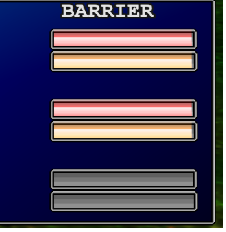
what do you think of the bar redesign :)

compare the barrier to the atb limit borders.  Also sorry didnt read your reply until I posted this so havent looked at what you suggested yet.
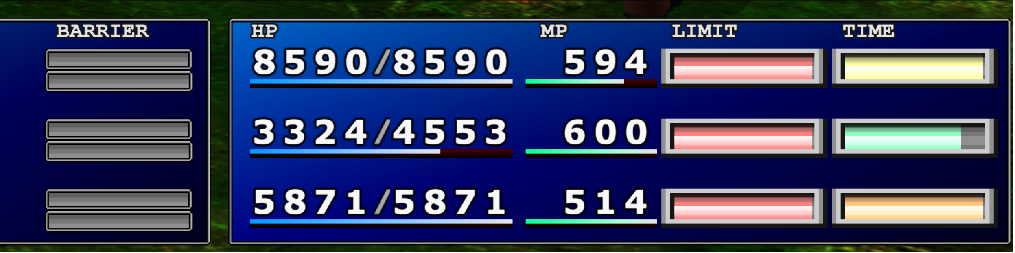
Sj9dRCm.png


also after big guard

rHYgTcO.png


I think I just need to move right hand side one pixel to the left.
 
Last edited:
Definitely looks better, but I'd need to see them ingame before I give final thoughts.

Is it possible to align the MP text directly over the start of the MP bar? Same with the BARRIER text, although only slightly left. LIMIT and TIME need new bars first before we can talk realignment.

Symmetry is key to a good looking UI  8-)
 
Last edited:
Barrier can definitely be moved left, I dont know yet about MP, I will look into it (I think MP is already in its left most position and stock also has it out of line, barrier is too far left in stock and I over compensated), I just want to finish the bars first, as moving those is just editing their position in the png files.
 
Sorry I been out for some hours, I am finishing up now, MP cannot be moved without hexediting which I wont bother with to move that.

There is also a known issue with next level exp bar alignment's, I think there is a fix for it provided by DLPB but it crashes enhanced stock so that is a known issue to be left alone.  Its not as bad on the main menu, its worst on the post battle screen.

https://drive.google.com/file/d/1m4dGuJMMGeDHTEXVK0DcUUCNHWIrr300/view?usp=sharing

There will be a newer iro also with preview images for each config option.
 
Last edited:
This will align the exp and limit bars properly for the Main menu.

1-Base_03
Code: [Select]
Code:
{Next Level width main6CAC39 = 31 C9 8A 8D 88 FB FF FF 66 69 C9 84 00 31 D2 8A 91 AD FD DB 00 66 6B D2 3D C1 EA 05 52{limit bar color X-axis6CAC62 = 4B{limit bar color flash X-axis6CAD53 = 4B{limit bar border X-axis6CAD81 = 476CADB0 = 47
I'll try working on their alignment in the Status menu next. Then after that, the After Battle menu.
 
Thanks, I did just do an update internally so it isnt as bad, but will put this and then redo again to fit the fix.

Also I fixed the one extra pixel on the bottom barrier bar (noticeable if you look hard enough LOL).

I believe this one if for after battle menu but it causes it to crash.

Code: [Select]
Code:
{after battle lvl - probably to fix bar alignment, dont know as it crashes game{6C8358 = E8 7C B5 24 00 C1 EA 05
 
Last edited:
I can tell you the limit bar is good on the status screen after I fixed the bars, I also made the bar more like the battle screen style, it was adjusted before to try and cater for the misalignment.

So its just the exp bar that needs fixing now on status and post battle.  If we cannot fix post battle I suggest we keep the main menu aligned, as that one is seen the most by the player, also the status screen isnt as bad as the post battle screen.
 
Last edited:
Status
Not open for further replies.
Back
Top