mod install SOLVED

  • Thread starter Thread starter comet
  • Start date Start date
Status
Not open for further replies.
C

comet

Guest
hi all, after installing some mods and the bootleg config, I get this error when the game starts

ERROR: couldn't open movie file: C:\Program Files\Square Soft, Inc.\Final Fantasy VII\movies\eidoslogo.avi
ERROR: couldn't open movie file: C:\Program Files\Square Soft, Inc.\Final Fantasy VII\movies\sqlogo.avi

not sure what it means or how it affects the game,?

Thanks Ugerstl this suggestion you made worked

    If you want to play all the movies from your HD and not from the CD's,
    you must do this:

        Create a folder named movies in your FF7 folder

        Copy all movies from your CD's (*:\ff7\movies\*.*) to this folder.
        (overwrite? => YES)

        Download ff7moviedirr2.zip and decompress it.
        Execute    ff7moviedir.exe   and chose the folder you have created.
 
Last edited:
Hi comet,

execute this command and post the output using the # button
   => [ code ]  C:\FF7-dir.txt  [ /code ]

Code: [Select]
Code:
dir "C:\Program Files\Square Soft, Inc.\Final Fantasy VII\movies" >C:\FF7-dir.txt
 
#Volume in drive C is Vista
 Volume Serial Number is 3C74-FF12

 Directory of C:\Program Files\Square Soft, Inc\Final Fantasy VII\movies

08/04/2012  18:19    <DIR>          .
08/04/2012  18:19    <DIR>          ..
               0 File(s)              0 bytes
               2 Dir(s)  80,787,746,816 bytes free


and also ff7.txt file output


#Windows Registry Editor Version 5.00

[HKEY_LOCAL_MACHINE\SOFTWARE\Square Soft, Inc.]

[HKEY_LOCAL_MACHINE\SOFTWARE\Square Soft, Inc.\Final Fantasy VII]
"DataDrive"="E:\\"
"AppPath"="C:\\Program Files\\Square Soft, Inc.\\Final Fantasy VII\\"
"DataPath"="C:\\Program Files\\Square Soft, Inc.\\Final Fantasy VII\\Data\\"
"MoviePath"="E:\\FF7\\Movies\\"
"DiskNo"=dword:00000000
"FullInstall"=dword:00000001

[HKEY_LOCAL_MACHINE\SOFTWARE\Square Soft, Inc.\Final Fantasy VII\1.00]

[HKEY_LOCAL_MACHINE\SOFTWARE\Square Soft, Inc.\Final Fantasy VII\1.00\Graphics]
"DD_GUID"=hex:00,00,00,00,00,00,00,00,00,00,00,00,00,00,00,00
"DriverPath"=""
"Driver"=dword:00000000
"Mode"=dword:00000001
"Options"=dword:00000000

[HKEY_LOCAL_MACHINE\SOFTWARE\Square Soft, Inc.\Final Fantasy VII\1.00\MIDI]
"MIDI_DeviceID"=dword:00000000
"MIDI_data"="GENERAL_MIDI"
"MusicVolume"=dword:00000064
"Options"=dword:00000001

[HKEY_LOCAL_MACHINE\SOFTWARE\Square Soft, Inc.\Final Fantasy VII\1.00\Sound]
"Sound_GUID"=hex:a7,d5,05,49,7e,84,6f,46,9d,06,12,5d,7f,9b,b3,bf
"Options"=dword:00000000
"SFXVolume"=dword:00000064
 
Last edited:
Thanks for the Registry output.

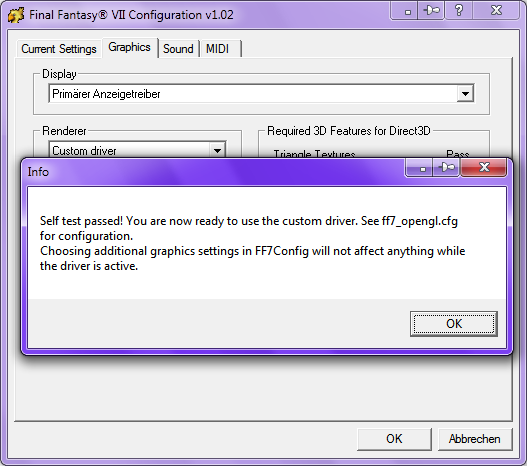
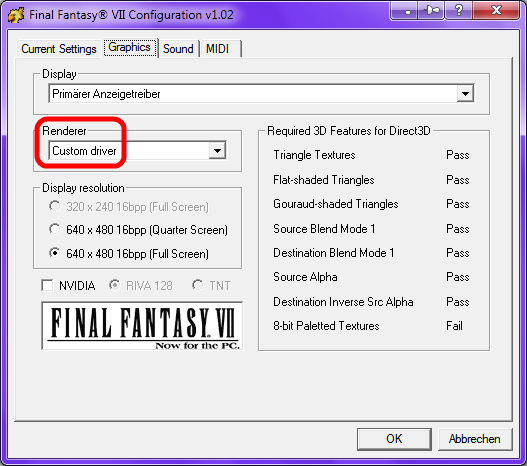
Aali's driver is not configured correctly => "DriverPath"=""


  • Run FF7Config.exe as Administrator
    ( Hint: right-click FF7Config.exe => Run as Administrator )
  • Graphics: Renderer = Custom driver

       
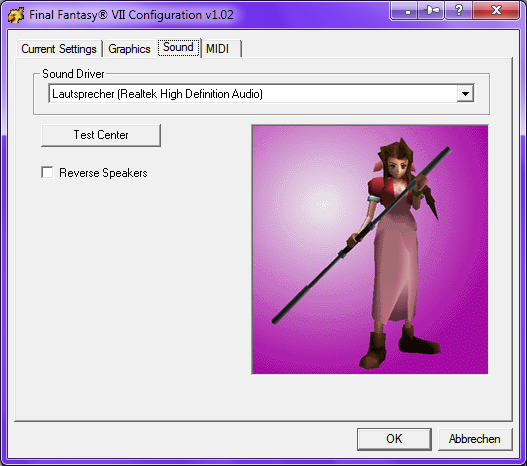
  • Sound: select Sound Driver
                => Test Center/Left/Right

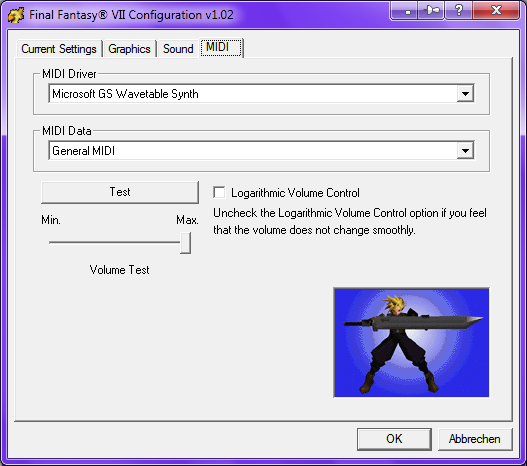
  • MIDI:MIDI Driver=Microsoft GS Wavetable Synth
            MIDI Data  =General MIDI

            => Test
                 => Min./Max. Volume Test
                      => Logarithmic Volume Control on/off

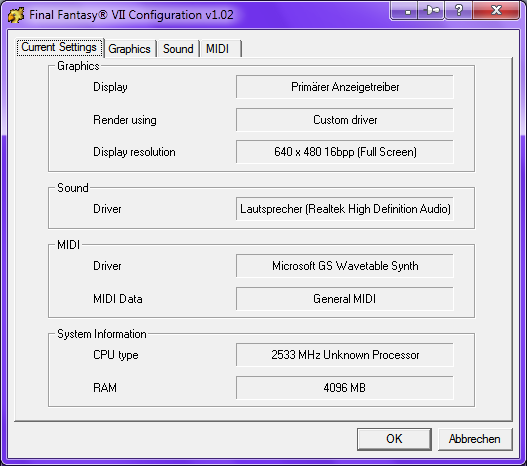
  • Result

 
Hi comet

ERROR: couldn't open movie file: C:\Program Files\Square Soft, Inc.\Final Fantasy VII\movies\eidoslogo.avi
ERROR: couldn't open movie file: C:\Program Files\Square Soft, Inc.\Final Fantasy VII\movies\sqlogo.avi
Directory of C:\Program Files\Square Soft, Inc\Final Fantasy VII\movies

08/04/2012  18:19    <DIR>          .
08/04/2012  18:19    <DIR>          ..
               0 File(s)              0 bytes
               2 Dir(s)  80,787,746,816 bytes free

#Windows Registry Editor Version 5.00

[HKEY_LOCAL_MACHINE\SOFTWARE\Square Soft, Inc.]

[HKEY_LOCAL_MACHINE\SOFTWARE\Square Soft, Inc.\Final Fantasy VII]
"DataDrive"="E:\\"
"AppPath"="C:\\Program Files\\Square Soft, Inc.\\Final Fantasy VII\\"
"DataPath"="C:\\Program Files\\Square Soft, Inc.\\Final Fantasy VII\\Data\\"
"MoviePath"="E:\\FF7\\Movies\\"
"DiskNo"=dword:00000000
"FullInstall"=dword:00000001
.
.
.
I think the keys you are Posted are not up to date.

Start the command prompt :  Windows-Key + R
Execute this command (I guess you have Windows Vista home basic 32bit):
Code: [Select]
Code:
regedit.exe /e C:\FF7.txt "HKEY_LOCAL_MACHINE\SOFTWARE\Square Soft, Inc."
Post the new FF7.txt (look into C:).

Make sure the key "MoviePath" is pointing exactly to the folder, where the movies are.

greetings Kompass63
 
Status
Not open for further replies.
Back
Top