R
RecklessPrudence
Guest
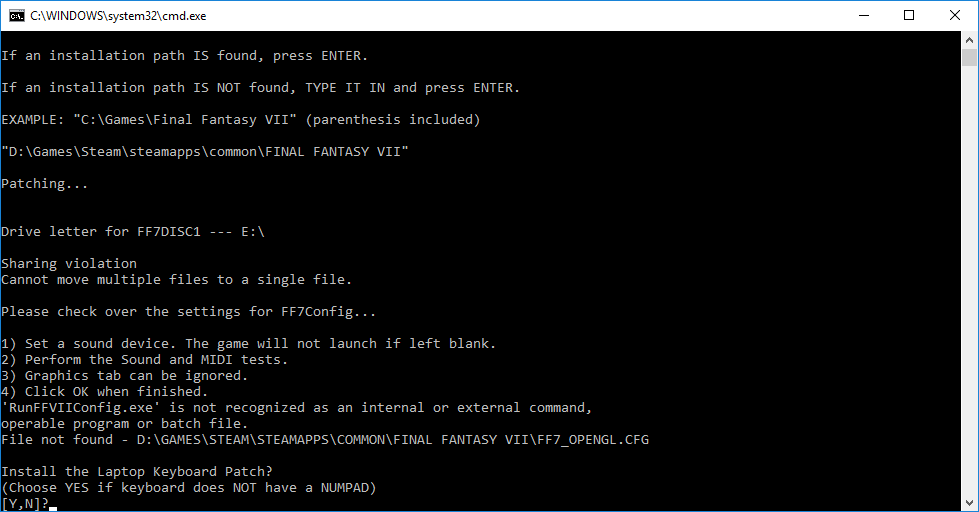
Hi, I haven't played FF7 since the '90s on my PSX, and I'm hoping to play a modded version. I thought I had installed it all correctly, FF7DISC, Game Converter, downloaded the 20GB+ of mods, all the rest of it, but it wouldn't run. Did some looking around, saw that the problem was that I hadn't set up the sound preferences in FF7Config. Tried to run it from the folder, then when that didn't work, poked around some more and saw I was supposed to do it only after the Game Converter launched it. So I ran Game Converter, told it to Overwrite, and... no Config window opened. Tried to Unpatch and patch it from scratch, and still no Config window. After patching, the converter opens a blank cmd window that nothing shows up on and nothing can be typed on, and an FF7Config.exe can be seen in my Task Manager. Nothing else. To exit the command window I only have to click the close button, but no Config window pops up, and the process won't go away until I close it from the Manager. The converter is being run as Admin - 'cos otherwise it won't get this far - but I have no way to get in to FF7Config to set my sound preferences.
It's probably something real obvious I'm missing that I'll feel like an idiot once you guys point it out, but any help would be appreciated.
EDIT: Windows 10 Pro, Version 1703.
EDIT2: I ran the converter again, and now it's saying something about a sharing violation. I'm... reasonably sure... it didn't say anything about that, first time...
EDIT3: A clean install of the game got rid of the sharing violation message, but still didn't get me a Config window. The second run of the converter had the new cmd window have a message about how the sound settings weren't done, that I could have immediately repeat by pressing a key like it said. Now if I close that window and go back to the main converter cmd window and his spacebar, it will ask about the laptop keyboard patch.
It's probably something real obvious I'm missing that I'll feel like an idiot once you guys point it out, but any help would be appreciated.
EDIT: Windows 10 Pro, Version 1703.
EDIT2: I ran the converter again, and now it's saying something about a sharing violation. I'm... reasonably sure... it didn't say anything about that, first time...
EDIT3: A clean install of the game got rid of the sharing violation message, but still didn't get me a Config window. The second run of the converter had the new cmd window have a message about how the sound settings weren't done, that I could have immediately repeat by pressing a key like it said. Now if I close that window and go back to the main converter cmd window and his spacebar, it will ask about the laptop keyboard patch.
Last edited: