[PC] External Texture Support - Tonberry: Enhanced (2.04)

  • Thread starter Thread starter JeMaCheHi
  • Start date Start date
Status
Not open for further replies.
Quick question - This (and other mods) state they are incompatable with the Steam overlay, but if I turn the Steam overlay off, my Steam Controller seems to stop working. I was wondering if anyone here knew of a way to fix this, or if it is simply a choice between using my Steam controller or nice updated textures...
If you use GeDoSaTo and customize your ini file to allow for the steam overlay to load in advance, then you might be able to use your controller with the mods.

Otherwise, you could try xpadder or something like pinnacle
 
Last edited:
Hello everyone,

Thanks to everyone who have worked on the various graphical mods. I've played FF8 Steam last year with various mods installed, and everything worked fine. But now I'm trying to reinstall the game with mods and I'm having some trouble getting it to work.

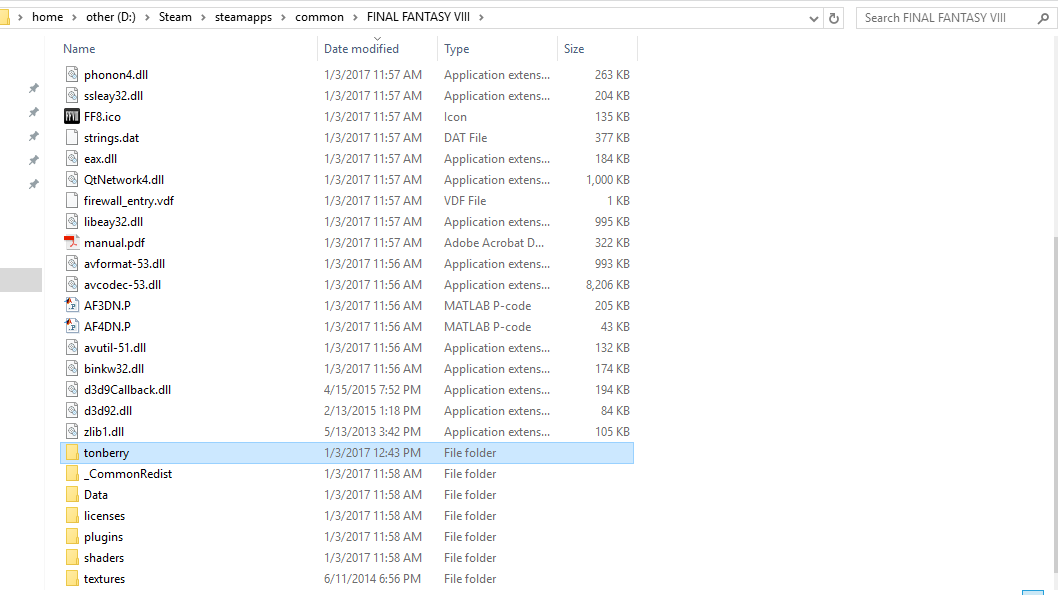
I've only installed the game and Tonberry only so far (v2.04). This is how my FF8Dir looks like:

Xm2ZqP7.png


Note that I've renamed "d3d9.dll" in the screenshot above.

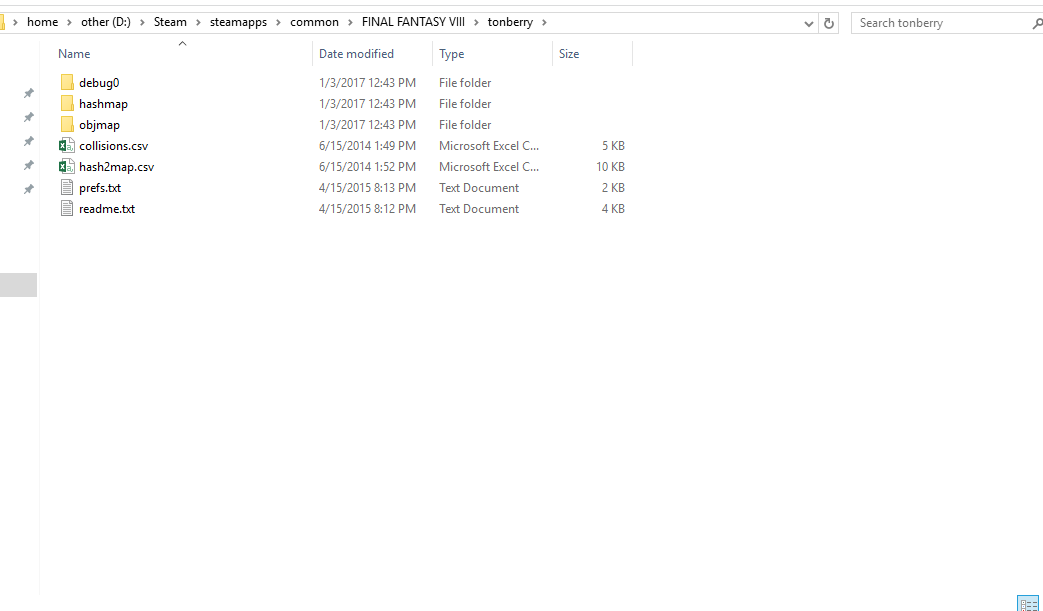
Here is my tonberry dir:
s3m34S9.png


The ff8/textures and hashmap folders are empty, since I've only installed Tonberry and no actual mods yet.

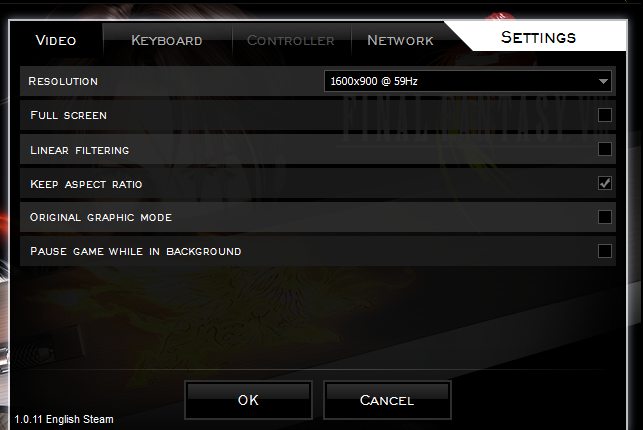
Here is my in-game ff8 config screen (I could only get the launcher and game to work if I rename the d3d9.dll):
BSOy761.png


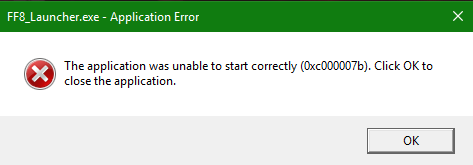
And finally, here is what happens if I try to run the game with "d3d9.dll" filename restored.

j4LjMT9.png


I've tried installing VC++ redist, .NET framework, DirectX, and they all seem to be up-to-date. I've also tried restarting windows and setting the exe to run as admin. My OS is Windows 10.

Any ideas on how to fix this?

Thanks in advance and keep up the great work!
 
I've seen this issue with Windows 10 before... Try running FF8 from your first processor core only.  Set that up by right clicking on the ff8 exe in your task manager and setting it to CPU 0.  Shouldn't have to do this, but it might be a quick fix.

Also - check to see if your DirectX drivers are up to date.  You might need to 'roll-back' your drivers.  This seems to be a directx9 issue, mainly.

Also, make sure your prefs.txt has the cache set to 250 or lower.

Were you using Windows 10 before?
 
Thanks for the reply, Mcindus.

I've seen this issue with Windows 10 before... Try running FF8 from your first processor core only.
I've tried doing this, but the problem is, next time I run it, it goes back to "all processors", and I have no idea how to make it "stick". Since I have to rename the dll back, and then re-run the launcher, it will just go back to "all processors", and I get the same error (hence not being able to switch to single-core).

Also - check to see if your DirectX drivers are up to date.  You might need to 'roll-back' your drivers.  This seems to be a directx9 issue, mainly.
DirectX should be up-to-date already. I've run this installer:

https://www.microsoft.com/en-gb/download/details.aspx?id=35

and according to the installer, I have  the latest or newer version installed. I'm not sure how to roll-back to an older version, nor which version I should try using.


Also, make sure your prefs.txt has the cache set to 250 or lower.
It was set to 250, but after changing it to 100, I still got the same error.

Were you using Windows 10 before?
It was Jan 2016 according to my Steam achievement timestamp (I got the last achievement when I played most recently), so yes, I believe it was Windows 10.

It was a different system though (desktop). Right now I'm trying to run it on a laptop (don't have the desktop anymore).

Compatibility modes (win8 and win7) don't seem to solve it either.
Oh, and I forgot to mention this in my original post: I've turned off the steam overlay and cloud saves.
 
Last edited:
Hello, sorry for my bad English. Thx for your Works.
When I install Tonberry, the game does not start the Luncher
VC ++ 2010 Redistributable is up-to-date.
Steam Overlay is off
My OS is Win10
 
Thanks for the reply, Mcindus.
I've tried doing this, but the problem is, next time I run it, it goes back to "all processors", and I have no idea how to make it "stick". Since I have to rename the dll back, and then re-run the launcher, it will just go back to "all processors", and I get the same error (hence not being able to switch to single-core).
DirectX should be up-to-date already. I've run this installer:

https://www.microsoft.com/en-gb/download/details.aspx?id=35

and according to the installer, I have  the latest or newer version installed. I'm not sure how to roll-back to an older version, nor which version I should try using.

It was set to 250, but after changing it to 100, I still got the same error.
It was Jan 2016 according to my Steam achievement timestamp (I got the last achievement when I played most recently), so yes, I believe it was Windows 10.

It was a different system though (desktop). Right now I'm trying to run it on a laptop (don't have the desktop anymore).

Compatibility modes (win8 and win7) don't seem to solve it either.
Oh, and I forgot to mention this in my original post: I've turned off the steam overlay and cloud saves.
Hello, sorry for my bad English. Thx for your Works.
When I install Tonberry, the game does not start the Luncher
VC ++ 2010 Redistributable is up-to-date.
Steam Overlay is off
My OS is Win10
Renaming the d3d9.dll disables tonberry completely, which is why you shouldn't do that at all.  Leave that file alone.

Make sure that you're modifying ff8_en.exe and NOT ff8_launcher.exe in the task manager.

Most likely, this is an issue with a 32 bit application and a 64 bit application conflicting.

Everything I read up on is saying it's a software issue with the DirectX9 dll's required for the game.  The microsoft link you posted directly says it does NOT update key components of the directx9 -runtime- because it is a part of your Windows install.  This issue pops up on other games that require d3d9.dll.  To fix this, you need to make sure you have all of the Direct X runtimes (will not load with the web-based auto-launcher - download it from your windows updates). 

If I were you guys, I would open up my windows updater and see if there's anything that is related to DirectX9 that you can install.

This is a stupid error on Microsoft's part - they should have included -everything-, and instead make certain fundamental drivers 'optional installs' and force some weird backward incompatibility issues because of it.  Also - they placed a 'hard cap' on all 32-bit games so they can't use more than 4GB of VRAM in Win10 for some reason...

Also - update your graphics drivers for your GPU - even if it's the on-board one.

This could also be an issue with a poorly written 'monitoring' program that is conflicting with d3d9.dll
Here's some more information:
https://answers.microsoft.com/en-us...h/23ef2a8a-3cd4-4df3-af20-e87e10e334dc?auth=1
 
Last edited:
Renaming the d3d9.dll disables tonberry completely, which is why you shouldn't do that at all.  Leave that file alone.
Yes, I had to disable tonberry completely to be able to change the in-game settings; which is why I renamed the dll.

Thanks for your previous post! I didn't know that the web updater doesn't include everything. In case anyone else has a similar problem, I downloaded this:

https://www.microsoft.com/en-us/download/details.aspx?id=8109

and that fixed the problem, and I can now run tonberry with the mods.
 
i have this weird problem when i alt-tab out of the game, and when i go back i see this
it does work after a few tries though, and the mods seem to be working normally.

r90d9l.jpg

hsorb9.jpg

vr38gg.jpg
 
Well this is awkward.
Normally I would try to back my posts up with crash dumps or whatever theyre called, but the problem im currently having is sort of unique for me, usually I can figure it out simply reading the crash popup, but thing is, the problem im having is that the moment im starting FF8_launcher I get the seizure warning, but then nothing, the launcher dosnt popup at all.

Things ive tried:
disable Tonberry. <works>

disable Tonberry by renaming D3D9 while starting the Launcher, but change the name back again before I start the game <works> first I thought this would do nothing, but it did change somethings, such as my font, its BOLD now, I cant remember which mod did that, but that specific part seems to work, but nothing else as far as im aware. (first time playing with mods, and steam, I cant tell what changed or not really)

changed all the hashmaps <Didnt work>

disabled all the mods, and simply only running Tonberry <Didnt work>

reinstalled essentials like VCR and DirectX <Didnt work>

Tried debug <Didnt work>

EDIT: Im running on OS windows 7. Ultimate if that matters.
 
Last edited:
Well this is awkward.
Normally I would try to back my posts up with crash dumps or whatever theyre called, but the problem im currently having is sort of unique for me, usually I can figure it out simply reading the crash popup, but thing is, the problem im having is that the moment im starting FF8_launcher I get the seizure warning, but then nothing, the launcher dosnt popup at all.

Things ive tried:
disable Tonberry. <works>

disable Tonberry by renaming D3D9 while starting the Launcher, but change the name back again before I start the game <works> first I thought this would do nothing, but it did change somethings, such as my font, its BOLD now, I cant remember which mod did that, but that specific part seems to work, but nothing else as far as im aware. (first time playing with mods, and steam, I cant tell what changed or not really)

changed all the hashmaps <Didnt work>

disabled all the mods, and simply only running Tonberry <Didnt work>

reinstalled essentials like VCR and DirectX <Didnt work>

Tried debug <Didnt work>

EDIT: Im running on OS windows 7. Ultimate if that matters.
You might have a weird monitoring program getting in the way of the D3D9.dll... try shutting everything off but steam.

Sounds like an issue with driver conflicts.  Did you try all of the above instructions for the directx9 installs? the web installer doesn't install everything.  What mods are you using?
 
You might have a weird monitoring program getting in the way of the D3D9.dll... try shutting everything off but steam.

Sounds like an issue with driver conflicts.  Did you try all of the above instructions for the directx9 installs? the web installer doesn't install everything.  What mods are you using?
Its not a problem with monitor programs, thats the first thing I check after something, anything really, fails to start, or load. My computer is completely up to date, so I should have the latest updates for Directx 9.
And as for mods:

Tonberry 2.04: Enhanced[forums.qhimm.com]
Tonberry Enhanced enables the replacement of texture files.


SeeD Reborn v3.5[forums.qhimm.com]
Text, Menu, and GUI Overhaul by MCINDUS

Project Eden v1.0[forums.qhimm.com]
Field Background 4x Upscale by Omzy

Tripod v1.1[forums.qhimm.com]
Triple Triad Texture Overhaul by MCINDUS

BattleFieldPack v2.0[forums.qhimm.com]
BattleField Upscale Project by MCINDUS and FatedCourage

Rebirth Flame v1.2[forums.qhimm.com]
Character Texture Project by FatedCourage

HorizonPack v3.0[forums.qhimm.com]
World Textures, Maps, and Vehicles Upscale by MCINDUS and FatedCourage

Project Hellfire v1.2[forums.qhimm.com]
GF Summon Replacement/Upscale Pack by MCINDUS and FatedCourage

Apocalypse v1.1[forums.qhimm.com]
Boss Upscale by FatedCourage

Lunar Cry v1.2[forums.qhimm.com]
Enemy Upscale (100% Complete) by MCINDUS


Basiclly all texture mods that was listed here
https://steamcommunity.com/sharedfiles/filedetails/?id=391096600
Except for World UV Texture Patch[forums.qhimm.com] by MaKiPL

EDIT: I do recall during installation of all the mods that some folders and files asked to be replaced/moved, I simply replaced them every time, cause I was told that all these mods should go together. Maybe Im wrong?

2nd EDIT: by running compatibility mode Windows XP service pack 2, I manage to load the launcher for 0.5 seconds before it disappears (completely serious here) if I time it correctly I can manage to press play game before the launcher disappears, and the game  starts fine, I also know some mods, or all mods, are working since the font has changed to the bold one at the new game/ load save menu.
I press load save, selects a save where I know im on the overworld(if that helps) the moment the load bar is finished after selecting the save I want, the game freezes.

 
Last edited:
Its not a problem with monitor programs, thats the first thing I check after something, anything really, fails to start, or load. My computer is completely up to date, so I should have the latest updates for Directx 9
Still sounds like it's a DirectX9 issue.  Follow all of the links on this page regarding the issue... it's a common one.  D3D9.dll is a 'developer' dll - and isn't part of any 'normal' installs since DX11 came out.

Also - try to run FF8 on a single core through the task manager.  This might help.
 
Still sounds like it's a DirectX9 issue.  Follow all of the links on this page regarding the issue... it's a common one.  D3D9.dll is a 'developer' dll - and isn't part of any 'normal' installs since DX11 came out.

Also - try to run FF8 on a single core through the task manager.  This might help.
Ah, alright, Yeah, ive been doing Directx problem solving for days with nothing to show for it, and to be honest I thought for sure that after I manage to actually launch the game that Directx wasnt the problem.

2nd EDIT: by running compatibility mode Windows XP service pack 2, I manage to load the launcher for 0.5 seconds before it disappears (completely serious here) if I time it correctly I can manage to press play game before the launcher disappears, and the game  starts fine, I also know some mods, or all mods, are working since the font has changed to the bold one at the new game/ load save menu.
I press load save, selects a save where I know im on the overworld(if that helps) the moment the load bar is finished after selecting the save I want, the game freezes.
I even manage to load a save thats NOT in the overworld and it works fine, its only the overworld save that seems to freeze. Granted I only have 2 saves, 1 overworld, 1 in deling city.
 
Last edited:
I remember i had the same issue on another game,dragon quest viii. It was because in the launcher i configured the game to be  full screen.
 
I remember i had the same issue on another game,dragon quest viii. It was because in the launcher i configured the game to be  full screen.
Thanks mate, yeah Ive read that one aswell, even went so far as to make it a launch option in steam itself, didnt work im afraid, but I do know that others that had D3D9 problems have solved it that way.
 
Ok, I need help. For the life of me, I am unable to get anything to work. I have downloaded the texture packs of eden,seed,etc. placed them in the main game folder under textures. I have also downloaded and place tonberry in main game folder. I have put all the hashpack in the haskpack folder. I don't see any obj files. I am trying to introduce my wife into some of the older FF, but she is turned off by graphics. She got spoiled on the FFX remastered.

edit: I finally got it to work.
 
Last edited:
Hi,

Had been using tonberry for a while and now I'm getting the same issue squarekiddo responded with. it seems tobe an issue with the d3d9 and I can't figure out how to fix it. any help is appreciated.
 
Hi,

Had been using tonberry for a while and now I'm getting the same issue squarekiddo responded with. it seems tobe an issue with the d3d9 and I can't figure out how to fix it. any help is appreciated.
You probably updated to windows 10?

you guys need to get the directx9 download from here if you're having d3d9 issues: 

https://www.microsoft.com/en-us/download/details.aspx?id=8109

also - if you're still running into the same issues, try disabling RaW if you have it running.
 
Last edited:
So I am also having the  issue where direcX is being a jerk. Ive been working with McIndus via email and am posting here as a last resort.
I have windows 10, my steam overlay is turned off. Geforece experience monitoring is turned off. I use windows defender.

I run the directX installer to no avail. I opened the june2010 file itself, and the infinst.exe wont run. right clicking on the various inf in that .cad result in at least one install trial that did "something" and the game still wont launch.

the Ultima launcher quickly brings up the seizure warning and the FF8_ULTRA_LAUNCHER.exe states: "FF8_Launcher.EXE opened successfully. Attempting to laod by Process Name (FF8_EN.EXE)...  Still Waiting....Click "PLAY!""

however, once i hit ok on the seizure warning....big fat nothing.

McIndus and I believe it is an issue with the d3d9.dll, d3dcallback.dll, and zlib.dll.

It may be as simple as i cant install the DX properly cause im dumb? idk.
 
Status
Not open for further replies.
Back
Top