
[PC] HRC Resizer

  • Thread starter Thread starter Borde
  • Start date Start date
Status
Not open for further replies.
B

Borde

Guest
Well, while Reunion figures out how to solve the clipping problems with the hi-res models (or you want hi-res SD models like me :-P), you may use this program to adjust the size of the models in order for them to fit better on the background.
Here you have:
http://perso.wanadoo.es/e/ventanucos/HRC_resizer.zip

Updated with ice_cold513 FAQ. Thanks for writting it!
 
Last edited:
WWWWEEEEEeeee

thx you i love the SD models on the FF games im going to have a messabout with this tool now

any big bugs to stay from??
 
Ok thxs

OK Boys & Girls lets go bug hunting. :wicked:  :wicked:
 
Ok guys, yes this is ancient, but I have a request.  I have no idea how to make programs, and I have a huge task of manually resizing each and every NPC to certain, specific sizes.  This means I have to manually edit the .hrc file for every bone.

It would save me months of work if someone could create a program, very similar to this one, that instead of adjusting the bones by a percentage, adjusts them based on the numbers inputted.  Thanks in advance if anyone is up to this or even has the know how.
 
Sure, should be trivial.

How would you intend to input the information? Give a couple of examples of the changes you'd be making.
 
Ok guys, yes this is ancient, but I have a request.  I have no idea how to make programs, and I have a huge task of manually resizing each and every NPC to certain, specific sizes.  This means I have to manually edit the .hrc file for every bone.

It would save me months of work if someone could create a program, very similar to this one, that instead of adjusting the bones by a percentage, adjusts them based on the numbers inputted.  Thanks in advance if anyone is up to this or even has the know how.
I 2nd this idea.
 
Ok guys, yes this is ancient, but I have a request.  I have no idea how to make programs, and I have a huge task of manually resizing each and every NPC to certain, specific sizes.  This means I have to manually edit the .hrc file for every bone.

It would save me months of work if someone could create a program, very similar to this one, that instead of adjusting the bones by a percentage, adjusts them based on the numbers inputted.  Thanks in advance if anyone is up to this or even has the know how.
What you are doing is entirely different from my resizing method (which I have completed since 2 years or so). I have changed the scale the model would have in a certain field within the flevel.lgp. You change the size a model will have globally in any field. Never the less both ways create a big problem: the models aren't placed on the walkmesh correctly and will standing through it.

Sadly the only realistic solution to compensate that is to change all animations to the new high, and even then there are animations which hardly can be corrected because they have a full move a scene (a MP animation springs in my mind).
Here what I had done for Cloud so far:
https://mega.nz/#!WYtR1Y4A!MMXit515P2WEYQEVf_Qp_mQ7x7DQHXbwWT5foam7ax0

Sure, should be trivial.

How would you intend to input the information? Give a couple of examples of the changes you'd be making.
This is a tricky task because some models get a body correction trough the animation (see Tifa and Aerith). I think it would be clever to normalize the leg bones and changing the other bones by the percentage the upper leg bone has grown.


I actually need a tool which can edit the animation files itself because it would be much better if I could convert an animation with 24 bones to 40 bones. The new bones doesn't even need to be animated.But  this way we could unify all human animations and never getting trouble anymore if we change a model with a different bone number.
 
Sure, should be trivial.

How would you intend to input the information? Give a couple of examples of the changes you'd be making.
I would want to be able to type them in. It would need to load the hrc to verify how many and what bones.

The only issue, like kaldarasha was saying, is that some of the models, like the children, use animations that adults use due to having the same number of bones. However, I think that problem can be bypassed by not adjusting bone lengths too severely
 
I would want to be able to type them in. It would need to load the hrc to verify how many and what bones.

The only issue, like kaldarasha was saying, is that some of the models, like the children, use animations that adults use due to having the same number of bones. However, I think that problem can be bypassed by not adjusting bone lengths too severely
More specific, please.

Do you envisage loading a HRC, being presented with a grid showing all the bones with their current lengths, and just moving down the grid and applying an adjustment to each one? Or some other interface?

Would you overtype the current length, or would you want to type in an adjustment (+2.4, -0.45, ...) ? Would you need the ability to apply an adjustment to a whole bunch of bones at once? If you adjust a parent bone, should it apply any changes to the child bones at all, or leave them unchanged?

What you are doing is entirely different from my resizing method (which I have completed since 2 years or so). I have changed the scale the model would have in a certain field within the flevel.lgp. You change the size a model will have globally in any field. Never the less both ways create a big problem: the models aren't placed on the walkmesh correctly and will standing through it.

Sadly the only realistic solution to compensate that is to change all animations to the new high, and even then there are animations which hardly can be corrected because they have a full move a scene (a MP animation springs in my mind).
Here what I had done for Cloud so far:
https://mega.nz/#!WYtR1Y4A!MMXit515P2WEYQEVf_Qp_mQ7x7DQHXbwWT5foam7ax0

This is a tricky task because some models get a body correction trough the animation (see Tifa and Aerith). I think it would be clever to normalize the leg bones and changing the other bones by the percentage the upper leg bone has grown.


I actually need a tool which can edit the animation files itself because it would be much better if I could convert an animation with 24 bones to 40 bones. The new bones doesn't even need to be animated.But  this way we could unify all human animations and never getting trouble anymore if we change a model with a different bone number.
Just adding new not-actually-doing-anything bone entries to the animation files should be pretty easy. Fundamentally it's basically just inserting a bunch of zero rotations into the file.
 
If I understood Bear correctly he wants to nomalise the models to one size.
 
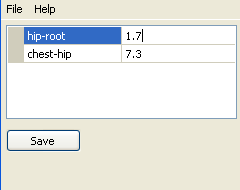
I would like an interface where the hrc is loaded and each bone is labeled (i.e. hip root) and has a box beside it where the bone length is displayed.   This box can then be easily edited using the numpad on the keyboard to input whatever length is desired.  It would also be helpful for them to be in a list format so that multiple bone lengths can be displayed at once so scrolling is minimized. For my purposes, it would be IMMENSELY helpful to be able to temporarily store lengths so that with the click of a button, the saved lengths can be applied to the new hrc without having to manually type each one in.  So if I want to change hip root from 1.0 to 1.2 and apply it to others, I could click a box beside the length to save whatever number has been input, once a new hrc is loaded, another box can be pushed to load 1.2 in place of whatever number the hrc originally had.  This is most beneficial for skeletons like Cloud where there are 64 other models that have his exact same structure.

As far as adding new bones that don't do anything, that may throw errors in kimera, but should work fine in game.  If it's easy to do, it could be worth trying, at least until a proper converter is made for them
 
Ficedula hasn't logged in for over a month.  Is anyone else willing and able to to create this program?
 
Ficedula hasn't logged in for over a month.  Is anyone else willing and able to to create this program?
Are you still looking for this?  If so, is this the kind of thing you're looking for?
hBGGZ4f.png

I think I could make an editor like this.
 
Yes!
It will need to be able to read the .hrc to know what bones are used in the model, but the big feature I need is for the lengths I input to stay even when a new hrc is loaded.  That way I can open aaaa.hrc, set all of its bone lenths, save it; then when I open aaab.hrc, all the lengths I manually typed in will still be up (or a button can be pressed to recall them?) so that all I have to do is open aaab.hrc and save it and all of its lengths will be the changed to the same as aaaa.hrc
 
Could there be a one made for the battle models as well or give it support for them?  It would help great for us non-hex savvy modders for giving Sephiroth and other characters different animations and create new characters and bosses the way we in-vision them.
 
Yes!
It will need to be able to read the .hrc to know what bones are used in the model, but the big feature I need is for the lengths I input to stay even when a new hrc is loaded.  That way I can open aaaa.hrc, set all of its bone lenths, save it; then when I open aaab.hrc, all the lengths I manually typed in will still be up (or a button can be pressed to recall them?) so that all I have to do is open aaab.hrc and save it and all of its lengths will be the changed to the same as aaaa.hrc
This project ended up being a little harder than I thought, but I should have something soon.  One question, when an HRC has an entry like:

Code: [Select]
Code:
l_handl_foarm2.2786036#1 l_hand 2 ERJE ESAA
is the '#1 l_hand ' significant.  Almost all entries only have 4 lines and so I'm assuming those are comments or something like that.
 
Yep that entry should be ignored.
While you at creating a new program I could need two new functions: one is to change the vertices type to 0, 1 or 2 (http://wiki.qhimm.com/view/FF7/P#.P_File_Header), the other is to remove the textured flag from a group of a p-file. I have ask Dan already for that and he would do it, when he gets the time for it. However if you already working on a similar tool there is probably no need for another tool.
 
I would like an interface where the hrc is loaded and each bone is labeled (i.e. hip root) and has a box beside it where the bone length is displayed.   This box can then be easily edited using the numpad on the keyboard to input whatever length is desired.  It would also be helpful for them to be in a list format so that multiple bone lengths can be displayed at once so scrolling is minimized. For my purposes, it would be IMMENSELY helpful to be able to temporarily store lengths so that with the click of a button, the saved lengths can be applied to the new hrc without having to manually type each one in.  So if I want to change hip root from 1.0 to 1.2 and apply it to others, I could click a box beside the length to save whatever number has been input, once a new hrc is loaded, another box can be pushed to load 1.2 in place of whatever number the hrc originally had.  This is most beneficial for skeletons like Cloud where there are 64 other models that have his exact same structure.
I've put this on my github page.  I usually just write software for my use.  This is the first thing I've tried to release for others to use.  I hope it works.

I hope the utility is self explanatory.  There's 3 tabs.  On the first one you can load and edit an hrc file.  You load a profile to update all the values at once.  On the second tab you can save the current values to a new profile.  The 3rd tab is a batch tool.  You can drop a bunch of files on it, select a profile, and hit the go button and it will TRY to update all the files at once. 

The utility is severely undertested, so please back up anything you want to change first.
 
Last edited:
Status
Not open for further replies.
Back
Top