[PC] LGP inserter/extractor/repacker & library - ulgp (1.2)

  • Thread starter Thread starter luksy
  • Start date Start date
Status
Not open for further replies.
downloaded and placed the libs in ulgp folder when i open ulgp a command prompt comes for a split second then disappears, later installed the libs into system 32 and ulgp still the same thing? on windows 7 32bit
 
Last edited:
This is a non-interactive command line app, you need to open a prompt in the folder (hold shift and right click n the folder -> open command window here). Read the readme.
 
Can't manage to replace some files in battle.lgp and char.lgp with other files pretty confusing with command prompt  :-X yes i read the readme many times and still can't get it
Anyways many thanks for creating this awesome program i guess il have to wait for the gui version :)
 
Command line is very easy but you just have to learn it.  And only once.  The command line is a lot faster than a GUI can hope to be because you can create quick batch files to do the jobs for you, and when used with an installer they are invaluable.  GUI for a tool like this is clunky...

I used to avoid command line as much as I could, but once you learn the basics, it really isn't bad at all!
 
Last edited:
Can't manage to replace some files in battle.lgp and char.lgp with other files pretty confusing with command prompt  :-X yes i read the readme many times and still can't get it
Anyways many thanks for creating this awesome program i guess il have to wait for the gui version :)
If you post what you tried maybe I can point you in the right direction.
 
Yeah guess i should try learning command line once and for all will be handy later surely :)
And Luksy i tried those commands said in readme i think in command i typed '-r battle.lgp '  then pressed enter think it said error, il give a proper look tomorrow in bed now on phone xD
Do i have to specify where those lgp's are placed maybe?
 
You need to specify precisely what you are inserting into an lgp archive, unlike extracting it won't automatically read all files in the current directory (it doesn't accept wildcards either). For an example of how to overwrite files in an existing archive, let's say in your current directory you have "battle.lgp", and two files "foo" and "bar", to overwrite the files in the lgp run this:

ulgp -r battle.lgp foo bar
 
Think im kinda getting it now, but the amount of files i want to replace the files within battle.lgp are aaaa to smda. I placed ulgp, battle.lgp and those p files all in one folder in the desktop folder called battle.lgp and tried this command in readme first
   Edit the files, then overwrite the file inside the archive
      ulgp -r flevel.lgp -C flevel gldelev
Not sure what gldelev means.. so replaced flevel words with battle and it said it replaced only 1 file but it can't find the path
http://imgur.com/08xdXYh

Also tried your command now it also says path not found
http://imgur.com/oYzPjao

Sorry for bothering you was just playing about and learning how to do this with the cmd lol il use aalis lgp for the time being, just his don't have the replace files directly but have to extract all files then replace then archive again, takes some time :P
 
Last edited:
edit.

There are two Cs... I'd change the second one to use t (target) or another letter, Luksy :)
Not a good idea to use case letter for 2 different operations (and I'd make all ops case insensitive).

@e1sunz

What you want is this:

1.  Place all files that are to be encoded into a folder (call it myfiles) .  Place it in same place as ulgp.exe.

2. open command prompt

3. use ulgp -r PathToLGPArchive myfiles

Where PathToLGPArchive is obviously something like C:\FF7\data\field\flevel.lgp

4. If extracting all files you would use
  ulgp -x PathToLGPArchive -C myextractedfiles 

5. if extracting specific file (in this case dyne and del1)
 ulgp -x PathToLGPArchive -C myextractedfiles  dyne del1

Also, Kranmer will make likely the app neater by adding the libs to the executable and compressing.  So don't worry about that either.

Also, gldelev is just a file name inside flevel.

 
Last edited:
Finally some progress thanks alot DLPB!
It all looks well in the command prompt here:
http://imgur.com/BVUOj3O
It finished in an instant but then i noticed the battle.lgp still has the same file size but the date modified changed.. tried it in game and nothing changed, im using the steam version if that's maybe why or abit dodgy, am trying to apply mods from here, didn't convert to 1998 yet:
https://www.ff7catalog.com/threads/9769/
Replacing files within lgp is nothing new done this plenty times and had no problem using aalis lgp tools with GUI.. im too dumb to use this afterall lol, this isn't too important it's ok was just trying out this awesome program with cmd :)
Also, Kranmer will make likely the app neater by adding the libs to the executable and compressing.  So don't worry about that either.
Also, gldelev is just a file name inside flevel.
Cool! and oh right
 
Last edited:
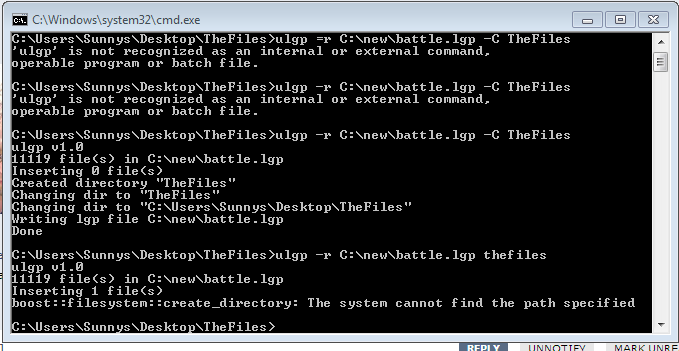
Change myfiles to "Thefiles" and make sure that the files you want to add to the lgp archive are INSIDE the Thefiles folder.  tell me what happens.
 
Did that and checked, and also just realized it said in command prompt after doing it, it says 'inserting 0 files' :o
http://i.imgur.com/ylRHrOY.png
and it also made another new folder within 'TheFiles' folder called 'TheFiles' aswell but is empty
 
Remove the -C from the one with -r.  It then adds the file, and I think that is how it is supposed to be.  But there is still an error message.  Luksy will have to explain that.

Surely this program still allows adding of files from folders?  Try this and then see if the file has been updated

ulgp -r PATHANDFILE thefiles

Where "thefiles" is a folder in same place as ulgp.exe, and contains the files that are to be added.
and PATHANDFILE is the lgp file.
 
Last edited:
i moved everything in ulgp and the libs inside the "thefiles" folder in desktop before and checked again & the battle.lgp file is placed in a new empty folder at C:\new like before
28UrmTj.png

Maybe the best option is to simply extract to a folder replace files manually then lgp archive again? but not to use the direct replace
 
The ulgp and libs have to be outside the folder.  The "Thefiles" folder should be in the SAME PLACE (the same folder) as ulgp.

The ulgp.exe locates the folder "Thefiles"  from the same path.

Thefiles ONLY CONTAINS the files you want to update.  The ones you want to be placed into the ulgp archive.

In other words lets just do this:

Place ulgp and libs in a folder called "theprogram"  and then inside "theprogram" place a new folder "thefiles". Then you go back to place where ulgp is (one folder back) and open ulgp in command prompt.
 
Last edited:
Ok only left the files i want to replace with in "thefiles" and inside the including "ulgp" folder and inside that has the ulgp content so i right clicked on "thefiles" folder and clicked 'Open command window here' then did what you said now i got this:
http://i.imgur.com/TP0E7aJ.png
also tried 'Open command window here' on the ulgp folder inside and the results abit different
http://i.imgur.com/9zpzpq5.png
 
Nope.  That's all wrong.

Do what I said above with "theprogram" folder and "thefiles" folder.  That way it can't go wrong.  And right click "theprogram" folder to bring the command prompt up when you do it.

edit.

And after you have done that, wait.  because either my command using -r above is wrong, or there is something wrong with ulgp.  It can append single files but doesnt seem to allow appending of files from folder, which it should (or at least it used to :P).

Like you said before, you can use -c to create new archive but that shouldnt need to be done.
 
Last edited:
Ohhh right ok made a folder in desktop and in there 2 seperate folder "ulgp" and "the files" right clicked on "ulgp" folder and clicked Open Command prompt here then did what you said:
http://i.imgur.com/pUDMtmV.png
Oh just realised took up too much thread space just for my own thing sorry! I think i should give up now but i did learn a thing or two from this lol :) think i got a dodgy pc? meh Thanks alot both of you
 
Last edited:
Go back one dir with cd .. And type this:

dir /b thefiles | ulgp\ulgp -r C:\new\battle.lgp -C thefiles -e
 
Go back one dir with cd .. And type this:

dir /b thefiles | ulgp\ulgp -r C:\new\battle.lgp -C thefiles -e
Is this the new way to encode (append) files from a folder?
 
Last edited:
Status
Not open for further replies.
Back
Top