[PC] p model simple editor - Kimera (0.97b) + Satsuki addon

  • Thread starter Thread starter satsuki
  • Start date Start date
Status
Not open for further replies.
S

satsuki

Guest
Hello.

I've done a small "addon" for Kiméra (needed for a friend at first, but why not share it ^^)
It's goal is to optimise model display scaling and to simplify screenshot of models.
ATM it's in french only and i'm beta testing it but i can clean the code and translate it in english if someone here need it ^^

Here's the Kimera + addon :
kes.png


Here's the files (source code included):
http://yatoshicom.free.fr/Kimera97c.102.7z

Addon's features:
   -Model display:
      -Choose background color (r/g/b).
      -Force camera view distance (so the scale between models is respected).
      -Apply a default root rotation after loading models.
      -Shift the model display (x%, y%) to make better centering for screenshot.
      -Auto apply ground height compute after loading models.
   -Model screenshot
      -Screenshot current model in bmp (in kimera\screenshots\modelname\animationname folder, and auto increment to avoid overwriting).
      -Force model's windows size (width/height in pixels).
   -Char.lpg folder
      -Open a model to fill models's and animation's lists.
      -You can load a model or animation in a list, with mouse scroll, or with previous/next buttons.
      -Disable "bad number of bones messages" after loading animation.
      -Auto load the current animation when you load au new model.
      -Screenshot all animations for a model (automatic and ignore the bad animations).
      -Screenshot all animations for all models (automatic and ignore the bad animations).
   -Show / reduce or hide the Satsuki's addons frames.
 
Last edited:
I wan't please. Any updates to this program are good ones.
I would happily enjoy using this

I would need it in English though :(
 
I wan't please. Any updates to this program are good ones.
I would happily enjoy using this

I would need it in English though :(
enough to get you started...
FF7-Model-editor-Kimera-English-basic-translation.jpg
 
So far i've done the translation, need to do some more beta test, will release today to tomorrow ^^

ke.png
 
Last edited:
Is there a way for adding new textures on the models , I am interesting with it.
 
You can convert the models with bitrun to an obj file and load it in Blender or 3DMax
 
Thank for your reply

..The trouble is When I import the finaly textured 3DS max file format to Kimera for making P file that make mess with texturing.

For now I use every time the 3DS file format when I export from bitrun. The obj file have a better extraction compatibility about P file from FF7?

How do you Import in the finally step. you use 3DS Max format for compile it in p file and hrc file? This is what I do every times...
Have you some special step to do for make a nice work about textures?
I use Blender for now...for modeling and texturing. But Textures ID in Kimera don't display the others textures when I import 3DS files format.
 
I use the v0.97c and I have this kind of bug? or this is normal?

Here I have export Cloud face from original RHC File (P file included) from FFVII. Import it to Blender in 3ds file format.
That seem work for now about this step. But after importing to Kimera 0.97c I have some trouble about the textures of the face watch here the screenshoots.

Test-Kimera-00.png

Test-Kimera-01.png

Test-Kimera-02.png

Test-Kimera-03.png


In Blender the textures seem well assigned --> OK but after an import directly in Kimera of the 3DS file format exported from Blender of the original Cloud Head (example from here) on the HRC structure file opened in Kimera before. There is only one associed texture to the 3D head instead of 3 textures in the main view (like on the screenshoot-->Eye). This seem a bug from Kimera because I can import my 3DS model in other 3D apps with textures (eye-mouth).

If you have tips about this bugs?

Here is the example with the original Cloud Face export import (I have not touching this one for view the main trouble I encounter)

Thank for your help
 
@EQ2Alyza
I can't reproduice the bug you have, nevermind if i start minimized or maximized, here's the results after min/max the window:

Windowed:
min.png


Maximised:
max.png


Could you tell me more, when this is appening, witch model... ?
 
Is it possible to add a textured group in Kimera? (importing a P file for the new textured group?)
Example: I have the Face of a characther loaded in a RHC full character file and trying to import the textured eyes from a P file on the face P file.

Thanks for reply.
 
The head mesh has to be exported in to separate groups. When I import a model I export in blender the full head mesh, then I delete every face of it except of the textured faces and export the remaining faces (left eye, right eye and mouth) too. If you go the long but safe way you also have to convert the object files to 3ds files for pcreator. In pCreator you have to open the full head mesh first then you must add the remaining faces for the texture. Add only to the added faces the bmp for the uv.
 
BUG:
When shifting the model display, the area the mouse must click to select a .p model is shifted as well. If I shift the model display by -60% on the y-axis, I must click significantly above the .p file to select it. If I set it to +60%, I must click significantly below the .p file to select it.
 
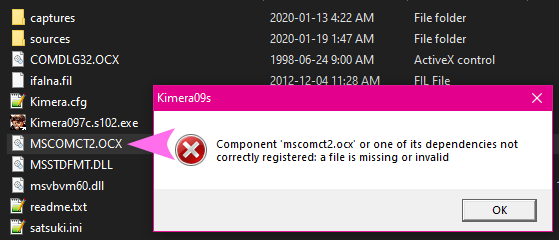
Hi Satsuki, I've run into a weird issue. When I try to open Kimera, it immediately throws an error:
"Component 'mscomct2.ocx' or one of its dependencies not correctly registered: a file is missing or invalid"

Ce3xpm6.png


"mscomct2.osx" is definitely in the folder. Is there another dependency that I might be missing?


edit: Found the answer! Reply #832 by Kaldarasha in the original Kimera thread.
For anybody who wants to install Kimera copy and paste these files (comes with Kimera) to sysWOW64 (on a 64bit OS).*
  - COMDLG32.OCX
  - mscomct2.ocx
  - MSSTDFMT.DLL

Open a CMD with admin privileges.
1. Changing the folder from System32 to SysWOW64

You will see that:
Code: [Select]
Code:
C:\Windows\System32>
Write at first "cd.." and hit enter
and you gain this:
Code: [Select]
Code:
C:\Windows>
Now write "cd syswow64" and hit enter
to move to the folder with the files
Code: [Select]
Code:
C:\Windows\SysWOW64>


2.Next we register the files. Write "regsvr32 COMDLG32.OCX" and hit enter.
Example:
Code: [Select]
Code:
C:\Windows\SysWOW64>regsvr32 COMDLG32.OCX
Continue with
"regsvr32 mscomct2.ocx"
and
"regsvr32 MSSTDFMT.DLL"
If done correctly you will get every time a success report.

*Note: On a 32bit OS put the files into system32 and leave the command prompt as it is and start with the file registration.

And of course write everything without quotes.
 
Last edited:
Status
Not open for further replies.
Back
Top