[PC] p model simple editor - Kimera (0.97b)

  • Thread starter Thread starter Borde
  • Start date Start date
Status
Not open for further replies.
Is it possible to easily add one?
Ive been using it to make qgears models and I have to keep a text file with each model explaining what colors go where
 
I don't know if it is easy to add. I demanded a while back the use of custom color pallets rather than the current pallet system which has some pre-lighting information and because of that isn't much of use this way. Borde said that the pallet and color system was only a hasty build in so it isn't comfortable at all but he's to busy to change a thing on it. The src code is available if you know how to ad such a thing.
 
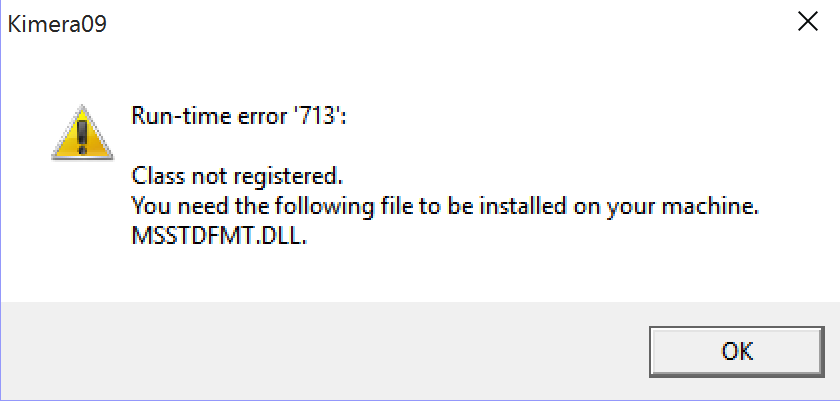
Anyone able to get this running in Windows 10? I'm getting this error and can't find any fixes on Google that work for Windows 10:


EDIT: I figured it out. Copy msstdfmt.dll to C:\Windows\System32 or C:\Windows\SysWOW64, run command prompt as admin, open the directory the .dll is in, type regsvr32 msstdfmt.dll and hit Enter.
 
Last edited:
I take it you did a fresh windows 10 install EQ2? I upgraded from an older version and it left all my dll files in place.
 
I actually upgraded from Windows 8.1, but this was on a new laptop I just bought that didn't have any of my mod stuff moved to it until after the upgrade. My old laptop was Windows 7 and launched with no hiccups.
 
So, I think I might have discovered a hideous bug here... Although it's a big maybe. Regarding the "Compile Multi-P bones into a single file" feature. Long story short, I need this because I'm working on a battle model and it doesn't accept multiple parts on the same bone.

So, I've got a two-part model and the two parts need to use different textures. Problem is, when Kimera compiles them into a single file (it leaves the parts as different groups so it can use multiple texture slots, which is exactly what I need), the UV map of the second part seems to get all messed up. I can't even use Biturn to convert the new file into 3DS and check if there's a pattern to the UV mess-up, because Biturn doesn't recognize the file anymore.

Has this happened to anyone else? Are there any nice workarounds? I currently have a mesh that looked like a head a minute ago, but now looks like a pile of vomit no matter which way around I try and flip the texture.  >:(
 
Workaround:
Compile the files with Bitrun to 3ds models. Load the 3ds files in pCreator, use 'Add Group' after you have opened the first to have them merged in one peace. Select a group and add a texture to them. Do this for other groups as well. Don't forget to swap the y coordinates off the UV map (you can find the tool for it under 'view'). Save this as new p-file you want.
 
Workaround:
Compile the files with Bitrun to 3ds models. Load the 3ds files in pCreator, use 'Add Group' after you have opened the first to have them merged in one peace. Select a group and add a texture to them. Do this for other groups as well. Don't forget to swap the y coordinates off the UV map (you can find the tool for it under 'view'). Save this as new p-file you want.
Sweeeet, that worked wonders! :D
 
I downloaded Kimera but when I try to load a model, I got Error 32765. I've been readins on the forums for hours trying different things to fix this, including placing dll files into System32 and all but I just can't get it to work. Has anyone else run into the same problem? Thanks.
 
So here we are again. As I said it would be a huge help if someone can port this from VB6 to C#. Here is an official tool for a conversation: https://msdn.microsoft.com/de-de/vstudio/ff793478
I knew that this isn't the proper way and a rewrite from scratch would be better, but maybe it can help users to bring this tool to work on modern system without the need to install the old VB6 library on their PC. Not to mention all the research were to find and how to install them.
 
For anybody who wants to install Kimera copy and paste these files (comes with Kimera) to sysWOW64 (on a 64bit OS).*
  - COMDLG32.OCX
  - mscomct2.ocx
  - MSSTDFMT.DLL

Open a CMD with admin privileges.
1. Changing the folder from System32 to SysWOW64

You will see that:
Code: [Select]
Code:
C:\Windows\System32>
Write at first "cd.." and hit enter
and you gain this:
Code: [Select]
Code:
C:\Windows>
Now write "cd syswow64" and hit enter
to move to the folder with the files
Code: [Select]
Code:
C:\Windows\SysWOW64>


2.Next we register the files. Write "regsvr32 COMDLG32.OCX" and hit enter.
Example:
Code: [Select]
Code:
C:\Windows\SysWOW64>regsvr32 COMDLG32.OCX
Continue with
"regsvr32 mscomct2.ocx"
and
"regsvr32 MSSTDFMT.DLL"
If done correctly you will get every time a success report.

*Note: On a 32bit OS put the files into system32 and leave the command prompt as it is and start with the file registration.

And of course write everything without quotes.
 
Last edited:
I found a bug, while I doubt that it will ever be fixed here it is:
When loading a battle field model with Kimera, it reads only the files until it meets 'z' at the end of the files name. Every file after it won't be loaded. Example:
It reads every file of oraa til it reaches oraz. So orba, orbb and orbc won't be loaded and therefor are not displayed.
 
Is there a fix anywhere for the "End of memory" error?  I get it so so often while using higher res models.
 
Is there a fix anywhere for the "End of memory" error?  I get it so so often while using higher res models.
If you haven't done this yet then set in kimera.cfg “UNDO_BUFFER_CAPACITY =” to 1. This reduces the possible undo operations to 1 (or 2) but makes the program much more stable.
 
Sorry for the necro but I can't seem to be able to use Kimera anymore.  I followed all the registration steps and it won't load.  Also says the all caps one is incompatible even though I got it to work before.

Edit: found my issue I needed to run the command prompt in admin rather the run feature.  Most of the sites told me to use run.  So command prompt admin and then make sure the program itself is run as admin.
 
Last edited:
Hi, I try to put new textures on original models from Final Fantasy VII but Kimera don't let me it do it nicely as it seem. I can only replace for now the previous textures...Wich way to use for create new ones textures like hair, shoes, beard...
 
FYI
The "Unknown option " of the editor is for fix this O_o

Captura.png

Captura2.png
 
I have a problem: I tried to open Kimera, but a notification told me "Component 'mscomct2.ocx' or one of its dependencies not correctly registered: a file is missing or invalid." How would I fix this problem?
 
Status
Not open for further replies.
Back
Top