[PC] p model simple editor - Kimera (0.97b)

  • Thread starter Thread starter Borde
  • Start date Start date
Status
Not open for further replies.
I hope so. Animations aren't a problem any more. Effects, on the other hand, could pose a problem. Akari old me they are pretty much hard-coded into the executable, so they must be modified in assembler one by one... which sucks.
Talk to DLPB, he is the EXE master.


Why didn't I figured out earlier? Gradients! The full head is visible, if transparency is on. Is there a possibility to build in a feature to set gradients?
Maybe that is, what the engine needs to use transparancy.
 
Last edited:
Necro master here!

I'll have to ask is there some special trick about compute attached weapon position? using .97 I get a garbled message in upper left corner of model viewer seems to say choose and have a directory in it. No matter where on the model viewer I click left or right button as feature instructions say, nothing happens unless I hit escape, then garbled message disappears. Any chance one of you folks might publish a Compute Attached Weapon Position for Dummys?

This does seem like the logical place to ask this question, especially with search function down. I read through this entire thread to find when Borde added this function and each page after, but couldn't find anything about this feature being complicated.
 
Ah, thats your problem. The box is only info what to do. Click OK and then do the left or right mouse click on the bone of your choice.
 
I click the bone I want to attach to, and nothing happens as far as I can tell. What does it do when it works? Ive right left clicked all over trying to get it to give me some indication that it's working. I've attempted to do this with the weapon chosen, all sorts of different things. That garbled message I mention appears after I click ok on the instruction box that says click right or left on the bone to attach. The garbled message stays there (in the upper left corner of the model viewer) no matter where I click or what I do until I hit escape, then disappears. Other than that I can't see any problems, no crash, no issues.
 
Last edited:
This is how it works usually for me:

Click the button and the window appears,...

... then I confirm it and the window disappears...

...and at last I click on some bone and the weapon is bounded to it.
 
You've solved my problem in a way Kaldy, because you showed me I was doing the correct procedure. My problem was due to the use of AntiAliasing and/or Anisotropic filtering through forced driver settings. Probably shoulda figured that out like 2 days ago... I still get the garbled message in the corner, but the feature works as intended now. Tyvm screenshots.

Edit: After testing Kimera doesn't like Supersampling. I can use AA and anisotropic filtering, but AA must be adaptive multisampling or just multisampling. This is on my poor little ATI HD6850
 
Last edited:
Hey, need help please . . .
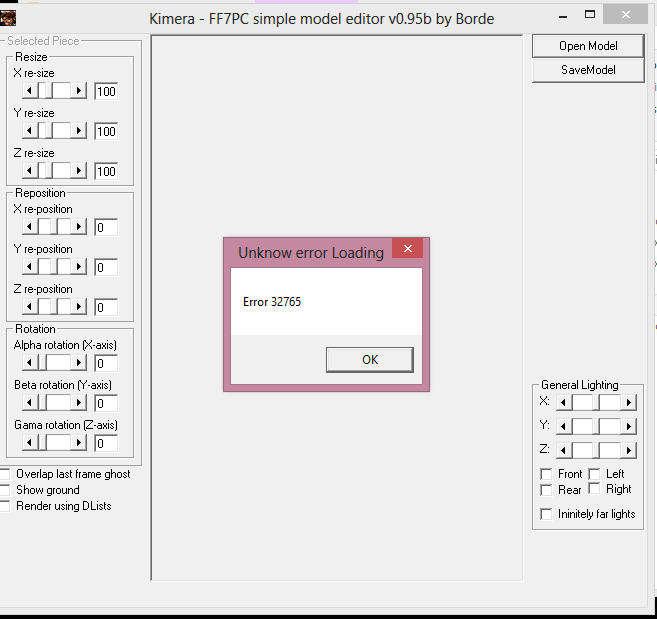
When i open kimera and choose open model i get
"Title -- Unknown error loading  //  Msg -- error 32765"

If i drag and drop the P file onto it it says
"Title -- Error reading  //  Msg --Error reading P file blah blah"

Is there a problem or am i overlooking something stupid?
Thanks
 
ahxlFPy.png

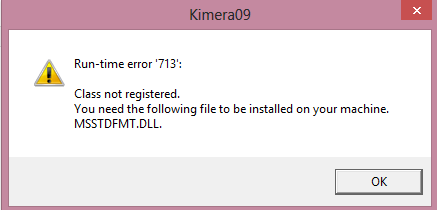
Just recently got Windows 8 and tried to open Kimera but it gives me that error i have redownloaded/extracted, run as admin, download a previous version and still the same problem anyway i can fix this so i can use Kimera? At first when i opened it, it mentioned that smartscreen or something thinks this file is bad pressed 'Run anyway' then still get to that same popup
 
CDV2NFg.png

Yup extracting your one it opened up fine until i pressed Open Model and got the error you have
Hopefully someone could help us out :)
 
glad i could help at least a little :D
drag your P file onto kimera and see if it works that way for you, doubt it but its worth a try
 
glad i could help at least a little :D
drag your P file onto kimera and see if it works that way for you, doubt it but its worth a try
Thanks mate that worked kinda :) after saving it crashes etc :/ and to make yours work have to always drag that main P file on top of the program icon while can't manually open up the program :/
 
Last edited:
Thanks alot mate that actually worked!!  ;D ah finally
You should try that too if you got the same problem, thanks again :)

Would still be nice if Borde could make this fully compatible with Windows 8 if it's possible and just open up the program and use it like normal but for now it seems gonna have to always drag the p file on top of Kimera, but only in the the older 0.95b one you provided tried in the newer original ones same problem
wow i didnt expect that lol, i error when i do that?? What did you use to extract the LPG?
 
Last edited:
wow i didnt expect that lol, i error when i do that?? What did you use to extract the LPG?
I use Aali LGP/ULG with .bat files to extract and put em back together again make sure to drag only one file of lgp the top one like Cloud model only drag ove the icon of Kimera Rtaa not the others along with it
Everything worked fine until i got to pressing 'Save Model'
Img removed
 
Last edited:
ok ill give it a go and see if i stumble accross a fix
Any chance of a link to it? i cant seem to find it, just other versions that i already tested, <-- nevermind i got it
And how can i attach printscreens to help with my problems on here??
And the last possible thing i can ask lol, rather than going through all 12k files how can i find out which 1 im after? i want RedXIII battle model
 
Last edited:
If your on win8 just press the Windows key + prnt screen and it will be saved to your screenshot folder in Picture folder or you can use Snipping tool, or just prnt screen then paste on Paint save it
I upload it on imgur here:
http://imgur.com/ then on the right where it says link for (message boards) just copy and paste that here
To view what lgp files belong to what check this spreadsheet listing everything:
https://spreadsheets.google.com/spr...oDVsrYhVdG0zZERUT0tsOF91eHE2WHo4ZWRseWc&gid=3
 
Status
Not open for further replies.
Back
Top