[PC] p model simple editor - Kimera (0.97b)

  • Thread starter Thread starter Borde
  • Start date Start date
Status
Not open for further replies.
Yeah that's the 095 shadow1918 gave me afterwards which works if i drag a P file to open it but can't save or use it as normal so that's no good and i previously also used the updated Kimera 096 and 097 and i get that problem which i had from the start .. think it's something to do with Windows8
 
Finally got it working!
Solution:
Get the latest Kimera
Inside it you will see a file called MSSTDFMT.DLL.
Copy it to system32, open command prompt as admin. type regsvr32 followed by the .dll file name
You'l get a succeed popup now open up Kimera and use it as normal :)
 
Last edited:
Yeah that success message your on about dont like me . . . i get an error :P
 
You need to have all the .dll files that are in the kimera folder registered in the system32 file. If you're having trouble google regsvr32 to get more info on how to use it. Make sure it's the latest version of Kimera, and that you're opening the command prompt as administrator.
 
Kimera 0.97, running as admin and coppied the MSSTDFMT.DLL into system32.
typed regsvr32 msstdfmt.dll and it complained about it
 
Did you run the Command Prompt as admin? Then type it exactly like this
regsvr32 MSSTDFMT.DLL.
Then press enter and see if it worked or maybe your on 64bit? I tried this on a 32bit
 
Running on 64bit, i tried it again and same thing, the error is
"The module MSSTDFMT.DLL failed to load
make sure the binary is stored in the specific path or debug it . . ."
ect
 
Try this maybe
regsvr64 MSSTDFMT.DLL.
make sure to put that (.) at the end of .DLL. aswell
 
still nothing, running as admin tried all options. You sure its only that 1 file i have to place into my system32 folder? and is it inside another folder aswell or?
 
When i open kimera and choose open model i get
"Title -- Unknown error loading  //  Msg -- error 32765"

If i drag and drop the P file onto it it says
"Title -- Error reading  //  Msg --Error reading P file blah blah"
just realised after reading your problem from before i don't think it has to do with the file im telling you to place this problem's different to mine, sorry mate not sure how to fix that :/
in 64bit is there a system64 folder? if so try it there if you want aswell but doubt that will fix it
 
nah i got past them errors, it was because i was using the wrong extractor and leaving it in the wrong place, i got left with the same problem you did with the save error.
No system64 folder only thing related maybe is "SysWOW64"
not a clue what that is
 
im not gunna delete them lol, anything there is there for a reason haha
 
Syswow64 are files for 64 bit windows. Kimera seems to run on 32 bit though. You'll need to do this as an admin, which will also put you in the system32 directory. Search "cmd", right click run as administrator. Regsvr32 will register what ever .dll file you need.
 
yeah iv done everything that has been said, run cmd as admit, have the DLL in the system32 folder and typed the correct line and it tells me this
"The module MSSTDFMT.DLL failed to load
make sure the binary is stored in the specific path or debug it . . ."
ect
 
It means you're probably in the wrong directory. Are you sure you're opening the command prompt as an administrator and you copied the .dll file to the correct location? Make sure it says system32 in the command line, otherwise you need to navigate to it. "cd windows\system32" You should already be there if you ran cmd as an admin, but sounds like you're in another directory. Remember google is your friend and you're not the first person to have trouble with the MSSTDFMT.dll file.
 
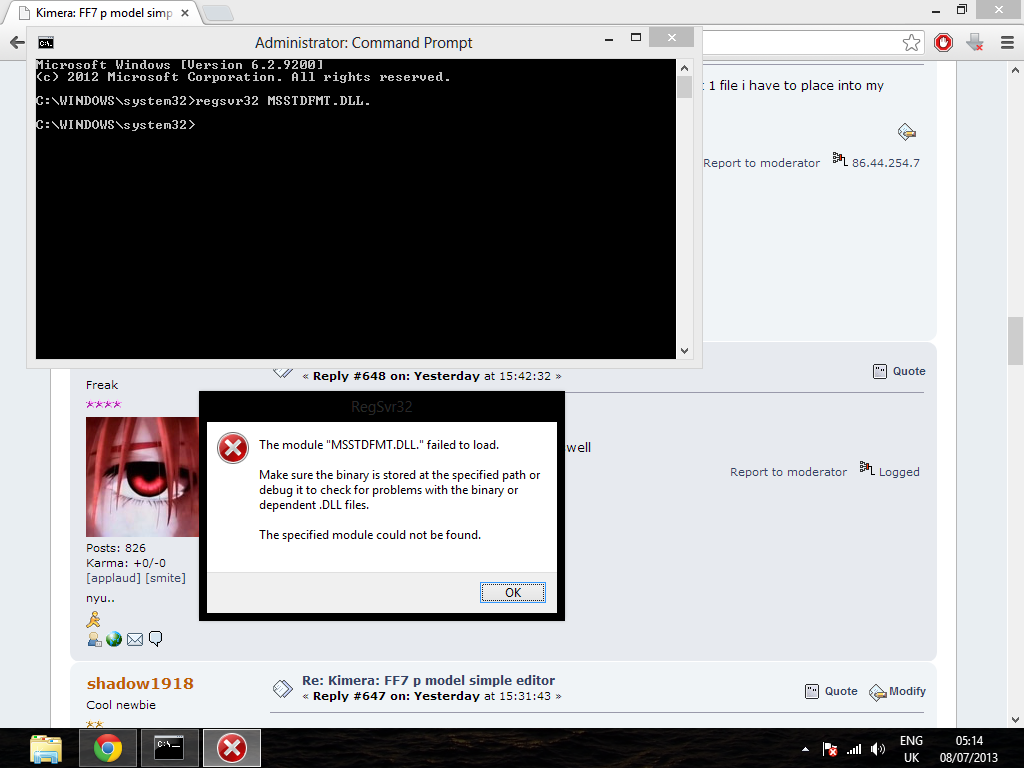
I do it as said before, to the last detail and this is my error
mV5SWUt.png
 
Did you try googling this? Nothing you need to do in the command line requires a period. I may not have been clear so just copy and paste this: regsvr32 MSSTDFMT.DLL

When you added the period you changed the file name and format so the computer didn't recognize it.
 
Status
Not open for further replies.
Back
Top