F
ff7rules
Guest
Another bug also the editing of enemys names is not saving at all

Yeah, the "done" button doesn't do a thing, and "cancel" closes and saves the changes. Still, it's no big deal.
Wow! This is the result of lazy programming on my part. I changed some variables to be global then didn't realize that that required a re-write of my saving processes. I think I have it more isolated now.
What I meant by camera override is : camera override. This is what it's called, and this is what it does
But this is just me being annoying. If you need more precisions, this is in the Animations/Formations window, in an enemy's tab. At the right of each attack, you can assign an animation. Then, at the right of the animations, you have a field called Camera Override. Basically, this forces a new camera data for this particular attack. Since my modifications sometimes turn a single-target attack into a multi-target attack, I need to change those values (so the camera doesn't zoom on the middle character when said attack hits the whole team). In previous versions of Proud Clod, the data in those fields was always saved - but not in PrC 1.5.0.α_4! :'(
If you change a camera override value, close the animations/formations window, then open it again, you'll see your modifications - implying it will save. But alas, if you save your scene.bin, the data reverts to its previous state.
Oh yeah. I forgot about those.Sorry. Yeah, they weren't right. They weren't saving properly at all. I fixed that too.
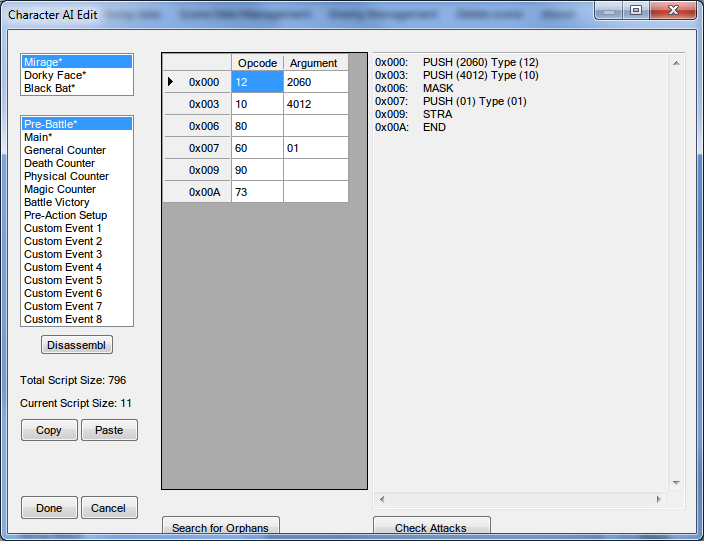
Oh yeah, and now that I'm at it, there is another bug - regarding AI editing this time. When you create a new line and type the 93 opcode, the program instantly displays an error message. And once, after I added many different 93 opcodes, the program would start to automatically add lines consisting of 00s below them (opcode being 00, argument being 00 00). And everytime I'd delete those unwanted lines, they would keep coming back after closing and opening the AI window again -__-
So I had to use Proud Clod 1.2.0.0 to do my AI editing, since it looks like it handles AI editing with more stability somehow.
Yuck. This is why I have old versions of WM archived. ;D AI made a drastic change a few versions ago and that was bound to cause some odd things. I haven't gotten to this yet, but I'll look at it.
I'll upload these changes soon. I think.Another bug also the editing of enemys names is not saving at all
Actually it does, just not in the scene selector. I should probably fix that...Done.
Proud Clod can update the KERNEL.BIN, but doesn't do it when it saves. I'm not going to offer much help to people that don't read the included readme....Hojo fixes the issue by updating the kernel.bin when you save. However, Proud Clod does not...
Serious? Wow, and I was going to have enemies and bosses drop many attribute related Materia.This new PrC will accept either KERNEL.BIN or kernel2.bin attack/item names (no, enemies never carry materia either dropped or stolen. You either find it or buy it).
If you do this, can you allow copying and pasting of enemy entries (collectively, like the whole form) into/over another enemy's form/entry (or whatever it's called)?It hit me as I was fixing this that I want to make it more like the tool Square was likely using to create the scene.bin in the first place. What I envision is there are entries for enemies, attacks, and scenes. Specifically, a list of each and a form for each. During saving, the tool would combine them all based on the formation data entries.
Yep, I'm aware. I've just had some 'hair-tearing' problems with field scripting, so I had previously thought I was able to get by using the battle drops. But meh, whatever guess I have to slowly learn instead.You can make non-random enemies drop materia via field scripting. Think about the Ifrit materia Jenova-BIRTH leaves behind.
Sorry to double-post, but I was just wondering... Will this tool combine both of your programs, Wall Market and Proud Clod? And I haven't got any answer to my question either
Can you tell when you'd be able to release this?No and No are the answers to these questions.Sorry to double-post, but I was just wondering... Will this tool combine both of your programs, Wall Market and Proud Clod? And I haven't got any answer to my question either
Sort of. This isn't going to be as direct as editing already existing flat files. This reads all the existing data and makes it more manipulatable. As it is, copying an entire enemy from one scene to another has the current PrC doing all sorts of crazy array copies that I don't entirely trust. What this will do is load the data from the scene.bin into attacks, enemies, and formations and recompile them back into scene files when you want to save. That will make it much easier to copy whole enemies and attack data between scenes without having to worry about how to replace the AI. It's easier to create from scratch than make a whole bunch of replacement and relocate methods.Wow... Will this tool be able to edit any byte of the scenes? Are all the bytes known?
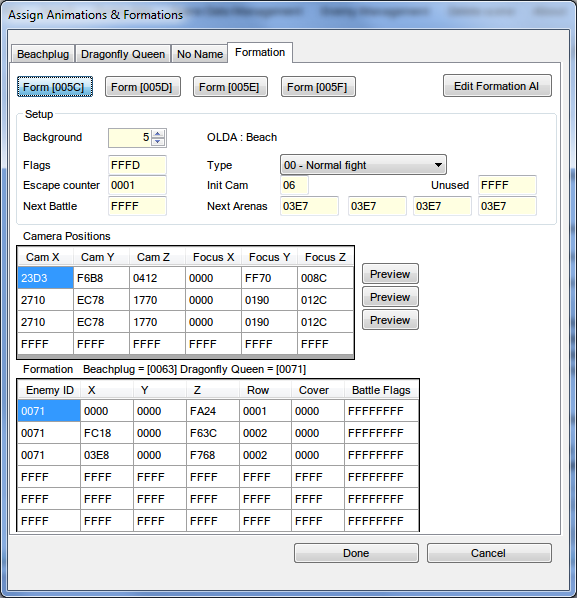
PrC is currently undergoing a complete rewrite which will address many of the issues you just brought up. I'll make a new topic when it's ready because it will be a completely different application.I've encountered a few niggles with this version. Overall, the release is impressive, but there are a few minor changes that I think would really improve the application:
...
