[PSX/PC] General editor - Hades Workshop (0.50b)

  • Thread starter Thread starter Tirlititi
  • Start date Start date
Status
Not open for further replies.
Good afternoon everyone. I am a complete newb when it comes to this stuff. I downloaded HW and was messing around with some text for items and abilities, etc. Just to learn how to use this and test it out. But I cannot figure out how to actually apply my changes to my Steam version of FF9. I cannot seem to find a basic tutorial of how to use HW. Can anyone help me out? Forgive me if this is not the right place to ask. Feel free to redirect me if necessary. Thanks!
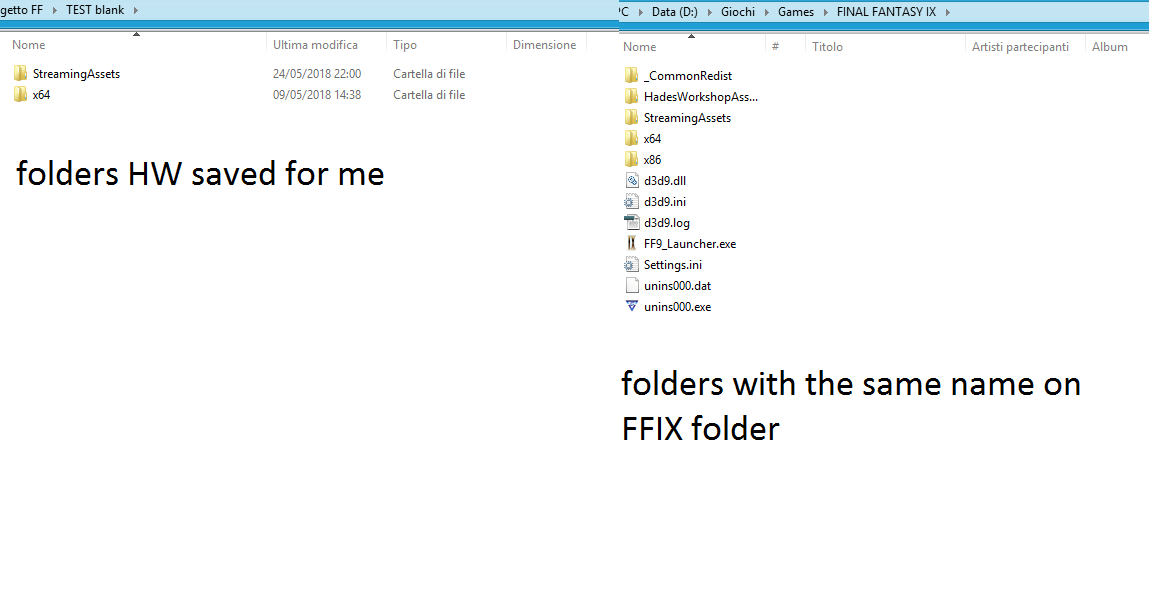
Hi there, it's easy! First of all, when your project is finished you click on File --> Steam Mod and  you choose your destination folder (never on the same of FFIX).
After this there will are some folders with files in, everything you need to do is to copy the files in the folders, and paste into the folders with the same name you will find into the FFIX folder

uykATfj.png


Hope I explained well enough ;)
 
he need explanations about how to use the program , not only about how to save the changes
 
@Tirlititi there is another thing i need help for : unlike the other characters , amarant\the salamander-man and zidane , can't use their trance commends during the normale state , no matter if i put their trance command in the section of the normal commands in battle , but as i said , this problem exist only for them , basically , if i put dharma in the normal commands of amarant , the respective abilities will just disappear , the same goes for zidane , so what's the procedure to solve the problem ?
 
Guys, I guess I need your help again..so.. in the end I've decided to put Blank in the third part on Pandemonium.. the one with Dagger, but for some reason (I bet I forgot something on the code) everytime I try to call an action battle for Blank (using potions, abilities etc), Dagger do those actions (and glitching too) so there's something kinda strange, for sure something that I didn't add

But WHAT?  :cry:
 
I don't know either... You have weird problems seriously ^^'
Please show your codes in which you add Blank in the battle. I also need to see the "SetCharacterData" line that you use for setting up Blank.

For model swapping, I'm working on it but I don't guarantee anything for the next release.
 
I don't know either... You have weird problems seriously ^^'
Please show your codes in which you add Blank in the battle. I also need to see the "SetCharacterData" line that you use for setting up Blank.
Ahahaha,I know right? Okay, let me see..

Those two are for the battle

Code: [Select]
Code:
Function Main_Init    InitObject( 1, 128 )    while ( !( GetBattleLoadState & 16 ) ) {        Wait( 1 )        set VAR_GenUInt8_206 = GetRandom    }    set #( VAR_GlobUInt16_24 = ( SV_PlayerTeam[MODEL_TYPE] ==$ 0 ) )    set #( VAR_GlobUInt16_24 |= ( SV_PlayerTeam[MODEL_TYPE] ==$ 1 ) )    set #( VAR_GlobUInt16_26 = ( SV_PlayerTeam[MODEL_TYPE] ==$ 2 ) )    set #( VAR_GlobUInt16_28 = ( SV_PlayerTeam[MODEL_TYPE] ==$ 3 ) )    set #( VAR_GlobUInt16_28 |= ( SV_PlayerTeam[MODEL_TYPE] ==$ 4 ) )    set #( VAR_GlobUInt16_28 |= ( SV_PlayerTeam[MODEL_TYPE] ==$ 5 ) )    set #( VAR_GlobUInt16_28 |= ( SV_PlayerTeam[MODEL_TYPE] ==$ 6 ) )    set #( VAR_GlobUInt16_30 = ( SV_PlayerTeam[MODEL_TYPE] ==$ 7 ) )    set #( VAR_GlobUInt16_30 |= ( SV_PlayerTeam[MODEL_TYPE] ==$ 8 ) )    set #( VAR_GlobUInt16_32 = ( SV_PlayerTeam[MODEL_TYPE] ==$ 9 ) )    set #( VAR_GlobUInt16_34 = ( SV_PlayerTeam[MODEL_TYPE] ==$ 10 ) )    set #( VAR_GlobUInt16_34 |= ( SV_PlayerTeam[MODEL_TYPE] ==$ 11 ) )    set #( VAR_GlobUInt16_36 = ( SV_PlayerTeam[MODEL_TYPE] ==$ 12 ) )    set #( VAR_GlobUInt16_38 = ( SV_PlayerTeam[MODEL_TYPE] ==$ 13 ) )    set #( VAR_GlobUInt16_40 = ( SV_PlayerTeam[MODEL_TYPE] ==$ 15 ) )    set #( VAR_GlobUInt16_42 = ( SV_PlayerTeam[MODEL_TYPE] ==$ 16 ) )    set #( VAR_GlobUInt16_42 |= ( SV_PlayerTeam[MODEL_TYPE] ==$ 17 ) )    set #( VAR_GlobUInt16_44 = ( SV_PlayerTeam[MODEL_TYPE] ==$ 18 ) )    if ( #VAR_GlobUInt16_28 ) {        set VAR_GlobUInt8_46++        set VAR_GlobUInt16_28[MODEL_OFF] =$ 65535L        set VAR_GlobUInt16_28[SHADOW] =$ 0        set VAR_GlobUInt16_42[MODEL_OFF] =$ 65535L        set VAR_GlobUInt16_42[SHADOW] =$ 0    }    while ( GetBattleState != 1 ) {        if ( #VAR_GlobUInt16_42 ) {            set VAR_GlobUInt16_42[PRESENCE_OFF] =$ 1        }        Wait( 1 )    }    if ( #VAR_GlobUInt16_28 ) {        set VAR_GlobUInt16_28[PRESENCE_OFF] =$ 1    }    Wait( 1 )    RunBattleCode( 35, 0 )    while ( GetBattleState != 4 ) {        Wait( 1 )    }    return
Code: [Select]
Code:
Function Main_Loop    if ( VAR_GlobUInt8_47 && ( !VAR_LocUInt8_0 ) ) {        set VAR_LocUInt8_0++        while ( IsAttacking != 0 ) {            Wait( 1 )        }        if ( GetBattleState != 4 ) {            return        }        RunBattleCode( 32, 0 )        while ( GetBattleState != 1 ) {            Wait( 1 )        }        set VAR_GlobUInt8_52 = 255        set VAR_GlobUInt8_48++        while ( !VAR_GlobUInt8_49 ) {            Wait( 1 )        }        set VAR_GlobUInt16_28[PRESENCE_ON] =$ 1        set VAR_GlobUInt16_42[PRESENCE_ON] =$ 1        set VAR_GlobUInt8_50++        while ( !VAR_GlobUInt8_51 ) {            Wait( 1 )        }        Wait( 5 )        set VAR_GlobUInt16_28[MODEL_ON] =$ 65535L        set VAR_GlobUInt16_28[SHADOW] =$ 1        set VAR_GlobUInt16_42[MODEL_ON] =$ 65535L        set VAR_GlobUInt16_42[SHADOW] =$ 1        Wait( 40 )        RunBattleCode( 36, 9 )        BattleDialog( 11 )        Wait( 45 )        if ( #( SV_PlayerTeam & VAR_GlobUInt16_28 ) ) {            if ( !( ( #Matching(VAR_GlobUInt16_28[STATUS_AUTO_A], 2097152L) ) && ( !( #Matching(VAR_GlobUInt16_42[STATUS_AUTO_A], 2097152L) ) ) ) ) {                RunBattleCode( 36, 10 )            } else {                RunBattleCode( 36, 11 )            }        }        BattleDialog( 12 )        Wait( 60 )        RunBattleCode( 35, 0 )        while ( GetBattleState != 4 ) {            Wait( 1 )        }    }    Wait( 1 )    loop

and those are the lines where i putted Blank in


Code: [Select]
Code:
 CureStatus( 0, 127 )        CureStatus( 1, 127 )        CureStatus( 3, 127 )        CureStatus( 2, 127 )        CureStatus( 4, 127 )        CureStatus( 5, 127 )        CureStatus( 7, 127 )        CureStatus( 6, 127 )        CureStatus( 8, 127 )       --------------- HERE I STARTED SetCharacterData( 11, 1, 14, 21, 7 )        SetName( 11, 92 )        set Setting_PartyReserve = 1215         SetPartyReserve( Setting_PartyReserve )        RemoveParty( 0 )        RemoveParty( 1 )        RemoveParty( 2 )        RemoveParty( 3 )        RemoveParty( 4 )        RemoveParty( 5 )        RemoveParty( 9 )        RemoveParty( 6 )        RemoveParty( 10 )        RemoveParty( 7 )        RemoveParty( 11 )        RemoveParty( 8 )        set VAR_GlobBool_147 = AddParty(2)        set VAR_GlobBool_147 = AddParty(0)        set VAR_GlobBool_147 = AddParty(11)        set VAR_GlobBool_147 = AddParty(65535)        set VARL_GenUInt8_303 = 0        set VAR_GlobInt16_8 = ( VAR_GlobInt16_10 = ( VAR_GlobInt16_12 = ( VAR_GlobInt16_14 = 99 ) ) )        if ( 1 ) {            set VARL_GenUInt8_303++            set VAR_GlobInt16_8 = 2        }        if ( 1 ) {            set VARL_GenUInt8_303++            set VAR_GlobInt16_10 = 0        }        if ( 1 ) {            set VARL_GenUInt8_303++            set VAR_GlobInt16_12 = 11        }        if ( 0 ) {            set VARL_GenUInt8_303++            set VAR_GlobInt16_14 = 65535----------------- HERE I FINISHED        }        set VAR_GlobBool_148 = ( VAR_GlobBool_149 = ( VAR_GlobBool_150 = ( VAR_GlobBool_151 = 0 ) ) )        if ( VAR_GlobInt16_8 != 99 ) {            if ( GetHP(VAR_GlobInt16_8) == 0 ) {                set VAR_GlobBool_148 = 1            }        }        if ( VAR_GlobInt16_10 != 99 ) {            if ( GetHP(VAR_GlobInt16_10) == 0 ) {                set VAR_GlobBool_149 = 1            }        }        if ( VAR_GlobInt16_12 != 99 ) {            if ( GetHP(VAR_GlobInt16_12) == 0 ) {                set VAR_GlobBool_150 = 1            }        }        if ( VAR_GlobInt16_14 != 99 ) {            if ( GetHP(VAR_GlobInt16_14) == 0 ) {                set VAR_GlobBool_151 = 1            }        }        if ( ( ( ( VAR_GlobBool_148 + VAR_GlobBool_149 ) + VAR_GlobBool_150 ) + VAR_GlobBool_151 ) == VARL_GenUInt8_303 ) {            if ( ( VAR_GlobInt16_8 != 99 ) && ( VAR_GlobBool_148 == 1 ) ) {                SetHP( VAR_GlobInt16_8, 1 )            }            if ( ( VAR_GlobInt16_10 != 99 ) && ( VAR_GlobBool_149 == 1 ) ) {                SetHP( VAR_GlobInt16_10, 1 )            }            if ( ( VAR_GlobInt16_12 != 99 ) && ( VAR_GlobBool_150 == 1 ) ) {                SetHP( VAR_GlobInt16_12, 1 )            }            if ( ( VAR_GlobInt16_14 != 99 ) && ( VAR_GlobBool_151 == 1 ) ) {                SetHP( VAR_GlobInt16_14, 1 )            }        }        CureStatus( 0, 127 )        CureStatus( 1, 127 )        CureStatus( 3, 127 )        CureStatus( 2, 127 )        CureStatus( 4, 127 )        CureStatus( 5, 127 )        CureStatus( 7, 127 )        CureStatus( 6, 127 )        CureStatus( 8, 127 )        if ( IsInParty(5) ) {            set Setting_OptionalQuina = 1        } else {            set Setting_OptionalQuina = 0        }        if ( ( ( Setting_PartyInitialized >> 0 ) & 1 ) == 0 ) {            SetCharacterData( 0, 1, 255, 9, 0 )            set Setting_PartyInitialized |= 1        }        if ( ( ( Setting_PartyInitialized >> 2 ) & 1 ) == 0 ) {            SetCharacterData( 2, 1, 255, 6, 2 )            set Setting_PartyInitialized |= 4        }
For model swapping, I'm working on it but I don't guarantee anything for the next release.
Oh do not worry about it, I still wait with hope!
 
Last edited:
I want to add damage to the Break attacks Steiner has. So, it does damage like a regular attack, and also performs the Break (Power, Armor, etc.) Is there any way to do that?
 
I want to add damage to the Break attacks Steiner has. So, it does damage like a regular attack, and also performs the Break (Power, Armor, etc.) Is there any way to do that?
Change the Effect of the spell. To either Magic Attack, etc.
 
@ploppo: About adding Beatrix, the simplest ways if you don't care about story are to use either CheatEngine or Albeoris's Memoria (the latter is the easiest but not compatible with changes made with HW).
I don't do team viewer or other things like this. I explained precisely how to import Beatrix out of my mod and if you made a mistake the 1st try, just try again ^^'

About Salamender/Zidane trance skills, the most probable if I got it right is that you only swapped the command in the "Stats" panel.
In the "Stats" panel, you need to:
1) Remove the "Trance link" of those characters by setting the option to "None",
2) Replace the abilities from the ability list to the ones used by the trance commands.
If you apply 1) without 2), you should be able to use all the abilities without learning them. If you apply both 1) and 2), you'll make these abilities learnable exactly the same as for the other abilities. In particular, you should also make sure that Zidane's weapons (and Salamender's) teach the trance abilities instead of the normal ones.

@Squid7777: It is not possible without changing the battle engine (the solution proposed by Incinerator doesn't work because Break abilities are not statuses). There are 2 ways of changing the battle engine: using Albeoris's Memoria tool (not compatible with HW) or using a C# DLL editing tool (compatible with HW as long as you don't mess with sensible parts of the engine).
I suggest that you use dnSpy for that.
What you need to do is to edit the class "btl_calc". More specifically, the method "CalcMain" of that class and even more specifically, the cases 33, 34, 35 and 36 in the switch. It should be something like this by default:
Code: [Select]
Code:
 case 33: case 34: case 35: case 36:  btl_calc.CalcSub_101(cALC_VAR);  btl_calc.CalcSub_114(cALC_VAR);  if (btl_calc.CalcSub_121(cALC_VAR))  {   if (prog_no == 33)   {    DEF_PARAMS expr_F0B = target.defence;    expr_F0B.p_def /= 2;   }   else if (prog_no == 34)   {    target.elem.str = target.elem.str * 3 / 4;   }   else if (prog_no == 35)   {    DEF_PARAMS expr_F54 = target.defence;    expr_F54.m_def /= 2;   }   else if (prog_no == 36)   {    target.elem.mgc = target.elem.mgc * 3 / 4;   }  }  break;
The "CalcSub" lines are quite abstruse.
"CalcSub_101" setups the accuracy of the spell,
"CalcSub_114" lowers the accuracy if Shell is on,
"CalcSub_121" performs the accuracy check: what is inside the "if" block is executed only if this check connects and the "missed" flag is turned on otherwise.
In that file, I've copied the "btl_calc" class and renamed the "CalcSub" methods to make it more readable. You can look at it to understand how spell effects work.

What you want to do is changing these lines to something like this:
Code: [Select]
Code:
 case 33: case 34: case 35: case 36:  btl_calc.CalcSub_101(cALC_VAR); // Accuracy for the break effect  btl_calc.CalcSub_114(cALC_VAR); // Shell hit rate malus for the break effect  if (((int)v.hit_rate > Comn.random16() % 100) && ((int)v.ev <= Comn.random16() % 100)) // conditionally lower stat  {   if (prog_no == 33)   {    DEF_PARAMS expr_F0B = target.defence;    expr_F0B.p_def /= 2;   }   else if (prog_no == 34)   {    target.elem.str = target.elem.str * 3 / 4;   }   else if (prog_no == 35)   {    DEF_PARAMS expr_F54 = target.defence;    expr_F54.m_def /= 2;   }   else if (prog_no == 36)   {    target.elem.mgc = target.elem.mgc * 3 / 4;   }  }  // Unconditionally damage the target:  btl_calc.CalcSub_13A(cALC_VAR); // Setup base damage like a physical strike  btl_calc.CalcSub_141(cALC_VAR); // Apply caster bonuses of Bersek/Trance and malus of Mini  btl_calc.CalcSub_143(cALC_VAR); // Apply target bonuses of Sleep/Mini and maluses of Defend/Protect  btl_calc.CalcSub_159(cALC_VAR); // Apply equipment elemental boosts of the spell element  btl_calc.CalcSub_203(cALC_VAR); // Setup the damage... Everything else is handled by "CalcResult"  break;
It's a kind of mix between "Break" spells and "Physical Strike" spells.

@ToraCarol: I'm not sure...
These lines from the "Main_Init" function are definitely wrong:
Code: [Select]
Code:
    while ( GetBattleState != 1 ) {        if ( #VAR_GlobUInt16_42 ) {            set VAR_GlobUInt16_42[PRESENCE_OFF] =$ 1        }        Wait( 1 )    }
Use these instead:
Code: [Select]
Code:
    while ( GetBattleState != 1 ) {        Wait( 1 )    }    if ( #VAR_GlobUInt16_42 ) {        set VAR_GlobUInt16_42[PRESENCE_OFF] =$ 1    }
Also, you should import the .hws file "LocalVariableSettings": in the AI scripts, it gives names to the local variables and make it much more readable (you'll see "dagger" and "blank" instead of "VAR_GlobUInt16_28" and "VAR_GlobUInt16_42" for example).
But I'm not sure that it will fix the bug... I'll try to investigate it if it doesn't work, but I'm busy with the next version of HW right now.

 
@Tirlititi my objective is to unlock her permanently , not temporary , so i don't know how i could do with cheat engine , and if i can permanently have her with that engine tool than i could be nice if hw become compatible with it , but what exactly is the reason why is not compatible ? and i was thinking about the reason of the failure : all i did was to download the alternate fantasy files from your post on steam, so maybe that can be the mistake , then , i followed your guide , and i unticked everything except the "text" and the "fields" parts , after importing i modified that part of the script in the boss fight that would be glitcky , still no trace of beatrix , maybe the problem depend on the fact that i applied the mod after several saves and several progress in the plot , or maybe the problem come from the language i selected initially (italian), what do you think ?
 
Yes, you need to select the english (US) language. There is no italian translation right now (after the next release of HW, I'll work on an international version of Alternate Fantasy).

The problem with Albeoris's Memoria is that it changes sensible parts of the engine. The spell datas, for instance, are not stored in the same format anymore after applying Memoria.
 
@Tirlititi ok , in any case , i deleted the previous save and started the game in english language , this time it should work , i mean i am not an hacker , but i take a look at the entries menu in hw , and i see that both zidane and beatrix have the "2" , while the non existent characters  in that zone have the "255" , but is possible that zidane need a "1" instead of a "2" ? i mean , is possible that she doesn't appear because of that corresponding number ? come to think of it , after an initial failure i take a look at the conversation in the steam forum , this time , before start the game in english , i injected the parts that contain beatrix trough a what you called " the before_scene " or something like that , but i don't know if that can be a problem or not
 
Last edited:
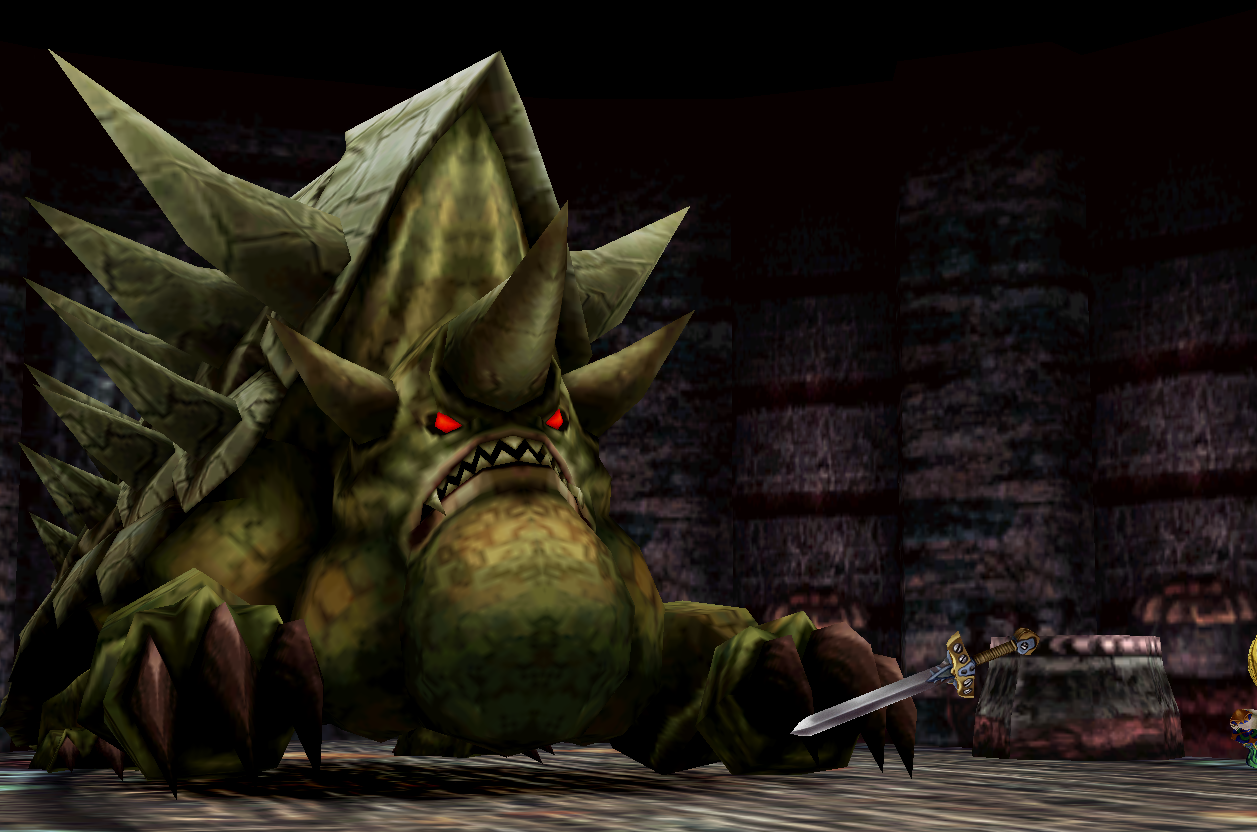
@Tirlititi.. thank you so much! I know that the follow code you sent me was the right one, but I've tried to change place for testing.. because when the battle is starting, at very first the "floating sword" of Blank appears, and when the ATB stars it desappear! (already the camera is not the best, so imagine)

4Rxw4KF.png


 I've tought that doing something like this it may have solved the problem.. and it did...but.. it creates me one even worse! So, ok, thanks to you now I know that I have to try something else..so..I'll give a chek, but if anyone will find a solution before me I will be so thankful!
 
Last edited:
@Tirlititi   even after starting the game in english language , she doesn't appear in the castle coutryard :\ , at this point i could try to add her by myself once i reach the part of the plot were i can fight kuja for the lust time
 
@ToraCarol @Trilititi : i managed to solve the problem , in trith i followed the procedure correctly , the real problem is something that none mentioned in any post , that is : if we select a certain language in hades workshop , we are modifying the relative language in the game itself , but usually those kind of programs doesn't have this clause , at least isn't something common for a non hacker , essentially , the first three times i applied the mod to the italian language of ff9 , so the only result was to not make her appear in the castle to recruit her , and also to corrupt the italian translation , but after i selected the english language in the program , and also running the game since the beginning in english , she finally appeared , in short , those kind of details are very important to know , it was only for a coincidence that i attempted to apply the mod after selecting the english text in the program
 
@Tirlititi link thanks , i solved the problem about the trance command of zidane and amarant, usually they only appear when they are in trance because those abilities aren't present in three apposite sections used to tell the game that a certain character have a certain ability , in short , to give any ability we want to any character we want we must : place the command\support ability in the skill list of an equipment that belong to the character that we chose , and do the same in the command\support ability section , and if we want to give to someone a command , we also must place that command in the list of abilities that belong to a certain command
 
Last edited:
@Tirlititi  were the game store and assign the music to play during the random battles ? i like to substitute the usual battle them with the ost " you are not alone " :D
 
@Tirlititi  were the game store and assign the music to play during the random battles ? i like to substitute the usual battle them with the ost " you are not alone " :D
It's stored resources.assets :: BtlEncountBgmMetaData.txt
It's arranged as:

Code: [Select]
Code:
  "2924": { // field ID    "138" // Enemy ID : "35", // Music to Play
Though for You're not Alone event in particular, the function is ran from the script, with "RunSoundCode( 0, 0 )"; played throughout the scene. The three battles are not present in BtlEncountBgmMetaData.txt, to prevet the changing of music during battle encounter.
It is in the Main_Loop function of field: Pand./Mind Control IIRC.

Change it from the script; change it from p0data61.bin
 
Last edited:
Status
Not open for further replies.
Back
Top