[PSX/PC] General editor - Hades Workshop (0.50b)

  • Thread starter Thread starter Tirlititi
  • Start date Start date
Status
Not open for further replies.
EDIT: One last things. Albeoris also added a "Spell rate" feature: apart from the method "Perform" that you can find in the battle scripts, you sometimes have a method "RateTarget" that returns a Single (number) and is added when the class derivates from "IEstimateBattleScript". This method is meant to somehow measure the usefulness of an ability in a given situation. I am not sure if that feature is working (maybe it is used when the player turns Auto-battle on?) though, and you can ignore it if you don't care.
Code: [Select]
Code:
[Battle]SelectBestTarget = 1 ; 0 - Original, 1 - Estimate the best target via IEstimateBattleScript
Hello! If you enable this option, the cursor will not point to the first goal in the list, but to the best one based on the total score.

For example, if two characters lack 1000 HP, and we select “Heal”, but one character has 20% HP and the other has 80% HP, then the cursor will point to a character with 20% HP, since he is the best target.

If you select "Golden Needle (Soft)" the battle with the gargoyle, then the cursor will point to it.

If you select "Eat", the cursor will be placed on a target whose skill has not yet been learned.

Also, in the latest version, you can replace Vivi's basic attack with basic spells. Which spell will be used is also determined by this rating. BUT (!) since I’m not sure that it’s a good idea to turn on automatic target selection for attacking skills, I excluded script No. 9 (Magic Attack) from the list used to select a target.

Code: [Select]
Code:
ViviAutoAttack = 0 ; 0 - Default attack, 1 - One of the basic spells (Fire, Blizzard, Thunder) cost-free MP
P.S. Thank you so much for adding support for CSV tables!
 
@Adho: Well, for the dialogs, it's really because the dialog list is only a database. It's the script that decides whether a dialog is used or not and when. In theory, those dialogs could be randomly shuffled and still be used in the order as long as the script uses the proper dialogs at the correct time.

@Weisshuf: It's surely because of the font that you use. Someone else already had that bug a long time ago and you need to change the font to a proper one (if you have Memoria, font can be changed in the "Memoria.ini" file).

@Caledor: Thank you :)
I didn't even see that name and description of Carbuncle was not updated. I just never use its alternate effects ^^"

@Albeoris: You're welcome. Thanks to you for clarifying that stuff.
 
Update : 26 November 2023

So here is a little tutorial to add music WITHOUT replacing the existing ones

You will need just Audacity for that but don't worry, it's very simple !

Sorry in advance if I make grammatical or spelling mistakes :)

I) Create/Prepare your soundtrack

First of all, you need to prepare your music with Audacity (or another software if possible).

/_!_\ Open Audacity's config (Ctrl + P), then go in Import/Export and check if the option is enabled => Show Metadata Tags editor before export

On this first step, we need to create two metadata on your file : "LoopStart" and "LoopEnd". Indeed, Memoria can convert .ogg in another format with an AKB header (the important part !).
This header will contain the loop region from your music : this step is essential to make an appropriate OST for FF9.

At the bottom of the screen, right click on numbers and select "samples."

y2ecE81.jpg


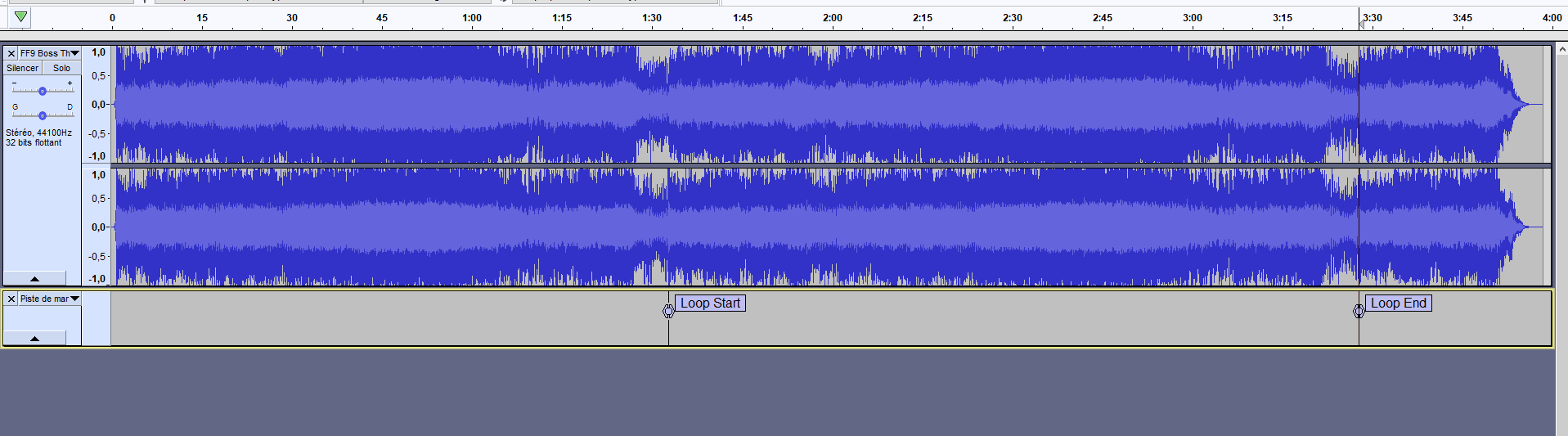
Open your audio file with Audacity and create looping region, you can use labels (Tracks -> Add Label or Ctrl + B).

These labels are optional but are very useful to visualize the loop. Of course, these two points in the song MUST sound exactly the same !

3JPBdG5.jpg


Once your loop is in place, select the region between theses labels and note the number of frames of the loop start and the loop end.

ycOOzht.jpg


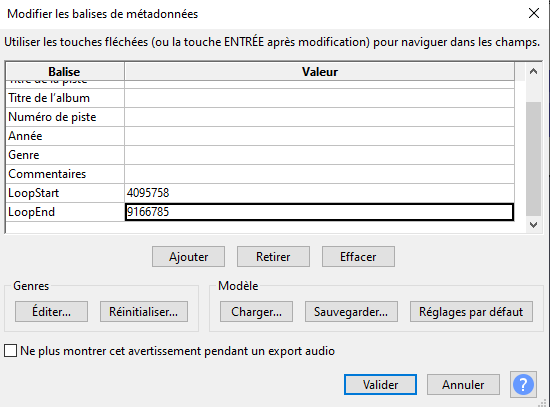
On this example : Loop Start = 4095758 and LoopEnd = 9166785.

Export your file in .ogg format and the metadata window will pop up.

On this window, "Add" two lines and name them EXACTLY : LoopStart and LoopEnd, with their respective values (frames number), like this :

QE9htv5.png


Save as music123.ogg for example and now, you need to create a specific folder on the selected path : StreamingAssets\assets\resources\Sounds\Sounds01\BGM_

II) Add an index for your soundtrack

Download this file from this link => Pastebin link !

Rename it musicmetadata.txt and place it in this folder :
- If you don't use mods => FINAL FANTASY IX\x64\FF9_Data\Resources\resources\embeddedasset\manifest\sounds
- If you use mods, take the folder with the highiest priority and place it here => FINAL FANTASY IX\[YOUR MOD]\FF9_Data\Embeddedasset\manifest\Sounds

On this file, add theses lines at the end :

Code: [Select]
Code:
 {      "name": "Sounds01/BGM_/music123",      "soundIndex": "149",      "type": "Music"    }
You must have something like that... carefull with commas !

Code: [Select]
Code:
    {      "name": "Sounds01/BGM_/music121",      "soundIndex": "148",      "type": "Music"    },    {      "name": "Sounds01/BGM_/music122",      "soundIndex": "147",      "type": "Music"    }, <======= Don't forget the comma here !    {      "name": "Sounds01/BGM_/music123",      "soundIndex": "149",      "type": "Music"    }  ]}
To check IDs available, you can check here => List of musics (FF9)

Save your musicmetadata.txt.

After that, you can edit "BtlEncountBGMMetaData.txt" (for battles on the field) and "WldBtlEncountBGMMetaData.txt" (for battles on the map) from the ressources.assets to add your music. You can extract these files from Hades Workshop, with the Unity Assets Viewer.

/_!_\ The ID you must use is the "soundIndex" ! For our previous example, the ID will be 149 and not 123 !

If you forget how to change ID music from battle => Changing the battle music of specific battles (Steam)

And... that's all ! Congrats !  ;)

Hopefully, when you will launch a battle with your new soundtrack, Memoria will create your soundtrack with .akb header.

If you encounter any difficulties, don't hesitate to consult the Memoria.log file to see what happens.

Hope that's will be helpfull if you want to make various battle with differents soundtracks !

PS : Didn't test yet but i suppose you can make this same logic with SoundEffect (dictionnary SoundDisplayNames on Memoria and soundeffectmetadata.txt on ressources.assets)

 
Last edited:
DV, friends, if you notice any problem in the game engine (equipment is incorrectly displayed) or in the Memoria (music is not exported), do not hesitate to write about it:
https://github.com/Albeoris/Memoria/issues

In a few weeks, we fixed dozens of problems that I didn’t even know about (thanks to a detailed description from snouz).

If you already have a ready solution, share the pool requests:
https://github.com/Albeoris/Memoria/pulls

If you are not friends with Git, but found a solution and tested it through dnSpy, just describe it in the issue so that I can check it and quickly apply to the game.
 
DV, friends, if you notice any problem in the game engine (equipment is incorrectly displayed) or in the Memoria (music is not exported), do not hesitate to write about it:
https://github.com/Albeoris/Memoria/issues
I didn't report this issue atm because I don't know if the problem comes from my side or from Memoria.
I will test tomorrow on my laptop : if the problem happens again, I'll open a ticket on Github :)

By the way, i have a question (for Tirlititi) : it's possible to know exactly which sound effect (.akb files from p0data62 or p0data63) is used by a spell animation ?
I try to find this information on "Environment/Spell Animations"... it doesn't seem to be there (or i can read this kind of information)

For example, can't find SFX files for Thunder Slash (Steiner/Beatrix).
 
Last edited:
Found it. Their list is in the file "SpecialEffectMetaData.txt" in the resources.assets.
They are listed depending on the special effect (there are usually many of them for a single special effect). For instance, sounds used by Thunder-Slash-1 (ID 191) are:
Code: [Select]
Code:
Sounds03/SE50/se500228Sounds03/SE50/se500229Sounds03/SE50/se500230
It's the exact same sounds used for Thunder-Slash-2 and Thunder-Slash-3. I don't know if you have access to the spell effect IDs in HW (I think not) but they are listed there.

If I understood correctly, sounds in the meta-data are listed by their order of usage.
 
It's the exact same sounds used for Thunder-Slash-2 and Thunder-Slash-3. I don't know if you have access to the spell effect IDs in HW (I think not) but they are listed there.

If I understood correctly, sounds in the meta-data are listed by their order of usage.
Oooooohhh... perfect ! That's what i need !  ;D

Indeed, theses IDs are not available on "Spell Animation" but now, that's will be perfect to fix somes crappy sounds (like Thunder Slash or when Steiner cast something... rip my ears)

Thank you again Tirlititi  :)
 
As always, thanks Tirlititi for Hades Workshop.

I am not an expert on programming, I have been trying to modify formulas, so there is already two for strenght and magic based attacks:

( (power-defense) * random[str or mg, str or mg + (level + str or mg)/8]

I would like to add (or replace) a formula like this but based on speed. I tried using dnSpy, but when I compiled i got multiple errors on btl_calc... I saw the error list and the errors comes from others lines completely different from the ones i was modifying, so I though it might be compatibility issues or it is me who is commiting the mistake.

Would anybody help me on this topic to see if is it possible to do this modification?
 
These are common (and very tedious) errors triggered by dnSpy... For some reason, it doesn't accept many implicit type-cast although it forgets to write them when generating the C# code before you're allowed to edit it.
Eg.:
Code: [Select]
Code:
uint i = 1;ushort u1 = i;ushort u2 = i+1;
This will possibly be an error for both u1 and u2 because they don't have the proper byte length. The fix for that is to force the type-cast:
Code: [Select]
Code:
uint i = 1;ushort u1 = (ushort)i;ushort u2 = (ushort)(i+1);
Since the problem repeats everytime you try to edit a method or a class (even if you already fixed it on a previous edit), I took the habit to copy-paste codes in my text editor and do the changes there, then copy-paste back the code in dnSpy and keep the code saved somewhere for subsequent modifications.

For the class btl_calc, you can use my dropbox version (if you don't use Memoria): it has fixes for these dnSpy errors and makes things more readable without any change in the system.
 
Last edited:
I think I understand. Thanks.

BTW, when i open the link you sent me, it says that the folder "Public/FinalFantasyIXCode" does not exist.
 
Thanks, I copied a wrong link and used a wrong tag indeed ^^"
I fixed the link now.
 
Awesome, already followed what you told me before you fixed the link.. I did it! I added a formula bases on speed!, i just finished the testing.

First thing was to add a method, cause I saw the STR and MAG formulas also had one, and then had to put it on CalcMain for this to have effect. I took the "unused" ones that appears on the Hades Worskhop list ("unused 78" and so on).

Now I need to mix it with the weapon attack. I know there are formulas for weapon attacks, the issue with them is that they do not count the power on the spell, so it does not matter how much power I add, the damage is about the same.

I was looking into the programming on drain, it seems that they equal the calculated amount for damage to the absorbed caster hp, that way they could put in on one line. I would experiment a little bit to make the same, but instead of absorbing the damage, it just recovers 5% of the caster max hp.
 
Hey Tirlititi, I've got a peculiar issue that I'm hoping has an easy answer that I'm missing.

For context, I'm trying to add new enemies to battles, largely to increase the number of battles with multiple opponents in the end game, since FF9 tends to be kind of deficient with that sort of thing. So I've been creating new versions of monsters from different parts of the game with increased stats, attacks and so forth. This has been going rather well, except for one thing: I'm trying to increase the sizes of the monsters.

I have already been able to do this to original monsters in the game (for instance making the Gigan Toad much larger than usual) and it works fine with no bugs I can see. When I do the same thing to monsters I have produced, this results in a very obvious problem: when the battle loads, not only would the monster in question be increased in physical size, so does Zidane. He becomes HUGE.

The size modification that I've been using is the same one found in Torama's loop script. This is what it looks like for the working Gigan Toad:

Code: [Select]
Code:
Function Gigan_Toad_Loop    while ( !( GetBattleLoadState & 8 ) ) {        Wait( 1 )        set VAR_GenUInt8_206 = GetRandom    }    set SV_FunctionEnemy[MODEL_SIZE] =$ 6144    set SV_FunctionEnemy[STOP_ANIM] =$ 2    set SV_FunctionEnemy[PLAY_ANIM_ONCE] =$ 0    return
And it works perfectly fine. What I'm using for my own monsters is not unlike that, so for example:

Code: [Select]
Code:
Function Plastique_Loop    while ( !( GetBattleLoadState & 8 ) ) {        Wait( 1 )        set VAR_GenUInt8_206 = GetRandom    }    set SV_FunctionEnemy[MODEL_SIZE] =$ 6144    return
The monster increases in size as expected, but this produces BIG ZIDANE, who is very amusing but not really what I'm looking for.

I've been fiddling with this on and off for about a week and I'm not entirely sure what I'm missing. Any idea what I have done wrong?
 
I have 2-3 questions as well ^^

1°) About this part "Properly adding a new enemy to a battle (Steam), i make a special combat with 4 Ghosts (1 King and 3 Minions) : however, they have same stats (i can bypass this with SV_FunctionEnemy so np).

But i can't modify drops for Ghost King for example... it will alter the drops of all the ghosts as well. So my question is : it's possible to separate 2 ennemis with same model, to make 2 distincts ID (something like that) ?

I see the game can do that, some examples with Zaghnol/Mu/Feng from Lindblum or monsters from Treno Arena : there is a way to make that ?

2°) About SV_FunctionEnemy, i see you can edit elemental affinities on battle with SV_FunctionEnemy[ELEMENT_IMMUNE], SV_FunctionEnemy[ELEMENT_WEAK], SV_FunctionEnemy[ELEMENT_ABSORB] and SV_FunctionEnemy[ELEMENT_HALF] (ex : Malboro script)

But i can't edit status effect with SV_FunctionEnemy (STATUS_IMMUNE, STATUS_AUTO and STATUS_CURRENT)... i can read the value in battle (with a Battle Text) but can't find a way to change the value  :-\ is there any way to change that or not by chance?

3°) Not a HW question but.... where i can find all monster attacks SFX from PSX ?  :-D Try to search on .iso/.bin PSX games but... damn ^^ Can't find theses files !
 
@Clem Fandango: I don't know that bug.
Are you sure that this "loop" function is what makes Zidane big? If you remove it (or keep only "return"), then both the monster and Zidane get regular sized?
If yes, you can try to use something like this instead of "set SV_FunctionEnemy[MODEL_SIZE] =$ 6144":
Code: [Select]
Code:
set 16[MODEL_SIZE] =$ 6144
Use "16" for the first enemy, "32" for the 2nd, "64" for the 3rd and "128" for the 4th. It may be not the best way to do (if you have several Plastique in the fight, they share the loop function... there should be no problem having a line for each one of them). At least, you can see with that if the problem comes from "SV_FunctionEnemy" for some reason.

Also, double-check that your enemy groups have the correct number of enemies (and with proper enemy type) and that the "Main_Init" function creates them properly as well, with the correct IDs.

@DV:
1°) Yes, there should be no problem copy/pasting a Ghost in the list of enemies for that battle so you have two different Ghosts; the game doesn't care if they have the same models or such... Just maybe uncheck the option "Edit similar enemies" when you do that. Once your super-ghost is given a different level or name, though, you can enable back that option because it won't be considered similar to the other ghosts by HW anymore.

2°) You can't do that by default unfortunatly :/
It goes down to the functionalities implemented in btl_scrp. You can see that you can access to the status properties ("GetCharacterData", cases 42-45) but can't modify them ("SetCharacterData", there's no cases 42-45). In AF's source files, there are codes for improving that part though and, in particular, let scripts be able to do that, so you can mod the DLL to add (at least) that feature and then use it in your HW scripts. I am not sure how we will implement all the features I need for AF in a next version of Memoria but it can be safely assumed that for statuses it will be implemented like that (for the new features that were not present at all, such as modifying a spell's stat during the battle, I may make it optional or external...).

3°) The 3D models of their attacks' SFX? You can't. They are not in a format that could be recognized by any model ripping software :/
However, Tasior2's FF9 Reverse tool was able to get a couple of very specific SFX models very well, but it's limited (IIRC, the "Correct answer" and "Wrong answer" SFX of the Ragtime Mouse were amongst the only ones to be read thanks to it).
 
@DV:
1°) Yes, there should be no problem copy/pasting a Ghost in the list of enemies for that battle so you have two different Ghosts; the game doesn't care if they have the same models or such... Just maybe uncheck the option "Edit similar enemies" when you do that. Once your super-ghost is given a different level or name, though, you can enable back that option because it won't be considered similar to the other ghosts by HW anymore.
I never see this option to "Edit similar enemis"..... i am blind lol.
That's perfect o/ Thanks !

2°) You can't do that by default unfortunatly :/
It goes down to the functionalities implemented in btl_scrp. You can see that you can access to the status properties ("GetCharacterData", cases 42-45) but can't modify them ("SetCharacterData", there's no cases 42-45). In AF's source files, there are codes for improving that part though and, in particular, let scripts be able to do that, so you can mod the DLL to add (at least) that feature and then use it in your HW scripts. I am not sure how we will implement all the features I need for AF in a next version of Memoria but it can be safely assumed that for statuses it will be implemented like that (for the new features that were not present at all, such as modifying a spell's stat during the battle, I may make it optional or external...).
Oh ok, i just discover that when testing an IA Boss so... that's not important ^^ Thanks for the clarification !

3°) The 3D models of their attacks' SFX? You can't. They are not in a format that could be recognized by any model ripping software :/
However, Tasior2's FF9 Reverse tool was able to get a couple of very specific SFX models very well, but it's limited (IIRC, the "Correct answer" and "Wrong answer" SFX of the Ragtime Mouse were amongst the only ones to be read thanks to it).
Woops ! I didn't mean SFX but Sound Effect... sorry  ;D
Somes sounds effects on Steam version are... yeah that's something. For example Lancer/Ryuken from Freyja, i swear i can hear a dolphin dying at the end  :o :-D Wth.

I found a .zip with all sounds effects from Characters but can't find from Monsters... any idea to get theses files ?
 
Sounds are AKAO, which is a common format to at least FF7/FF8/FF9. I guess there are programs to rip them yes, although I've never cared about it (there are a couple of people who extracted all the PSX sounds though so that's definitely possible).
 
@Clem Fandango: I don't know that bug.
Are you sure that this "loop" function is what makes Zidane big? If you remove it (or keep only "return"), then both the monster and Zidane get regular sized?
If yes, you can try to use something like this instead of "set SV_FunctionEnemy[MODEL_SIZE] =$ 6144":
Code: [Select]
Code:
set 16[MODEL_SIZE] =$ 6144
Use "16" for the first enemy, "32" for the 2nd, "64" for the 3rd and "128" for the 4th. It may be not the best way to do (if you have several Plastique in the fight, they share the loop function... there should be no problem having a line for each one of them). At least, you can see with that if the problem comes from "SV_FunctionEnemy" for some reason.

Also, double-check that your enemy groups have the correct number of enemies (and with proper enemy type) and that the "Main_Init" function creates them properly as well, with the correct IDs.
Thanks for the assist Tirlititi, that alternative did the trick.

It was definitely the SV_FunctionEnemy causing the issue, seemingly. If I removed that one line or otherwise just left the Loop function to return, both the monster and Zidane would go back to their regular size. Main_Init was okay too, the monsters were behaving as they were supposed to and there wasn't anything amiss otherwise. Very weird!
 
I have a little question Tirlititi : currently, i create/edit some moves to make combo attacks (serious lack on FFIX).

But i have a little issue... juste here :

comboFF9.gif


I use "Effect Point" on "Edit Animation" for each hit. Of course that's works but it missing something : showing damage HP for each hit.

With spell animation, it's pretty simple to make this kind of manipulation.
However, with basic enemy attack... it's only show the last hit.

So my question : you think it's possible to show HP value for each hit ? (maybe with DnSpy or something, to edit Effect Point or by using another trick/idea  ;D).

If this is not possible or too complicated, no worries! I'll do without ^^
Thanks in advance !
 
Last edited:
I can't see your image.
For Enemy Spell Animations, it all depends on how the effect is triggered. The "Run Spell Animation" and "SFX" codes should give the hand to a generic "Spell Animation" and thus show the numbers every time. However, for both of them, it's not possible to have two different generic "Spell Animations" running at the same time. I could make a two-hit attack with Kraken using a "SFX" after a "Run Spell Animation" (Bubble-gun + Leg), but it requires some time gap between the two to have them work correctly.

For the "Effect Point" of Enemy Spell Animations, it doesn't seem to ever trigger the "Figure point" by itself. You can indeed change that using dnSpy to change that behaviour. The simplest is to display the figures at the same time as applying the effect (it may look a bit odd because the figures are usually delayed a bit, but it makes things way simpler). In the method "btlseq.SeqExecCalc", add a "btl2d" line:
Code: [Select]
Code:
 public static Int32 SeqExecCalc(SEQ_WORK pSeqWork, BTL_DATA pMe) {  btlseq.BattleLog("SeqExecCalc");  CMD_DATA cmdPtr = pSeqWork.CmdPtr;  UInt16 tar_id = cmdPtr.tar_id;  for (BTL_DATA next = FF9StateSystem.Battle.FF9Battle.btl_list.next; next != null; next = next.next)  {   if ((next.btl_id & tar_id) != 0)   {    btl_cmd.ExecVfxCommand(next); // Effect point    btl2d.Btl2dReq(next); // Figure point   }  }  pSeqWork.CurPtr++;  return 1; }
I didn't test it but that should be ok.
 
Status
Not open for further replies.
Back
Top