[PSX/PC] General editor - Hades Workshop (0.50b)

  • Thread starter Thread starter Tirlititi
  • Start date Start date
Status
Not open for further replies.
excellent news!^^ meanwhile i edit consumable items and some accessories like garnet etc to be equipment
 
After trying to edit I found two problems, the first is that if I try to edit the rings that Amarant throws to turn it into a usable weapon I cannot change the "Model id" and therefore when entering combat it crashes, I don't know if there is any way to unlock the "Model id" tab to put the model of another weapon.
The second problem is that the items that can be used as antidote etc. don't have armor values ​​and I can't put defensive stats on them. I understand that this last thing cannot be solved, but I think that the Enabling Model ID thing would allow the change of weapons.
 
In order to have a weapon model for the throwing disc, you need to first generate your mod with Hades Workshop and then manually open the file "{YourModFolder}/StreamingAssets/Data/Items/Weapons.csv" using the Notepad text editor: at the bottom of the file, you'll see that the disc models are "<null>" and that you can copy/paste another weapon's model ID to replace it (eg. replacing the "<null>" by "GEO_WEP_B1_011" will make it look like Cinna's hammer).

Adding defensives stats to any item is also something that the next Memoria release will allow.
 
I made the changes in the file and the changes were not made in the game, I tried to change many different weapon models, not only the ones with the rings and none of them took effect, I don't know the reason. Do I need to have memory engine installed for those changes?
 
Yes, Memoria Engine.
When you use Hades Workshop with a game modded by Memoria, you should generate your mod in the form of "Raw Assets + Spreadsheet (Memoria)". If you didn't use it until now, I suppose you used to generate "Unity Archives + Compiled DLL" and replace the base game's files with them. When you use Memoria, you don't replace any existing file with your mod(s): you use mod folders and activate those in the mod manager.
 
Until now I did not use memory, these days I will try to install it and see what can be done with memory, to install it I only have to use the files from the post that you sent me?
 
I already installed the memory, it was easy to install, I really appreciate the simplicity ^^ Fixed the problem with the weapon models, thank you very much! I have two questions now, one is about how to change the maximum speed, strength, magic and spirit. I know you have a section in the forum, but I wonder if it can be done with memory too. And I would like to break the limit of support skills that characters can learn.
 
I  try do the change with memoria engine the max stats of dex, strengs, magic and spirit but i not found the form. And i try do your post about how do this changes but when i do and save change with hades, the games always freeze in the first screen. I tried many things but none worked for me
 
Hello Tirlititi,

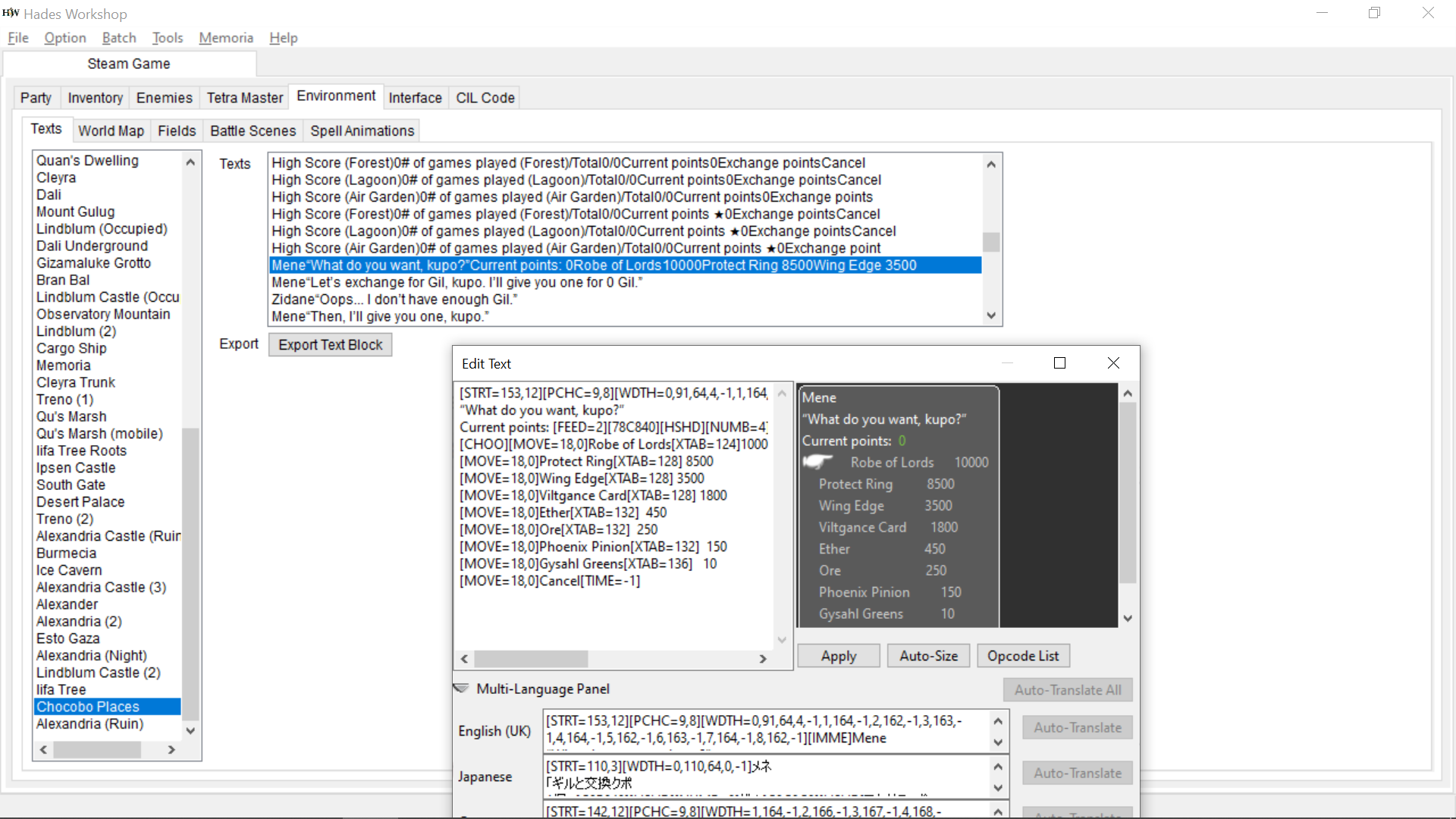
I was hoping you could help me with something. I've edited the rewards Mene exchanges for H&C points. I've changed Protect Ring to Rebirth Ring and Wing Edge to Elixer, however, I can't seem to figure out how to change the text in the menu. It still says Protect Ring, even though I receive a Rebirth Ring. Any help would be appreciated.
 
That's one of the dialogs in the "Chocobo Places". Search for Mene's lines "Mene “What do you want, kupo?”..." in the "Environment -> Texts" panel.
 
I found this in "Chocobo's Forest"

Function Moogle_Male_64
    switch 3 ( Chocobo_CurrentField ) from 1 {
    case +0:
        SetTextVariable( 2, Chocobo_ForestHighScore )
        SetTextVariable( 3, Chocobo_ForestGamePlayed )
        break
    case +1:
        SetTextVariable( 2, Chocobo_LagoonHighScore )
        SetTextVariable( 3, Chocobo_LagoonGamePlayed )
        break
    case +2:
        SetTextVariable( 2, Chocobo_GardenHighScore )
        SetTextVariable( 3, Chocobo_GardenGamePlayed )
    }
    SetTextVariable( 5, ( Chocobo_ForestGamePlayed + Chocobo_LagoonGamePlayed ) + Chocobo_GardenGamePlayed )
    SetTextVariable( 4, Chocobo_HotColdPoints )
    if ( Chocobo_Lv99 == 0 ) {
        WindowSync( 7, 128, 240 )
    } else {
        WindowSync( 7, 128, 243 )
    }
    if ( GetDialogChoice == 0 ) {
        set VAR_LocUInt16_9 = 0
        set VAR_LocUInt8_2 = 8
        EnableDialogChoices( 511, VAR_LocUInt8_2 )
        WindowAsync( 6, 4, 246 )
        while ( VAR_LocUInt16_9 < 1 ) {
            set VAR_LocInt8_29 = 1
            EnableDialogChoices( 511, VAR_LocUInt8_2 )
            SetTextVariable( 4, Chocobo_HotColdPoints )
            set VAR_LocInt8_30 = 0
            while ( VAR_LocInt8_30 < 1 ) {
                if ( IsButton(655360L) ) {
                    set VAR_LocInt8_30 = 1
                }
                Wait( 1 )
            }
            switch 9 ( GetDialogChoice ) from 0 {
            case +0:
                if ( ( Chocobo_HotColdPoints >= 10000 ) && ( GetItemCount(175) < 99 ) ) {
                    set Chocobo_HotColdPoints -= 10000
                    AddItem( 175, 1 )
                    set VAR_LocInt8_29 = 0
                }
                set VAR_LocUInt8_2 = 0
                break
            case +1:
                if ( ( Chocobo_HotColdPoints >= 8500 ) && ( GetItemCount(208) < 99 ) ) {
                    set Chocobo_HotColdPoints -= 8500
                    AddItem( 208, 1 )
                    set VAR_LocInt8_29 = 0
                }

The 208 at the bottom there is the Rebirth ring. The WindowAsync near the top: "WindowAsync( 6, 4, 246 )", is where he says "What do you want, kupo?" I just can't seem to figure out how to alter the menu text.

 
The first string was under "Function Moogle_Male_59" I also found this under "Function Moogle_Male_64"

    } else {
        if ( VARL_GenBool_809 == 0 ) {
            WindowSync( 6, 128, 221 )
        } else {
            RunScriptAsync( 6, 25, 30 )
            set VAR_LocUInt8_1 = 0
            while ( VAR_LocUInt8_1 != 99 ) {
                SetTextVariable( 0, 251 )
                EnableDialogChoices( 255, VAR_LocUInt8_1 )
                if ( Chocobo_ForestHighScore > 0 ) {
                    SetTextVariable( 2, Chocobo_HotColdPoints )
                    WindowSync( 6, 128, 226 )
                } else {
                    if ( VARL_GenBool_1087 == 1 ) {
                        WindowSync( 6, 128, 225 )
                    } else {
                        WindowSync( 6, 128, 224 )

Both contain the line you quoted, but I'm still very lost.
 
You found the complicated thing in the complicate panel "Environment -> Fields", congrats ?
Now you just need to find the easy thing in the easy panel: "Environment -> Texts -> Chocobo Places". It contains all the texts and dialogs used in chocobo places (forest, lagoon, garden, paradise and dream). Around the middle of the list, there's the line you are looking for. Double-click on it and you'll be able to edit that line.

obbh8Qe.png
 
Wow I'm dumb. Sorry, I didn't even look at that tab. All these years later and your still out here answering questions. Thank you, really.
 
hey tiriltiti,
i'm trying to edit enemies panel on FF9 PSX (1.0 version) (pure vanilla/untouched) but when I try to rename an enemy, Hades Workshop crash instantly, even try to backspace one letter it instant crash.
 
Hey akirat9, I had this same problem. When you try to rename an enemy, you can't just type it in the bar. You have to click the ... button next to the enemy name and then edit and apply.
 
Hey Tirlititi,

I'm having some difficulty editing the treasures for the chocobo dive spots. I've located the treasure values in "Function World_Chocobo_17" and I've changed the value of what used to be a "Black Robe" but when I save the changes, create a PPF, and patch my game, I still get a "Black Robe." I'm loading a proper save file evey time, not a save state. Am I missing something?

Function World_Chocobo_17
    RunAnimation( 8139 )
    WaitAnimation(  )
    RunAnimation( 8141 )
    WaitAnimation(  )
    SetObjectFlags( 14 )
    Wait( 60 )
    SetObjectFlags( 5 )
    RunAnimation( 8138 )
    WaitAnimation(  )
    switch 1 ( VAR_GlobUInt8_34 ) from 2 {
    case +0:
        switch 5 ( VAR_GlobUInt8_36 ) from 7 {
        case +0:
            set VARL_GenBool_1465 = 1
            set VAR_LocUInt8_37 = 226
            set VAR_LocUInt8_42 = 10
            set VAR_LocUInt8_38 = 15
            set VAR_LocUInt8_43 = 1
            set VAR_LocUInt8_39 = 190
            set VAR_LocUInt8_44 = 1
            set VAR_LocInt16_40 = 594
            set VAR_LocUInt8_45 = 1
            break
        case +1:
            set VARL_GenBool_1464 = 1
            set VAR_LocUInt8_37 = 247
            set VAR_LocUInt8_42 = 10
            set VAR_LocUInt8_38 = 100
            set VAR_LocUInt8_43 = 1
            set VAR_LocUInt8_39 = 109
            set VAR_LocUInt8_44 = 1
            set VAR_LocInt16_40 = 592
            set VAR_LocUInt8_45 = 1
            break
        case +3:

The bottom list of items is what was changed. The "100" is an armlet, it's what used to be a "Black Robe"
 
I don't know what's wrong. I can change the world map treasures. Dive spots and Chocographs, but it won't path them to the ISO anymore. I changed some in the a few months ago, and they are still working, but is won't patch anything I change now. It'll patch spell name changes.
 
Ignore me. I figured it out. I completely forgot that you have to edit the world map depending on where you are in the game. Blue Narciss or Invincible.
 
Status
Not open for further replies.
Back
Top