[PSX/PC] General editor - Hades Workshop (0.50b)

  • Thread starter Thread starter Tirlititi
  • Start date Start date
Status
Not open for further replies.
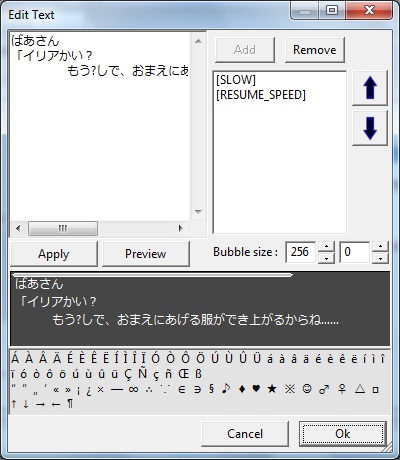
need add\edit this menu (add characters from charmap like in image)
b4pG8TsSW.jpg

and add save/load gliph positions in manadge texture menu
 
I now can open the Japanese version, but there's many Kanji missing from the text (ones replaced by "?").
Is this because of differents Kanji table are used in different location in the game?

EObREVt.jpg


Is there any way to fix this?
 
Yes, that's because of the extended table. I don't know any simple way to make it work : I guess I'll have to list all the kanjis in each of the extended tables and put them in the .conf as well...
If it's only a matter of translating, you can try to find the game script somewhere else and erase those characters. It shouldn't bug if you replace them by some other text.

Another bad news : the update will surely be delayed. I want to fix that previous bug, with the local system dependancies and I'm not done yet with the other thing that I've worked on.
 
If it helps, I had a Japanese reader figure out the "first" table for me once (the one in the Prima Vista rooms, don't remember if its ID is 0):

Code: [Select]
Code:
            '姫','我','隊','来','船','誘','拐','父','様','思','居','芝','観','演','虫','室',            '客', 'Υ','_','俺','愛','貴','度','奏','語','婚','刃','足','恋','話','仕','連',            '達','結','役','嫌','親','聞','掛','仲','言','主','太','乗','飛','続','望','宵',            '友','声','待','席','議','会','込','訳','申','引','醜','隙','驚','皆','苦','兄',            '張','頑','悟','良','奴','落','貸','到','団','戻','遅','娘','容','始','困','負',            '勝','存','納','年','座','玉','為','観','考','関','機','痛','壊','塞','赦','余',            '露','礼','悲','弟','済','刺','静','烈','憎','希','和','笑','千','丸','斯','母',            '原','覧','裂','公','盛','評','集','揮','響','美','番','情','急','舞','台','細',            '練','習','念','計','違','願','恩','配','漫','毎','朝','穴','幕','軽','頼','鳥',            '君','顏','参','安','丈','夫','熱','勘','弁','明','説','籍','祝','建','怪','男',            '捕','低','鐘','総','豪','少','逢','緒','帰','央','貢','仇','庫','温','泣','潮',            '早','準','完','供','胆','例','功','哀','彼','広','界','拒','輝','七','貝','似',            '仮','倉', non, non, non, non, non, non, non, non, non, non, non, non, non, non,             non, non, non, non, non, non, non, non, non, non, non, non, non, non, non, non,             non, non, non, non, non, non, non, non, non, non, non, non, non, non, non, non,             non, non, non, non, non, non, non, non, non, non, non, non, non, non, non, non

sauce

Where "non" is nothing.

I felt too bad about asking her to do the rest because it takes a long time, and there's like 20 of them or something.
 
Yeah, that'll save some time to me or thisguyaresick (who gentlefully helps me).
Thank your friend for us.
 
need add\edit this menu (add characters from charmap like in image)
b4pG8TsSW.jpg

and add save/load gliph positions in manadge texture menu
For shikulja's question:
1. Extract FF9.IMG from the CD
2. Open it in a hex editor. I recommend Windhex by Bongo.
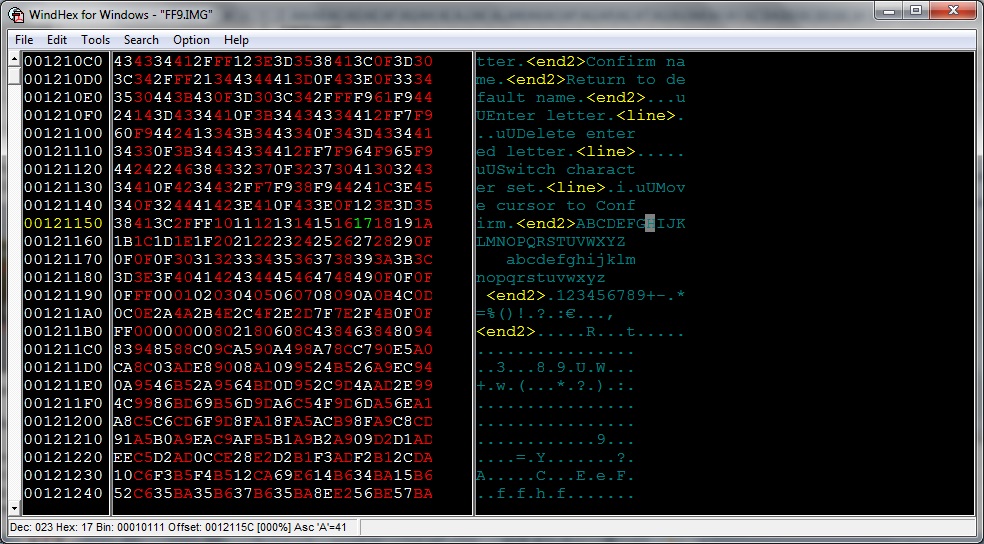
3. You can edit the hex manually or just use Atlas to insert it. The address as my picture below.

LOD4CtI.jpg


For Tirlititi's: I have seen many strategy games like Fire Emblem use various Kanji tables as well as the Kana table. They have a trigger bite for each array, such as $09 to trigger the Kana array, $0A for Kanji array 1 and $0B for Kanji array 2. I think FF9 use the same method (Japanese version). Can you embede this function to Hades workshop?
 
I know how it works, it's just that it's incredibly tedious because we need to register all the kanjis' tables and that there are a lot of them (between 20 and 30 I would say).
You're right about the byte flags though. It's explained here :
http://wiki.qhimm.com/view/FF9/CharTables

The problem is for the "External Kanji Table" : there is one different for each place in the game. thisguyaresick is doing a great job at the moment to write down all these tables but you can figure it takes some time.

EDIT : Actually, that makes 65 external tables in total...
 
Last edited:
Update to 0.24.
Here are the changes :
- You can now edit the game's script (for fields and battles). It's a new feature and is still very limited though. You can also edit fields' name. See bellow for more informations,
- You can now add and edit text opcodes. I don't know the effect of all the opcodes but the most useful of them (the unknown are read as their hexadecimal code, as before).
- Added a "curve editing tool" for the level progressions. It's nice for seeing the progression curves, but not too much precise. It's more like a gadget for now even if it's better than a bunch of figures. I'd like to improve it but that really shouldn't be my priority.
- Fixed the bug making the configurations file not working depending on the local system.
- Fixed a bug making World Maps' texts uneditable (it must be recent because that worked before).
- Improved the time spent for scanning files (it shouldn't upgrade with this version though ^^').

Also, please note that the DLLs have been updated as well.

So, I've got a whole bunch of things to say...

First, I gave up on card data finding. There are several reasons for that, the main one being the fact they are not at the same place at all in the binary files in PAL/NTSC versions and the Japanese one. I'll get back to it when I understand better the top levels structures of the binary file (once again, your wiki helped a lot but it wasn't enough for that particular problem :/).

Second, about the external kanji table, I'm being helped by ThisGuyAreSick2 and Yugisokubodai and that's the next thing I'm donna do. It will come asap with a bug-fix version if I find any (not that I want it but I know there are usually some of them ^^').

Third, the game's script...
You can edit both Battle scripts and Field scripts, as said, but you cannot edit the World Maps' scripts. The reason is that, in the Japanese version, there is A FRACKING BLOCK OF TEXT IN THE MIDDLE OF THE SCRIPT. I have absolutely no clue about why it is there or even if it's properly handled by the game itself (it may be present only inside unused World Maps, since there are 13 of them). So I disabled the reading/editing of the scripts in World Maps.
Here is an example of a piece of script :
HadesWorkshopScriptSample.jpg

It's Baku's scripted movements and dialogs after the party defeats him (as Masked Man). The first "Animation" code is him patting Zidane's head, then he says "You're looking a lot better", then he faces south (a 0 angle is south ; a 64 angle is west) and say "Gwahahaha", etc...

About what you can edit, I'm not 100% sure of pretty much everything, so it may bug a lot. I just played with it a little and succeeded in changing some chests' content, some dialogs and with a good practice, you should be able to edit some scripted cinematics to a certain extent.
About editing limitations : I don't know the meaning of most opcodes and I've not implemented a way to change a code's length yet. Thus, you can't change an opcode yet, only its arguments. What's more, you can't change any of its arguments, but only the numerical ones. Most of opcodes' arguments can be either numerical values or "variable code" : the variable codes are (quiet) well displayed but cannot be edited yet.
Also, all the JUMP-ing opcodes are displayed as is. The jumping offset is the binary value so it won't help a lot. I would like to turn them all into "if/then/else", "switch" and "loop" statements but that's for a next time.

And one last thing : the edition of the script can be made easier if you go to the item, stats, texts and enemies panel before. Some numerical values (item ID, character's name, text ID and battle ID) will be translated in more understandable things. It's not 100% accurate though, for now :/

I'm gonna be really busy IRL for the month to come. I don't think I'll do anything else than reading some kanji tables until then.

EDIT : Update to 0.24b. Fixed some few things I forgot to do.
 
Last edited:
I'm doing with the Kanji tables now  :P
By the way, about the font. I extracted it with Tim Viewer, edited it with a photo editor out there, then re-insert to the game and it's displayed just as in the Photo editor.

However, when I exctracted the font using Hades to .tga file, then edited it with the photo editor, re-inserted with Hades, it does't displayed excatly what I did in the photo editor.

I wonder does Hades modifies the font wrongly?
 
There are several sorts of TIM and I handle them quiet differently. Besides the compression method (the 3-pixels-coded-as-2 thing), there is also the handling of the transparancy : it's ignored in some of the TIMs.

I guess TIM viewer retrieve the 3rd pixel slightly differently than me, then... But I only compute a mean and it seems the most correct way of doing it...
 
Hi Tirlititi,

First thanks for this tool. It's amazing. I am now considering fixing those minor glitches still present in the game.

The infamous Thunder Slash Glitch is my target for now and we're having a lengthy discussion with Vir about HOW it should be fixed : http://www.gamefaqs.com/boards/197338-final-fantasy-ix/69536029#8

But that's not why I am replying here. I was wondering if you would make the tool so that we can change stuff in Tetra Master. I'd like to fix the 1,700 pts glitch.

Self-quoting from : http://www.gamefaqs.com/boards/197338-final-fantasy-ix/69143572?page=5#54

I was wondering about the intended rank for 1,700 pts in Tetra Master. It currently reads "Would you like to discard this card?" as we all know. The 2nd best rank is "Master".

Now, if you read the "Strategy Guide" key item, it is signed by "Grand Master I", and I think this is the title that would have been earned by the player if there wasn't the glitch. Simply "Grand Master" would be my guess as I don't think they would have specified the count, or maybe "Grand Master IX", who knows !
 
Hi Aladore,
I don't really know how to fix that bug properly. The title "The Collector" is present in the text datas but it is kinda badly referenced for its use in the card menu.

Here is what I know :
• The text list begins with each of the 32 rank names, including the last one which is "The Collector".
• The text coming right after it is "Would you like to discard this card ?".
• In the UI datas, there is some variable pointer instead of the text ID for the collector rank's text field.
So it seems that the variable jump from value 30 ("Master") to value 32 (the "Would you like..." text ID) instead of being caped at 31 ("The Collector"). I don't know why, though, but I checked and there is no dummy rank in-between so it really seems to be relative to how the variable is increased.

So, here is a ppf patch to fix it in a non-satisfying way (for me ^^') : I swapped the IDs of the texts "The Collector" and "Would you like...". Two errors make it work fine... It's only for the US version, though.
But I would prefer to fix the way the variable is incremented.

As for being able to fix it with HW, I don't think it will be feasible before long. I gave up on Tetra Master edition and even so it would be more a matter of coding/UI managing.

About the Thunder Slash glitch, I personally think that it was changed from a physical attack to a demi-like spell because otherwise it would be too much similar to Thunder Swords. It would be that they forgot to change the accuracy (and maybe power) in the process.

Thanks for your feedback and good luck bug-fixing the game ^^
 
Last edited:
Thanks to you, I had the curiosity to check "The Collector" rank's localization in French, which is "LE Grand Maître"... kinda disappointing. Anyway this gave me closure about this issue.

http://aladore3viii4.free.fr/files/FF9/Tetra Master ranking - French.htm

I used monkey-moore-0.5-2009-11-29-win32 for a Relative Search in order to check that.

I was wondering, your "The Collector fix" ppf file worked perfectly for my NTSC US copy : how did you make it ? If it's too much trouble don't bother to answer, but I was thinking of making the same file for other regions. So if you could provide me with the names of softwares that can do the job I'd be grateful.

Well, just for the sake of discussion, I also wondered about the cap of two things :

- Frogs caught : 32,767. This cap seems forced as it is 7FFF in hex. Do you think another cap was intended ?

- Jump rope : there seem to be no cap at all. After 8,388,607 (7F FFFF) the counter displays 0 and after 16,777,215 (FF FFFF) the counter overflows. I tested 9,999 among other values to see if there is a cap but I don't seem to find one.

Also, about the Thunder Slash glitch, it's settled. We (Vir and I) both agreed on the fact that it should be changed to Physical Attack. The only nitpicking lies in the Power where Vir went with 19 and I went with 17.
 
I wrote a detailled way to make the fix, but it was a bit tedious and doesn't work for the japanese version (card datas are a bit different in it). So here it is :

More details if someone wants to make one himself (you should better know some hex editing ^^') :
Only in PAL/US versions

You need to change 3 bytes to fix the bug :
1) change the 31th text pointer to the one of the 32th
2) change the 32th text pointer to the one of the 31th
3) change the ID of the text used by the question box when discarding cards from 32 to 31

1) The text lists and pointers are at the very beginning of the "Card Menu" module (see the wiki : the card module is the 11th of the 1st directory (Directory '0' in the wiki)). The pointers begin at the position 0x1C of the module and are 4 bytes-long (2 bytes for the actual pointer and 2 unknown bytes). Go to the 31th pointer (position in the module : 0x98) and change its value by the one following it (at position 0x9C).
To find the card module easier, you may try to search for the raw datas 0x0113002F002D that should be at position 0x13 of the card module, but that's not the case in some version (Japanese at least, though it seems to be ok in PAL versions).

2) Do the same for the 32th pointer (at position 0x9C, still) : change it to the value the previous one had before you changed it.

3) Search for the raw datas 0x20000424 in the same module (it seems it's always 0x2000042400000486 in all versions) and change that 0x20 into 0x1F.
You should find it approximatively at the offset 0x5C00 from the beginning of the module.

EDIT : I forgot to answer you about the caps. You will be able to see how values are caped with the scripts. HW can already display/edit the field scripts in some extent (it's hard to decipher but you could retrieve the things you asked with some patience ^^'). Besides that, the caps are related to the byte length of the datas.
We are on making the japanese charmaps for now, then I'll do 2/3 things like editing images directly inside HW and then I'll try to organize and improve the script editing tool.
 
Last edited:
Thank you for these answers. I'll give you feedback about those matters as soon as I got a chance to follow your instructions :)
 
Say, I see you got text color support going! I like it!

Sorry that I'm plying you with problems, then...

I find it always places the opcode at the beginning of the field and I sure haven't got using those arrows down to precision. What I do is cut all the text above the last character where I need an opcode, put in that opcode, and paste the rest of the text in front of it. Repeat.

Is there a better way?


Also, in game, the red text I put in seems to be shadowed.  Is that something I'm doing?

I have a screenshot, and I see buttons to Insert Image (it puts in html codes?) and "Attachments and other options" (nothing about attachments there?), but I haven't worked out how to post it.
 
@ Xinlus : Thank you for your spanish fellows ^^

@ Vir : Yeah, you can just remove the µ that is created at the beginning of the text and write another one where you want it, then click on "Apply" (if there are missing µ when you click on it, the last opcodes will be removed ; if there are too many of them, the last of them are removed).
I'm thinking of making it a bit more convenient.

For the shadowed red, I'll test it. There are 2 opcodes for each color, so I guess the other one is the best suited. I guess the one you have to choose depends on weather you are editing a "help" message or a generic text, but I'll figure it.

I can't add attachments either. I guess you have to upload your image somewhere else and put the into the IMG tag.
Like 【img】http://YourImage.png【/img】

Also, I added some few dialogs in the first post. The Burmecia's one is not present in the french version ; that's the only one I found that is in that case (usually, there are more translated text in the french version than the US one).
 
Hey ! Sorry for double-posting, but I have a request.
I found another unused dialog in Cleyra that is only in the japanese version. It seems to be the dialog between Freya, the king and the high priest in Cleyra's temple.

Could someone nice and motivated translate it?
フライヤ
「ブルメシア王、ごぶさたしております

ブルメシア王
「おお、フライヤ、よくぞ来てくれた

ブルメシア王
「クレイラ大祭司と共に歓迎するぞ

クレイラ大祭司
「フライヤ殿

クレイラ大祭司
「この度のこと、もはや、ブルメシアだけの問題では無くなってきました

フライヤ
「承知いたしております

フライヤ
「ですが……

フライヤ
「私の力ではなんともならぬやもしれませぬ

ブルメシア王
「フライヤ……、あの時のことを言っておるのだな?

ブルメシア王
「あの時のことは、あやまる

ブルメシア王
「どうか、許してくれぬか?

ブルメシア王
「いや!許せぬのは分かっておる

ブルメシア王
「だが、いまは、わずかとなったブルメシアの国民の命がかかっておるのだ
Thanks in advance !
 
Freya
It has been some time, Your Majesty.

King of Burmecia
Ah, Freya, well met.
The High Priest and I welcome you.

High Priest of Cleyra
My Lady.
It would appear that this predicament no longer concerns Burmecia alone.

Freya
I understand, Your Holiness.
And yet...
I fear my strength alone may not suffice.

King
Freya...I know what troubles you.
I must apologize for earlier.
Can you ever forgive me?
No! Of course you cannot.
But the fate of the people of Burmecia now hangs by but a thread.
 
Last edited:
Status
Not open for further replies.
Back
Top