[PSX/PC] General editor - Hades Workshop (0.50b)

  • Thread starter Thread starter Tirlititi
  • Start date Start date
Status
Not open for further replies.
Great job  ;)
I added it to the list, as well as the balloon mini-game.
 
I finished the Kanji table for disc 3 today.
Hope a new version will be released soon  :P

By the way, has disc2,4 done yet? If not, I'll take the job done.
 
Thank you so much ! I'll upload it ASAP !

http://aladore3viii4.free.fr/patches/

Screen%20Fix%20Card%20Rank%20Glitch%20FR.png
 
Last edited:
how codes to make all card with all arrow and complete attributes like this Nova dragon?
 
I'm done with Disc 2, too.
For me, Hades Workshop is perfect but one litte thing discribed below.
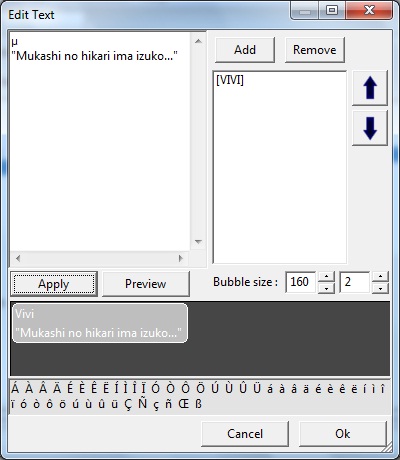
An example here, you can see the dialogue window (bubble) fit the text length perferctly.

bH0AAWw.jpg


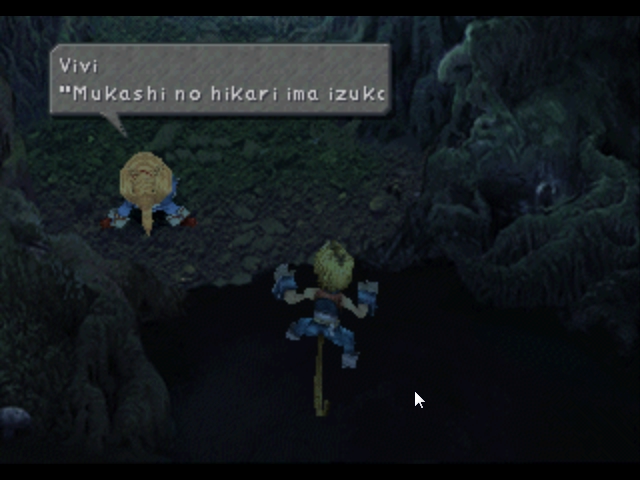
But in game it looks like this

qA678lv.jpg


It means dialogue bubble lenght doesn't displayed exactly. Since it already knew the lenght (how many pixels) of each characters, so the whole text lenghth calculating and displaying is a piece of cake. Pleas correct if I'm wrong  ;D

Hope to see this get fixed along with the kanji table in the next version.  :wink:
 
Last edited:
Yeah, the bubble's length is inaccurate. You're right when you say that calculating the text's length is a piece of cake, but that means displaying the text with the extracted charmap images. I was thinking of doing that eventually, but that's a totally different way to do it (I basically have to rewrite the whole "WriteText" feature of a text editor ^^).
I don't think it'll come in the next version, but I'll try to do it soon still.

@ gledson999 : You'd like to check out this other awesome program :P
 
Oh I didn't know that it's complicated.
By the way, can I paste the Kanji tables to config file ? Or I have to do something special to read proper Japanese?
 
The program is not configured yet to read several external charmap at once. It'll also come in the next version.
 
Thanks, I guess. Not sure which idea you're talking about :p

Update to 0.24c. Not a lot of new things here, mainly the support of japanese extended dialogs. Tell me if you find errors in kanjis.
Also, you can now edit textures and images pixels by pixels inside the program. It's not so easy to draw letters but that's better than exporting/importing. You can also make some good stuff with item icons and other UI images. You can zoom in/out using the wheel, but you can't modify the color set in the palettes yet.

And that's quiet all, if I recall well.
 
I just tested my issue and the second "[RED" (heh, putting that in brackets works on this forum, too) does not shadow, for everyone's future reference. I don't know if that second Red was there in the last version and I overlooked it, but in this version it works fine for sure. Maybe I misunderstood when you said there were two versions; I thought you meant available to code so I didn't check.

Either way, thanks for the great and consistent support!

I'm going to add the colored text to my moddings be in line with the game and probably change the MP cost on Six Dragons. Odd ability, that.
 
I don't know why, but there's still some Kanji missing, which is replaced with ?
 
Where? Which place?
Thisguyaresick2 told me that there was some for enemies' name. I didn't find out how those are handled.
If it is in dialogs, I just checked in everyone of them from disc 1 and didn't find any. You're sure that's not regular ? ? ^^
 
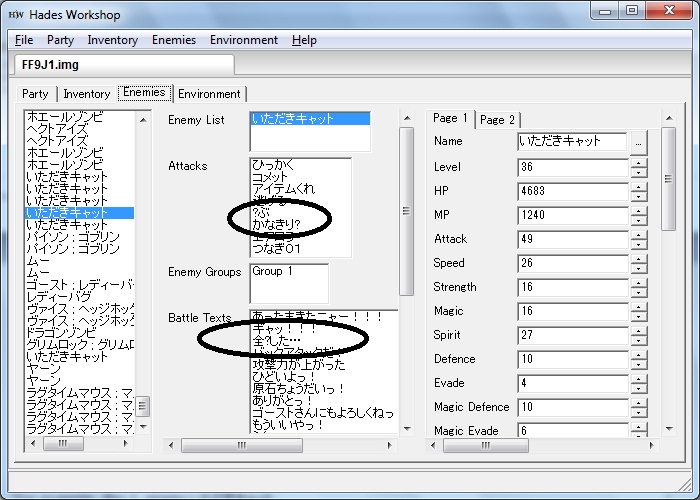
Oh it's strange that after resetting my PC, the field message is OK now. But there's stell some missing Kanji in the enemies tab.
For example, disc 1, enemy いただきキャット
kwMsCpU.jpg


I don't know what is the fist character, but the second one is 滅 (metsu) for sure.
 
Say, I just noticed many items' Battle Help text is messed up in my modded discs. I did not do this. The clean ISOs are okay. All the Battle Help entries before Ice Brand are long strings of 0s, fragments of unknown text, computer gibberish. The actual entries start with Ice Brand: i.e., Ice Brand is "Cinna's Hammer," Coral Sword is "Weapon used by thieves" [Dagger].

Everything looks okay in-game, though, so I thought it might be something with the workshop's reading? If it had been something I'd done... I almost certainly would have asked you anyway ;) Battle Help is the tooltip that comes up for Amarant's Throw menu, right? I downloaded a save GameFAQs (that's how I have been doing my testing) and checked some tooltips in the Throw menu and none of the daggers appeared off.

Thought of doing some further testing for you:

My clean ISOs, which are the basis for my most recent modded discs (the ones I mention here) do not have this issue. Patched disc 1 at least of the previous version of my mod also looks fine. Now this is interesting: if I open the clean ISO and then open the most recent mod (the only one with the symptom), there is no issue. I also looked at the Menu Help tips all the way down the list in case maybe they got offset later (though the erroneous Battle Help doesn't appear to have anything to do with the Menu Help), but it's all in alignment. So it's just something about how Hades Workshop reads this particular patched disc, evidently.

Fyi, the only differences between this mod and the previous versions are that I deleted a little Menu Help text in order to put in the properly colored Elem Atks which I modded and I adjusted Steiner's base magic stones because evidently I had not actually done that in the version I uploaded.

 
Last edited:
Yes, Amarant's throw menu and also item's menu (ores and potions have a slightly different help).
That's not normal and it will bug if you attend to save.

I guess that's because it scanned the discs wrongly, because it was already patched. It should only scan clean ISO, otherwise that can happen.

Try to do that :
1) Make a scan of a clean ISO (simply open it with HW), you end up with a file (eg. : FFIX_Disc1.hwf) in the directory of your ISO,
2) Rename that .hwf file so it matches the name of your modded ISO (eg. : FFIX_Disc1_Modded.hwf) - replace the old one if needed -,
3) Open your modded ISO with HW.

It shouldn't do a scan of your modded ISO (otherwise you messed up something) and it should work well (otherwise I messed up something ^^).

If that doesn't work, please send me the patch you used and the .hwf file.
 
It's all straight when loaded that way. It's no problem for me even if it reads it funny as long as it works in the game, of course. Just trying to help if I found a bug :)
 
Tirlititi, is the change/defend able to fully edit now? i wanna make "change" a custom movelist called "killer" with desc. "Kills and Heals"
 
Na, the command pannel hasn't been improved, sorry.
I never had the chance to get the datas related to it. I hope that's not too deeply hardcoded but I fear it is.

I saw there was a patch for improving the ATB speed in-battle. I'll check about it ; maybe that'll give me informations on how commands are handled. I'll see that before getting into the script.
 
Status
Not open for further replies.
Back
Top