[PSX/PC] General editor - Hades Workshop (0.50b)

  • Thread starter Thread starter Tirlititi
  • Start date Start date
Status
Not open for further replies.
Hello everyone, being a fan of Final Fantasy 9 especially, I hoped to see its output on PC and the possibility of being able to create it in HD, to redo it in 3D the ideal would be to get the walkmesh, as well as the coordinates camera and each environment to be able to work on it, I am completely null on the mod of FF IX so I wondered if someone had a complete pack to provide me so that I can take care of it? I had already done previously on FF 7 for those who know me :) But FF7 never interest me as much as the 9 and I would like to spend my time on the environment of the 9 which attracts me more and give the opportunity someone to do something :)

Sorry for the bad english, google translation does not speak very well your language.
 
Hello everyone, being a fan of Final Fantasy 9 especially, I hoped to see its output on PC and the possibility of being able to create it in HD, to redo it in 3D the ideal would be to get the walkmesh, as well as the coordinates camera and each environment to be able to work on it, I am completely null on the mod of FF IX so I wondered if someone had a complete pack to provide me so that I can take care of it? I had already done previously on FF 7 for those who know me :) But FF7 never interest me as much as the 9 and I would like to spend my time on the environment of the 9 which attracts me more and give the opportunity someone to do something :)
I could see new walkmeshes would provide possibility to import new backgrounds in assets; but whole 3D . In that case, the backgrounds would be kicked, and instead add 3D environments (maps) in the assets. No need for a walkmesh then, in such case. You see?

(Still dunno about the Vivi Cure bug).
 
I could see new walkmeshes would provide possibility to import new backgrounds in assets; but whole 3D . In that case, the backgrounds would be kicked, and instead add 3D environments (maps) in the assets. No need for a walkmesh then, in such case. You see?

(Still dunno about the Vivi Cure bug).
I don't think its really possible to just switch everything out with 3d meshes, what I'll do, and I'm guessing what jmp434 intends to do is simply remodel and replace the backgrounds like what people did with the FF7 backgrounds (admittedly, to a much higher quality).
 
Oh it's possible; being a Unity game after all.
Ah, I mean more as in, 'I don't think its a realistic goal', its possible, but the amount of extra things that'd need writing and editing is a bit much, plus actual 3D environments, if its still a static camera, would end up looking worse due to aliasing I'd imagine.
 
Ah, I mean more as in, 'I don't think its a realistic goal', its possible, but the amount of extra things that'd need writing and editing is a bit much, plus actual 3D environments, if its still a static camera, would end up looking worse due to aliasing I'd imagine.
oh, but a real goal it is; determine is key. Minus the static camera; I always saw me eventually making ffix:tza with 3d & environments gambits (not a fan of backgrounds + fixed cameras; seems like an old method) with this engine still. T pointed where UI handled, it was extra work, but was determined to get gambits working here; at least I got somewhere! The button. I don't see it as completely impossible, more doable with determination. If Tirlititi confirms it's 100% impossible to do 3d environments; well, there's always back to walkmeshes for new backgrounds.
 
oh, but a real goal it is; determine is key. Minus the static camera; I always saw me eventually making ffix:tza with 3d & environments gambits (not a fan of backgrounds + fixed cameras; seems like an old method) with this engine still. T pointed where UI handled, it was extra work, but was determined to get gambits working here; at least I got somewhere! The button. I don't see it as completely impossible, more doable with determination. If Tirlititi confirms it's 100% impossible to do 3d environments; well, there's always back to walkmeshes for new backgrounds.
Hmm, I'm quite happy to just remake backgrounds and pre-render them honestly. Then I can paint over to get smaller details, this is a bit easier than doing standard 3D, and its a nice change of pace from the usual day job.

I'm curious to see what Tirlititi thinks about the possibility of fully 3D Environments, as that'd require a huge amount of work, replacing the environments is one thing, but then if you have a 3D Camera the game would have to become quite different in order to work, so instead of having single scenes like now, it'd have a whole accessible map, which means NPC's walking between scenes, things looking good from every angle. Even modelling wise it'd add so much extra time.

Theres a point where you'd be doing so much work, and so many edits, and wrestling against the engine so much, that it'd be easier to simply rebuild most of the engine to support all the changes instead of trying to endlessly bend it to your will.

I honestly think a lot of the charm of the game is due to the framing of the scenes, having a fully 3D scene would require things that're off camera usually to have new animations, effectively you'd have to redo all the 3D Art again from scratch, but if its possible, it'd be a very interesting thing to witness.
 
So, I'm working on something else right now and I can't test about these bugs you mentioned, Incinerator, but I'll eventually take a look at them.
About 3D environment, it would be possible to change the engine to make it possible ; I don't even think that would be such a huge amount of work (the environment is already mostly 3D, engine-wise). It would be way more difficult to recreate the scenes themselves in 3D, and I don't think they would look as great as prerendered backgrounds (not to mention that a lot of things are working visually because of static backgrounds: look at Alexandria's bell tower, its size from outside and its camera for inside).

The foot sfx datas are indeed stored in the walkmesh (well, more precisely, the walkmesh says which kind of ground each triangle is ; then the script says which footstep sound is played on each kind of ground). It is not possible to replace the walkmesh data now because there's no tool to edit the walkmesh itself.

@jmp434: You have the 3D OBJ files describing the walkmesh geometry two posts above yours. The cameras of the fields are a bit weirdly stored and, last time I tried, I couldn't have them properly readed.
 
a huge amount of work,
That's the thing; I love it when it's possible, so it doesn't feel huge; especially when I think of the beautiful final outcome it would have! The determination never dies.

So, I'm working on something else right now and I can't test about these bugs you mentioned, Incinerator, but I'll eventually take a look at them.
Understood.

About 3D environment, it would be possible to change the engine to make it possible ; I don't even think that would be such a huge amount of work (the environment is already mostly 3D, engine-wise).
Yaass! Positive possibility!

It would be way more difficult to recreate the scenes themselves in 3D, and I don't think they would look as great as prerendered backgrounds (not to mention that a lot of things are working visually because of static backgrounds: look at Alexandria's bell tower, its size from outside and its camera for inside).
Yeah, and recreate texture sets to match the environments from the prerendered backgrounds. Proper UV's.
I was forced to recreate in the environments in 3D anyways for ffix: tza the fmvs, considering it has different characters; look at the CGI, those as close to visual 3D of the environments in FF9 as one would get, without always seeing static positions. So, best start is to observe those, get a ball rolling and build off that.
 
Yeah, and recreate texture sets to match the environments from the prerendered backgrounds. Proper UV's.
I was forced to recreate in the environments in 3D anyways for ffix: tza the fmvs, considering it has different characters; look at the CGI, those as close to visual 3D of the environments in FF9 as one would get, without always seeing static positions. So, best start is to observe those, get a ball rolling and build off that.
It seems like it might be worth setting up a new topic then, instead of filling this one with our discussion.

I've had a look around, but I can't find any 3D or art related things for ffix: tza, do you happen to have anything online I can view at all? I'm curious how close you got to the FF9 environments, as I'm doing things myself recently, and thinking about eventually trying to get a few other people onboard if possible.

I'm not sure what you mean by proper UV's, do you that the originals are just renders so there is no UV data?
Creating textures to match the visuals shouldn't be difficult, most of the time, but its a given that anything we make is probably going to differ a little bit.
 
Last edited:
It seems like it might be worth setting up a new topic then, instead of filling this one with our discussion.
That other point was answering Tirlititi.

I've had a look around, but I can't find any 3D or art related things for ffix: tza, do you happen to have anything online I can view at all?
I use to, last year, around November. But then, no, I kept it all on the DL (just on my pc), to not waste anyone's time looking it over.

I'm curious how close you got to the FF9 environments,
Since November of last year, I've only gotten to FMV scene: Brahne summons Atomos~Lindblum.
But had to go back and redo some of them (not all, just the ones with Zidane in it, y'know like the one at the Lindblum/Telescope~Disc 1) with the recent update of two characters in scene.
Oh it doesn't matter anyways.

as I'm doing things myself recently, and thinking about eventually trying to get a few other people onboard if possible.
Thing is, I only do it for ffix:tza, as that is the only motivation there that keeps me going. If I try to switch and do it all for the vanilla game, I will lose interest, I just know I will. It's happened 3 times already. Not that I hate the vanilla, NO, I now just wanted to tell a story through ff9~my story. Whilst keeping ff9's main story intact. If you get it.

Creating textures to match the visuals shouldn't be difficult, most of the time, but its a given that anything we make is probably going to differ a little bit,
Yeah not much hard; but also never delivers 1:1.
 
Tirlititi, what is the field:
"Opening- For FMV"?

Whenever I select 'Edit Script' on it, HW crashes.

And is there a way to make the game save a variable value without needing to physically change fields?
Alternatively; does the game need to be hard saved or auto saved to remember a "set VAR = 1" function?

I want to set an unused variable to value "1" just before calling to Field(16000) Thing is, the game will never autosave Field(16000)
And the game needs to remember it set the variable to "1"

my setup (brief):
Code: [Select]
Code:
Battle (1, 938)set VAR_[unused] variable = 1Field( 16000 )
 
It's the field that is loaded when hitting the "New Game" button. It basically launches the opening cinematic and move to Prima Vista/Cargo Room.
It used to work fine. I guess that it crashes because it has no background or walkmesh ; I'll fix it.

Variables of type "General" (Var_Gen...) are the ones saved in saved games. It doesn't matter whether it's an auto-save or a moogle save.
I'm not really sure what you're doing that for. If you want to have a "New Game +" feature, setting a flag before an auto-save is not the way to go because auto-saves make sure that both executions are ran with the same setup (you can't distinguish between the 1st execution and the execution after the player hits the "Continue" button).
 
Variables of type "General" (Var_Gen...) are the ones saved in saved games. It doesn't matter whether it's an auto-save or a moogle save.
Thanks for the notice, Tirlititi.
I got it working, still!
 
Hello Tirlititi! Thank you for this awesome tool! Thank to you I  have finally got the occasion to put Blank in and I'm so excited bout that! Now I have a few questions.. hope you will help me!

1) In the Invicible the function "Set Party Member etc" doesn't work... everywhere i put the code, the game won't start after the "squaresoft" logo.. there's the black screen, no music or something else.. why?
2) I tried to take a look of the follow tutorial "How to place characters on the field" but I seriously don't know why, it won't appear..? I made a new object (the number 2, as you said), i tried to put two new voices in the script, the first with the following code for blank "Init", the second is the command "Speak" I tried to copy and paste this one

Code: [Select]
Code:
Function Blank_SpeakBTN    ifnot ( IsMovementEnabled ) {        return    }    set VAR_A6_158 = 0    if ( VAR_A6_159 == 1 ) {        DisableMove(  )        if ( VAR_A6_144 == 0 ) {            DisableMenu(  )        } else {            Wait( 1 )        }    }    0x27( 127 )    TurnTowardObject( 250, 32 )    WaitTurn(  )    WindowSync( 0, 128, 199 )    set VAR_A6_158 = 1    if ( VAR_A6_159 == 1 ) {        if ( VAR_A6_156 == 0 ) {            EnableMove(  )            0x27( 255 )            if ( VAR_A6_144 == 0 ) {                EnableMenu(  )            }        }    }    return
 to try..but doesn't work??? Why???
3) "NPC models corresponding to a Party's member"... I was wondering, how works exactly for Blank?

And for the Scenes, for example "Pandemonium" if I want to put him (You know, like you did for Beatrix) how do I do? And in the battle?

4) Last, for now.. there's a way to edit the portraits of the characters from menu etc? ( http://abload.de/img/retroarch-0424-150004neswt.png )


Thank you if you will help, I'm kinda new at modding especially FFIX but I'd like to try and test!
 
Last edited:
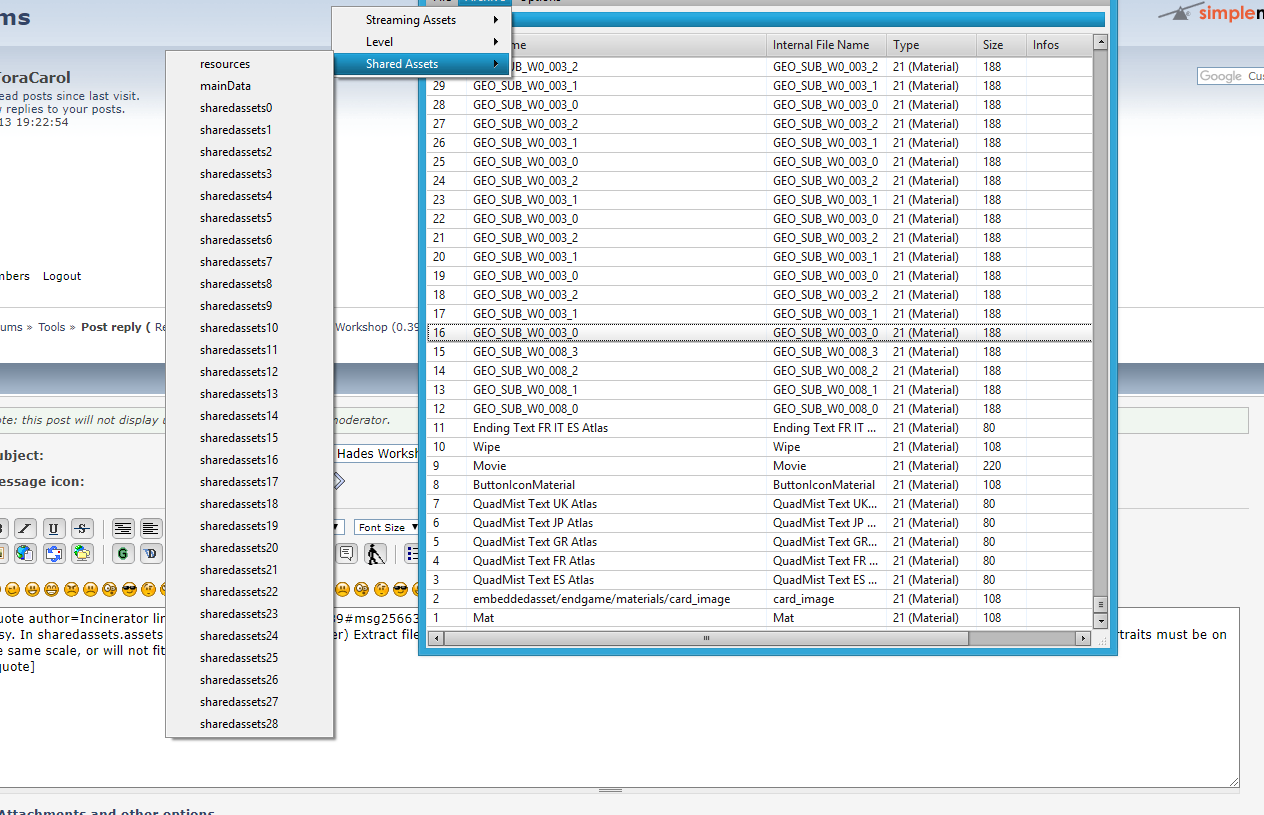
Easy. In sharedassets.assets (open with the Unity Viewer) Extract file FaceAtlas; rename to .png. When finished, must remove the '.png' extension to be imported back in. Portraits must be on the same scale, or will not fit.
Thank you for the kind and quick reply! Please, i'm stupid... tell me.. which one of these??

FMIV9mT.png


And, another question.. when I try to export a file nothing happens.. I mean, I click export and..no reactions.. why?

UPDATE

Ok, I tried to click the Import button, and I see the folder "HadesWorkshopAssets" so the files are here.. but when I finished to modify the pictures how does work to put in the game back? :)
 
Last edited:
Since HW Unity Viewer still only modifies assets in the x86 folder, that file must be moved to x64 directory after import to see the results.
 
Ok, thank you! I give a try and I'll let you know. Meanwhile I hope someone will help me for the other questions even if I know probably it may takes time :P
 
Last edited:
Ok, so lot's of things there :/

1) The problem lies somewhere else. Modifying the script should have no impact on what happens after the SquareEnix logo. Script modifications are in the file "p0data7.bin" and, if you get an "Assembly-CSharp.dll", that means you're modifying something else.
I don't know what could cause this bug with the latest version of HW. You may try to update your FF9 game by going to your Steam's game library -> right-click on FF9 -> Properties -> Check the integrity of local files. It will update the game to the latest Steam release and replace the modded files (it won't remove the .hws files and it's always better to have your mod in that format as well ("File -> Save Mod" in HW)).

2) So, if I understand correctly, nothing happens in-game if you do that? No bug, but nothing changed?
If so, it may be because of:
- Either your "Blank_Init" function is wrong ; since your "Blank_SpeakBTN" is correct, I feel that you did the other one just fine,
- Or you forgot to add a line "InitObject" in the "Main_Init" function: you should have a look at it and see a bunch of those "InitObject" lines, each corresponding to some 3D model on the field,
- Or you made the mod in one language and play the game in another one (the default language is "English (US)" in HW, you can change that in the "Files -> Preferences"). Scripts are language-dependant.
- Or, as Incinerator said, you copy the files in the "x86" folder of the game while playing in "x64" mode. If you copy the modded files in both folders, you're sure to be good in that regard.

3) It's a bit complicated: Blank uses the same slot as Amarant, so you can't have them both in the team at the same moment. Since Amarant is already there (as a party member) in the Pandemonium scripts, the best is to consider Blank as a NPC if you want to add him in cutscenes.
There is only one feature that is different between playable characters and NPCs in the scripts: it's the possibility to refer to an entry (in that case, a 3D object) that corresponds to the characters in your party. In the "InitObject" line, for instance, one can use "InitObject( 251, 0 )" to refer to the 1st character in the party, instead of doing things like:
Code: [Select]
Code:
if (IsInParty(0)) { // If Zidane is in the party    InitObject( 10, 0 ) // Init the 3D object and functions corresponding to Zidane}if (IsInParty(1)) { // If Vivi is in the party    InitObject( 11, 0 ) // Init the 3D object and functions corresponding to Vivi}// etc...
Except for that feature, NPCs and PCs are handled the same way.

4) That picture is in the "sharedassets2" archive (like most of this kind of pictures).
When you "right-click -> Export selection", it exports the file in the folder "HadesWorkshopAssets" (in the game's directory) as you saw. You may edit the file from there (if you have the option "Automatically convert images to PNG", as I recommand, you should be able to edit the file with any image editing tool). In order to re-import the modded file in the archive, you must be sure that this modded file is in the "HadesWorkshopAssets" folder at the same place and with the same name as when exported (in this case, there should be no ".png" extension because the file doesn't have an extension in his name in the archive). Then just "right-click -> Import Selection" should popup a message, either saying it was successfully imported or saying that it failed.
The general politic is that the Unity Assets Viewer expect the re-imported file to be in the same format as the exported file, ie. it expects a PNG image if you have the "Automatically convert images to PNG" enabled.
And to complete, the archives are indeed duplicated (except for the "Streaming Assets" archives) in two folders, "x64" and "x86" and only one of them is used by the game. You may switch folders in the Unity Assets Viewer in its options, or you may indeed copy-paste the modded archive to the other folder as well.

 
Status
Not open for further replies.
Back
Top